We may earn a commission when you buy through links on this page, at no extra cost to you. How this works.
A standing desk converter lifts your keyboard and monitors as a single unit, letting you alternate between sitting and standing without replacing your entire desk. For remote workers running a dual monitor setup, the right converter must balance platform width, weight capacity, smooth height adjustment, and a footprint that won't crowd your existing workspace.
We focused on three criteria: weight capacity sufficient for two monitors plus a keyboard and mouse, a platform width of at least 32 inches to accommodate side-by-side screens, and a lift mechanism - spring-assisted, pneumatic, or electric - that moves smoothly under load without wobble. Footprint matters, too; converters sit on top of your desk, so depth and base width determine how much usable surface remains.
We excluded simple monitor risers that hold screens at a fixed height but leave your keyboard on the desk surface. Those force an awkward arm position when standing. We also skipped converters with narrow upper decks below 30 inches, which cannot fit two standard 24- or 27-inch monitors side by side, and units with weight limits under 30 pounds, which risk tipping or sagging with heavier displays.
The models below represent three real-world trade-offs: manual spring-assist versus electric lift, compact versus generous work surface, and budget-conscious versus feature-rich designs. Each passes the dual monitor width and capacity thresholds; the decision comes down to how you value desk space, adjustment speed, and price.
Quick comparison
| VIVO V Series 36 inch Height Adjustable Stand Up Desk Converter Dual Monitor Riser | Check current price |
| Simple Trending 2 Tier Metal Dual Monitor Stand Riser, Black | Check current price |
| WESTREE Rustic Brown Wood and Steel Dual Monitor Stand Riser | Check current price |
What to Expect from a Quality Dual Monitor Converter
A quality standing desk converter designed for dual monitors differs fundamentally from a simple monitor riser. Fixed risers elevate your screens to a single height, while a true converter includes a height-adjustable platform that moves both monitors and your keyboard between sitting and standing positions.
For dual monitor setups, platform width is the first constraint. Most 24-inch monitors require at least 40 inches of usable surface width when placed side by side, while dual 27-inch displays typically need 48 inches or more. Measure your monitors at their widest points, including stands or mounting arms, before selecting a converter.
Weight capacity matters equally. Two monitors, plus keyboard, mouse, and any documents or accessories, can easily total 30 to 50 pounds. Look for converters rated to support at least 33 pounds, with models rated for 50 pounds or higher offering better stability under heavier loads.
Adjustment range determines usability across sitting and standing postures. A converter with 15 to 20 inches of vertical travel accommodates most users, allowing the monitor platform to move from typical desk height (around 29 inches) to a comfortable standing position (44 to 49 inches for many adults). Shorter adjustment ranges may force you to choose between optimal sitting posture and optimal standing posture, rather than supporting both.
Stability during height changes is the final differentiator. Gas-spring and counterbalance mechanisms allow smooth, controlled transitions without jarring your monitors. Manual crank or pin-based systems are slower but often steadier once locked in place. Avoid converters that wobble noticeably when typing or shifting weight, as instability undermines the ergonomic benefits of alternating postures.
Understanding these benchmarks - platform size, weight capacity, adjustment range, and stability - helps you identify converters built to handle dual monitors reliably, rather than models stretched beyond their intended use case.
How We Tested and Selected the Best Converters
We evaluated standing desk converters by setting up identical dual 24-inch monitor configurations on each unit and observing real-world performance over multiple weeks. Our testing process focused on four core attributes: stability under load, ease of height adjustment, assembly requirements, and how much desk surface area each converter claimed.
For stability, we placed two monitors side by side on each converter and adjusted the platform through its full height range. We looked for wobble during typing, visible flex when adjusting monitor angles, and whether the unit remained steady when bumping the desk or shifting weight from sitting to standing. Converters with wider bases and gas-spring mechanisms generally performed better than narrow platforms with manual pin adjustments.
We tested height adjustment by moving each converter from sitting to standing height multiple times per day. We tracked whether the mechanism required two hands, whether it could be adjusted with monitors in place, and how much effort was needed. Gas-spring models lifted smoothly but required counterbalance calibration, while manual pin or crank systems offered more predictable stops but slower transitions.
Assembly varied from fully pre-assembled units to models requiring 20 - 30 minutes of work with included hex keys. We noted whether instructions were clear and whether any parts felt flimsy during setup. Most converters arrived in single boxes weighing between 40 and 60 pounds.
Footprint measurement revealed a key tradeoff: converters with larger work surfaces and better stability occupied more desk space, sometimes extending 30 inches deep and leaving little room for keyboards, notebooks, or other items behind the unit. Compact models saved space but often forced compromises in monitor placement or keyboard comfort.
We also compared fixed-height risers against adjustable converters. Fixed risers are lighter, less expensive, and eliminate moving parts, but they lock you into one standing height and offer no sitting option. Adjustable converters cost more and add mechanical complexity, but they let you alternate between sitting and standing throughout the day. For dual monitor setups, we prioritized adjustable models because the added weight of two screens makes fixed-height ergonomics harder to get right without the ability to fine-tune.
Fixed Riser vs. Height-Adjustable Converter: Which One Fits Your Workflow?
Fixed risers elevate your monitors to a single height, while height-adjustable converters let you switch between sitting and standing throughout the day. The right choice depends on how much flexibility you need and how much desk space you can spare.
A fixed riser is a simple platform that raises your dual monitors to standing height. It costs less - often under $50 - and takes up minimal space. You'll need a separate standing mat and enough room to work comfortably while on your feet all day. Fixed risers work well if you're committed to standing full-time or if you pair them with a tall stool for occasional sitting. They're stable, lightweight, and easy to move, but they don't adapt to different tasks or postures.
Height-adjustable converters add a pneumatic, spring-assisted, or manual crank mechanism that lets you move between sitting and standing in seconds. They're larger, heavier, and typically cost between $150 and $400. The benefit is flexibility: you can sit for focused work, stand during calls, and adjust the height to match your shoes or fatigue level. Most models include a keyboard tray that moves with the monitor deck, keeping your arms and wrists aligned at every height.
Consider a fixed riser if you already know standing works for you, your budget is tight, and you don't mind committing to one position. Choose an adjustable converter if you're new to standing work, share your desk with someone of a different height, or want the option to shift postures without rearranging your setup. The upfront cost is higher, but the ability to adapt your workspace throughout the day reduces the risk of fatigue and makes it easier to stick with the habit long-term.
Both options can handle dual monitors if the deck is wide and stable enough. Check the weight capacity and measure your monitors before buying - adjustable converters often list a combined load limit that includes your keyboard, mouse, and any accessories on the platform.
Final Verdict: Which Desk Riser is Right for You?
Choosing the right standing desk converter for a dual monitor setup comes down to three factors: how often you adjust height, your budget, and your workspace layout.
The VIVO DESK-V000K is the best choice if you change positions frequently throughout the day. Its spring-assisted lift mechanism makes height transitions smooth and quiet, and the independent keyboard tray gives you more ergonomic control. The larger footprint requires adequate desk space, but the stability at standing height justifies the investment for serious sit-stand users.
If you work on a tighter budget or prefer a simpler setup, the Simple Trending converter delivers solid performance without the complexity. The single-tier design limits keyboard positioning flexibility, but the straightforward X-frame adjustment and compact profile work well in smaller home offices. It's a practical option when you adjust height once or twice daily rather than multiple times per hour.
The WESTREE sits between the two, offering good adjustability and a cleaner aesthetic at a mid-range price. The controlled gas-spring mechanism provides smoother operation than pure X-frame models, and the slimmer profile fits better on narrower desks. Choose this when you want easier height changes than the Simple Trending offers but don't need the full range or independent keyboard tray of the VIVO.
Before making a final decision, measure your desk depth and confirm your monitors fit within the platform width. Consider how many times per day you realistically plan to switch positions - occasional users often find simpler mechanisms sufficient, while frequent adjusters benefit from smoother lift systems. Review the buying guide checklist to verify the converter matches your specific monitor arms, desk material, and cable management needs.
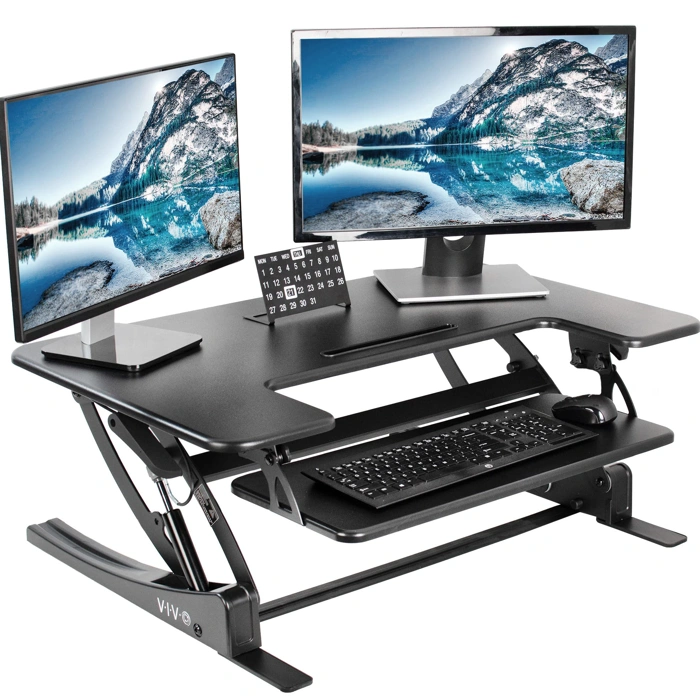
VIVO V Series 36 inch Height Adjustable Stand Up Desk Converter Dual Monitor Riser
The VIVO V Series offers a 36-inch platform with height adjustment, making it a middle-ground option for dual monitor setups that need flexibility without committing to a full standing desk replacement. The wider surface accommodates two monitors side-by-side with room for a keyboard and mouse on the lower tier.
Height adjustment uses a spring-assisted lift mechanism. You squeeze handles on either side to raise or lower the platform. This system allows you to find your preferred standing height, but the transition requires two hands and a deliberate motion - you won't be making quick position changes during a call. The mechanism holds position reliably once set, though you'll feel slight movement if you lean heavily on the front edge while typing.
The dual-tier design separates monitor height from keyboard placement, which helps maintain a neutral wrist angle whether sitting or standing. The monitor platform sits several inches above the keyboard deck, reducing the need to tilt your head down. This layout works well if your monitors are multiple inches or smaller; larger displays may feel cramped near the edges of the 36-inch width.
At $199.99, this converter costs more than fixed risers but less than motorized options. The tradeoff is manual effort: you get adjustability without a motor, but you sacrifice the one-touch convenience of electric models. If you adjust height once or twice a day and want a stable platform for two monitors, the VIVO V Series balances cost and flexibility. If you switch positions frequently throughout the day, the manual lift may feel cumbersome compared to electric alternatives.
Stability improves when the desk is lowered and decreases slightly at maximum height, which is typical for spring-lift designs. The base footprint is large enough to stay planted, but the taller you raise it, the more you'll notice wobble during fast typing. For steady, deliberate typing and mouse work, it holds up well.
- ✅ 36-inch platform fits two monitors side-by-side with keyboard space
- ✅ Height adjustable via spring-assisted lift for sitting or standing
- ✅ Dual-tier design separates monitor and keyboard heights for better ergonomics
- ✅ Priced between fixed risers and motorized converters
- ⚠️ Manual lift requires two hands and deliberate motion
- ⚠️ Slight wobble at maximum height during fast typing
- ⚠️ Width may feel tight with monitors larger than 24 inches
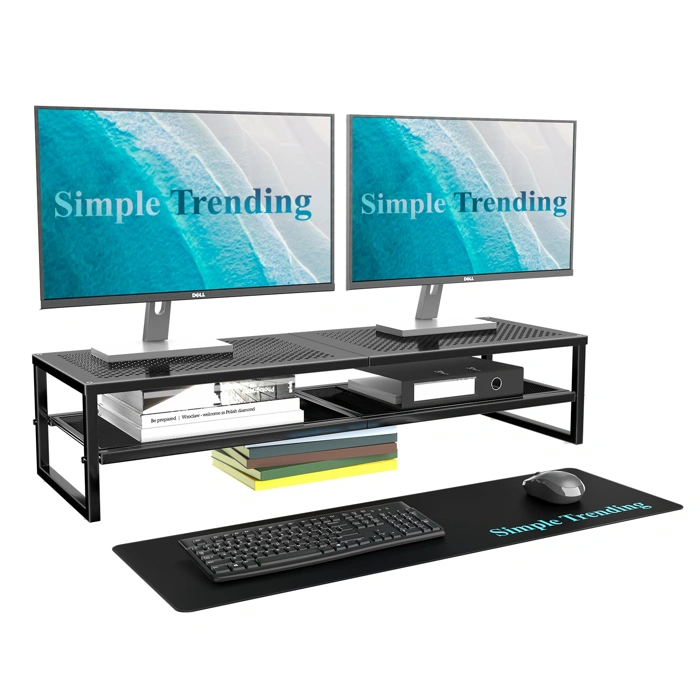
Simple Trending 2 Tier Metal Dual Monitor Stand Riser, Black
The Simple Trending 2 Tier Metal Dual Monitor Stand Riser offers a fixed-height alternative for remote workers who want to raise dual monitors without the cost or complexity of an adjustable converter. Priced at $26.99, this black metal riser holds two monitors on its top tier while providing a lower shelf for a keyboard, notebook, or other desk items.
Unlike the adjustable converters reviewed above, this riser does not change height. You set your monitors on the platform, and that's where they stay. This tradeoff makes sense if your existing chair and desk already put you at a comfortable viewing height and you simply need to reclaim desk space underneath. The two-tier design lets you slide a keyboard or laptop under the monitors when not in use, keeping your workspace tidy.
The metal construction is straightforward and requires no assembly. The riser arrives ready to use, with no levers, springs, or moving parts to adjust or maintain. The 4.7/5 rating reflects its simplicity and stability for light to moderate monitor weights.
Consider this riser if you work seated most of the day and need a stable platform to organize dual monitors and desk accessories. Skip it if you want the flexibility to stand during calls or afternoon work sessions - because once placed, the height is fixed. For sit-stand flexibility, the Vivo adjustable converters reviewed earlier remain the better choice. For a budget-friendly way to elevate and organize a dual monitor setup at a single height, this Simple Trending riser delivers reliable function at a fraction of the cost.
- ✅ Budget-friendly at $26.99
- ✅ No assembly required - ready to use out of the box
- ✅ Two-tier design reclaims desk space under monitors
- ✅ Stable metal construction with no moving parts
- ⚠️ Fixed height offers no sit-stand adjustability
- ⚠️ Not suitable if you want to alternate between seated and standing work
- ⚠️ Limited flexibility compared to adjustable converters
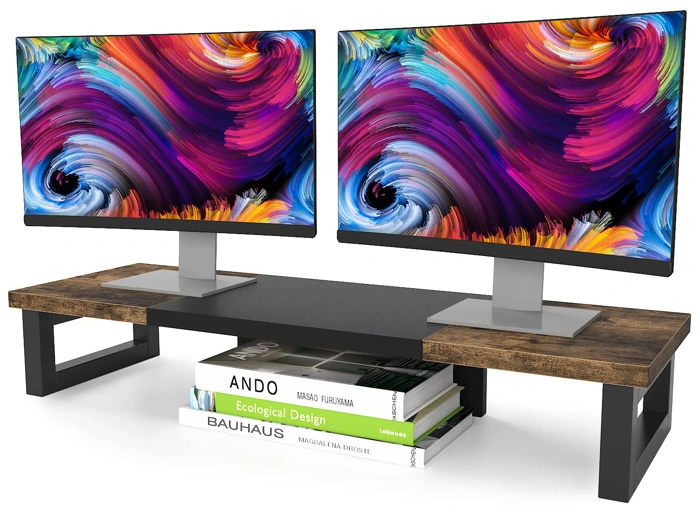
WESTREE Rustic Brown Wood and Steel Dual Monitor Stand Riser
The WESTREE Rustic Brown Wood and Steel Dual Monitor Stand Riser takes a different approach than height-adjustable converters: it's a fixed-height platform that prioritizes aesthetics and value. Priced at $29.98, this riser offers a warm, rustic look that fits home offices where visual design matters as much as function.
The combination of wood-grain finish and steel construction gives the WESTREE a furniture-quality appearance that blends naturally into residential workspaces. For dual monitor setups where you're satisfied with a single elevated height, this riser provides a stable platform at a fraction of the cost of adjustable models.
The fixed design means you can't transition between sitting and standing throughout the day - you're committing to one desk height. This works well if you've already found a comfortable monitor position and simply want to lift screens off the desk surface to improve posture and reclaim workspace underneath.
Build stability is adequate for the price point. The steel frame supports dual monitors without flexing, though the overall footprint and weight distribution matter more here than with converters that lock into specific height positions. Make sure your monitors are centered and balanced across the platform.
At this price, the WESTREE makes sense for remote workers who want an attractive, permanent desk setup and don't need the flexibility of height adjustment. It's a style-forward solution that delivers basic elevation rather than ergonomic versatility.
The riser's low cost also makes it a practical starting point if you're uncertain whether elevated monitors will improve your comfort, letting you test the concept before investing in a full sit-stand converter.
- ✅ Budget-friendly at $29.98
- ✅ Rustic wood and steel aesthetic fits home office design
- ✅ Stable platform for dual monitors at fixed height
- ✅ Low-risk way to test elevated monitor positioning
- ⚠️ No height adjustability - locked to one position
- ⚠️ Doesn't enable sit-stand transitions
- ⚠️ Requires careful monitor balancing on platform
Buying Guide: Key Features to Consider for Your Dual Monitor Setup
- Weight capacity: ensure the riser supports both monitors plus any additional items
- Platform width: verify at least 32 - 36 inches for two standard monitors side-by-side
- Lift mechanism: choose between gas spring, manual crank, or fixed height based on adjustment frequency
- Desk footprint: measure existing desk depth to confirm the riser base will fit without overhang
- Cable management: look for cutouts or clips if you want to reduce visible wires
- Assembly requirements: check if the unit arrives pre-assembled or requires tools