We may earn a commission when you buy through links on this page, at no extra cost to you. How this works.
Mechanical keyboards deliver tactile precision and durability that typists appreciate, but their signature click can disrupt colleagues in shared office spaces. The audible feedback that makes mechanical switches satisfying at home becomes a liability when coworkers are concentrating nearby.
Unlike membrane keyboards that rely on rubber domes for near-silent operation, traditional mechanical switches produce noise through two mechanisms: the physical contact of internal switch components and the keycap bottoming out against the keyboard case. A clicky Blue switch can register 65-75 decibels during typing - comparable to normal conversation volume - while quieter mechanical alternatives aim for 40-50 decibels, closer to ambient office background noise.
'Quiet' in the mechanical keyboard context does not mean silent. It means reducing acoustic output while preserving the tactile bump or linear smoothness that defines mechanical feel. This balance matters in shared environments where you need responsive typing feedback without broadcasting every keystroke across the room.
Selecting a quiet mechanical keyboard involves evaluating switch design, case construction, keycap material, and stabilizer quality. Linear switches with dampening mechanisms tend to produce less noise than tactile or clicky variants. Dense case materials and foam dampening layers absorb vibration that would otherwise amplify sound. Thicker PBT keycaps create a deeper, less sharp sound profile than thin ABS caps.
The right choice depends on your typing style, the acoustic tolerance of your workspace, and whether you prioritize minimal noise or maximum tactile feedback. Understanding these tradeoffs allows you to choose a keyboard that respects shared space while maintaining the mechanical typing experience you prefer.
What Makes a Keyboard Quiet? The Core Components of Sound
Keyboard noise doesn't come from a single source - it's the result of four distinct acoustic events happening with every keystroke. Understanding each component helps you identify which improvements will make the biggest difference in your workspace.
Switch actuation sound is the click or tactile bump inside the switch mechanism itself. Clicky switches like Cherry MX Blue produce an intentional high-pitched click at the actuation point, while tactile switches create a quieter bump, and linear switches have no internal sound event at all. This is the only noise component that's locked into your switch choice - you can't modify it after purchase.
Bottoming-out impact occurs when the keycap strikes the switch housing at the end of travel. This produces a sharp plastic-on-plastic collision that's often louder than the switch mechanism itself. Typists who press keys fully - most people in normal use - generate this sound with every keystroke. The impact travels through the plate and into the case, amplifying across the entire keyboard.
Case resonance determines how vibrations propagate through the keyboard body. Hollow plastic cases act as amplification chambers, while aluminum cases produce a higher-pitched ping. The mounting style matters too: keyboards with rigid plate mounting transfer more vibration to the desk surface, while gasket or isolation mounts contain sound within the case. Weight and internal空腔 volume both affect how long vibrations sustain.
Stabilizer rattle affects longer keys - spacebar, shift, enter, and backspace. Wire stabilizers can develop play over time, creating a metallic rattle distinct from switch noise. Loose-fitting stabilizer stems produce an additional hollow clack. This component varies significantly by manufacturing tolerance and assembly quality, even within the same keyboard model.
The relative loudness of each component depends on your typing style. Light typists who don't bottom out keys will hear mostly switch actuation, while heavy typists generate maximum impact noise. In shared offices, bottoming-out impact and case resonance typically cause the most disruption because they produce lower-frequency sounds that carry farther than high-frequency switch clicks.
Effective noise reduction targets multiple components simultaneously. Switching from clicky to linear switches might reduce actuation noise but leaves impact and resonance untouched. The quietest mechanical keyboards combine silent switch designs, impact dampening, resonance control, and stabilizer tuning into a complete acoustic package.
A Deep Dive into Quiet Mechanical Switches
The heart of any quiet mechanical keyboard lies in its switches. Understanding the differences between switch types - and the engineering that makes them quiet - helps you match a keyboard to your typing style and office environment.
Mechanical switches fall into three broad families: linear, tactile, and clicky. For shared offices, clicky switches are off the table - they produce an audible click by design. The choice narrows to linear silent switches and tactile quiet switches, each offering a distinct typing experience with reduced noise.
Linear Silent Switches
Linear switches travel straight down without a tactile bump or audible click. Silent linear variants add rubber dampeners at the top and bottom of the switch housing to absorb the impact when the keycap bottoms out and when it returns. This dampening cuts the sharp clack that typifies standard mechanical keyboards.
Popular examples include Cherry MX Silent Red, Gateron Silent Red, and Kailh Box Silent Pink. These switches typically feature actuation forces between 45g and 50g and a total travel distance of 3.7mm to 4mm, with actuation occurring around the 2mm mark.
Linear silent switches deliver smooth, consistent keypresses with minimal resistance variation. They're favored by typists who prefer uninterrupted travel and by gamers who value rapid key repetition. The tradeoff: without a tactile bump, you rely entirely on bottoming out or muscle memory to confirm a keypress, which can lead to heavier-handed typing until you adjust.
Tactile Quiet Switches
Tactile switches provide a noticeable bump partway through the keypress, signaling actuation without requiring you to bottom out. Quiet tactile switches pair this bump with internal dampening to reduce both impact noise and the sound of the tactile mechanism itself.
Examples include Cherry MX Silent Brown, Boba U4 Silent, and Zilent switches. Actuation forces range from 45g to 67g, with travel distances similar to linear switches but a tactile event occurring at or just before the actuation point.
The tactile bump offers typing feedback that can reduce bottoming-out force and fatigue over long sessions. Many touch typists find the bump helps with accuracy and rhythm. The tradeoff: even with dampening, tactile switches produce slightly more sound than their linear counterparts due to the mechanical event inside the switch. The bump also introduces minor resistance variation that some users perceive as scratchy or inconsistent, especially in lower-quality switches.
Dampening Mechanisms Explained
Silent switches achieve noise reduction through soft rubber or silicone pads installed at the stem's top and bottom travel points. When the stem moves, these pads compress to absorb kinetic energy that would otherwise transmit as sound through the plate, case, and desk.
This dampening is most effective against high-frequency impact noise - the sharp clack of bottoming out. It does less to suppress the lower-frequency sound of the spring or stem rubbing inside the housing. As a result, silent switches are quieter but not silent; expect a muted thock or soft thud rather than complete silence.
Actuation Force and Travel Distance
Actuation force - the pressure required to register a keypress - affects both typing feel and noise. Heavier switches (60g and above) can encourage lighter touch and reduce bottoming out, which in turn reduces noise. Lighter switches (45g to 50g) enable faster typing but may lead to more forceful impacts if you're not accustomed to the reduced resistance.
Total travel distance and actuation point matter less for noise but significantly affect comfort. Shorter travel (3.5mm or less) can feel abrupt and may increase bottoming-out frequency. Standard 4mm travel with a 2mm actuation point offers a comfortable middle ground for most typists.
Choosing Between Linear and Tactile
Your choice depends on typing style, feedback preference, and office norms. Linear silent switches suit users who type with a light, fluid motion and prefer smooth, uninterrupted travel. They're the quietest option when typed with a soft touch and work well in environments with strict noise expectations.
Tactile quiet switches suit typists who rely on physical feedback to pace their keystrokes and reduce bottoming out. They're slightly louder than silent linears but still much quieter than standard mechanical or clicky switches. If your office tolerates low background noise and you value typing feel over absolute silence, tactile quiet switches offer a practical compromise.
If you're unsure, consider a keyboard with hot-swappable switches, allowing you to test both types without committing to a single layout. Many enthusiast boards and some mainstream models now support switch swapping, making it easier to fine-tune your setup as your preferences and workspace demands evolve.
Beyond Switches: How Keycaps and Case Design Impact Noise
Quiet switches are only part of the equation. Even linear or silent switches can produce excessive noise if mounted in a hollow, unoptimized case or paired with thin keycaps that amplify every impact.
Keycap material and thickness change how sound radiates when a key bottoms out. PBT (polybutylene terephthalate) keycaps are denser and typically thicker than ABS (acrylonitrile butadiene styrene), producing a deeper, more muted thud instead of a high-pitched clack. Double-shot or dye-sublimated PBT caps in the 1.4 - 1.6 mm thickness range absorb more energy at the point of contact, reducing the sharp tap that carries across a room.
Keycap profile also matters. Lower-profile sets such as Cherry or XDA travel less distance to bottom out, shortening the impact duration. Taller profiles like SA or MT3 can create a louder, more resonant sound if typing force is high, though the sculpted shape may encourage lighter key presses that offset this effect in practice.
Case construction determines how much vibration escapes the enclosure. Aluminum and polycarbonate cases without internal dampening act as resonance chambers, amplifying switch and stabilizer noise. Gasket-mount designs - where the plate floats on silicone or poron gaskets rather than screwing directly to the case - isolate key impact from the outer shell, preventing sound transmission to the desk surface.
Foam layers are the most accessible upgrade. Case foam sits between the PCB and bottom housing, absorbing hollow echo. Plate foam goes between the switches and mounting plate, softening the metallic ping common in brass or aluminum plates. PE (polyethylene) foam between the PCB and switches adds a subtle damping layer that reduces high-frequency rattle without muffling tactile feedback.
Plate material influences both feel and sound. Brass and steel plates are rigid and project more audible ping; FR4 (fiberglass composite), polycarbonate, and POM (polyoxymethylene) plates flex slightly under force, absorbing energy and producing a quieter, softer bottom-out. In shared offices, a flexible plate paired with silent switches and thick PBT keycaps will produce significantly less desk-transmitted noise than any single component optimized alone.
Hollow versus filled case design is equally critical. Keyboards with large internal voids create echo chambers; models with integrated foam fills, silicone dampeners, or even sand-filled cavities in enthusiast builds eliminate that airspace, leaving only the direct switch sound. When evaluating a board for shared-space use, checking whether the manufacturer includes foam or gasket mounting in the stock configuration can be as important as the switch choice itself.
Secondary rattles from stabilizers - the wire mechanisms under long keys like spacebar, shift, and enter - often dominate the sound profile in otherwise quiet builds. Screw-in stabilizers with factory lubrication and band-aid or foam mods on the PCB contact points reduce wire tick and housing slap. Plate-mount stabilizers are easier to assemble but harder to silence without custom work, so screw-in designs are preferable when noise control is the priority.
When these elements align - thick PBT keycaps, gasket or isolating mount, multi-layer foam dampening, flexible plate material, and tuned stabilizers - the keyboard becomes mechanically quiet beyond what any switch alone can achieve. In a shared office, this holistic approach ensures that even energetic typing remains unobtrusive, letting the tactile satisfaction of mechanical keys coexist with workplace courtesy.
How to Test and Adjust Your Keyboard's Acoustic Profile
Even the quietest mechanical keyboard will produce different noise levels depending on your typing style, desk surface, and office acoustics. Testing your keyboard's actual sound output in your workspace helps you identify areas for improvement and decide whether additional modifications are necessary.
Start by recording a short typing session on your phone, positioned about three feet away - the typical distance to a nearby colleague. Play it back and compare the recording to your office's ambient noise during quiet periods. If the typing sound noticeably cuts through conversation or computer fan noise, your keyboard may need adjustments.
Test at multiple times throughout the workday to understand how your keyboard sounds during morning quiet hours versus afternoon activity. Early morning and late afternoon are often when shared offices are most sensitive to keyboard noise, as fewer people are on calls and ambient sound is lower.
Pay attention to your typing technique. Bottoming out - pressing keys all the way down until they hit the base - creates the loudest impact noise. Practice typing with a lighter touch, allowing the switch actuation point to register the keystroke without forcing the keycap to slam into the keyboard case. This adjustment alone can reduce noise by 20 - 30% without any hardware changes.
If your keyboard still sounds too loud, consider simple acoustic modifications. Rubber O-rings fit around each keycap stem and cushion the bottoming-out impact, reducing the sharp clack by several decibels. They're inexpensive and reversible, though they do slightly change the key feel by shortening travel distance.
Desk mats and foam dampening pads placed under the keyboard absorb vibration that would otherwise amplify through your desk surface. Many office desks act as resonance chambers, making keyboards sound louder than they are. A 3mm neoprene or felt pad breaks that acoustic coupling.
For keyboards with removable cases, adding internal dampening foam between the PCB and bottom case reduces hollow resonance. This modification requires disassembly but offers significant acoustic improvement, especially on keyboards with large internal cavities. Use 2 - 4mm foam sheets designed for keyboard modding, cut to fit around standoffs and screw posts.
After each modification, repeat your recording test to measure the difference. Small changes compound: O-rings plus a desk mat plus lighter typing can transform a moderately loud board into one that blends into office background noise.
Keep in mind that perceived loudness varies by individual sensitivity. What sounds acceptable to you may still distract a noise-sensitive colleague. When in doubt, ask nearby coworkers for honest feedback after you've made adjustments, and be prepared to switch to a quieter switch type if modifications don't achieve the necessary noise reduction.
Conclusion: How to Make a Confident Choice for Your Office
Choosing a quiet mechanical keyboard for a shared office comes down to matching switch type, case construction, and keycap material to your typing style and workspace expectations. Start by deciding whether you prefer the smooth, silent travel of linear switches or the subtle feedback of tactile quiet switches. Linear options tend to produce less noise from the mechanism itself, while tactile switches offer a bump without the click - ideal if you want confirmation without disturbing neighbors.
Once you've narrowed your switch preference, evaluate the case and plate materials. Keyboards with solid aluminum or steel cases, internal dampening foam, and plate-mounted switches will absorb more vibration and reduce hollow resonance. Pair those with PBT keycaps, which produce a lower-pitched, softer sound on bottom-out compared to thinner ABS plastic.
Layer in workspace-specific features based on your setup. If you move between a laptop and desktop, prioritize multi-device Bluetooth pairing and USB-C wired fallback. For cable-free desks, look for reliable 2.4 GHz wireless alongside Bluetooth. Hot-swap sockets give you the flexibility to test different silent switches without committing to one feel permanently, and programmable layouts let you reduce unnecessary keystrokes that contribute to cumulative noise.
Remember that "quiet" is relative to both your environment and how you type. A keyboard with silent switches and foam dampening will still produce sound if you bottom out with force or type on a hard, resonant desk surface. If possible, test a board in person or order from a retailer with a clear return policy. Pay attention to how it sounds on your actual desk and whether your coworkers notice a difference during normal work hours.
Your confident choice will balance measurable noise reduction - silent switch stems, case dampening, quality keycaps - with the features that support how you actually work. Prioritize the fundamentals first, then add convenience features that fit your workflow. By focusing on construction and switch design rather than marketing claims, you'll end up with a keyboard that's genuinely quieter and more considerate in a shared space.
Essential Features for a Shared Workspace Keyboard
- Wireless connectivity to reduce desk cable clutter and improve workspace flexibility
- Low-profile or standard height based on desk ergonomics and wrist position
- Programmable keys or software for customizing shortcuts without audible feedback
- Battery life adequate for full workweeks without frequent charging interruptions
- Neutral or professional appearance that fits shared office aesthetics
- Hot-swappable switches if you want to test or replace switches without soldering
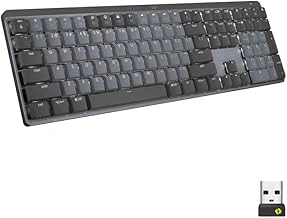
Logitech MX Mechanical Full-Size Wireless Mechanical Keyboard with Tactile Quiet Switches
The Logitech MX Mechanical Full-Size Wireless Mechanical Keyboard with Tactile Quiet Switches sits at the premium end of the quiet mechanical keyboard market at $159.99. This full-size wireless board features Logitech's tactile quiet switches, which provide noticeable feedback without the sharp click that can disrupt shared workspaces.
The full-size layout includes a dedicated number pad, making this keyboard suitable for colleagues who regularly work with spreadsheets or data entry alongside their regular typing. The wireless connectivity reduces cable clutter on shared desks and offers flexibility in positioning the keyboard for comfort.
Logitech designed this keyboard with a refined metal top plate that adds stability during typing and contributes to a more consistent sound profile. The build quality meets the expectations of the price point, with materials that feel substantial and keycaps that resist the shine that develops on lower-quality alternatives.
The tactile quiet switches deliver a middle-ground experience: you feel a bump at the actuation point without generating the noise of traditional clicky switches. This makes the keyboard appropriate for shared offices where colleagues appreciate some audible confirmation of keystrokes but need to avoid the percussive sound of standard mechanical switches.
This keyboard makes the most sense for professionals who type frequently, value wireless freedom, and prefer tactile feedback over the completely silent feel of linear switches. The full-size layout works best when desk space isn't constrained and when the number pad sees regular use. Colleagues who primarily write documents or code may find the tactile switches provide useful feedback without crossing into disruptive territory.
The $159.99 price reflects the wireless capability, premium materials, and established brand engineering. For shared office environments where budget allows and tactile feedback matters, this keyboard balances quiet operation with the satisfying feel that many mechanical keyboard users prefer.
- ✅ Tactile quiet switches provide feedback without disruptive clicking
- ✅ Wireless connectivity reduces desk cable clutter
- ✅ Full-size layout includes number pad for data work
- ✅ Metal top plate adds stability and consistent sound profile
- ✅ Premium build quality with durable keycap materials
- ⚠️ $159.99 price point may exceed some office budgets
- ⚠️ Full-size footprint requires adequate desk space
- ⚠️ Tactile switches still produce more sound than linear alternatives
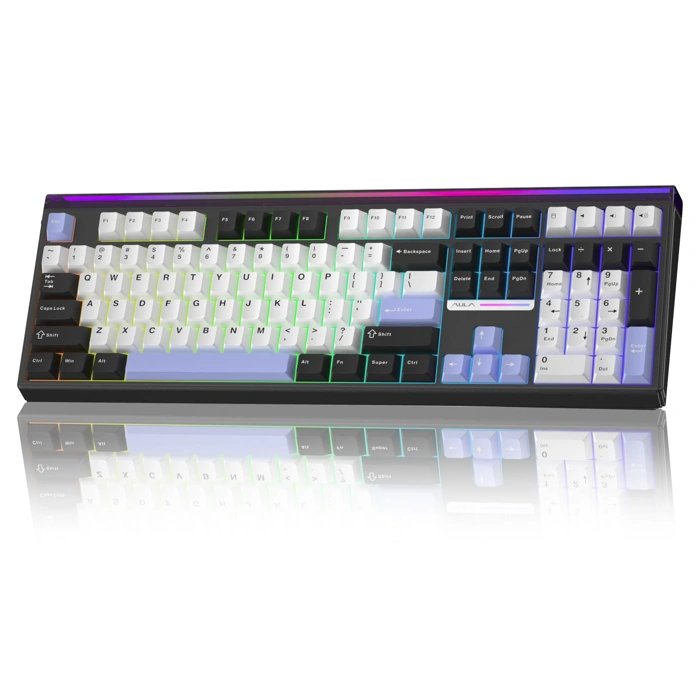
Aula H108 Full Size Wireless Mechanical Keyboard with Hot Swappable Gasket RGB
The Aula H108 offers a different path to quiet operation in shared offices: buy the platform, choose your silence. At $76.99, this full-size wireless mechanical keyboard arrives with hot-swappable switches and gasket mount construction - two features that directly affect both sound and customization.
Hot-swappable sockets let you pull the included switches and install silent alternatives without soldering. If you already own silent linear or tactile switches, or you're willing to source a set separately, the H108 becomes a canvas. Gasket mounting suspends the plate on silicone or foam strips inside the case, absorbing vibration before it reaches the desk and reducing the hollow clack common in tray-mount boards.
The RGB lighting is fully programmable, and wireless connectivity keeps the desk clear - both practical in a shared environment. The full-size layout includes a number pad, so you won't lose productivity if your workflow depends on it.
The tradeoff is upfront effort. The board ships with its factory switches, which are not marketed as silent. To achieve the noise reduction this guide targets, you'll need to budget for a set of quiet switches and spend multiple - multiple minutes swapping them. That's flexibility, not plug-and-play convenience.
If you enjoy tweaking your tools and want gasket-mount acoustics without spending $multiple, the Aula H108 delivers the foundation. If you prefer a keyboard that's silent out of the box, look elsewhere in this guide.
- ✅ Hot-swappable switches let you install your own silent switches without soldering
- ✅ Gasket mount construction absorbs vibration and reduces hollow case noise
- ✅ Wireless connectivity with full-size layout including number pad
- ✅ Value-focused at $76.99 for a customizable platform
- ⚠️ Ships with non-silent switches; quiet operation requires separate purchase and installation
- ⚠️ Requires hands-on setup time to achieve noise reduction
- ⚠️ Limited verified details on switch type, battery life, and acoustic baseline