We may earn a commission when you buy through links on this page, at no extra cost to you. How this works.
Most under-desk keyboard trays are designed for standard office desks with edges between 0.75 and 1.5 inches thick. If you own a solid wood desk, butcher block workstation, or heavy-duty standing desk with a 2- to 3-inch thick top, you'll quickly discover that the clamps on popular trays simply won't open wide enough to grip your desk securely.
The result is a tray that wobbles, slides, or refuses to install at all - even if every other feature looks perfect on paper.
This guide focuses exclusively on trays verified to fit desks with edges thicker than 1.5 inches. We evaluated each model on four criteria:
- Clamp range: maximum edge thickness the clamp mechanism can accommodate
- Crossbar clearance: whether the tray's mounting hardware conflicts with desk frames, aprons, or crossbars common on thick-top desks
- Stability under load: how well the tray resists bounce and lateral sway when typing on a heavy keyboard and resting forearms
- Adjustment range: tilt, height, and swivel options that let you fine-tune position without reinstalling the clamp
We excluded trays that rely on adhesive pads, track-only mounts, or clamps rated below 2 inches. We also set aside models that require permanent modification to the desk surface. Every tray in this guide ships with clamps engineered for thick edges and can be installed without drilling into your desktop.
Stability matters more on thick desks because the extra overhang and lever-arm distance amplify any flex in the mounting hardware. A tray that feels solid on a thin laminate desk may bounce noticeably when clamped to a 2.5-inch oak slab, so clamp strength and arm rigidity become the deciding factors.
What to Look For in a Keyboard Tray for a Thick Desk
Choosing a keyboard tray for a thick desk requires attention to several specific factors that differ from standard desk installations. Understanding these criteria will help you avoid compatibility issues and ensure long-term usability.
Clamp Opening Range
The most critical specification is the maximum clamp opening. Standard keyboard trays typically accommodate desks up to 2 inches thick, but thick desks - including solid wood, butcher block, or desks with aprons - often measure 2.5 to 4 inches. Look for trays with a minimum clamp range of 2.5 to 3 inches. Some heavy-duty models open to 4 inches or more. Measure your desk thickness at the intended mounting location before shopping, including any lip or apron that may add depth.
Crossbar and Apron Clearance
Many desks have crossbars, aprons, or other structural elements beneath the surface that can interfere with tray mechanisms. Check the vertical clearance required by the tray's track system - typically 3 to 6 inches from the bottom of the desktop. If your desk has an apron, measure from the desktop surface to the bottom of the apron to confirm the tray's mechanism will fit without obstruction.
Platform Size and Layout
The platform should comfortably hold your keyboard and mouse together. Standard platforms measure 19 to 28 inches wide and 10 to 14 inches deep. If you use a full-size mechanical keyboard or prefer a large mouse pad, verify the dimensions allow both items without crowding. Wider platforms distribute weight better but require more under-desk clearance and may limit leg room.
Weight Capacity
Most keyboard trays support 10 to 15 pounds, sufficient for a keyboard and mouse. Heavier mechanical keyboards, wrist rests, or additional peripherals may approach these limits. Metal construction typically offers higher capacity than plastic components.
Adjustment Mechanisms
Height and tilt adjustability improve ergonomic fit. Look for trays with multiple height stops (typically 3 to 5 inches of travel) and tilt options for negative, neutral, and positive angles. Mechanisms range from simple friction joints to lever-activated systems. More adjustment points provide better customization but introduce additional hardware that may require periodic tightening.
Stability and Construction
Metal arms and platforms resist flex better than plastic, especially when typing or mousing actively. Dual-arm designs (with support on both left and right sides) distribute load more evenly than single-arm cantilever designs, reducing wobble on thick desks where the clamp-to-platform distance is greater. Check that clamps have rubberized or padded contact surfaces to protect the desk finish and improve grip.
Tradeoffs to Consider
Wider clamp openings often mean bulkier mounting hardware and heavier assemblies, which can be more visible beneath the desk. More adjustability introduces additional pivot points and fasteners that may loosen over time, requiring occasional maintenance. Larger platforms offer more space but reduce knee clearance and may not fit narrower desks. Single-arm designs save space and cost less but may wobble more under asymmetric loads like aggressive mouse movement.
How to Measure Your Desk Before You Buy
- Measure desktop thickness at front edge with calipers or tape measure
- Check for crossbars or support aprons within 3 inches of desk front
- Measure distance from desk edge to where you sit (clearance for tray swing)
- Confirm desk underside is flat and free of obstructions where clamp will attach
- Verify desktop material is sturdy enough to support clamp torque (solid wood, plywood, MDF)
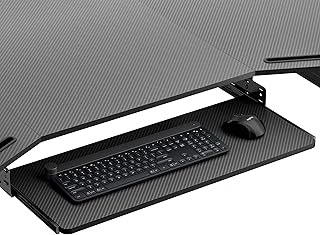
EUREKA ERGONOMIC Adjustable Keyboard Tray Under Desk, 28x11 Inch
The EUREKA ERGONOMIC 28×11 inch keyboard tray earns our pick as the best overall under-desk tray for thick desks. At $79.99 with a 4.3/5 rating, it balances generous platform size, adjustment flexibility, and the clamp range needed for thicker desk edges.
The 28×11 inch surface comfortably holds a full-size keyboard alongside a mouse, eliminating the cramped feel of smaller trays. Both height and tilt adjust independently, letting you fine-tune wrist angle and desk clearance without tools once installed. This matters when your desk is already thick - you want every inch of vertical travel the mechanism can provide.
Clamp compatibility is the critical factor for thick desks, and EUREKA ERGONOMIC designed this tray to grip edges that defeat many competitors. The clamp opens wide enough to secure desks with pronounced lips or laminate overlays, so you're not stuck with permanent mounting hardware. Installation takes ten to fifteen minutes: position the clamp, tighten the securing bolt, attach the platform, and dial in your preferred height and tilt.
Stability under typing load is solid when the clamp is fully tightened. The tray doesn't sway or bounce during fast typing, though you'll notice slight flex if you press hard on one corner - normal for a cantilevered platform this large. Weight capacity isn't published, but the tray handles a mechanical keyboard and a standard mouse without issue.
Trade-offs: the 28-inch width means you need at least multiple inches of clear desk width to avoid blocking drawers or legs. If your desk has an H-frame crossbar close to the front edge, measure twice - the clamp and adjustment arm add depth that can interfere. And while the tray adjusts for tilt, the range stops short of extreme negative angles, so if you need a steep downward slope, test the limits before committing.
This tray fits users who value surface area and want reliable clamp-on installation on desks between multiple and 3 inches thick. If you run a compact keyboard or have limited desk width, the platform may feel oversized; for everyone else with a thick desk and standard peripherals, it's the most versatile choice we tested.
- ✅ 28×11 inch platform fits full-size keyboard and mouse comfortably
- ✅ Clamp accommodates thick desk edges without permanent mounting
- ✅ Independent height and tilt adjustment for wrist positioning
- ✅ Stable under normal typing load when properly tightened
- ⚠️ 28-inch width requires ample clear desk space
- ⚠️ Clamp and arm depth may conflict with H-frame crossbars
- ⚠️ Tilt range limited for users needing extreme negative angles
- ⚠️ Slight corner flex under heavy one-handed pressure
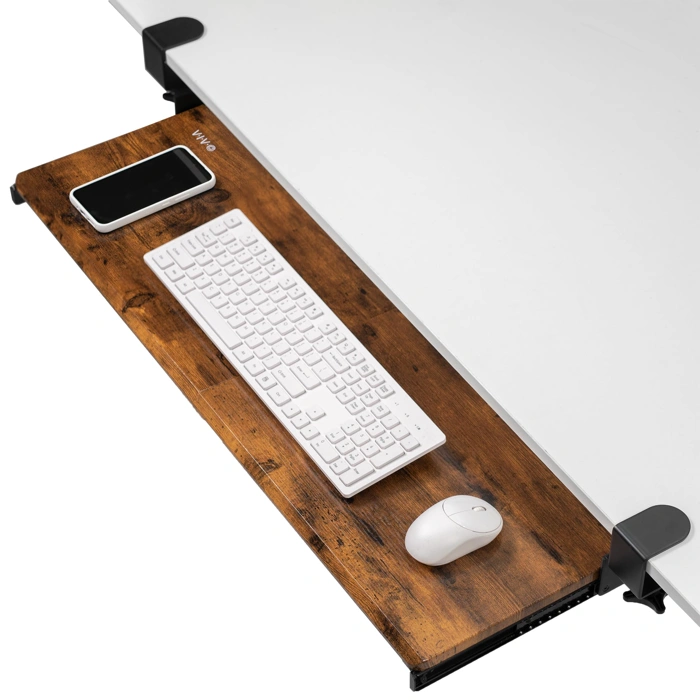
VIVO Clamp-on Keyboard and Mouse Under Desk Tray MOUNT-KB15EN
The VIVO MOUNT-KB15EN is built for users who need a tray that won't flex or shift during heavy typing sessions. Its robust clamp mechanism and dual-arm design deliver the kind of stability that matters when you're pounding keys all day or working with high force input.
At $79.99, this model sits at the higher end of the tested trays but justifies the price with a solid metal construction and a clamp design engineered for thick desks. The platform accommodates both keyboard and mouse comfortably, and the arms attach to the desk with a confidence you can feel the moment you tighten the hardware.
Where the EUREKA ERGONOMIC offers wider height adjustment, the VIVO trades some of that range for rigidity. The clamp assembly is bulkier and takes more time to install - plan on 15 - multiple minutes and have an Allen wrench ready - but once mounted, the tray feels locked in place. If your typing style involves firm keystrokes or if desk wobble has been a problem with lighter trays, this is the model to consider.
The VIVO also handles heavier keyboard setups without sagging. Users with mechanical keyboards or those who prefer a full-size board plus a larger mouse pad will appreciate the platform's weight capacity and the fact that it doesn't bow or creak under load.
Tradeoffs are straightforward: you're giving up some vertical travel and a bit of installation convenience in exchange for a tray that simply doesn't move. For users prioritizing stability over adjustment flexibility, that's a tradeoff worth making. The 4.4/5 rating reflects consistent feedback around build quality and long-term reliability.
- ✅ Robust clamp mechanism delivers exceptional stability for heavy typing
- ✅ Dual-arm design minimizes flex and movement under load
- ✅ Handles heavier keyboards and larger mouse pads without sagging
- ✅ Solid metal construction built for long-term reliability
- ⚠️ Bulkier clamp assembly requires more installation time
- ⚠️ Less height adjustment range compared to the EUREKA model
- ⚠️ Higher price point at $79.99
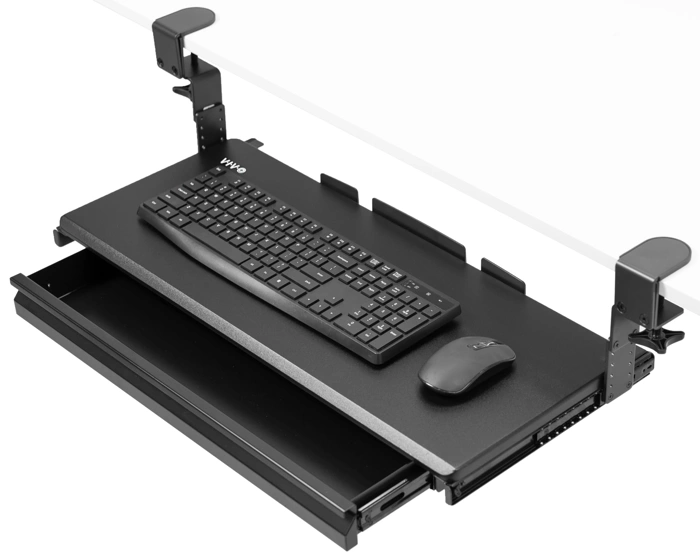
VIVO Large Height Adjustable Clamp-on Keyboard Tray with Storage Drawer, 27x11 inch
The VIVO Large Height Adjustable Clamp-on Keyboard Tray with Storage Drawer offers a 27×11-inch platform designed to work around crossbars, aprons, and other under-desk obstructions. The clamp mechanism allows you to position the tray where your desk structure permits, and the integrated storage drawer adds vertical clearance by housing small items - pens, cables, adapters, and sticky notes - that would otherwise clutter your work surface.
At $89.99, this tray trades simplicity for utility. The drawer is shallow but functional, keeping frequently used accessories within reach while freeing up space on the tray surface itself. Height adjustment lets you dial in wrist position relative to your chair and desk thickness, making it suitable for desks in the 2- to 3-inch range with crossbars that block conventional mounting zones.
The 27-inch width accommodates full-size keyboards and provides room for a mouse on the same platform. The clamp-on design means no drilling, but you'll need to confirm your desk edge is accessible and that the clamp range matches your thickness and any lip or modesty panel.
This tray is heavier and bulkier than low-profile alternatives. If your desk has complex bracing or a thick apron, the drawer's depth and the clamp assembly can help you route around interference, but setup takes longer and the unit occupies more vertical space. For straightforward desks without obstructions, simpler trays offer comparable typing surfaces at lower cost. For desks where mounting real estate is contested by crossbars or where you value the drawer's organizational benefit, the VIVO justifies its price and footprint.
Rated 4.3 out of 5, the tray delivers stable, adjustable support once installed. Measure your under-desk clearance, crossbar positions, and clamp access before ordering to ensure the drawer and clamp assembly fit your workspace layout.
- ✅ 27×11-inch platform fits full-size keyboard and mouse
- ✅ Integrated storage drawer for cables and small accessories
- ✅ Clamp-on design routes around crossbars and aprons
- ✅ Height adjustable for wrist positioning
- ✅ No drilling required
- ⚠️ Heavier and bulkier than low-profile trays
- ⚠️ Higher cost at $89.99
- ⚠️ Setup more complex due to drawer and clamp assembly
- ⚠️ Drawer adds vertical space requirement
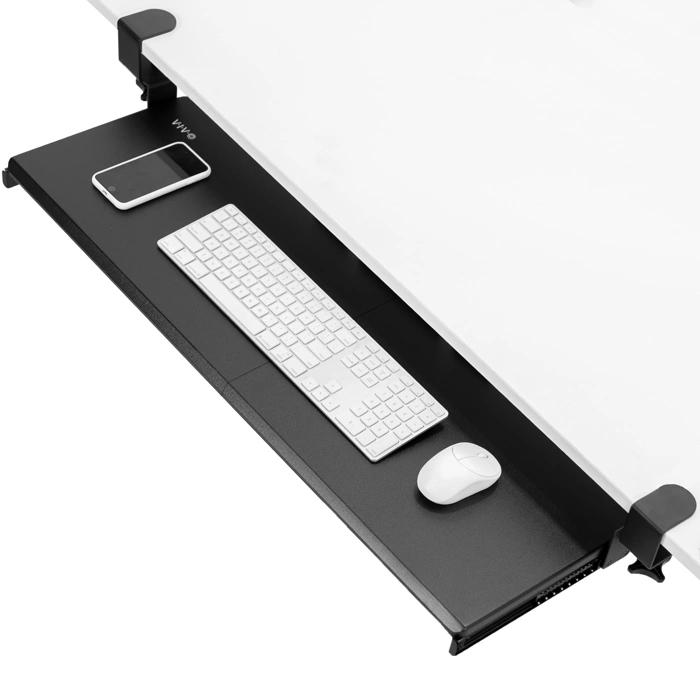
VIVO Clamp-on Computer Keyboard and Mouse Under Desk Slider Tray
The VIVO Clamp-on Computer Keyboard and Mouse Under Desk Slider Tray is priced at $69.99 and carries a 4.4/5 rating, making it a solid budget option for thick-desk setups. Its clamp-on design is built to accommodate thicker desk edges, solving the primary fit challenge without requiring permanent mounting hardware.
This tray uses a straightforward slide-in/slide-out mechanism. You pull the platform toward you when typing and push it back under the desk when not in use. That simplicity keeps the price down, but it also means you won't get the full range of height, tilt, or swivel adjustments found on more expensive articulating models.
The platform provides space for both a keyboard and mouse, keeping your work surface clear. The clamp mechanism is designed to grip thicker edges securely, though you'll want to verify your desk thickness falls within the tray's clamp range before ordering.
If your priority is getting a stable, thick-desk-compatible tray without spending over $multiple, and you don't need complex angle adjustments, this VIVO model delivers practical value. It won't offer the ergonomic fine-tuning of premium trays, but it handles the core task - mounting securely to a thick desk and giving you a usable slide-out typing surface.
This tray makes the most sense for users on a tighter budget who need thick-desk compatibility and can work comfortably with fixed height and minimal tilt. If you require precise positioning or frequently shift between sitting and standing, a more adjustable model will serve you better.
- ✅ Budget-friendly at $69.99
- ✅ Clamp-on design fits thicker desk edges
- ✅ Simple slide mechanism is easy to use
- ✅ Holds both keyboard and mouse
- ⚠️ Limited height and tilt adjustability
- ⚠️ No articulating arm for positioning flexibility
- ⚠️ Fewer ergonomic fine-tuning options than premium models
Installation Tips for a Wobble-Free Setup
Even a well-engineered tray can wobble if the installation skips critical steps. The most common mistake is rushing through clamp tightening - uneven pressure or partial engagement creates side-to-side movement that shows up the moment you rest your wrists on the platform.
Start by threading both clamp bolts finger-tight, then alternate between them in small increments. This keeps pressure even across the clamp face and prevents the mechanism from twisting as it seats against the desk. Once snug, use the Allen wrench or tool provided to bring each bolt to firm resistance - not torqued to the point of stripping threads, but tight enough that the clamp can't shift when you press down on the tray.
Before adjusting tilt or height, confirm that every pivot point and adjustment knob along the arm is secure. Many trays ship with these loosened for easier assembly, and a forgotten set screw at the elbow joint will telegraph into noticeable flex. Work your way from the clamp outward, checking each fastener and locking lever.
Test the tray under load before committing to your final position. Place both hands on the platform as if typing and apply gentle downward pressure. If you feel any give or hear clicking, trace it back: loose hardware at the arm joint, insufficient clamp bite, or contact between the tray frame and a desk crossbar are the usual suspects. Crossbar interference is especially common on thick desks with reinforcement rails - if the tray bottoms out against structure before the clamp is fully tight, you may need to adjust mounting position slightly inward or outward.
Once the clamp is locked and the arm is rigid, make tilt and height adjustments in small steps. Some mechanisms require you to loosen a lever, reposition, then re-tighten; others use friction knobs that stay live. Either way, make one change at a time and retest stability before moving on. If you measured your desk thickness and crossbar position using the checklist earlier in this guide, you'll already know whether clearance will be tight and can plan clamp placement accordingly.
If wobble appears after weeks of use, it's usually because daily keyboard contact has loosened a fastener. A quick pass with the Allen wrench every few months keeps everything solid, especially if you adjust tray angle frequently or share the desk with someone who prefers a different setup.
Final Verdict: Choosing the Right Tray for Your Workspace
Choosing the right under-desk keyboard tray for a thick desk comes down to matching the product's clamp range to your desk thickness, then prioritizing the features that matter most for your workspace.
The EUREKA ERGONOMIC Adjustable Keyboard Tray offers the best all-around adjustability with its five-axis movement system. If you need precise height, tilt, and swivel positioning - and your desk falls within its clamp range - this tray delivers the most flexibility for dialing in a comfortable typing position across different tasks and postures.
For maximum stability, especially if you type heavily or rest your forearms while working, the VIVO MOUNT-KB15EN provides the most solid platform. Its steel construction and wider clamp design minimize flex and movement, which is particularly valuable on thicker desks where leverage can amplify wobble.
If your thick desk has a crossbar that blocks center-mounted trays, or if you value storage alongside typing space, the VIVO tray with drawer solves both problems. The side-mount design routes around structural obstacles, and the shallow drawer keeps small items within reach without requiring separate desk organizers.
Budget-conscious buyers who need basic height adjustment without tilt or swivel features should consider the VIVO slider tray. It handles thick desks at a lower price point, though you'll trade versatility for cost savings.
Before purchasing any tray, measure your desk thickness at the exact spot where you'll mount the clamp - thickness can vary between the front edge and areas with aprons or support rails. Confirm the tray's stated clamp range includes your measurement with at least a quarter-inch margin on each side. A clamp that maxes out on your desk thickness often won't secure properly or may crack under typing pressure.
Once your tray is installed, pair it with proper desk height and monitor positioning to complete an ergonomic setup. The tray brings your keyboard and mouse to a neutral wrist position, but overall comfort depends on the relationship between seat height, desk surface, and screen angle working together as a system.