We may earn a commission when you buy through links on this page, at no extra cost to you. How this works.
Remote work pushed millions of people to reconsider their home office gear, and mechanical keyboards have moved from enthusiast territory into mainstream conversations. The appeal is straightforward: better feedback, longer lifespan, and a more satisfying typing experience compared to the rubber-dome boards bundled with most desktops. But the switch isn't automatic - mechanical keyboards come with real tradeoffs, particularly around noise, cost, and the learning curve that comes with unfamiliar key feel.
The biggest barrier used to be the clicky racket. Early adopters tolerated it or worked alone, but shared spaces and video calls made loud switches a dealbreaker for many remote workers. That's changed. Manufacturers now offer silent and low-profile mechanical options that keep the tactile benefits without disturbing housemates or coworkers on Zoom. Understanding which switch type matches your environment is the key to making the upgrade work.
This guide walks through the tangible advantages of mechanical keyboards, the downsides that still matter, and a practical breakdown of switch types so you can match features to your actual workspace. Whether you're curious about durability, frustrated by mushy keys, or just trying to figure out if a mechanical board will survive your next team call, the decision comes down to fit between what you type, where you type, and what you're willing to spend.
The Major Pros of Using a Mechanical Keyboard
Mechanical keyboards deliver longevity that membrane and scissor-switch boards rarely match. Most mechanical switches are rated for 50 to 100 million keystrokes per key, which means a decade or more of heavy daily use without the mushy feel or missed inputs common in worn rubber domes.
Each keypress gives you immediate feedback. Tactile switches produce a noticeable bump at the actuation point, while clicky switches add an audible snap. Linear switches move smoothly without interruption. That feedback helps typists and gamers register every input without bottoming out, reducing wasted motion and finger strain over long sessions.
Customization sets mechanical keyboards apart. Hot-swappable sockets let you pull out one switch type and snap in another without soldering, so you can shift from a tactile bump to a quiet linear feel in minutes. Custom keycap sets in PBT or double-shot ABS add texture and color, and programmable firmware lets you remap keys, build macros, or adjust lighting per-key.
Many users notice less finger fatigue because mechanical switches typically actuate halfway through their travel at forces between 45 and 65 grams, lighter than the full press required by most membrane boards. Faster actuation and shorter reset distance mean your fingers move less for the same output, which adds up during all-day typing or extended gaming.
If you value a keyboard that adapts to your workflow, lasts through years of use, and gives clear confirmation with every tap, the mechanical design offers measurable advantages over disposable alternatives.
The Potential Cons to Consider Before You Buy
The upfront cost is often the first hurdle. A decent mechanical keyboard typically starts around $70 and climbs quickly past $150 for premium models, while a reliable membrane board usually stays under $30. If you're coming from a basic keyboard bundled with your computer, the price jump feels significant, especially when you're not yet sure whether the typing experience will justify the expense.
There's also a learning curve. The first few days on a mechanical board can feel awkward. Key travel is deeper, and if you switch from low-profile laptop keys to high-profile mechanical switches, your fingers need time to adapt. Typing speed may dip temporarily, and the tactile feedback can feel overly pronounced until muscle memory adjusts. Most users adapt within a week, but the transition isn't seamless for everyone.
Size and weight matter more than you might expect. Many mechanical keyboards are full-size or tenkeyless layouts built with aluminum or thick plastic frames, making them heavier and bulkier than the slim membrane boards common in offices. If desk space is tight or you travel frequently, the footprint and heft can become a daily friction point rather than a one-time inconvenience.
The most common deal-breaker is noise. Clicky switches like Cherry MX Blue or similar designs produce a sharp, audible click with every keystroke. In a shared office, open workspace, or home environment where others are on calls or concentrating, that sound becomes disruptive fast. Even tactile switches can be louder than membrane keys, and bottom-out noise from aggressive typing carries across quiet rooms. If your workspace demands discretion, you'll need to choose linear or silent switches and possibly add dampening accessories, which adds complexity and cost to an already steep investment.
Understanding Keyboard Switches: From Clicky to Quiet
Mechanical switches determine how each key feels and sounds under your fingers. The three traditional families are clicky, tactile, and linear, each built around a different internal mechanism that changes both the feedback you feel and the noise your keyboard makes.
Clicky switches, typically called Blue switches, include a dedicated click mechanism inside the stem that produces an audible click and a tactile bump on every key press. Actuation force usually sits around 50 - 60 grams, and you hear and feel exactly when the switch registers your keystroke. The trade-off is volume: clicky switches are loud enough to disturb coworkers or housemates in shared spaces.
Tactile switches, often labeled Brown, skip the click mechanism but keep a small bump partway through the key travel. You feel when the switch actuates without the sharp click sound. Actuation force tends to be slightly lighter, around 45 - 55 grams, and the sound profile is quieter - more of a soft thud than a snap. Tactile switches are popular among typists who want physical feedback without the noise of a clicky switch.
Linear switches, such as Red variants, remove both the click and the tactile bump. The keystroke is smooth from top to bottom, with no interruption in travel. Actuation force is often the lightest, around 45 grams, and the sound depends mostly on how hard the keycap hits the switch housing. Gamers often prefer linear switches for rapid key presses, though some typists find the lack of feedback makes it easier to bottom out and create more noise than expected.
Newer silent variants modify the switch housing with rubber dampeners at the top and bottom of travel. These reduce the impact noise when you press and release each key, cutting the sound profile significantly compared to standard linear or tactile switches. Silent switches usually add a few grams of actuation force because of the dampening material, and the bottom-out feel is softer. Travel distance across most mechanical switches stays consistent at 4 millimeters total, with actuation happening around 2 millimeters down.
When choosing a switch type, match the mechanism to your environment and typing style. Clicky switches reward deliberate typing but demand tolerance for noise. Tactile switches balance feedback and volume for mixed-use settings. Linear switches suit fast input but require attention to bottoming-out force if you want to stay quiet. Silent linear or silent tactile switches offer the best noise control when decibel levels matter more than pronounced feedback.
Addressing the Office Noise Concern: Can Mechanical Keyboards Be Quiet?
Office noise is one of the biggest worries when people consider switching to a mechanical keyboard, especially in shared workspaces where traditional clicky switches can irritate colleagues. Silent mechanical switches solve this problem by adding small rubber dampeners to the stem, which cushion both the downstroke and upstroke to eliminate the sharp clack. Keyboards that combine silent switches with internal foam layers or gasket-mount designs can approach the sound profile of a standard membrane board while keeping the tactile feedback and durability that make mechanical keyboards appealing.
Case construction matters as much as the switch itself. Keyboards with dense plastic or aluminum frames, layered foam between the PCB and plate, and silicone gaskets absorb vibration before it reaches your desk, turning every keystroke into a muted thud rather than a hollow ping. If you type with a light touch, a well-dampened board becomes nearly inaudible beyond arm's length.
The Keychron V6 Max offers a practical example of how far quiet mechanical designs have come. This full-size wireless model ships with pre-lubricated silent switches, multiple layers of sound-dampening foam, and a gasket-mount structure that isolates the plate from the case. The result is a typing experience that feels responsive and smooth without broadcasting every keystroke across the room. For remote workers who share space with family or move between home and office, a board like this removes the acoustic tradeoff that used to define mechanical keyboards.
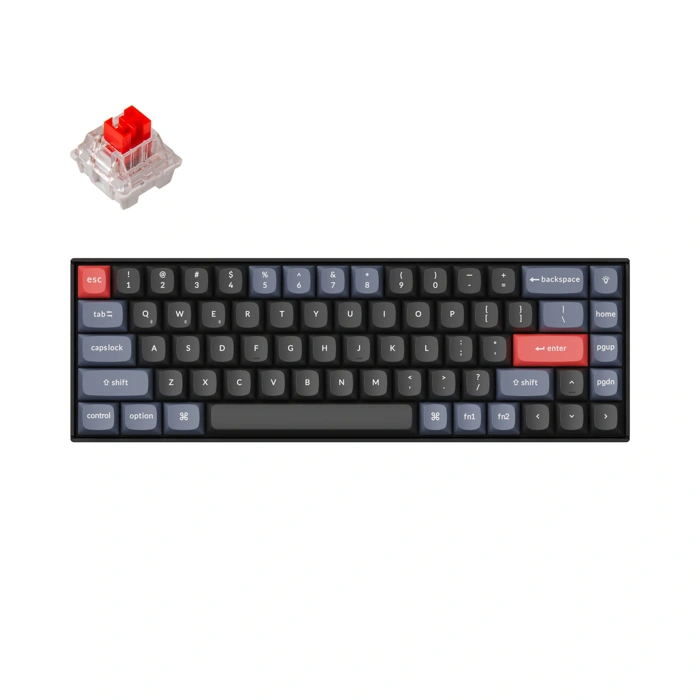
Keychron K6 Pro Wireless Custom Mechanical Keyboard
A full-size layout with quiet operation solves one of the biggest objections to mechanical keyboards in shared workspaces. The Keychron V6 Max offers hot-swappable switch sockets and QMK/VIA programmability in a design that accommodates office-friendly switches without locking you into a single feel. Rated 4.3 out of 5 across 11 reviews, this board balances mechanical feedback with sound-dampening features that reduce desk clatter.
Hot-swappable sockets let you test different switch types - tactile browns, linear reds, or silent variants - without soldering, so you can tune typing noise and key resistance to your environment. The full-size numpad layout suits spreadsheet work and data entry, while QMK/VIA firmware support allows custom key mapping for macros or layer toggling. Sound-dampening materials inside the case and stabilizers help control the hollow ping and rattle that louder boards produce, keeping typing noise closer to a premium membrane level when paired with quieter switches.
Programmability means you can assign frequent commands to single keys, adjust actuation behavior, or create application-specific layers - all without manufacturer software running in the background. The matte keycaps resist fingerprint shine over long sessions, and the USB-C connection works across Windows, macOS, and Linux without driver installation. If you want mechanical typing feel in an office setting and plan to experiment with switch preferences, the combination of swappable sockets, sound control, and full-size layout delivers flexibility that entry boards and soldered models skip.
- ✅ Hot-swappable sockets for testing switch types without soldering
- ✅ QMK/VIA programmability for custom macros and key mapping
- ✅ Sound-dampening design reduces mechanical keyboard noise
- ✅ Full-size layout includes numpad for data entry and spreadsheets
- ⚠️ Limited review sample size with 11 verified ratings
- ⚠️ Quieter operation depends on choosing silent or tactile switch options
- ⚠️ Programmability requires learning QMK/VIA firmware tools
Quick Checklist: Is a Mechanical Keyboard Right for You?
- You type more than four hours per day and value tactile feedback
- You're willing to invest $80 - $200 for long-term durability
- Desk space allows a full-size or TKL layout
- You work in a shared space and will choose silent or tactile switches, not clicky blues
- You want programmable layers or custom keycap options down the road
Final Verdict: Who Should Switch to a Mechanical Keyboard?
High-volume typists who spend hours each day writing, coding, or managing spreadsheets stand to gain the most from switching to a mechanical keyboard. The tactile feedback and consistent actuation reduce typing fatigue over long sessions, and the durability of mechanical switches means the keyboard will maintain its feel for years instead of becoming mushy after twelve months of heavy use.
Remote professionals prioritizing comfort and longevity will find the investment worthwhile. If your current membrane keyboard requires you to press harder or bottom out with every keystroke, a mechanical option with linear or tactile switches can reduce finger strain and improve typing speed. The longer lifespan - often 50 million keystrokes per switch - also makes the higher upfront cost more reasonable when spread across several years of daily use.
Users willing to navigate switch selection will unlock the real benefits. Cherry MX Red, Brown, and Silent Red switches offer quiet operation suitable for shared spaces, while Gateron and Kailh alternatives provide similar performance at lower price points. If you're concerned about noise in an office or during video calls, silent switches or pre-built models like the Keychron V6 Max eliminate the clicky stereotype without sacrificing the mechanical advantage.
Switching makes less sense if you type infrequently, prefer the thinnest possible profile, or have no issue with your current setup. Mechanical keyboards are heavier, taller, and require a bit of research to match switch type to your typing style. But for anyone who relies on their keyboard as a primary work tool, the combination of comfort, durability, and customization turns the switch into a practical upgrade rather than an enthusiast luxury.