We may earn a commission when you buy through links on this page, at no extra cost to you. How this works.
The sound and feel of your keyboard affect more than just typing speed. In a home office, every keystroke travels through walls, floors, and microphone feeds during video calls. A loud, clicky switch that energizes your workflow might annoy a partner working in the next room or echo through every meeting. A silent, smooth switch keeps the peace but may leave you missing the tactile confirmation that tells you a key actually registered.
Mechanical keyboard switches fall along a spectrum. Clicky switches announce each press with an audible click and a tactile bump. Tactile switches give you the bump without the noise. Linear switches glide straight down with no bump or click at all, offering the quietest operation and fastest actuation. Each category trades off feedback, sound, and feel in different ways.
Your workspace constraints matter as much as your typing preference. Shared spaces, thin walls, and frequent video calls push many remote workers toward quieter tactile or linear options. Solo setups with a closed door allow the full range of clicky, loud switches that some typists find most satisfying. The right switch aligns your typing experience with the realities of your environment, not an abstract ideal of performance.
This guide walks through the three main switch families - clicky, tactile, and linear - then explores how sound profile, actuation force, and travel distance shape your daily experience. You'll see which attributes matter most for focus, comfort over long sessions, and coexistence with others in your home office.
Understanding Keyboard Switches: A Simple Guide to Clicky, Tactile, and Linear
Mechanical keyboard switches fall into three main categories based on how they feel and sound when pressed. Clicky switches produce an audible click and have a noticeable bump you can feel partway through each keystroke, giving typists clear feedback with both sound and touch. Tactile switches offer that same physical bump without the loud click, creating a quieter typing experience while still letting you feel when a key has registered. Linear switches move smoothly from top to bottom with no bump or click, providing consistent resistance throughout the press and producing the least amount of noise.
The differences matter for practical reasons. Clicky switches are the loudest option and work well for solo home offices where the sound won't disturb others, but they can be disruptive in shared spaces or during video calls. Tactile switches strike a middle ground, offering physical feedback that helps reduce typing errors without the sharp acoustic signature of clicky switches. Linear switches are the quietest and smoothest choice, preferred by gamers who need rapid key presses and remote workers in noise-sensitive environments.
Sound and feel are personal, but understanding these categories helps match a switch to your workspace. If you share your space or take frequent calls, tactile or linear switches reduce ambient noise. If you type in isolation and enjoy audible confirmation with each keystroke, clicky switches deliver that experience. The bump in clicky and tactile switches can also improve typing accuracy for some users, while the smooth travel of linear switches allows faster repeated presses with less finger fatigue during extended use.
Head-to-Head Comparison: Sound, Feel, and Typing Experience
Sound level divides mechanical keyboard switches into two distinct camps. Clicky switches produce an audible click at the actuation point - typically around 60 to 70 decibels - while silent switches register below 40 decibels, often quieter than membrane boards. If you share a workspace or take calls throughout the day, that 20-decibel gap matters. Clicky switches announce every keystroke, which can disrupt colleagues or family members working nearby. Silent switches let you type through meetings without muting your microphone or drawing irritated glances.
Tactile feedback follows a similar split. Clicky switches pair their sound with a sharp tactile bump, giving you physical and auditory confirmation the moment a key registers. This dual feedback helps touch typists maintain rhythm and reduces bottoming out, since you know the key actuated before it hits the base. Silent switches usually rely on linear or lightly tactile mechanisms - smooth travel from top to bottom with minimal resistance change. You lose the pronounced bump, but you gain uninterrupted motion that some typists find faster once they adapt.
Typing rhythm shifts with each style. Clicky switches encourage deliberate, precise strokes; the feedback loop between sound and feel naturally slows your cadence and sharpens accuracy. Silent switches reward a lighter touch and faster finger movement, since there's no tactile event to wait for. Gamers who need rapid key presses often prefer linear silent switches, while writers who value each word may lean toward the deliberate pace of clicky tactile switches.
Workspace context seals the decision. Clicky switches suit private home offices, personal studios, or any environment where you control ambient noise. They make long typing sessions more satisfying and help you notice accidental key presses immediately. Silent switches fit open-plan offices, shared living rooms, late-night work sessions, and video calls. If anyone within earshot might hear your keyboard, silent switches preserve both your productivity and your relationships.
Who Should Choose a Loud, Clicky Keyboard?
Clicky switches make the most sense when you have the freedom to type without worrying about the people around you. If you work from a private home office or a space where noise isn't a concern, the sharp, audible click of each keypress can become a satisfying part of your workflow rather than a distraction.
The sound itself serves a purpose beyond nostalgia. That distinct click confirms registration before the key bottoms out, which can improve typing accuracy and rhythm, especially if you tend to work in concentrated bursts. Some typists find the audible feedback helps them stay engaged during long writing sessions or coding marathons, turning each keystroke into a small, tangible event.
Clicky switches aren't ideal for shared workspaces, video calls, or late-night sessions near sleeping family members. The noise carries, and what feels crisp to you can become repetitive background clatter to others. But in the right environment, that same sound profile becomes an asset. You get clear, immediate confirmation that the switch has actuated, which can reduce bottoming out and make fast typing feel more controlled.
If you value feedback you can hear and feel over silent operation, and your workspace allows it, clicky switches deliver a typing experience that's hard to replicate with quieter alternatives.
Who Is a Quiet, Smooth Keyboard Best For?
Silent, smooth keyboards work best when your surroundings demand discretion. If you share your workspace with a partner, roommate, or family member, the quiet operation of linear switches minimizes disruption during late-night projects or early-morning email sessions. Video calls and audio recording benefit from the absence of audible keystrokes that can bleed into microphone feeds, keeping your audio clean and professional.
Low noise tolerance - whether your own or someone else's - makes silent switches a practical choice. Typing in shared offices, libraries, or bedrooms at odd hours requires consideration, and smooth linear switches deliver the mechanical feel without the acoustic signature. These switches also suit anyone who finds clicky or tactile feedback distracting rather than helpful, offering uninterrupted keystrokes that let you focus on the screen instead of the sound.
If your environment penalizes noise or you simply prefer a calm, consistent typing experience, silent linear switches align your tool with your context.
Final Verdict: Choosing the Right Keyboard for Your Work Style and Environment
Choosing the right mechanical keyboard switch comes down to three core factors: how much noise your workspace can handle, whether you want tactile feedback with each press, and what kind of typing you do most often.
If you work in a shared space or take frequent video calls, a quieter switch with dampened sound will keep you productive without drawing complaints. Linear switches offer smooth, uninterrupted keystrokes ideal for fast typing and gaming, while tactile switches give you a noticeable bump that confirms each press without the sharp click.
For those who thrive on auditory feedback and work in private spaces, clicky switches deliver that satisfying sound with every keystroke. The tactile bump paired with the click can improve typing accuracy for some users, though the volume makes them poorly suited to open offices or late-night work sessions.
Consider your daily workflow. If you spend hours writing documents or coding, tactile feedback can reduce bottoming out and typing fatigue. If speed and fluid motion matter more - such as for data entry or competitive gaming - linear switches remove any resistance that might slow you down.
Test your tolerance for sound early. A switch that feels perfect in isolation can become grating after eight hours of continuous use. Start with your workspace constraints, then match switch characteristics to your typing habits and sensory preferences. That combination will guide you toward a keyboard that supports your work rather than disrupting it.
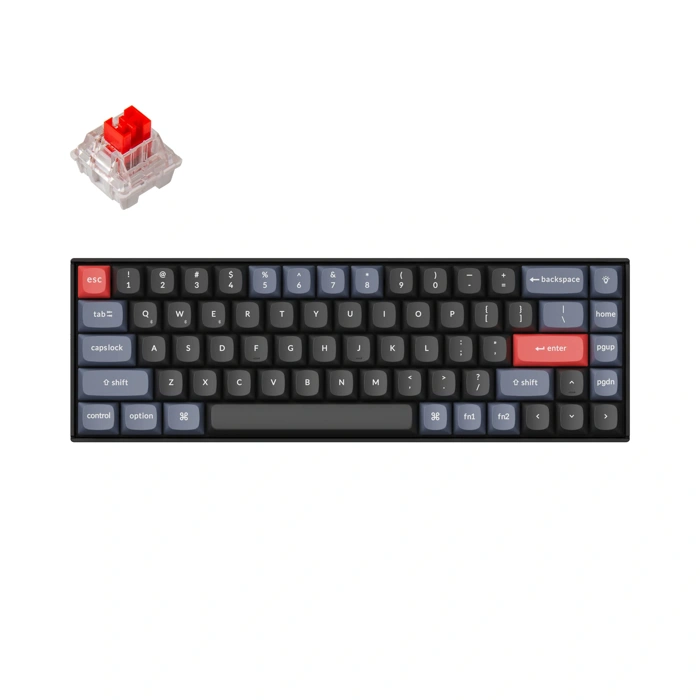
Keychron K6 Pro Wireless Custom Mechanical Keyboard
Choosing a keyboard that fits your workspace means understanding how switch type affects both typing experience and ambient noise. This keyboard, identified by Keychron K6 Pro Wireless Custom Mechanical Keyboard, offers a window into the trade-offs between audible feedback and shared-space practicality.
With a 4.3 out of 5 rating across 11 reviews, this model provides a reference point for users comparing mechanical and membrane options. Mechanical switches deliver distinct tactile feedback with each keypress, often accompanied by an audible click. That click confirms actuation without bottoming out, which some typists find satisfying and confidence-building during long sessions. The sound profile, however, becomes the defining constraint: clicky switches are louder than membrane alternatives, making them less suitable for open offices, shared workspaces, or video calls where background noise matters.
If you value keypress confirmation and work in a private setting, the crisp feedback can improve typing rhythm and reduce errors. If your workspace includes colleagues, family members, or frequent virtual meetings, the noise may outweigh the tactile benefit. Membrane keyboards and linear or tactile-silent mechanical switches offer quieter operation without the click signature.
The keyboard does not list detailed switch specifications or customization options in the verified product facts, so consider this a starting point rather than a fully documented switch comparison. The decision comes down to environment: clicky mechanical switches reward solo typists who enjoy audible confirmation, while quieter alternatives serve shared or noise-sensitive spaces more effectively.
- ✅ Tactile feedback confirms keypress actuation
- ✅ 4.3/5 rating based on 11 reviews
- ✅ Clicky sound profile suits users who prefer audible confirmation
- ⚠️ Louder operation may disrupt shared workspaces
- ⚠️ Limited verified specifications available
- ⚠️ Not ideal for video calls or open office environments
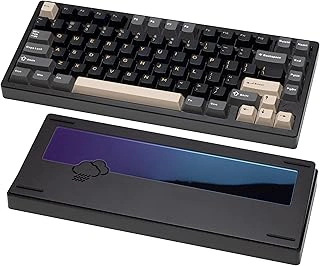
KEEBMONKEY WOBKEY Rainy 75 CNC Aluminum Triple-Mode Mechanical Keyboard
The KEEBMONKEY WOBKEY Rainy 75 arrives with a CNC aluminum chassis and triple-mode connectivity - wired USB-C, Bluetooth, and multiple GHz wireless - making it adaptable for desk setups that need flexibility. The frame feels solid, with edges machined smooth enough to avoid sharp contact during long sessions. That density helps dampen vibration, which matters when you're working in a shared space or late into the evening when sound carries.
This board ships with linear switches that glide without the tactile bump or audible click found in other switch types. Key travel stays smooth from top to bottom, and the lack of tactile resistance means your fingers can move quickly between keystrokes without fighting feedback. For quiet environments - home offices with thin walls, coworking desks, or late-night coding - the reduced noise footprint becomes the central advantage. You still hear the subtle thock of bottoming out, but it sits well below the sharp crack of clicky switches.
The 75% layout retains a function row and arrow cluster while trimming the numpad, so you keep navigation keys without stretching desk real estate. Key legends remain clear under ambient light, and the triple-mode switching lets you pair with a laptop, tablet, or desktop without re-plugging cables. Battery life in wireless mode will vary with backlight use, but the option to drop into wired mode keeps the board live during marathon work blocks.
Build quality at this price point balances metal construction with a straightforward feature set. The aluminum top doesn't flex under heavy typing, and the feet offer two angle positions to adjust wrist alignment. If you prioritize a quiet linear feel and appreciate the option to move between devices without a USB hub, the Rainy 75 delivers that combination without adding unnecessary extras. For typists who need smooth, low-noise performance in sound-sensitive settings, this board aligns well with those goals.
- ✅ CNC aluminum chassis reduces flex and dampens vibration
- ✅ Triple-mode connectivity (USB-C, Bluetooth, 2.4 GHz) for device flexibility
- ✅ Linear switches provide smooth, quiet keystroke with minimal noise
- ✅ 75% layout retains function row and arrows in a compact footprint
- ⚠️ Battery life in wireless mode varies with backlight settings
- ⚠️ Linear switches lack tactile feedback for typists who prefer confirmation bumps