We may earn a commission when you buy through links on this page, at no extra cost to you. How this works.
When your entire apartment fits inside what used to be a corporate conference room, carving out a dedicated workspace feels like an impossible puzzle. Yet the psychological and practical stakes are real: without clear boundaries between work and home, focus erodes, posture suffers, and the mental weight of being "always at the office" becomes inescapable.
A dedicated workspace in a small apartment isn't about square footage - it's about intentional zoning, furniture that earns its place, and sensory cues that tell your brain when you're on and off the clock. The challenge is making those boundaries visible and functional without sacrificing the flexibility that small-space living demands.
This guide walks through the decision framework for creating that separation: how to evaluate your layout for work zones, choose furniture that fits the scale and serves multiple roles, manage sight lines and sound, and build routines that reinforce the boundary even when the desk is three feet from your bed. Whether you're working in a studio, a one-bedroom, or a shared apartment, the principles are the same - priority, proportion, and clarity over size.
We'll cover spatial tactics that don't require walls, ergonomic compromises that still protect your body during long sessions, and the psychological tricks that make a corner feel like a separate room. The goal is a workspace you can trust to support focus and comfort, even when the footprint is tight and the layout is far from ideal.
Step 1: How to Choose the Right Corner for Your Office Nook
The corner you choose for your workspace sets the foundation for focus, comfort, and long-term usability. In a small apartment, every square foot competes for function, so your corner selection should balance four core criteria: natural light access, proximity to power outlets, distance from high-traffic zones, and ambient noise levels.
Start by mapping natural light. A corner near a window offers daylight that reduces eye strain during long work sessions and helps maintain circadian rhythm. If your apartment has only one window, position your desk perpendicular to it rather than directly facing it to minimize screen glare while still benefiting from indirect light. In studio layouts where the window also serves the living and sleeping area, a corner adjacent to the window - rather than blocking it - preserves light flow for the entire space.
Next, evaluate power outlet placement. Remote work setups typically require at least two outlets: one for your computer and monitor, another for a phone charger, lamp, or router. Corners far from outlets force you to run extension cords across walkways, creating tripping hazards and visual clutter. In older apartments with limited outlets, prioritize corners within six feet of existing power sources to avoid daisy-chaining power strips.
Traffic flow matters more in small apartments than in dedicated home offices. Avoid corners that sit between the entryway and kitchen, or between the bedroom area and bathroom in a studio. High-traffic zones generate movement, noise, and visual distraction throughout the day. A corner tucked behind a sofa, alongside a low-use wall, or in an alcove near a closet typically offers better separation, even without physical barriers.
Noise levels vary by corner depending on adjacency to neighbors, street-facing windows, and interior apartment activity. In a one-bedroom layout, a corner in the bedroom may offer the quietest environment but blurs the boundary between work and rest. A living room corner near a shared wall with a neighboring unit may carry muffled conversation or television audio. Test candidate corners at different times of day - morning, midday, and evening - to identify when noise peaks and whether it will disrupt video calls or focused work.
When no corner satisfies all four criteria, rank them by your daily work demands. If your role requires frequent video calls, prioritize low-traffic, low-noise corners even if they lack direct natural light; a desk lamp and neutral backdrop solve lighting and visual needs. If your work is screen-intensive but asynchronous, a bright corner near moderate traffic may be acceptable. Studio apartment dwellers often face the steepest compromises: consider a corner that allows a room divider or bookshelf to create a visual boundary, trading some openness for psychological separation.
Measure your candidate corners before committing. A true corner desk or L-shaped arrangement requires at least 48 inches along each wall; a compact desk placed diagonally in a corner needs roughly 36 inches of clearance. If your furniture extends into walkways or blocks access to closets or outlets, the corner will generate frustration regardless of light or noise advantages. Sketch your floor plan, mark outlets and windows, and trace typical movement paths to visualize conflicts before moving furniture.
Step 2: Selecting Space-Saving Furniture
Furniture selection determines whether a small workspace feels functional or cramped. The goal is maximum utility in minimum floor area, which means prioritizing pieces that respect dimensional constraints while supporting daily tasks without friction.
Start with desk dimensions. In tight quarters, standard 60-inch desks rarely fit. Look for depths between 18 and 24 inches and widths under 48 inches. A shallower desk frees floor space but limits monitor distance and keyboard placement - test the tradeoff by measuring your natural arm reach and screen preference before committing. Corner desks can capture unused angles, though they lock you into one layout.
Vertical storage solves the floor-space problem by moving organization upward. Wall-mounted shelves, pegboards, and floating cabinets keep supplies accessible without consuming desk surface or legroom. Pair vertical solutions with a minimal desk to avoid visual clutter. The downside: installation requires wall anchors or studs, and renters may face deposit risk or lease restrictions.
Drawer units offer concealed storage and can double as filing cabinets or pedestals under a desk. They contain clutter better than open shelves but add bulk. Open shelving is lighter visually and physically, making small rooms feel less closed in, but everything remains visible - helpful for grab-and-go items, problematic if you accumulate miscellaneous objects.
Foldable and wall-mounted desks promise zero-footprint storage when not in use. They work well for occasional remote work or multipurpose rooms where the workspace must disappear daily. The friction cost is real: every setup and takedown cycle adds time, and you lose the psychological anchor of a permanent station. If you work daily, that friction compounds. Reserve fold-away solutions for truly shared spaces or infrequent use.
Consider chair storage in the same framework. A compact task chair that tucks completely under the desk preserves walkway clearance. Backless stools and folding chairs store flat but sacrifice ergonomic support for long sessions - appropriate for short tasks, inadequate for full days.
Measure your available floor area, door swing, and clearance zones before shopping. Furniture that fits on paper can still block pathways or make the room feel oppressive. Prioritize pieces that serve multiple functions - desks with integrated shelving, storage ottomans, or monitor stands with drawers - so each item justifies its footprint.
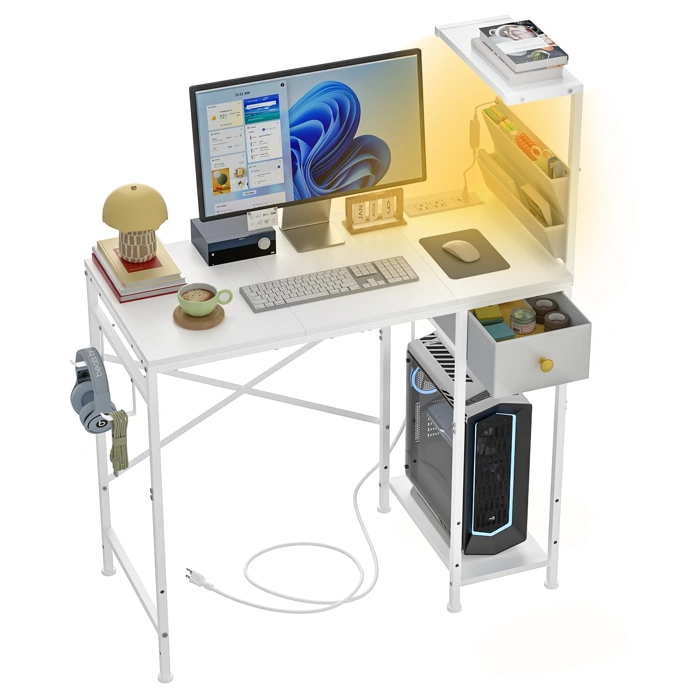
Jakyitvi 33.7" Computer Gaming Desk with LED Lights, Drawer, White
The Jakyitvi 33.7" Computer Gaming Desk offers a compact footprint designed for apartment corners and narrow alcoves. At just under multiple inches wide, it fits into spaces where full-size desks cannot, making it a practical option when floor area is limited.
The integrated drawer provides a dedicated storage slot for cables, chargers, or office supplies - helpful when you lack nearby shelving. The white finish and optional LED light strip add visual interest without requiring additional decor, which can be useful in shared or multi-purpose rooms where the desk needs to blend in or stand out depending on the time of day.
The surface accommodates a laptop or monitor, keyboard, and mouse, but deeper multi-monitor setups or large document spreads will exceed the workspace. The desk is rated 4.3 out of 5, priced at $59.99, and listed as in stock.
This desk suits renters who need an affordable, space-efficient solution and who prioritize built-in storage over expansive work surface. The LED lighting can be left off if you prefer a minimalist look, preserving flexibility as your apartment layout or aesthetic evolves.
- ✅ 33.7-inch width fits narrow corners and small rooms
- ✅ Integrated drawer for cable and supply storage
- ✅ Optional LED lights for ambient customization
- ✅ White finish blends with varied apartment decor
- ✅ Budget-friendly at $59.99
- ⚠️ Limited surface depth for multi-monitor or document-heavy tasks
- ⚠️ No brand reputation or warranty details available
- ⚠️ Drawer capacity may not replace full filing or shelving
Step 3: Creating Psychological Separation with Rugs, Lighting, and Dividers
Physical boundaries help your mind recognize where work begins and home life resumes - especially important when your desk sits five feet from your couch. In a small apartment, you can't rely on walls or doors, so you need to create separation using visual and spatial cues that signal a shift in context without claiming extra square footage.
An area rug is one of the simplest anchors. Place a rug under your desk and chair to define the footprint of your workspace. Choose a texture or color that contrasts with the surrounding floor or nearby rugs. This creates a literal boundary your eyes register every time you sit down, reinforcing the mental switch into work mode. The rug also reduces chair noise on hard floors and adds a layer of comfort underfoot during long sessions.
Lighting plays an equally important role. Overhead ambient light rarely provides the focus and control you need for screen work or reading. Add a dedicated task lamp to your desk - one with adjustable brightness or color temperature if possible. When you turn on that lamp, you're signaling the start of work; when you switch it off at the end of the day, you're closing the boundary. Avoid relying solely on overhead fixtures that illuminate your entire living space, as this blurs the distinction between work and relaxation zones.
Portable dividers offer the most dramatic separation without construction. A bookshelf positioned perpendicular to the wall creates a visual screen and adds storage. A folding room divider or a tension-rod curtain can be pulled closed during work hours and opened afterward to reclaim the space. Even a tall plant stand or a row of stacked storage cubes can provide enough of a barrier to reduce visual distraction from the living area. The key is portability: dividers you can reposition or remove keep your layout flexible as your needs change.
That said, not every workspace needs aggressive separation. If you work in short bursts, or if your apartment is already organized into distinct zones, adding dividers may feel like clutter rather than clarity. Separation is most valuable when you struggle to shift gears between work and personal time, when others share the space during your work hours, or when visual distractions - TV, kitchen, unmade bed - pull your attention away. If your focus holds without extra cues, a rug and lamp may be enough.
When choosing dividers, consider sight lines and sound. A bookshelf blocks the view of your living area but won't muffle conversation or TV audio. A heavy curtain dampens sound better than a rigid screen. Think about what breaks your concentration most - visual clutter, ambient noise, or the temptation to glance at non-work spaces - and build your boundaries accordingly. The goal is not to replicate an office, but to give your brain reliable signals that this spot, for these hours, is dedicated to work.
Step 4: Essential Ergonomics for Small or Temporary Setups
When square footage is scarce, ergonomics often becomes a casualty of furniture that fits rather than furniture that supports. Yet a well-configured compact workstation can still meet the fundamentals that keep discomfort and fatigue at bay during long work sessions.
Start with monitor height. The top edge of your screen should sit at or slightly below eye level when you look straight ahead. In a small apartment, you may be working with a laptop on a narrow shelf or fold-down desk. If the screen forces you to look down, add a riser - a stack of hardcover books, a wooden box, or a low monitor stand - and pair the laptop with an external keyboard and mouse. This single adjustment addresses neck strain, the most common complaint in makeshift setups.
Next, evaluate seat depth and lumbar support. Your back should rest against the chair with a small curve in the lower spine, and your thighs should rest flat with feet on the floor or a footrest. Compact chairs often sacrifice adjustability for footprint, so test whether the seat pan depth allows you to sit back without pressure behind the knees. If your chair lacks lumbar contour, a rolled towel or small cushion positioned at the belt line can provide adequate support without requiring an expensive replacement.
Keyboard and mouse placement matter just as much. Your elbows should hang close to your torso, bent at roughly ninety degrees, with wrists in a neutral line - neither cocked up nor angled down. If a shallow desk forces your keyboard too far forward, consider a compact tenkeyless model that reduces reach or a keyboard tray that mounts underneath. Mouse placement should mirror keyboard distance; overreaching to one side introduces shoulder tension that accumulates across a full workday.
Acceptable compromises exist when space limits adjustability. A dining chair can serve as a desk seat if you add a cushion for seat depth and use a footrest to correct leg angle. A wall-mounted fold-down desk may lack depth, but pairing it with a wireless keyboard and mouse reclaims wrist positioning even on a narrow surface. The goal is to identify which ergonomic principles you can satisfy with external accessories and which require a different furniture choice down the line.
Prioritize external peripherals over built-in furniture features when budgets and floor space are tight. A separate keyboard, mouse, and monitor cost less than a fully adjustable ergonomic chair and deliver more flexibility in a multi-use room. If you share your apartment with others or use the same table for meals, peripherals can be stored in a drawer or basket and reassembled in under a minute, preserving the ergonomic setup without monopolizing the room.
Lighting deserves a final checkpoint. Position your desk perpendicular to windows to minimize glare on the screen, and add a task light that illuminates your keyboard and documents without reflecting off the monitor. In a studio or one-bedroom, ambient ceiling light often casts shadows or creates uneven contrast, so a small LED desk lamp with adjustable brightness and color temperature can fill the gap without consuming precious desk real estate.
These checkpoints are not aspirational. They are the minimum conditions that allow a small or temporary workspace to function for hours at a stretch without forcing posture compromises that lead to stiffness, distraction, or the need to move every thirty minutes. When you understand which adjustments are non-negotiable and which can flex, you can configure a setup that respects both your body and your apartment's constraints.
Step 5: Smart Cable Management and Organization Hacks
A tangle of cables can overwhelm a small workspace faster than almost anything else. When your desk occupies a narrow corner or a fold-out shelf, every visible wire competes for visual attention and floor space you cannot spare. Smart cable management removes the clutter and makes the workspace feel intentional rather than improvised.
Start with adhesive cable channels or raceways along the back edge of your desk and down the nearest wall. These plastic or fabric guides bundle power cords, USB leads, and monitor cables into a single tidy path, keeping them off the work surface and out from underfoot. Mount them low enough that your chair wheels will not catch, but high enough to route cables cleanly toward outlets. In a tight setup, every inch of clear floor reduces trip hazards and makes cleaning simpler.
Under-desk clips - spring-loaded, magnetic, or self-adhesive - hold individual cables in place along the underside of the work surface. Route laptop chargers, phone cables, and peripheral cords through these clips so that unplugging a device leaves the cable ready to reconnect rather than falling behind furniture. In a small apartment, retrieving a dropped cable often means moving the desk or crouching into an awkward corner; clips prevent that frustration.
Mount your power strip to the underside or back leg of the desk using cable ties, Velcro straps, or screw-in brackets. An elevated power strip keeps outlets accessible, reduces strain on plugs, and shortens the visible cable runs between strip and devices. Choose a strip with wide spacing if you use bulky AC adapters, and confirm the strip's total wattage suits your monitor, laptop charger, and any desk lamp or USB hub you plan to plug in simultaneously.
If you connect a monitor, keyboard, mouse, and charging cable every morning, consider a single-cable docking station or a USB-C hub with pass-through power. One thick cable replaces four or five thin ones, cutting setup time and visual noise. This approach works best when your laptop supports video and charging over the same port; check your device specifications before investing in a hub.
Label cables near the plug end with tape flags, adhesive tags, or small cable labels. In a multipurpose space where you share outlets with lamps, chargers, and kitchen appliances, clear labels prevent accidental unplugging and speed up troubleshooting when something stops working.
Keep a small box or drawer insert near the desk for spare cables, adapters, and charging bricks you do not use daily. Storing these items vertically in divided sections prevents tangling and makes it easy to find the right cable when you need it. In a small apartment, cable clutter migrates quickly from desk to countertop to floor; a fixed storage spot stops the spread.
Bundle any excess cable length using reusable Velcro ties or twist ties rather than letting loops pile up behind the desk. Coiled slack collects dust, looks messy, and can create tension on connectors if the coils are too tight. Adjust the bundled length whenever you rearrange furniture so cables remain taut but not strained.
If you work near a window or radiator, route cables away from direct heat and moisture. Adhesive clips lose grip on damp walls, and heat can degrade cable insulation over time. In older apartments with uneven baseboards, use cable clips with stronger adhesive backing or small finishing nails if your lease permits minor holes.
Revisit your cable layout whenever you add or remove a device. A setup that worked for a laptop and lamp may feel chaotic once you add a monitor, external drive, or desk fan. Tidy routing takes ten minutes but preserves the clean look that makes a small workspace feel larger and more focused.
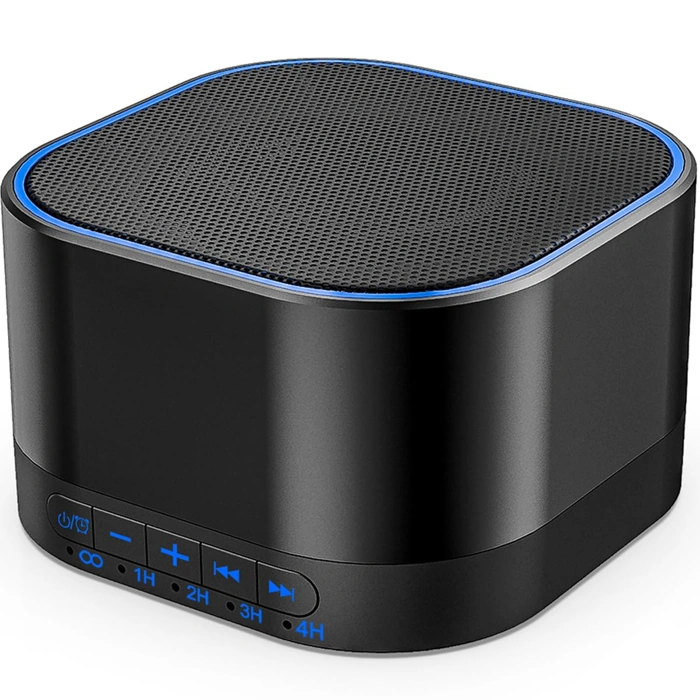
Magicteam White Noise Machine with 20 Soothing Sounds, Memory & Sleep Timer
The Magicteam White Noise Machine offers 20 sound profiles - including white noise, fan tones, and nature sounds - in a compact, portable design. Priced at $18.69, it features a built-in memory function that recalls your last-used sound and volume setting, plus a sleep timer that shuts off automatically after a set interval. The unit runs on AC power or USB, making it easy to position on a nightstand, desk corner, or shelf without claiming valuable floor space.
In a small apartment where walls are thin and household activity overlaps with work hours, the variety of sound options helps you mask conversations, appliance hum, or street noise. The timer function is useful if you want sound masking during focused work blocks but silence afterward. Because the device is lightweight and doesn't require batteries for primary use, you can move it between your workspace and bedroom as your schedule shifts.
The control dial is simple: rotate to cycle through sounds, adjust volume, and set the timer. No app or complicated menu. This straightforward interface works well when you need to adjust levels quickly during a call or when a neighbor starts vacuuming. The memory feature means you won't hunt for your preferred setting each time you power on.
Keep in mind that the speaker is small, so maximum volume may not fully mask louder disturbances like construction or heavy traffic. The sound quality is functional rather than audiophile-grade - sufficient for background masking but not immersive listening. If your apartment has particularly loud or unpredictable noise, pairing this machine with soft furnishings or a rug will improve overall sound absorption.
For remote workers in tight quarters who need affordable, flexible sound masking without dedicating desk real estate or dealing with app complexity, the Magicteam White Noise Machine delivers practical utility. Check current price.
- ✅ 20 sound profiles including white noise, fan, and nature options
- ✅ Memory function recalls last sound and volume setting
- ✅ Sleep timer for automatic shutoff
- ✅ Compact and portable with AC or USB power
- ✅ Simple dial interface with no app required
- ✅ Budget-friendly at $18.69
- ⚠️ Small speaker may not mask very loud disturbances at maximum volume
- ⚠️ Sound quality is functional, not high-fidelity
- ⚠️ No battery option for truly cordless use
Managing Ambient Noise and Distractions
Noise is one of the hardest challenges in a small or shared apartment, and physical distance isn't always an option. Background conversations, street traffic, neighbor activity, and household sounds all compete for attention when your workspace sits a few feet from the kitchen or living area.
White noise machines or apps can mask intermittent sounds like footsteps, muffled voices, or appliance hum. They work best when the goal is to blur unpredictable background noise into a steady, neutral layer. Compact models fit on tight desks and run quietly enough that they won't disturb others in an adjacent room.
Headphones - over-ear or in-ear - offer more control when you need isolation during video calls or focused tasks. Passive noise isolation helps in moderately noisy environments, while active noise cancellation is more effective against constant low-frequency sounds like HVAC or traffic. Battery life and comfort matter during long sessions, so test fit and weight before committing.
Spatial separation tactics include timing your deep-focus work when the apartment is quieter, using a room divider or bookshelf to create a psychological buffer, or orienting your desk away from high-traffic pathways. Even a subtle change in sightlines can reduce the feeling of interruption.
Some background sound is unavoidable in tight quarters. Accepting that reality reduces frustration and helps you build routines around it - scheduling calls during predictable quiet windows, using visual cues like a closed laptop lid to signal you're between tasks, or agreeing on quiet hours with housemates when possible.
Noise management in a small apartment is about layering small improvements rather than expecting silence. Combine tools, timing, and clear communication to create conditions that support focus without requiring a soundproof room.
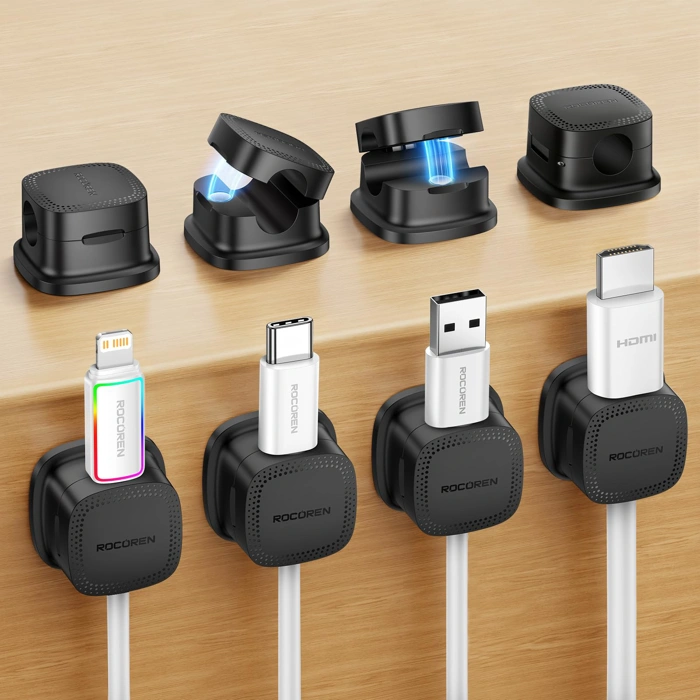
Rocoren Magnetic Cable Clips for Under Desk Cord Management
Cable clutter under a small workspace desk can turn a clean setup into a tangled mess. The Rocoren Magnetic Cable Clips offer a simple way to route and hold charging cables, monitor cords, and other wires close to metal desk frames or adhesive-mounted surfaces without drilling or permanent fixtures.
Each clip uses a magnetic base that snaps onto steel legs or crossbars, making repositioning quick when you add new equipment or adjust monitor height. If your desk frame is wood or composite, the adhesive backing provides an alternative mount that stays in place but leaves less residue than larger cable trays.
The open-channel design accommodates common USB-C, Lightning, and power cables without requiring you to thread connectors through tight loops. This makes swapping cables or unplugging devices faster than twist-tie or Velcro alternatives, which is helpful in a compact apartment where every peripheral shares the same small surface.
At $9.99, the clips provide an affordable entry point for under-desk organization without requiring toolkits or multi-step installation. The 4.8 out of 5 rating reflects solid usability for typical home-office cables, though heavier power bricks or stiff HDMI cables may pull the clips out of alignment if not positioned carefully.
Check current price to see if the Rocoren Magnetic Cable Clips fit your desk frame and cable routing needs.
- ✅ Magnetic base allows quick repositioning on metal desk frames
- ✅ Adhesive option available for wood or composite surfaces
- ✅ Open-channel design simplifies cable swapping and unplugging
- ✅ Affordable at $9.99 for basic under-desk routing
- ⚠️ Heavier power bricks or stiff cables may pull clips out of alignment
- ⚠️ Adhesive backing leaves more residue than no-mount solutions
Step 6: Building Habits to Maintain Work-Life Balance at Home
Physical boundaries help, but habits are what truly separate work from personal time when you live and work in the same small apartment. Without a commute or office door to mark transitions, deliberate routines become the psychological signal your brain needs to shift modes.
Start each workday with a consistent opening ritual. Change out of pajamas, make coffee, open the blinds, and turn on your desk lamp - the same sequence every morning. This chain of actions primes your focus and signals that work time has begun, even if you're only moving from bed to desk five feet away.
End your day with an equally firm closing ritual. Shut down your laptop completely, turn off task lighting, and physically stow work materials in a drawer or basket. If your desk doubles as a dining table, clearing it each evening reinforces the transition. Some people find that a short walk around the block - mimicking a commute home - helps reset their mindset before re-entering the same space as a living area.
Use lighting as a boundary tool throughout the day. Bright, cool light during work hours supports alertness; switching to warm, dim lighting in the evening tells your body it's time to wind down. If your workspace shares a room with your bed, a small adjustable lamp gives you control without lighting the entire space.
Calendar blocking protects your schedule from both work creep and home distractions. Mark your work hours visibly - on a shared household calendar if you live with others - and treat them as seriously as you would an office shift. Equally important: block personal time. Schedule lunch away from your desk, evening activities, and a hard stop time each day.
Device discipline reinforces these boundaries. Silence work notifications after hours, or better yet, log out of work accounts and close those apps. If you use the same device for work and personal tasks, consider separate browser profiles or user accounts to create a visual and functional separation.
Consistency matters more than perfection. You'll have days when a deadline blurs the line or a personal errand interrupts work hours. The goal is a default rhythm that makes the exception obvious, not a rigid system that collapses under normal life pressure. When boundaries blur occasionally, your established habits make it easier to reset the next day.
If you share your apartment, communicate your work hours clearly and negotiate mutual respect for focus time. A simple signal - headphones on, door cracked a certain way, or a small sign - can reduce interruptions without requiring a separate room. Trade focus blocks with a roommate or partner so everyone gets uninterrupted time.
Remember that sustainable work-from-home routines in small spaces are built on tradeoffs, not ideal conditions. You're balancing productivity, comfort, and the reality of limited square footage. The habits that stick are the ones that fit your actual life, not the ones that sound good in theory but require space or resources you don't have.
Small Apartment Workspace Setup Checklist
- Identify corner or wall zone with access to natural light and power outlets
- Measure available footprint and confirm furniture dimensions fit without blocking pathways
- Select desk with integrated storage or pair with vertical shelving to maximize usable surface
- Position monitor at eye level and keyboard at neutral wrist height
- Use rug, lighting, or portable divider to establish visual work zone boundary
- Install cable clips or channels to route cords under desk and reduce clutter
Common Mistakes and How to Avoid Them
Even with careful planning, small-workspace setups often stumble on a handful of predictable mistakes. Recognizing these early saves money, time, and back pain.
Buying furniture before measuring the footprint. A desk that looks compact online can overwhelm a corner once assembled. Measure floor dimensions, door clearances, and the swing radius of your chair before adding anything to your cart. Tape the outline on the floor with painter's tape to visualize actual footprint and movement space.
Deferring cable management until everything is installed. Routing power and data lines after your desk is against the wall turns into a frustrating puzzle. Plan cable paths during furniture placement: use adhesive channels, zip ties, or a simple cable sleeve before you push the desk into its final position. This prevents tangled cords from eating into your limited floor area and makes future adjustments much easier.
Skipping ergonomic baselines in the name of space savings. A fold-down shelf may fit the room, but if it forces you to hunch for four-hour stretches, the setup fails. Prioritize seated elbow height, screen distance, and foot support even in tight quarters. If a full-size chair won't fit, choose a compact task chair with lumbar support over a backless stool.
Assuming visual separation works for everyone. Bookcases, curtains, and rugs help many people mentally switch into work mode, but they don't create acoustic privacy or eliminate household interruptions. If you share the apartment with others on conflicting schedules, add a white-noise machine or agree on quiet-hour windows. Physical dividers set boundaries; behavioral agreements make them effective.
Overloading vertical storage without weight limits. Wall-mounted shelves and pegboards expand capacity, but drywall anchors have load ratings. Distribute heavy reference books and equipment across multiple studs or use floor-based units for anything over ten pounds per shelf. An overloaded floating shelf can pull free and damage both wall and gear.
Correcting these mistakes comes down to measuring twice, planning cable routes early, defending ergonomic minimums, layering separation tactics with communication, and respecting structural limits. Small apartments reward methodical setup far more than improvisation.
Next Steps: Refining Your Setup Over Time
Your dedicated workspace won't be perfect on day one, and that's expected. Commit to using your current setup for at least two weeks before making changes. During this trial period, keep a simple log - note which times of day you feel distracted, when your back or neck becomes uncomfortable, or if glare on your screen appears at certain hours. These patterns reveal what needs adjustment.
Make one change at a time. If you notice shoulder tension, adjust chair height or keyboard position first, then wait a few days to assess whether the discomfort improves. If afternoon glare disrupts focus, reposition your desk or add a curtain before investing in new lighting. Isolating variables helps you understand what actually works in your space rather than introducing multiple changes that mask the root cause.
Once your core setup feels stable - your chair supports your posture through a full work session, your desk height lets you type without strain, and your lighting reduces eye fatigue - you can consider targeted upgrades. A monitor arm can free up desk surface and improve screen positioning. A chair with better lumbar support may reduce back discomfort during long calls. Task lighting can refine your evening work environment. Approach each upgrade as a response to a logged need, not as a speculative purchase.
Small apartments reward incremental refinement. Every piece of furniture and every accessory competes for limited space, so each addition should solve a specific, documented problem. This disciplined approach keeps your workspace functional, your budget in check, and your apartment from becoming cluttered with gear that doesn't earn its footprint.