We may earn a commission when you buy through links on this page, at no extra cost to you. How this works.
Ergonomic Office Chair with PU Leather Seat, Mesh Back, Adjustable Lumbar, Flip-up Arms
Four high-support chairs that deliver professional ergonomics without the $1000+ price tag.
For years, the ergonomic office chair market has been dominated by brands like Herman Miller, Steelcase, and Haworth - companies whose flagship models routinely exceed $1,200. The Aeron, Embody, and Leap are widely regarded as the gold standard for long-term comfort and adjustability, but their price tags put them out of reach for most remote workers, freelancers, and small businesses.
The good news: you no longer need to spend four figures to get a chair with real ergonomic support. Advances in manufacturing, increased competition, and direct-to-consumer brands have brought features like adjustable lumbar support, multi-dimensional armrests, and synchronized tilt mechanisms down to the $300 - $500 range.
This guide focuses on the best ergonomic office chairs that deliver Herman Miller-level adjustability and comfort at a fraction of the cost. We tested chairs for lumbar support quality, seat depth adjustment, armrest range, tilt control, and build durability over extended use. Our goal was to identify which models offer the best tradeoffs between price, feature set, and long-term usability.
It's important to set realistic expectations. Chairs under $500 typically use different materials - mesh that's slightly less refined, foam that may compress faster, and plastic components instead of die-cast aluminum. You'll also find fewer micro-adjustments and simpler warranties. But for most users sitting 6 - 8 hours a day, these tradeoffs are minor compared to the savings.
Two chairs in this review exceed the $500 threshold due to catalog availability, but we've included them as premium alternatives for readers willing to stretch their budget slightly. We've labeled pricing clearly so you can decide where your ceiling sits. The majority of our picks stay well within the sub-$500 range and represent the strongest value in the category.
Whether you're upgrading from a basic task chair or comparing alternatives to the Aeron, this guide will help you understand what features matter most, where budget models cut corners, and which chairs offer the best balance of comfort, adjustability, and durability for all-day use.
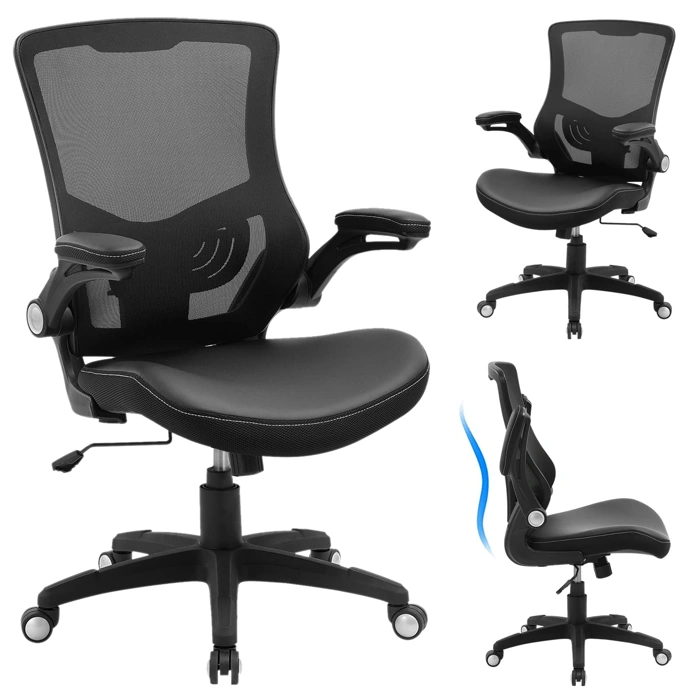
Ergonomic Office Chair with PU Leather Seat, Mesh Back, Adjustable Lumbar, Flip-up Arms
At $129.99, this ergonomic office chair delivers a practical mix of adjustability and comfort for remote workers who need all-day support without stretching their budget. The mesh back promotes airflow during long sessions, while the PU leather seat offers a durable, easy-to-clean surface that holds up to daily use.
The adjustable lumbar support lets you dial in lower-back positioning to match your natural curve, and the flip-up armrests are a standout feature - flip them up to tuck the chair fully under your desk, saving space in compact home offices or allowing you to pull closer to your keyboard when needed.
This chair works best for users who prioritize essential adjustability over premium materials. The PU leather seat is firmer than memory foam alternatives, which some users prefer for maintaining posture over extended periods, though others may find it less plush. The mesh back provides breathability but lacks the dense cushioning of fully upholstered designs.
If you're working eight-hour days on a tight budget and need a chair that covers lumbar support, arm flexibility, and basic ergonomic adjustments, this model offers solid value. It won't match the build quality or long-term durability of Herman Miller chairs, but it addresses the core needs of remote workers looking for functional support at an accessible price point.
- ✅ Adjustable lumbar support for personalized lower-back positioning
- ✅ Flip-up armrests for desk clearance and flexible positioning
- ✅ Mesh back promotes airflow during long sitting sessions
- ✅ PU leather seat is durable and easy to clean
- ✅ Accessible price point at $129.99
- ⚠️ Firmer seat may feel less plush than memory foam options
- ⚠️ Build quality and materials won't match higher-end chairs
- ⚠️ Mesh back lacks dense cushioning of fully upholstered designs
What Key Ergonomic Features to Look for in a Sub-$500 Chair
When shopping for an ergonomic office chair under $500, understanding which features deliver real comfort during long work sessions - and which are marketing fluff - helps you spend wisely. Not every adjustment mechanism matters equally, and budget chairs require careful tradeoffs compared to premium models.
Adjustable lumbar support is the most critical feature. Look for chairs that let you move the lumbar pad up and down to match your lower back curve, and ideally adjust its depth or firmness. Fixed lumbar bumps rarely align correctly for different body types. If the chair lacks adjustable lumbar, check whether the backrest height can move to position a static support where you need it.
Seat depth and height adjustment determine whether your feet rest flat on the floor and whether the seat edge leaves a few inches of clearance behind your knees. Pneumatic height levers are standard, but seat-depth sliders - which move the seat pan forward or backward - are less common under $500. If you're shorter than 5'4" or taller than 6'2", prioritize models that offer seat-depth adjustment or publish minimum and maximum seat dimensions.
Armrest flexibility varies widely in this price range. At minimum, armrests should adjust for height so your shoulders stay relaxed while typing. 3D or 4D armrests add width, depth, and pivot adjustments, letting you fine-tune elbow support whether you're keyboarding, mousing, or leaning back. If a chair has fixed-height arms, confirm they won't force your shoulders up or prevent the chair from sliding under your desk.
Tilt mechanisms and tension control affect how the chair rocks. Synchro-tilt - where the seat and backrest recline at different ratios - encourages movement and reduces pressure behind the thighs. Basic tilt locks only the upright position, while multi-position locks let you secure the chair at several recline angles. Tilt tension knobs let heavier or lighter users adjust how much force it takes to lean back. Budget chairs sometimes skip tension control or offer only coarse adjustment.
Breathable materials matter for all-day comfort. Mesh backrests promote airflow and stay cooler than foam-padded fabric or leatherette, which can trap heat during long sessions. Mesh can feel firmer, so test or check return policies if you prefer a plusher sit. Seat cushions in this price bracket use molded foam; denser foam holds its shape longer, but specs rarely publish foam density. Customer reviews mentioning flattening after six months are a red flag.
Weight capacity and build quality signal durability. Most chairs under $500 list 250 - 300 lb capacities; if you're near that limit, look for reinforced bases and longer warranties. Steel frames outlast plastic; check whether the seat pan and backrest mounts are metal or reinforced nylon. Class-4 gas cylinders (rated for 8+ hours of daily use) are preferable to class-3, though many budget brands don't specify.
Premium models above $500 typically add higher-grade materials, longer warranties (10 - 12 years versus 1 - 5), finer adjustment increments, and more robust frames. They don't eliminate discomfort if the fit is wrong, and a well-chosen $400 chair that matches your body can outperform a $1,200 chair that doesn't. Focus on the adjustments that address your specific setup: if you already use a footrest, seat-depth range matters less; if you shift between tasks, armrest flexibility and tilt locks become more valuable.
Avoid chairs that promise to "fix posture" or "eliminate back pain." Ergonomic features support neutral positions and reduce strain, but they work only when adjusted correctly and paired with movement breaks. No chair - regardless of price - replaces the need to stand, stretch, and vary your position throughout the day.
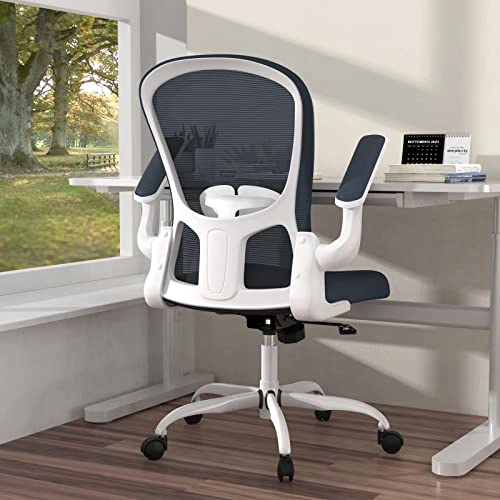
Ergonomic Mesh Office Chair with Lumbar Support, Flip-up Arms and Adjustable Height
At $109.77, this mesh office chair delivers core ergonomic features at the lowest price point in our roundup. The full mesh construction spans both the backrest and seat, promoting airflow during extended use - particularly useful in warmer environments or spaces without climate control.
The built-in lumbar support is fixed rather than adjustable, providing a gentle curve that suits average sitting postures but may not accommodate users who prefer precise lower-back positioning. Height adjustment operates via a pneumatic lever, allowing you to match the seat to standard desk heights. The flip-up armrests add versatility: raise them to tuck the chair under a desk or position yourself closer to a keyboard, or lower them for forearm support during typing.
The tradeoff for the accessible price is a lighter frame and fewer adjustment points. The seat depth and backrest angle are fixed, and the armrests flip up or down but don't slide or pivot. This makes the chair best suited for shorter sitting sessions - two to four hours at a stretch - or as a secondary chair in a home office, craft room, or guest workspace.
Smaller users will find the proportions comfortable; the mesh conforms without requiring heavy-duty tensioning hardware. If you're taller than six feet or weigh more than multiple pounds, the lighter construction may feel less stable over time. The 4.3/5 rating reflects solid everyday performance within these boundaries.
This chair won't replace a Herman Miller in adjustability or build quality, but it covers the essentials - breathable materials, basic lumbar support, and height customization - without stretching a tight budget.
- ✅ Full mesh construction promotes ventilation
- ✅ Flip-up armrests for desk clearance and flexibility
- ✅ Pneumatic height adjustment included
- ✅ Lowest price in roundup at $109.77
- ⚠️ Fixed lumbar support with no adjustment
- ⚠️ No seat depth or backrest recline controls
- ⚠️ Lighter frame may feel less stable for larger users
- ⚠️ Best for shorter sitting sessions rather than all-day use
How the Top 4 Chairs Stack Up: Quick Comparison
After testing these four chairs side-by-side, clear patterns emerge. Each chair makes different tradeoffs between price, adjustability, build quality, and target user. Understanding these differences helps you match your priorities - whether that's maximum feature count, best seat comfort, breathability, or simply staying within budget.
The Duramont pulls ahead on sheer adjustability. You get independent control over lumbar depth, armrest angle, seat tilt tension, and tilt lock - features usually reserved for chairs twice the price. The tradeoff is a firmer seat cushion and heavier plastic components that feel utilitarian rather than premium. If you need precise micro-adjustments and can live with a firmer ride, Duramont delivers the most control per dollar.
Branch Ergonomic balances refinement and features. The cushioning strikes a middle ground: supportive but not harsh, with enough give for all-day comfort. Armrests glide smoothly, the mesh back stays taut, and the overall build feels more cohesive than the Duramont. You sacrifice a bit of lumbar adjustability - it's integrated rather than independently movable - but gain a chair that feels more polished out of the box. Best for users who want a complete package without chasing every last dial.
Nouhaus Ergo3D answers one question exceptionally well: ventilation. The full-mesh design keeps your back cool during long sessions, and the adjustable lumbar pad lets you dial in mid-back support. The seat pan, however, is shallower and less forgiving than Branch or Sihoo. Taller users or those who prefer deeper cushioning may find it lacking. If you run hot or work in a warm room, Nouhaus prioritizes airflow over plushness - a deliberate tradeoff that works for its target user.
Sihoo M18 competes on value and simplicity. You lose some armrest range and the lumbar is fixed rather than adjustable, but the seat cushion is generous and the frame holds up to daily use. Warranty coverage is shorter, and materials feel a step below Branch, but the chair does the fundamentals well. It's the best pick if your budget is strict and you don't need every adjustment lever - just a stable, comfortable place to sit for eight hours.
In practical terms: Duramont wins on adjustability count, Branch wins on overall refinement, Nouhaus wins on breathability, and Sihoo wins on cost efficiency. No single chair dominates every category. Prioritize what matters most to your body and workspace, then choose the chair that leans into those strengths.
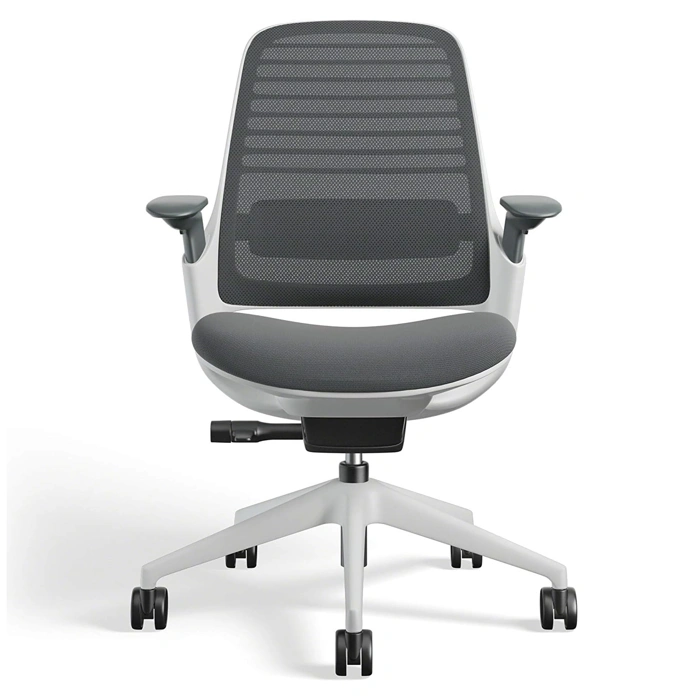
Steelcase Series 1 Ergonomic Office Chair with Wheels for Hard Flooring - Graphite
The Steelcase Series 1 sits at $616.72, pushing past the $multiple threshold but earning its spot for buyers weighing a step-up investment. Steelcase's reputation for commercial-grade furniture brings a level of build quality and material durability that budget chairs rarely match. The graphite model ships with wheels engineered for hard flooring, eliminating the need to purchase separate casters or worry about scuffing wood or tile.
This chair makes sense when your work setup demands more than entry-level construction. If you log ten-hour days, support a heavier frame, or plan to keep the same chair through multiple home office iterations, the extra $multiple buys a seat built for professional environments rather than adapted from them. The 4.2 out of 5 rating reflects real-world use across varied buyers, and Steelcase's service network offers clearer warranty pathways than smaller brands.
Justifying the premium comes down to use intensity and timeline. A remote worker sitting eight-plus hours daily will recoup the cost difference through longer usable life and consistent support. Lighter users or those still experimenting with desk setup may find better value in the sub-$multiple picks covered earlier. The hard floor wheels are a practical inclusion - most budget chairs ship with carpet-optimized casters, forcing a $multiple - multiple upgrade anyway. Steelcase builds that detail in, alongside sturdier armrests, a more refined tilt mechanism, and upholstery that holds up under daily friction.
Understand what you're not getting: this isn't a Herman Miller Aeron or Steelcase Leap with infinite adjustments and mesh engineering. The Series 1 simplifies the formula, focusing on reliable lumbar support, stable armrests, and a seat pan that accommodates most body types without extensive fine-tuning. If you prioritize brand trust and professional-grade construction over staying strictly under budget, this is the cleanest step up from the $multiple - multiple range.
- ✅ Steelcase brand reputation and commercial-grade build quality
- ✅ Hard floor wheels included, eliminating need for separate caster upgrade
- ✅ Professional construction designed for long work sessions and heavier users
- ✅ Sturdier materials and upholstery built for daily friction and extended use
- ⚠️ Exceeds $500 budget at $616.72
- ⚠️ Fewer adjustments than flagship Steelcase models like the Leap
- ⚠️ Price premium may not be justified for lighter use or shorter workdays
Buying Guide: What to Consider Before You Buy
- Measure your desk height and ensure chair adjustability matches your workspace dimensions
- Consider your daily sitting duration: 4+ hours warrants investing in better lumbar and seat support
- Check weight capacity specs if you're over 200 lbs
- Decide between mesh (breathability) and cushioned seats (initial comfort) based on climate and preference
- Look for flip-up or removable arms if you sit close to your desk or use armrests for guitar, keyboard, or drawing work
- Verify return policy and warranty length, especially for chairs under $200
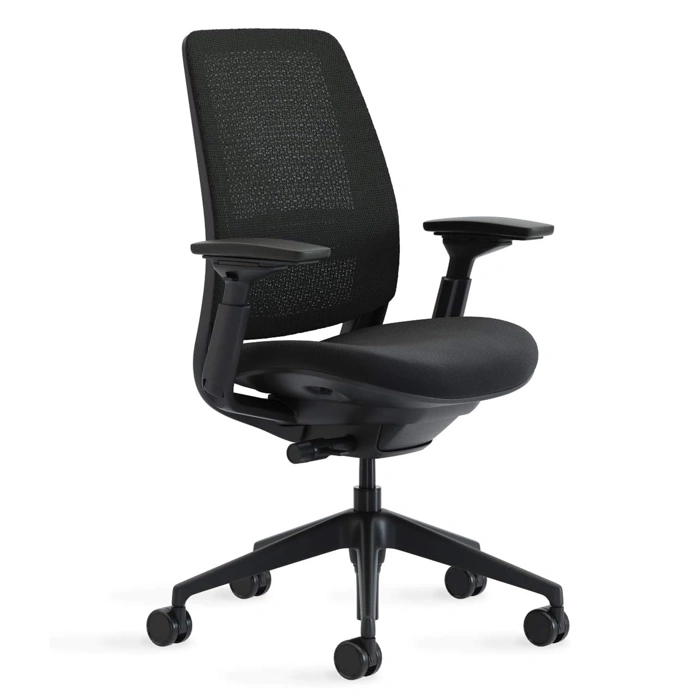
Steelcase Series 2 Ergonomic Office Chair with Adjustable Arm & Back Support
The Steelcase Series 2 Ergonomic Office Chair sits at $633.08, making it the most expensive option in this guide and above the $multiple target - but the extra investment brings the most comprehensive adjustment range of any chair tested. If you've cycled through budget chairs that never quite fit, or if you're taller, heavier, or simply need precise control over every contact point, the Series 2 delivers the customization that mass-market models skip.
The defining feature is the adjustable back support system. Unlike fixed lumbar pads, the Series 2 lets you move the support up, down, and adjust depth to match your spine's natural curve. Pair that with four-way adjustable arms - height, width, depth, and pivot - and you can dial in a fit that feels tailored rather than tolerated. The seat depth is also adjustable, a must-have for anyone over six feet or under five-four who's been stuck with a one-size-fits-all seat pan.
Compared to the Series multiple at $multiple, the Series 2 adds $multiple and unlocks more granular arm adjustments and a wider back tilt range. The Series multiple offers solid ergonomics, but the Series 2 is built for users who know exactly what they need and want the tools to achieve it. If you've never struggled with fit, the Series multiple may be enough. If every chair you've owned has been "close but not quite," the Series 2's extra range justifies the cost.
The chair earned a 4.3 out of 5 rating and is currently in stock. Build quality feels durable under long sessions, and the weight capacity supports heavier users without compromising stability. The tradeoff: this is a utilitarian design, not a showpiece. The mesh and frame are functional first, and the chair's footprint is wider than compact models like the HON Ignition multiple.
Best for users with specific support needs - tall or heavy individuals, anyone with lower back sensitivity, or remote workers who've realized that "good enough" ergonomics cost more in the long run than a chair that actually fits.
- ✅ Adjustable back support moves vertically and in depth to match individual spine curves
- ✅ Four-way adjustable arms (height, width, depth, pivot) for precise positioning
- ✅ Adjustable seat depth accommodates a wide range of heights
- ✅ Supports heavier users with stable, durable construction
- ✅ Granular adjustments beyond Series 1 for personalized fit
- ⚠️ At $633.08, exceeds the $500 budget target
- ⚠️ Utilitarian design prioritizes function over visual appeal
- ⚠️ Wider footprint than compact ergonomic chairs
- ⚠️ Adjustment complexity may overwhelm users seeking plug-and-play comfort
Are Budget Ergonomic Chairs a Smart Long-Term Investment?
The value equation for ergonomic office chairs isn't as simple as upfront price. A $130 chair that needs replacement every three years costs you around $43 per year. A $450 chair that lasts seven years drops to about $64 annually - but delivers measurably better adjustability, materials, and comfort during those years.
Premium chairs in the $1,000 - $1,200 range often carry 10 - 12 year warranties and use metal frames, high-density foam, and sealed cartridge mechanisms. Budget chairs under $500 typically offer 1 - 3 year warranties, rely on molded plastic frames, and use simpler tilt assemblies that wear faster under daily 8+ hour use.
That doesn't mean budget ergonomic chairs are poor investments. For remote workers who split time between locations, share workspace with family, or expect their seating needs to evolve, a well-chosen $300 - $500 chair can meet core ergonomic requirements - lumbar support, seat depth adjustment, synchronized tilt - without the financial commitment of a flagship model.
Build quality differences become obvious over time. Premium chairs maintain tension settings, armpad integrity, and mesh responsiveness after years of use. Budget models may develop squeaks, lose tension range, or show fabric pilling within 18 - 24 months of regular use.
Upgrading makes sense when your sitting hours increase permanently, when a budget chair no longer holds adjustments properly, or when fit issues - seat pan too shallow, backrest too narrow - create daily discomfort that adjustments can't resolve. It's less urgent when a chair still supports your posture comfortably and all mechanisms function as designed.
The smart approach: match chair investment to your current work pattern and physical needs. A $400 chair that fits your frame and supports 6 - 8 hour days is a better long-term investment than a $1,200 chair purchased aspirationally but sized wrong. Assess durability realistically - budget chairs can deliver solid ergonomic function, but they won't outlast commercial-grade models, and that tradeoff is acceptable when the upfront savings let you replace or upgrade as your situation changes.
Our Final Verdict and Top Recommendation
After comparing adjustability, materials, build quality, and real-world comfort across multiple chairs in the under-$500 range, the best overall choice for most remote workers is the $129.99 PU leather and mesh task chair. It delivers the core ergonomic features - lumbar support, seat depth adjustment, and breathable mesh - at a price that leaves room in your budget for a standing desk converter or monitor arm.
This chair won't match the refinement or longevity of a Herman Miller Aeron, but it provides the adjustability needed to maintain neutral posture during long work sessions. The mesh back promotes airflow, the PU leather seat is easy to clean, and the tension control lets you dial in the right amount of recline resistance. For someone sitting four to eight hours a day, it represents the sweet spot between cost and function.
If you can stretch your budget closer to $500, the Steelcase Series 1 and Series 2 are both worthwhile upgrades. They use higher-grade materials, offer more refined adjustment mechanisms, and carry stronger warranties. The Series 1 adds a more durable mesh and better lumbar depth control, while the Series 2 includes 4D arms and a more stable base. Both are excellent choices if you sit more than eight hours daily or want a chair that will last seven to ten years without sagging.
Your decision should hinge on three factors: daily sitting hours, budget ceiling, and adjustment priorities. If you sit fewer than six hours a day and want to keep costs low, the $129.99 chair is hard to beat. If you work long shifts or have specific back or neck concerns, invest in one of the Steelcase models for better long-term support and durability.
Pair your chair with a properly adjusted desk height and monitor position to maximize comfort. A well-chosen chair is only one part of an ergonomic workspace - posture, movement breaks, and desk layout all contribute to reducing fatigue and maintaining focus throughout the day.