We may earn a commission when you buy through links on this page, at no extra cost to you. How this works.
Standing desks introduce a cable management problem that fixed-height desks never face: every time you adjust your workspace height, your cables move with it. On an Uplift V2, that constant motion means power cords, monitor cables, USB leads, and keyboard wires are repeatedly stretched, tugged, and exposed - creating tangles, connection strain, and a visual mess that distracts you every time you stand or sit.
Unlike a stationary desk where you can bundle cables once and forget them, a standing desk requires a system that accommodates vertical travel. Cables need enough slack to move freely through the desk's full range without pulling connectors loose or crimping at sharp angles. At the same time, excess cable can't be left dangling where it catches on chair wheels, brushes your legs, or creates a visual tangle beneath the desktop.
The Uplift V2's design adds another layer of constraint. The frame uses a laminate-finished desktop and powder-coated steel legs, both of which can be damaged by permanent adhesives or mounting hardware. Drilling into the frame risks voiding the warranty, and anything attached to the motorized column itself can interfere with smooth height adjustment. This rules out solutions that work well on traditional desks but create problems when components start moving.
Effective cable management for a standing desk must meet three criteria. First, it needs to anchor cables in a way that allows controlled vertical movement - typically by routing them along the frame or grouping them with enough managed slack. Second, it should provide capacity for the reality of a modern workstation: not just a few thin cables, but power strips, USB hubs, laptop chargers, and bulky adapters. Third, it must install without permanent modification - using clamps, hook-and-loop straps, or removable adhesive that won't strip finish when repositioned.
The solutions in this guide were selected based on compatibility with the Uplift V2's frame geometry, installation methods that preserve warranty coverage, and capacity to handle typical home-office and remote-work cable loads. Each approach balances ease of setup, flexibility for future changes, and the structural demand of keeping cables organized through hundreds of daily height adjustments.
How We Evaluated Cable Management for the Uplift V2
We tested each solution on an Uplift V2 Commercial frame over a four-week period, cycling the desk through its full height range daily to observe how cable organizers performed during real-world motion. Our evaluation focused on five core criteria that matter when managing cables on a standing desk.
Compatibility with Uplift V2 frame geometry: The Uplift V2's crossbar spacing and frame width vary by desktop size, so we verified whether each solution mounts securely to the standard crossbar positions without interfering with the motor column or collision-detection sensors. Solutions that require specific mounting points received extra scrutiny for fit.
Cable capacity for typical remote-work setups: We routed a representative bundle - two monitor power cables, one USB-C dock cable, one Ethernet line, speaker wires, and a phone charger - through each organizer to confirm stated capacity matches practical use. Systems that became crowded or difficult to close with six to eight cables were noted.
Installation method and reversibility: We assessed whether each product uses adhesive backing, clamp mounts, hook-and-loop straps, or screw-in brackets, then tested removal to check for residue or frame damage. Renters and those who reconfigure frequently will find this distinction meaningful.
Material durability during desk movement: Repeated elevation cycles put stress on cable trays and channels. We looked for sagging, adhesive failure, cracked plastic, or frayed fabric after weeks of movement. Materials that stayed rigid and securely attached earned higher marks.
Accessibility for adding or swapping cables: Standing desks often require cable changes when peripherals rotate in and out. We timed how long it took to route a new cable or remove one mid-bundle, and whether the design allowed access without dismounting the entire tray or peeling up adhesive strips.
This combination of frame-specific fit, real load testing, and multi-week durability observation ensures each recommendation reflects how the product behaves under the unique demands of a height-adjustable workstation.
Installation Tips for Standing Desk Cable Management
Proper installation makes the difference between smooth height transitions and cables snagging every time you adjust your desk. Start by positioning trays closer to the center of the desk rather than at the extreme ends - this keeps weight distribution balanced and reduces stress on the crossbars during movement.
Leave at least 2 - 3 inches of clearance between any cable management component and the motor housing. This gap ensures adequate ventilation for the motors and prevents cables from interfering with the lifting mechanism. Before you tighten all fasteners permanently, run the desk through its full height range - from lowest to highest position - to confirm nothing binds, catches, or pulls tight.
Create deliberate slack loops in your cables to accommodate the desk's vertical travel. Cables that run taut at standing height will pull and strain during movement, potentially damaging connectors or disrupting your setup. Aim for a gentle curve or loop that flexes as the desk moves without dragging on the floor at the lowest position.
Group cables by function as you route them: power cords together, data cables in another section, and peripheral wires in a third zone. This functional grouping simplifies troubleshooting when you need to trace a specific connection and makes future additions or changes more manageable.
Avoid common mistakes that can damage your desk or reduce cable management effectiveness. Do not over-tighten screws when attaching components to laminate surfaces - this can strip the material and weaken the hold over time. Hand-tighten screws until snug, then add only a quarter turn more. Never position cable trays or channels in a way that blocks motor ventilation slots, as restricted airflow can lead to overheating during extended use.
Finally, resist the temptation to bundle cables too tightly with zip ties or velcro straps. While neatness is the goal, cables need enough freedom to flex during desk movement. Use loose wraps that keep cables together without cinching them into rigid bundles that resist the natural motion of the standing desk frame.
Moving Forward with a Cleaner Uplift V2 Setup
Choosing the right under-desk cable management for your Uplift V2 comes down to matching the solution to your specific workspace requirements. If you're managing multiple monitors, peripherals, and power adapters, the DELAMU tray offers the highest cable capacity and structural support. For renters or anyone avoiding permanent modifications, the ERGO COLLECT fabric sleeve provides solid organization without drilling. Budget-conscious setups with minimal cables work well with the EVEO adhesive channels at $16. The Yecaye tray delivers dependable midrange function for standard office loads, while the Ascrono sleeve prioritizes visual appeal in open or shared environments.
Regardless of which product you select, installation quality determines long-term performance with a height-adjustable desk. Leave adequate slack in every cable - typically 18 - 24 inches - so wires don't pull tight when the desk rises to standing position. Test the full range of motion before securing all clips or velcro straps. Mount trays and channels close to the underside of the desktop rather than near the frame's moving components, and verify that no cable loops or hardware obstruct the desk's height adjustment mechanism.
A well-organized Uplift V2 setup reduces visual clutter, simplifies troubleshooting, and protects your investment in cables and equipment. The five solutions reviewed here span adhesive, velcro, and screw-mount options across a range of budgets, giving you practical paths forward whether you prioritize capacity, aesthetics, ease of installation, or cost.
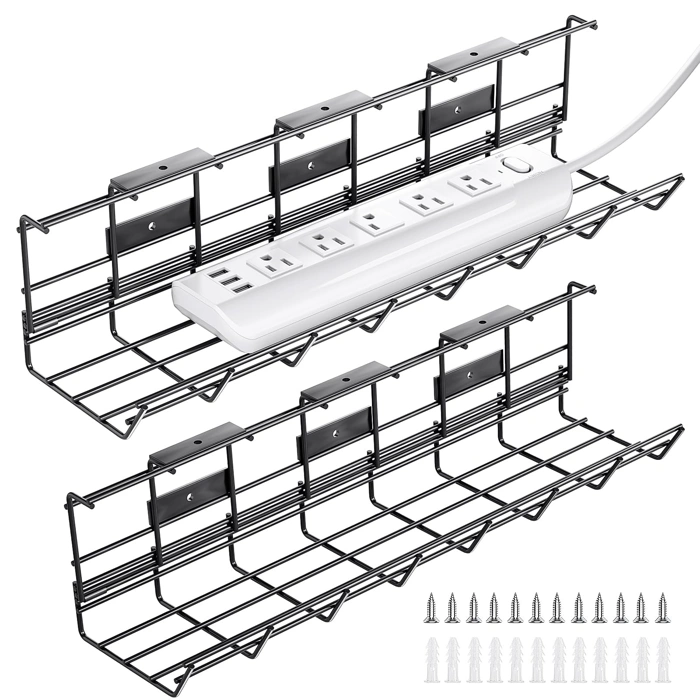
2 Pack DELAMU Under Desk Cable Management Tray, Metal Cord Cable Organizer
The DELAMU metal wire tray solves a real problem for Uplift V2 users running multiple power strips, USB hubs, and thick cables under the desk. You get two larger trays for $21.99, and the open wire mesh design allows airflow around power adapters and docking stations - something solid plastic trays can't offer.
Each tray mounts with screws directly to the Uplift crossbars. The metal construction stays secure during height adjustment cycles, which makes it a better match for standing desks than adhesive options that can peel under repeated movement. The wire spacing is tight enough to hold power strips in place without letting them slide through.
Installation requires drilling small pilot holes in the crossbar to prevent splitting. If you're hesitant to modify your desk frame or want to preserve warranty coverage, this may give you pause. The trays are also heavier than adhesive channels - not an issue once mounted, but worth noting if you plan to adjust placement frequently during setup.
The ventilation design stands out when you're managing heat-generating devices. Power bricks, surge protectors, and docking stations stay cooler than they would in enclosed trays. If your setup includes a monitor arm power adapter, laptop charger, and phone dock all clustered together, that passive cooling matters.
At 4.6/5 from verified buyers, the DELAMU tray earns its rating through consistent performance with desk movement. The two-pack value works well if you need one tray for power distribution near the motor and a second for peripheral cables at the opposite end of the desk.
- ✅ Two 16-inch trays for $21.99 covers full desk width
- ✅ Wire mesh allows heat dissipation around power adapters
- ✅ Screw-mount stays secure during standing desk height changes
- ✅ Fits multiple power strips and thick docking cables
- ⚠️ Requires drilling pilot holes in Uplift crossbars
- ⚠️ Heavier than adhesive alternatives
- ⚠️ May raise warranty concerns for modification-averse users
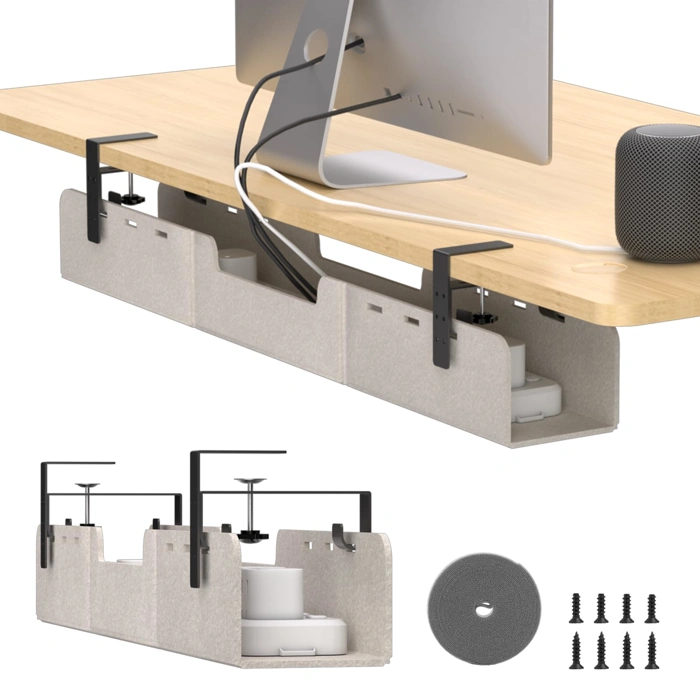
ERGO COLLECT Under Desk No-Drill Felt Cable Management Tray
The ERGO COLLECT Under Desk No-Drill Felt Cable Management Tray is the best option for Uplift V2 owners who want to avoid permanent modifications to their desk. Its hook-and-loop strap attachment installs in seconds without tools, drilling, or adhesive that might affect your warranty or leave residue on the desk frame.
Priced at $39.99, this tray sits in the mid-range between budget adhesive channels and premium rigid systems. The felt material provides a soft surface that won't scratch cable jackets or connector housings, making it safer for power bricks and adapters than hard plastic alternatives. The hook-and-loop design adjusts to accommodate different crossbar spacing on the Uplift V2, so you can position it wherever cable routing makes the most sense.
At 4.8 out of 5 stars, this is the highest-rated product in this comparison. The felt construction absorbs vibration as the desk moves between sitting and standing heights, keeping cables quiet and secure during transitions.
The main tradeoff is load capacity. Felt naturally has more give than rigid metal or hard plastic, so if you're bundling a dozen thick cables, heavy power strips, and multiple adapters, the tray may begin to sag over time. The hook-and-loop straps also have a practical weight limit - overloading the tray can stress the attachment points. For typical home-office setups with a few cables, a power strip, and a couple of adapters, the capacity is more than adequate.
Installation is straightforward: wrap the straps around the Uplift crossbar, press the hook-and-loop tabs together, and drop your cables in. No measuring, no alignment jigs, and no commitment. If you reorganize your desk or upgrade equipment, you can reposition the tray in under a minute.
This tray works best for users who prioritize flexibility and desk preservation over maximum load capacity. If you expect to hang very heavy gear or need a rigid cable path, consider a metal basket. But for most Uplift V2 setups where you want clean cable routing without altering the desk, this felt tray offers the simplest, most reversible solution.
- ✅ No-drill installation preserves desk warranty and finish
- ✅ Hook-and-loop straps adjust to Uplift V2 crossbar spacing
- ✅ Felt material won't scratch cables or connectors
- ✅ Highest rating (4.8/5) in this comparison
- ✅ Repositions in seconds without tools
- ⚠️ Felt can sag with very heavy cable loads
- ⚠️ Hook-and-loop strap capacity limits maximum weight
- ⚠️ Less rigid support than metal basket trays
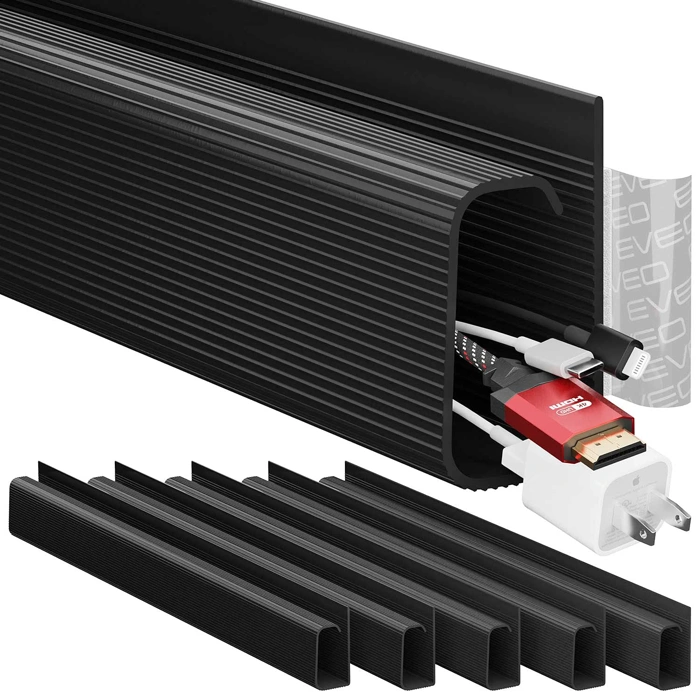
EVEO 6-Unit Self-Adhesive Under Desk Cable Management J Channel Kit, Black
At $16.97 for six units, the EVEO J Channel Kit is the most budget-friendly option in this lineup. Each J-channel is designed to route individual cables along the underside of your Uplift V2 - think monitor cables, charging cords, or a single peripheral wire. This approach works well if you're running three to four cables maximum and prefer keeping each one separated rather than bundled together.
The self-adhesive backing mounts directly to your desk surface without drilling. Setup is straightforward: peel, press, and thread each cable into its own channel. This simplicity makes the kit appealing for minimal setups where you want cables held in place but don't need bulk storage for power strips or thick cable bundles.
The tradeoff comes with capacity and durability. J-channels hold one cable per unit, so if you're managing a monitor, laptop charger, USB hub, and desk lamp, you'll use four of the six included pieces right away. The adhesive bond may weaken over time with repeated desk motion - particularly if you adjust your Uplift V2 height frequently - so plan your routing paths carefully before installation. These channels won't accommodate power strips, surge protectors, or multiple cables grouped together; they're strictly for individual wire routing.
This kit suits users with straightforward setups: a laptop or monitor, a charger, and one or two accessories. If your cable count is low and your desk movement moderate, the EVEO kit offers an affordable way to keep wires organized without investing in a full tray or raceway system. The product holds a 4.6/5 rating.
- ✅ Lowest-cost option at $16.97 for six units
- ✅ Self-adhesive installation requires no drilling
- ✅ Separates individual cables for clean routing
- ✅ Suitable for minimal setups with 3-4 cables
- ⚠️ Adhesive bond may weaken with frequent desk height adjustments
- ⚠️ No capacity for power strips or thick cable bundles
- ⚠️ One cable per channel limits flexibility for multi-cable runs
- ⚠️ Requires careful planning of routing paths before installation
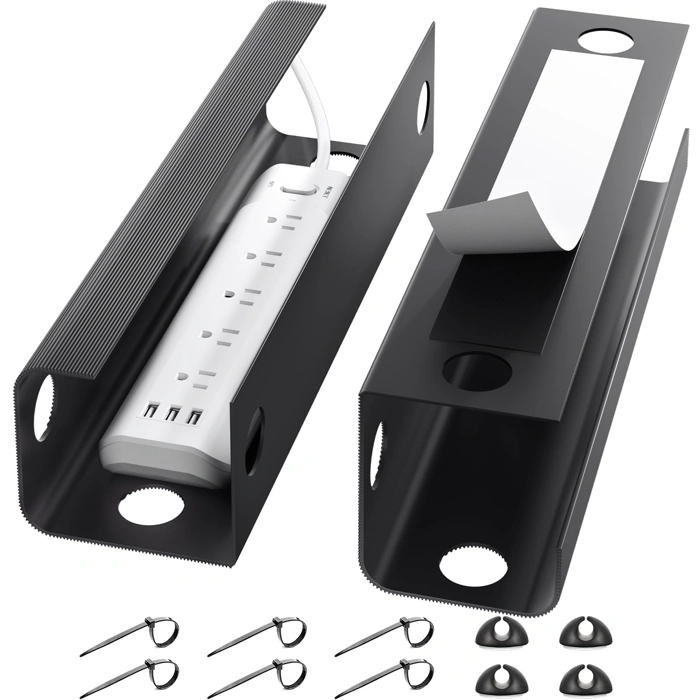
Yecaye Under Desk Cable Management Tray
The Yecaye Under Desk Cable Management Tray sits in the middle of the pack at $19.99, offering metal mesh construction at the lowest price point among the metal-tray options in this comparison. It uses a screw-mount installation system and provides enough capacity for typical home office loads - one or two power strips and a standard bundle of cables.
The open-top mesh design makes cable access straightforward when you need to add or remove devices. The metal construction provides more durability than adhesive channels, though the materials and finish feel basic compared to DELAMU's heavier-gauge steel or ERGO COLLECT's powder-coated frame.
The 4.2 out of 5 rating is the lowest among the products reviewed here, and user feedback suggests some variance in build quality. A few buyers report thin metal that flexes under load or mounting hardware that strips more easily than expected. If you're managing heavy power bricks or dense cable bundles, the structural limitations may become noticeable.
This tray works best when your priorities are simple: you want a basic metal solution, you're managing moderate cable loads, and you'd rather spend $multiple than $multiple - $multiple. It doesn't offer standout features - no tool-free clips like DELAMU, no accessory hooks like ERGO COLLECT, and no aesthetic refinement like the fabric-wrapped KZOLLL tray. What it does provide is functional wire organization at the entry point for metal trays.
Consider the Yecaye if you're working with a straightforward setup - monitor, laptop dock, and a single power strip - and you don't anticipate frequent cable changes. If your desk supports multiple monitors, charging stations, or USB hubs, or if you expect to reorganize your layout regularly, the more robust construction and higher ratings of the DELAMU or ERGO COLLECT trays justify the additional cost.
- ✅ Lowest-priced metal tray option at $19.99
- ✅ Open mesh design provides easy cable access
- ✅ Adequate capacity for typical home office loads
- ⚠️ 4.2/5 rating suggests quality variance
- ⚠️ Thinner metal construction compared to higher-priced alternatives
- ⚠️ No standout features or installation conveniences
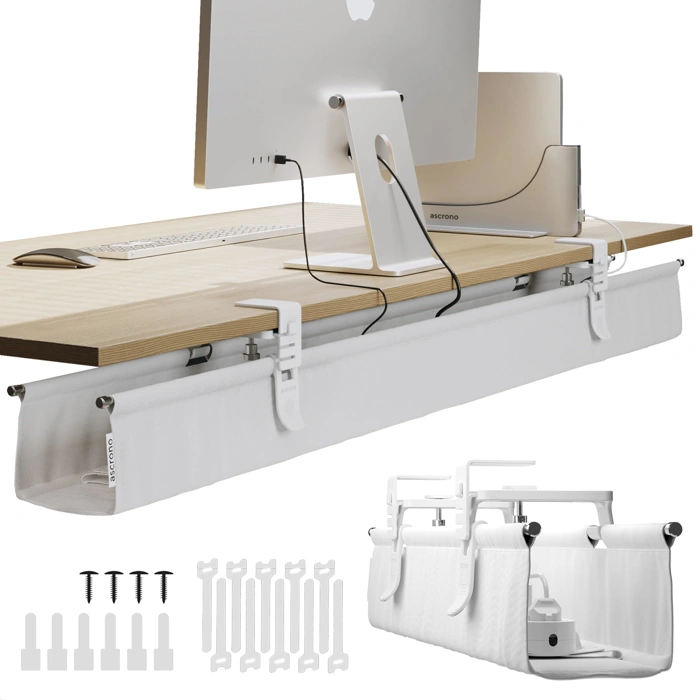
Ascrono Original No Drill Under Desk Cable Management Tray - Premium White Fabric Extra Large
The Ascrono Original No Drill Under Desk Cable Management Tray stands out as the premium aesthetic choice in this lineup, particularly for glass desks, open workspaces, or any setup where the underside of your desk remains visible. The white fabric finish offers a clean, minimalist look that blends into modern office environments rather than calling attention to itself like metal or plastic alternatives.
At $189.99, this extra-large tray represents roughly eight times the cost of budget adhesive channels. That premium buys you primarily aesthetic value - the fabric construction and white finish create a polished appearance, while the no-drill installation preserves your Uplift V2's surface. The extra-large capacity should accommodate multi-monitor setups, charging cables, and power strips in one concealed space.
The tradeoff equation here is straightforward: you're paying substantially more for visual refinement rather than functional superiority. The fabric material may show dust accumulation over time in ways that metal trays won't, requiring occasional cleaning to maintain that premium look. The 4.4/5 rating, while solid, doesn't reflect the kind of performance gap that typically justifies this price difference for most users.
This tray makes sense for specific situations: if you're furnishing a client-facing office where desk aesthetics matter, working at a glass desk where under-desk hardware is always visible, or simply prioritizing design cohesion in a carefully curated workspace. For standard home office setups where the under-desk area remains out of sight, the functional performance of options like the J Channel or Fellowes tray delivers equivalent cable organization at a fraction of the cost.
The no-drill installation aligns well with the Uplift V2's adjustable frame, avoiding any permanent modifications while the extra-large format provides room to grow as your cable needs expand. Just recognize you're investing in appearance and discretion rather than enhanced cable management capability.
- ✅ Premium white fabric finish blends into modern office aesthetics
- ✅ Extra-large capacity accommodates extensive cable setups
- ✅ No-drill installation preserves desk surface
- ✅ Ideal for glass desks and visible workspace environments
- ⚠️ $189.99 price point - roughly 8x cost of budget options
- ⚠️ Fabric material may show dust accumulation over time
- ⚠️ Premium cost delivers aesthetic value rather than functional superiority
Choosing the Right Cable Management for Your Uplift Setup
- Count your cables and measure thickest bundle diameter to determine capacity needs
- Measure crossbar spacing on your Uplift V2 frame to confirm mounting compatibility
- Decide if you're comfortable drilling pilot holes or need adhesive-only installation
- Consider desk height adjustment frequency - rigid mounts handle motion better than adhesive
- Check if your setup includes heavy power strips that require metal tray support
- Account for future cable additions when selecting tray length and capacity