We may earn a commission when you buy through links on this page, at no extra cost to you. How this works.
Your ability to focus at your desk is shaped less by willpower and more by the environment you build around you. When your workspace is cluttered, visually noisy, or poorly zoned, your brain spends energy deciding what to ignore - energy that should be directed toward the work itself.
This guide is built around three core principles: visual clarity (reducing competing stimuli in your line of sight), functional zoning (grouping tools and materials by task), and controlled stimuli (choosing what enters your workspace and when). Together, these principles create a layout that supports sustained attention without requiring constant self-discipline.
This article is written for remote professionals who work from a fixed desk and struggle with distraction, visual overwhelm, or inefficient tool placement. It assumes you have control over your workspace layout and want practical, repeatable steps to improve focus through spatial organization.
This is not a guide to aesthetic desk styling, nor does it prescribe complex productivity systems or app-based workflows. The focus is purely on the physical arrangement of your desk and the decisions that support concentration.
Who This Workspace Layout Is For
This workspace layout is designed for remote professionals who manage multiple projects, switch between tasks frequently, and find their attention fractured by visual clutter. If your desk has become a landing zone for unread mail, orphaned cables, coffee mugs, and tools you reach for once a week, this guide will help you reclaim that space.
It's especially useful if you experience task-switching fatigue - the mental drain that comes from hunting for a pen, moving stacks of paper to find your notebook, or clearing space just to open your laptop. The system here reduces cognitive load by giving every tool a predictable home and separating active work from reference materials.
This approach prioritizes function over aesthetics. You won't find advice on color-coordinated accessories or aspirational minimalism. Instead, the focus is on creating clear zones, limiting what's within arm's reach, and making it easy to reset your desk at the end of each work session. If you work from home and need your environment to support sustained focus rather than compete for it, this layout will serve you well.
What Matters Most in a Focus-Optimized Layout
A focus-optimized desk layout rests on three principles that directly affect how well you can maintain attention during long work sessions: surface zoning, visual noise control, and tool accessibility. Each shapes whether your environment supports deep work or quietly sabotages it.
Surface zoning divides your desk into three functional areas. The primary work area sits directly in front of you - monitor, keyboard, and an open space for note-taking or a tablet. This is where active tasks happen. The reference area occupies one side, holding materials you consult but don't interact with constantly: a notebook, printed reference sheets, or a secondary device. The reset zone is a small, clear corner or tray where you place a water bottle, a plant, or one personal object. This zone gives your eyes a neutral place to rest between tasks without introducing decision fatigue.
Clear boundaries between these zones prevent task bleed. When your primary work area also holds your phone, snacks, and a stack of mail, every glance away from the screen becomes a fork in attention. Zoning makes it obvious what belongs where, reducing the cognitive load of deciding what to look at next.
Visual noise control limits the number of objects in your peripheral vision. Studies on visual distraction show that even static objects - picture frames, stacks of books, charging cables - pull micro-doses of attention when they sit at the edges of your field of view. The goal is not sterile minimalism, but intentional editing. If an item doesn't serve your current work session, it belongs in a drawer, on a shelf behind you, or off the desk entirely.
Pay particular attention to horizontal surfaces. A desk crowded with objects forces your brain to continuously categorize and dismiss visual input, a low-grade tax on focus that accumulates over hours. Vertical storage - monitor stands with built-in drawers, wall-mounted organizers, or a pegboard - moves tools out of your sightline while keeping them accessible.
Tool accessibility follows a simple distance rule: items you use multiple times per hour belong within arm's reach, items you use once per day belong within desk reach, and everything else goes out of sight. Your mouse, pen, and primary notebook are arm's reach. Chargers, headphones, and reference books are desk reach. Archive files, spare supplies, and seasonal items live in a drawer or cabinet.
This hierarchy prevents two common traps. The first is the "just in case" desk, cluttered with tools you rarely touch but keep visible for hypothetical need. The second is the buried essential, where your stapler or USB hub hides under a pile, forcing you to break focus every time you need it. Accessibility is not about proximity alone - it's about predictable placement so retrieval becomes automatic rather than a search task.
Together, these three factors create a layout that defaults to focus. Zoning directs your attention to the right area for the task at hand. Visual noise control removes passive distractions. Tool accessibility ensures that the act of working doesn't generate friction. The result is an environment that doesn't demand willpower to stay on task - it simply makes focused work the path of least resistance.
Step 1: Define Your Primary Work Zone
The first step in organizing your desk for maximum focus is to define your primary work zone - the area where active tasks happen. This zone should occupy the central 24 to 30 inches of your desk surface, directly in front of your chair. Keep this space reserved exclusively for the tools and materials you're actively using during focus blocks.
Position your monitor at arm's length, with the top of the screen at or slightly below eye level. This placement supports a neutral neck position and keeps your visual focus centered. Place your keyboard directly in front of you, aligned with your body's midline, so your hands rest naturally without reaching or angling to either side. If you use a notebook or notepad for active tasks, position it within easy reach - typically to the dominant-hand side of your keyboard or just below the monitor if you reference it frequently.
The key to this zone is discipline: remove decorative items, extra supplies, and anything unrelated to your current task. Coffee mugs, picture frames, and accessory storage belong outside the primary work zone. During focus blocks, this central area should contain only your monitor, keyboard, mouse, and the single document or tool you're working with at that moment. This visual simplicity reduces cognitive load and keeps your attention anchored to the task at hand.
When you finish a task, reset the zone. Clear away completed notes, close unused tabs, and return non-essential items to their designated spots outside the primary area. This habit creates a clean slate for the next focus session and reinforces the boundary between active work and passive storage.
Step 2: Create a Reference and Tool Zone
Once your primary work zone is clear, designate a secondary area for items you need daily but not during every task. This reference and tool zone typically works best on your dominant-hand side or in a rear corner of the desk, close enough to grab without disrupting your central focus area.
This zone holds items like charging cables, a pen cup, notebooks, sticky notes, reference books, or a small desk lamp. The key tradeoff is accessibility versus visual distraction: keep these tools within arm's reach, but position them so they don't compete for attention when you're concentrating on core work.
Use shallow trays, small drawer organizers, or vertical stands to corral these items. A single tray can hold pens, highlighters, and a stapler, preventing them from scattering across the desk. A vertical file holder or slanted stand keeps reference materials upright and visible without sprawling horizontally into your work area.
Limit this zone to items you actually use at least once per day. If a notebook hasn't been opened in a week, move it to a drawer or shelf. The goal is to create a stable, predictable location for your everyday tools so you spend less time searching and more time working.
Consider the height and footprint of each item. A tall pen cup or bulky book stack can create visual clutter even when neatly arranged. Opt for low-profile containers and keep stacks horizontal when possible to maintain clear sightlines across your desk.
Step 3: Establish a Reset or Break Zone
Even the most organized desk can contribute to burnout if you never step away. A reset or break zone is a small, defined area - separate from your active work surface - dedicated to intentional mental transitions. This spatial boundary helps your brain switch gears without bleeding break activities into your task zones.
The zone doesn't need to be elaborate. A plant on a side shelf, a small zen garden on a filing cabinet, or a single tactile object like a smooth stone or wooden puzzle can serve as an anchor. The key is placement: position it outside your primary desk footprint, ideally to your side or behind you, so engaging with it requires a deliberate physical shift.
This separation matters because when break objects occupy your main work surface, they compete for attention during deep work. A phone face-up next to your keyboard, a book within arm's reach, or a fidget toy in your peripheral vision all create low-grade friction. Moving them to a designated reset zone means you choose when to engage, rather than being passively drawn in.
Use the zone intentionally. Stand, turn away from your monitor, and spend two minutes with your chosen object - water the plant, rake the zen garden, manipulate the puzzle. The physical act of moving and refocusing on something tactile signals a boundary. When you return to your chair, your work zone is still clear, and the transition feels deliberate rather than accidental.
For remote professionals who struggle with context switching, this spatial cue can replace the environmental shifts that office workers get naturally - walking to a break room, stepping outside, or visiting a colleague's desk. Your reset zone becomes a micro-environment that lives alongside your work setup without interfering with it.
Common Desk Organization Mistakes That Undermine Focus
Even well-intentioned desk setups can quietly erode focus when common organizational mistakes go unnoticed. One frequent error is over-accessorizing the primary work zone - placing too many pens, notepads, charging cables, and accessories within arm's reach. Each additional object competes for visual attention and increases the mental load required to locate what you actually need. Keep only the tools you use multiple times per hour in this zone; everything else belongs in secondary storage.
Another mistake is mixing work and break items in the same visual field. Coffee mugs, snack containers, personal photos, and leisure reading stacked alongside task-critical documents blur the boundary between focused work and rest. This spatial overlap makes it harder for your brain to shift cleanly between modes. Designate a separate surface or drawer for break-related items so your primary desk communicates work, not leisure.
Cable clutter is consistently underestimated. Tangled power cords, USB cables draped across the desk, and chargers sprawled near your keyboard create visual noise and physical obstacles that interrupt flow. Use cable clips, sleeves, or under-desk trays to route cables out of sight. A clean cable path reduces distraction and makes it easier to reposition equipment without causing a cascade of tangles.
Placing high-stimuli objects in your peripheral vision - brightly colored decor, notification-heavy devices, or items that trigger unrelated thoughts - pulls attention away from your central task. Peripheral vision is highly sensitive to motion and contrast, so even a blinking light or vivid object at the edge of your field can trigger involuntary attention shifts. Move these items outside your immediate sightline or choose neutral tones for accessories that must remain visible.
Finally, many remote professionals organize their desk once and never reassess as their task types evolve. A layout optimized for video calls may not support deep writing sessions; a setup designed for spreadsheet work may hinder creative brainstorming. Schedule a brief quarterly review to confirm your zones, tool placement, and visual field still match your current responsibilities. Small adjustments - swapping a monitor's position, relocating a lamp, or retiring unused accessories - can restore focus without requiring a full redesign.
Recognizing these mistakes early allows you to correct them before they become entrenched habits. A desk that supports focus is not static; it adapts as your work does, and it removes friction rather than adding to it.
Maintaining Your Organized Desk Layout Over Time
An organized desk is not a one-time achievement. Without ongoing habits, even the most thoughtfully arranged workspace will drift back toward clutter and inefficiency. The key is building simple maintenance routines that align with how your work actually evolves.
Start with a daily surface reset at the end of each work session. Before stepping away, return everything to its designated zone: pens to the holder, notebooks to their shelf position, charging cables coiled or clipped. Wipe down the desk surface if needed. This five-minute habit prevents accumulation and ensures you begin each day with a clear workspace rather than inheriting yesterday's chaos.
Add a weekly zone audit to your routine. Once a week, review each functional zone on your desk. Check that supplies are where you expect them, that your active-project area reflects current priorities, and that the reference zone contains only materials you genuinely need at hand. Remove items that have migrated from other rooms, discard receipts or notes that are no longer relevant, and restock anything running low. This fifteen-minute review catches drift before it becomes disorder.
Conduct a quarterly tool reassessment based on actual usage. Every three months, evaluate which tools and materials earned their place on your desk and which sat untouched. If that stapler has gone unused for twelve weeks, move it to a drawer or supply closet. If you find yourself constantly reaching for a particular reference book stored across the room, bring it into your primary zone. Your work patterns shift with projects, seasons, and responsibilities - your desk layout should shift with them.
Track layout adjustments deliberately rather than letting them happen passively. When you notice yourself repeatedly reaching awkwardly for an item, that's a signal to relocate it. When a zone feels crowded, reassess what truly belongs there. Effective organization responds to feedback from your own behavior, not rigid adherence to an initial plan.
Build buffer capacity into each zone. If your supply holder is stuffed to capacity, you have no room to add a new tool without forcing something out. If your cable management is maxed out, plugging in one more device creates tangles. Leaving 20 - 30 percent open space in drawers, holders, and organizers gives your system flexibility to absorb minor changes without requiring a full reorganization.
Set a specific trigger for deeper resets. Common examples include the start of a new quarter, the end of a major project, or a noticeable drop in focus or productivity. When the trigger occurs, spend 30 - 60 minutes reassessing your entire desk setup: zone boundaries, tool placement, storage solutions, and whether your current layout still matches your primary work modes. Treat this as preventive maintenance, not crisis management.
An organized desk is a working system, not a static display. The maintenance routines that keep it functional are small, frequent, and tied to real usage patterns. When your workspace evolves intentionally alongside your work, it continues to support focus rather than demanding it.
Final Takeaway
A desk organized for maximum focus isn't about aesthetics or minimalism for its own sake - it's about designing your workspace so that every object either supports sustained attention or stays out of the way. The core principle is simple: intentional zones, minimal surface competition, and tools positioned to reduce friction rather than create it.
When your active work zone is clear, your input tools are within arm's reach, and your reference materials have a dedicated home, you eliminate the micro-decisions and visual noise that fragment concentration throughout the day. These aren't dramatic changes, but they compound. A desk that respects the way attention actually works will consistently outperform one that treats every item as equally important.
Small spatial decisions - where your notebook sits, whether cables cross your sightline, how many objects compete for desk real estate - add up to measurable differences in how long you can hold focus and how quickly you re-engage after an interruption. The goal is a setup that makes deep work the path of least resistance.
Start with one zone. Clear your active work surface completely, then add back only what the next task requires. Build your input and reference areas from there. Refine as you notice what actually gets used and what creates drag. A focus-optimized desk is never finished - it evolves as your work does - but every intentional adjustment moves you closer to a workspace that protects attention instead of taxing it.
Before You Rearrange: Pre-Organization Checklist
- Remove everything from your desk surface
- Sort items into daily, weekly, and rarely used categories
- Identify your primary task type (writing, calls, data work, mixed)
- Measure your usable desk surface area and dominant hand reach radius
- Note current distraction sources (notifications, visual clutter, doorway sightlines)

Island Falls Home Zen Garden Kit 11x8in with 6 Tools & 15 Accessories
A dedicated break zone on your desk works best when it offers a genuinely different activity. The Island Falls Home Zen Garden Kit occupies an 11×8 inch footprint and provides a tactile, non-digital reset option that fits in a corner or on a side shelf.
The kit includes 6 raking tools and 15 accessories - enough variety to create different patterns without requiring storage for a sprawling collection. You can spend two minutes drawing lines in sand, rearrange stones, and return to work with a brief mental pause that doesn't pull you into a screen.
At $42.97 and rated 4.7 out of 5, this kit offers an accessible entry point if you want to test whether a physical, meditative tool supports your focus routine. The compact size means it won't dominate your desk, and the natural wood tray keeps sand contained.
This works well in the break zone described earlier - a small area separate from your primary work surface where you can shift attention for a few minutes. The garden stays visible as a reminder to step back, but it's discreet enough not to distract during deep work sessions.
If your desk organization strategy includes intentional pauses rather than scrolling breaks, a zen garden provides a structured, repeatable ritual. The multiple tools and accessories let you vary the experience without adding complexity, and the footprint is small enough to coexist with a notebook or a single plant.
- ✅ Compact 11×8 inch footprint fits desk corners and side zones
- ✅ 6 raking tools and 15 accessories provide variety without clutter
- ✅ Tactile, non-digital break activity supports intentional pauses
- ✅ Natural wood tray contains sand and maintains clean aesthetic
- ⚠️ Requires dedicated space that stays clear of work materials
- ⚠️ Sand may need occasional tidying if tools are handled quickly
- ⚠️ Effectiveness depends on building a consistent break habit
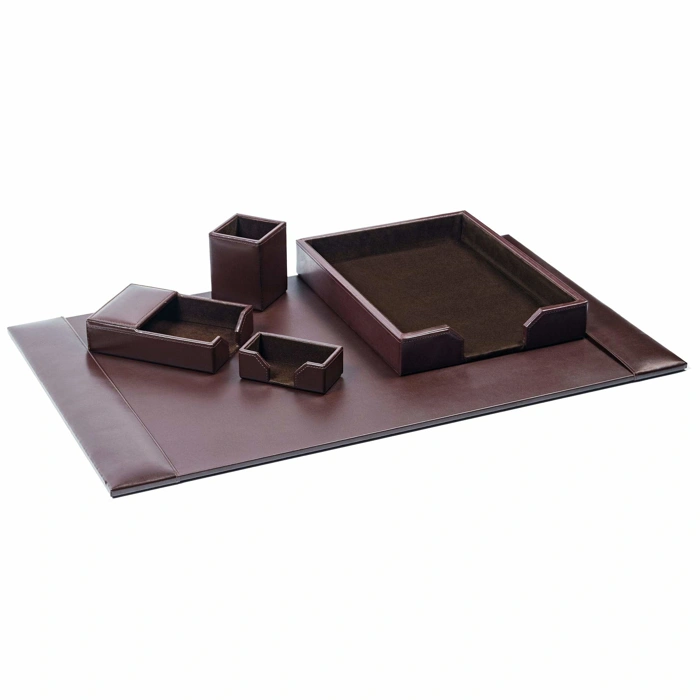
DACASSO Bonded Leather 5-Piece Desk Set with Desk Pad, Dark Brown
The DACASSO Bonded Leather 5-Piece Desk Set with Desk Pad in Dark Brown serves as a containment solution for the reference zone, grouping frequently accessed tools within a unified visual system. The set includes a desk pad, letter tray, and pen holder - components designed to define boundaries for paper, writing instruments, and incoming documents.
Matching bonded leather across all five pieces reduces visual fragmentation, an advantage for professionals who want surface consistency without hunting for compatible accessories. The dark brown finish and matte texture keep the set subdued rather than decorative, letting the organizational function remain primary.
This approach works well when your reference zone holds multiple tool categories that would otherwise scatter across the desk. The letter tray keeps incoming mail or project files vertical and visible, while the pen holder confines writing tools to a fixed location. The desk pad anchors the group and protects the surface underneath.
At $157.25, this set represents a commitment to cohesive surface management and longevity. It's suited for those who value coordinated containment and expect the desk set to last through years of daily use, rather than requiring periodic replacement. The 4.5/5 rating indicates consistent reliability.
The tradeoff is upfront cost and footprint: five pieces occupy more surface area than standalone organizers, so this set makes the most sense when you have dedicated reference-zone space and prefer visual uniformity over flexibility.
- ✅ Matching bonded leather reduces visual fragmentation across the reference zone
- ✅ Letter tray, pen holder, and desk pad define clear boundaries for tools and paper
- ✅ Dark brown matte finish keeps the set visually subdued and professional
- ✅ Longevity-focused design suited for years of daily use
- ⚠️ $157.25 upfront investment higher than standalone organizers
- ⚠️ Five-piece footprint requires dedicated reference-zone space
- ⚠️ Less flexible than modular accessories for changing desk layouts
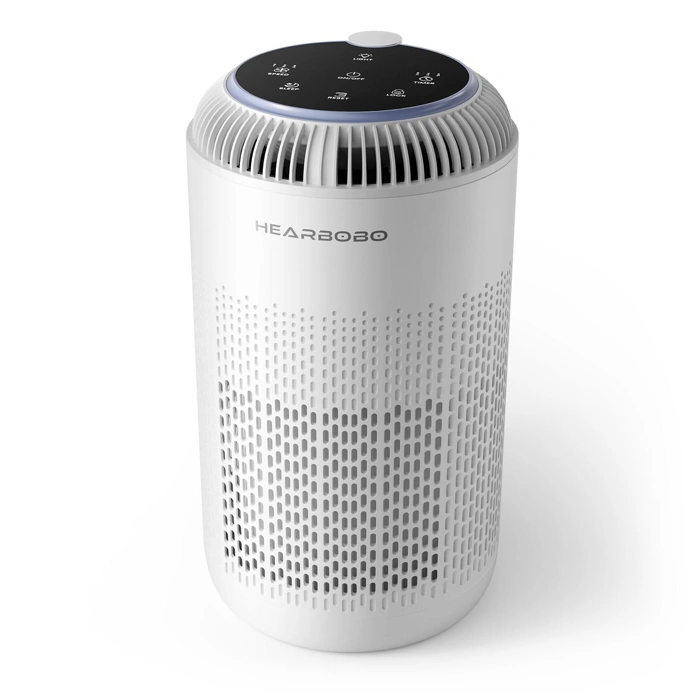
H13 True HEPA Air Purifiers for Home Large Room up to 1350 ft² with Aromatherapy, Hearbobo Air Cleaner for Pets Bedroom – Removes Dust, Smoke, Odors, Pollen, Quiet for Office & Allergy Relief
Air quality can quietly erode focus over the course of a workday. Dust, pet dander, and airborne irritants may not cause immediate distraction, but they contribute to fatigue, sinus pressure, and the urge to step away from your desk. The Hearbobo air purifier addresses this indirect factor with H13 True HEPA filtration designed for spaces up to 1350 square feet - coverage that works for most home offices, spare bedrooms, and open-plan work areas.
The unit's quiet operation is particularly relevant for concentration-dependent tasks. Unlike louder models that introduce ambient noise, this purifier runs without creating auditory distraction, allowing it to cycle air in the background while you work. The filtration targets dust, smoke, odors, and pollen - common airborne elements in home environments shared with pets or located near windows.
At $36.63 with a 4.6 out of 5 rating, the price-to-coverage ratio makes it a low-risk addition for remote workers who experience allergy symptoms or work in spaces with limited ventilation. The aromatherapy feature is optional and may be useful during breaks rather than active work periods, where strong scents can themselves become distracting.
This is not a direct productivity tool, but it removes a category of low-grade irritation that accumulates over hours. For allergy-prone workers or those sharing space with pets, cleaner air supports the sustained comfort that keeps you at your desk longer without needing to address physical discomfort.
- ✅ H13 HEPA filtration for spaces up to 1350 sq ft
- ✅ Quiet operation that does not introduce auditory distraction
- ✅ Targets dust, smoke, odors, pollen, and pet dander
- ✅ Low price point at $36.63
- ✅ Optional aromatherapy feature for break-zone use
- ⚠️ Air quality improvement is an indirect focus factor, not immediate
- ⚠️ Aromatherapy feature may introduce distracting scents during active work
- ⚠️ No brand or detailed spec transparency in verified product data
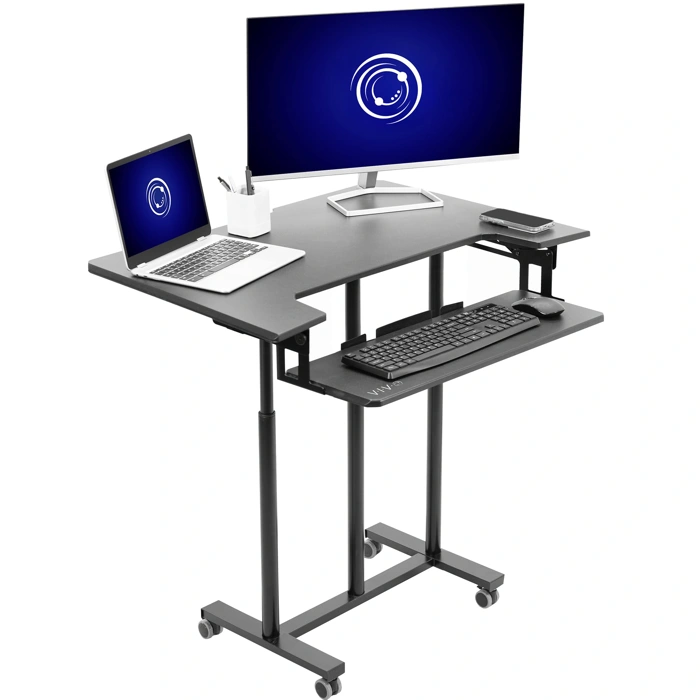
VIVO Mobile Height Adjustable Desk Cart with Sliding Keyboard Tray, Black
The VIVO Mobile Height Adjustable Desk Cart offers a practical solution when you need to reconfigure your workspace on the fly. If you share a home office, shift between tasks that require different setups, or want to separate your laptop from your monitor without committing to a permanent arrangement, this cart creates temporary work zones you can roll into place and adjust as needed.
The height adjustment mechanism lets you align the cart's surface with your primary desk or position it at standing height, while the sliding keyboard tray adds a second level for input devices or reference materials. This two-tier design is particularly useful when you want to dedicate the upper surface to a monitor or notebook and keep your keyboard at a different height or distance. The mobile base means you can push the cart aside when you need floor space, then pull it back when the task changes.
At $199.99, this cart is an investment that makes sense if physical flexibility is a recurring need rather than a one-time setup challenge. The 4.5/5 rating reflects solid construction that supports regular repositioning without wobble or instability. The black finish integrates quietly into most office palettes, and the wheels lock to prevent drift during focused work.
The tradeoff is footprint: even when rolled aside, the cart occupies space. If your room is tight or you rarely shift between task modes, a fixed secondary surface may serve you better. But for those who do need to adapt their layout throughout the day - switching from solo deep work to video calls, or sharing the room with a partner on a different schedule - the VIVO cart turns spatial constraints into flexible zones.
- ✅ Height adjustable to align with existing desk or standing position
- ✅ Sliding keyboard tray creates two-tier setup for separating devices
- ✅ Mobile base with locking wheels for repositioning and stability
- ✅ Solid construction supports regular reconfiguration without wobble
- ⚠️ Occupies floor space even when rolled aside
- ⚠️ $199.99 investment better suited to frequent layout changes than static setups