We may earn a commission when you buy through links on this page, at no extra cost to you. How this works.
Heavy ultrawide monitors - typically spanning 34 to 49 inches and weighing between 15 and 22 pounds - demand more from a monitor arm than standard displays. Choosing the right arm means verifying weight capacity with a safety margin, confirming VESA 100×100 mm compatibility, and ensuring your desk can support the clamp or grommet mount. Most heavy ultrawides require gas-spring arms rather than mechanical tension designs, which struggle to balance heavier loads smoothly.
This guide focuses exclusively on single-arm solutions for one heavy ultrawide monitor. We do not cover wall mounts, TV mounts repurposed for desk use, dual-arm configurations, or arms rated below your monitor's actual weight. If your monitor exceeds 22 pounds or uses a non-standard VESA pattern, you will need a specialized heavy-duty arm outside the scope of this article.
The core selection criteria are straightforward: match the arm's stated weight capacity to your monitor plus at least 20 percent headroom, verify that the VESA plate aligns with your monitor's mounting holes, check that your desk thickness falls within the clamp's range, and confirm the arm offers sufficient reach and height adjustment for your workspace. Installation requires basic hand tools, attention to cable-routing channels, and a methodical approach to balance adjustment once the monitor is attached.
By the end of this guide, you will understand how to evaluate weight ratings, decode VESA standards, assess desk compatibility, and execute a stable installation that keeps your ultrawide secure and fully adjustable.
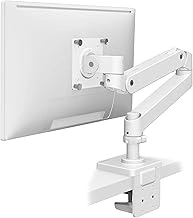
Ergotron – Upgraded LX Pro Premium Monitor Arm, Single Monitor Desk Mount – fits Flat Curved Ultrawide Computer Monitors up to 34 Inches, 4 to 22 lbs, VESA 75x75mm or 100x100mm – White
The Ergotron LX Pro Premium Monitor Arm supports monitors from 4 to 22 lbs and screens up to 34 inches, making it a fit for many curved and flat ultrawide displays. It uses VESA 75×the listed size or 100×the listed size mounting patterns, covering the majority of ultrawide monitors in this weight class.
This arm is built around a gas spring mechanism that allows smooth height, tilt, and rotation adjustments without tools once installed. The range of motion lets you position the screen precisely for seated or standing work, and the spring tension can be fine-tuned to match your monitor's weight. The premium construction and polished finish suit professional environments where stability and appearance matter.
At $199.00, the LX Pro sits at the higher end of single-arm pricing. That cost reflects durable materials, a refined adjustment system, and Ergotron's reputation for long-term reliability. If your ultrawide weighs 22 lbs or less and you prioritize smooth motion and consistent performance over years of daily use, this arm justifies the investment. For lighter monitors or tighter budgets, less expensive arms may cover basic positioning needs, but the LX Pro delivers refinement and confidence for heavier or high-value displays.
The white finish integrates cleanly with bright or minimalist desk setups, though the arm is also available in other colors. Installation follows a standard desk clamp or grommet mount, and the gas spring design means you won't need to reach for tools every time you adjust screen height or angle. This makes the LX Pro particularly useful for users who switch postures frequently or share a workspace.
If your ultrawide is at or near the 22 lb limit and you want an arm that will handle daily repositioning without sagging or requiring constant re-tensioning, the Ergotron LX Pro is a dependable choice worth the premium.
- ✅ Supports monitors from 4 to 22 lbs, suitable for 34-inch ultrawides
- ✅ Gas spring adjustment provides smooth, tool-free repositioning
- ✅ VESA 75×75 mm and 100×100 mm compatibility
- ✅ Premium build quality for long-term stability
- ✅ Clean white finish for professional desk setups
- ⚠️ Higher price point at $199.00
- ⚠️ May be overbuilt for lighter monitors under 10 lbs
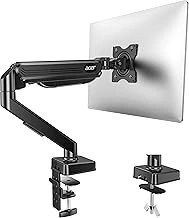
Acer Fully Adjustable Gas Spring Monitor Arm (17-34" Screens, 4.4-19.8 lbs)
The Acer Fully Adjustable Gas Spring Monitor Arm supports screens from the listed size and weighs between 4.4 and the listed size, making it an entry-level option for lighter ultrawides. Priced at $33.98, it offers basic gas spring adjustment at a budget-friendly price point, but its weight capacity means it works best with monitors well under the 19.8-pound upper limit.
This arm uses a gas spring mechanism to provide height and tilt adjustments, allowing you to position compatible monitors for better viewing angles. The specification range indicates it can handle monitors up to the listed size, but heavier displays closer to that threshold may experience sag over time or reduced adjustability as the spring struggles to counterbalance the load. If your ultrawide weighs the listed size or more, the gas spring may not provide stable, effortless positioning throughout its adjustment range.
The larger screen range covers many ultrawides, but weight is the more critical factor. Check your monitor's specifications before purchasing - if it exceeds the listed size, consider a higher-capacity arm to ensure consistent support and smooth adjustment. Monitors on the lighter end of the ultrawide spectrum, typically those under the listed size, will pair more reliably with this arm's gas spring tension.
Installation follows standard VESA mounting procedures, and the arm fits desks via clamp or grommet attachment. At this price, expect basic build quality and limited fine-tuning compared to premium models. The tradeoff is straightforward: lower cost in exchange for narrower compatibility and less robust long-term performance under heavier loads.
For ultrawide owners with lighter displays and modest budgets, this Acer arm provides functional adjustability. If your monitor weighs more than the listed size or you need dependable stability for years of daily repositioning, plan to invest in an arm with a higher weight rating and more durable construction.
- ✅ Budget-friendly at $33.98
- ✅ Gas spring adjustment for height and tilt
- ✅ Supports screens up to 34 inches
- ⚠️ 19.8 lb maximum may cause sag with heavier ultrawides
- ⚠️ Limited adjustability near upper weight limit
- ⚠️ Entry-level build quality
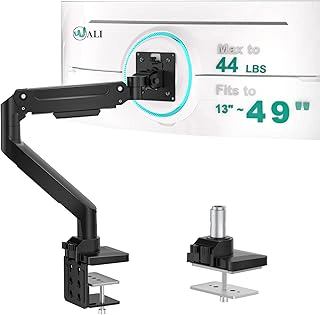
WALI Ultrawide Heavy Duty Gas Spring Single Monitor Desk Mount (GSM001XL)
The WALI Ultrawide Heavy Duty Gas Spring Single Monitor Desk Mount (GSM001XL) is built to handle heavier ultrawide displays without requiring the premium price of professional-grade arms. Priced at $59.99 and carrying a 4.4/5 rating, this mount uses a gas spring mechanism to support the weight of large monitors while allowing height and tilt adjustments. It targets users who need reliable support for their ultrawide setup but want to keep costs manageable.
The gas spring design compensates for monitor weight, making it easier to reposition your screen throughout the day compared to friction-based alternatives at this price point. The mount accommodates the wider footprint and higher center of gravity typical of ultrawide panels, though the adjustment range and refinement are not as smooth as higher-end models. Build quality is adequate for monitors within the specified weight capacity, but the materials and joint tolerances reflect the budget positioning.
At this price, the GSM001XL offers a practical entry point for heavy ultrawide mounting, especially if you prioritize function over premium fit-and-finish. The trade-off is less precise micro-adjustments and a chunkier aesthetic compared to more expensive arms. If your monitor falls within the weight limits and you don't need frequent repositioning, this mount delivers solid value for everyday ergonomic improvement.
- ✅ Budget-friendly at $59.99 for heavy ultrawide support
- ✅ Gas spring mechanism eases weight compensation
- ✅ Handles the footprint and weight distribution of ultrawide monitors
- ⚠️ Less refined adjustment precision than premium models
- ⚠️ Build materials and tolerances reflect budget positioning
- ⚠️ Bulkier appearance compared to higher-end arms
Who Needs a Heavy-Duty Ultrawide Monitor Arm
A heavy-duty ultrawide monitor arm makes sense when your display weighs more than 15 pounds or measures 34 inches or larger, and you need flexible positioning or want to reclaim desk surface area. Standard monitor arms typically support up to 15 pounds and may lack the reach or stability required for ultrawides, which often weigh between 16 and 30 pounds depending on size and panel technology.
You will benefit from a reinforced arm if you frequently adjust monitor height, tilt, or rotation throughout the day - common in sit-stand desk setups or shared workspaces. Ultrawide monitors on factory stands occupy significant desk depth, leaving little room for keyboards, documents, or other equipment. An arm lifts the display off the surface, creating usable space underneath and enabling you to push the monitor farther back or pull it closer as needed.
If your monitor stays in one fixed position, sits at a comfortable viewing distance without adjustment, and the factory stand provides adequate stability, a monitor arm may not add meaningful value. Factory stands are adequate when desk space is not a constraint and you do not need to reposition the display for different tasks or users. However, if cable management, ergonomic fine-tuning, or desk real estate recovery matter to your workflow, a heavy-duty arm suited to your monitor's weight and VESA pattern will deliver those benefits without the risk of sagging or instability that undersized arms introduce.
Desk and VESA Compatibility Check
Before purchasing any monitor arm, measure your desk thickness at the exact point where the clamp will attach, typically near the back edge. Most clamp mounts require a desk thickness between 0.4 and 2.5 inches (10 - 65 mm) from the top surface to the underside, measured front to back. Check for any lip, molding, or overhang along the rear edge that could interfere with clamp placement - many desks have a small ridge that reduces the effective clamping area.
Next, locate the VESA mounting pattern on the back of your ultrawide monitor. If the factory stand is still attached, remove it to expose the four threaded inserts arranged in a square or rectangle. Use a ruler or tape measure to confirm the center-to-center distance between the holes: most ultrawides use either 100 mm × 100 mm or the wider 200 mm × 100 mm pattern. Write down the exact spacing, as mismatched VESA plates will not align.
Glass desks require grommet-style mounts rather than clamp mounts, since clamping pressure can crack tempered glass. If your desk is particleboard or laminate thinner than 0.4 inches, reinforce the mounting area with a wood block or metal plate on the underside to distribute the load. For monitors without VESA holes, aftermarket adapter plates are available that attach to the monitor's existing stand mount or back panel, though you must verify the adapter's own weight rating and confirm it does not block ventilation slots.
Double-check that the arm's VESA plate includes all four mounting screws in the correct thread pitch (typically M4 for smaller monitors, M6 or M8 for heavy ultrawides). Measure twice before ordering: desk compatibility and VESA match are non-negotiable, and returning a mount due to fit issues costs time and shipping.
Step-by-Step Installation Process
Installing a monitor arm for a heavy ultrawide requires a systematic approach to ensure both safety and proper functionality. Begin by removing the factory stand from your monitor - most ultrawides have a quick-release button or require removing four screws from the back panel to detach the base. Once removed, locate the VESA mounting holes, typically arranged in a square pattern (100×100 mm, 200×100 mm, or 200×200 mm depending on your display size). Clean the area around the mounting interface to ensure a flush fit.
Attach the VESA mounting plate to the back of your monitor using the screws included with your monitor arm. Hand-tighten each screw in a cross pattern to distribute pressure evenly, then secure them fully with the provided hex key or screwdriver. Do not overtighten, as this can strip threads or crack the monitor housing. With the plate secured, set the monitor face-down on a soft surface while you prepare the arm assembly.
Assemble the arm pole and attach the desk clamp to your work surface, positioning it at the rear edge of the desk for maximum reach and flexibility. Ensure the clamp grips a solid portion of the desk - avoid areas with cable trays underneath or thin veneer that may compress under load. Tighten the clamp firmly, checking that the pole stands vertical and does not wobble. Next, attach the articulating arm to the pole according to the manufacturer's instructions, ensuring all connection points are locked into place.
Before mounting the monitor, enlist a second person to help lift and position the display - heavy ultrawides often exceed 30 pounds and are awkward to handle alone. Align the VESA plate on the monitor with the corresponding bracket on the arm, then slide or lock the monitor into place depending on your arm's interface design. Once attached, do not release the monitor until you have adjusted the gas spring tension to match the monitor's weight. Most arms include a tension adjustment knob or hex screw; turn it incrementally and test the monitor's movement until it holds position at any height without drifting up or down.
Set your desired height, reach, and viewing angle, then tighten any position locks if your arm includes them. Finally, route your display cables, power cord, and any USB connections through the arm's cable management clips or channels to keep them organized and prevent snagging during adjustment. Test the full range of motion and stability by gently moving the monitor through its articulation points, ensuring it holds steady before returning to regular use.
Gas Spring Tension Adjustment
Gas spring tension adjustment ensures your ultrawide monitor holds its position at any height without sagging or drifting upward. Most gas-spring arms include a tension screw - typically a hex socket - located on the spring cylinder itself or near the arm joint where the spring attaches.
To calibrate tension, start by locating the adjustment screw and identifying which direction tightens or loosens the spring; many arms mark this with small arrows or +/− symbols. If your monitor sags downward when released, tighten the screw in quarter-turn increments using the appropriate hex key. After each adjustment, lift the monitor to mid-height and let go to test whether it holds position. Repeat in small increments until the monitor stays put without drifting.
If the monitor drifts upward or feels springy when you try to lower it, loosen the tension screw by the same quarter-turn method. Proper tension means the monitor remains stable at any height in its range and moves smoothly when you apply light hand pressure - neither floating up nor dropping down on its own. Avoid over-tightening, which can make height adjustment stiff and put unnecessary stress on the gas spring mechanism over time.
When to Use Grommet vs Clamp Mounting
Clamp mounts grip the edge of your desk with a threaded screw mechanism, requiring no modifications and taking just a few minutes to install. They work best when you have at least 2 inches of accessible desk edge - free from cable trays, drawers, or other obstructions - and can handle desks up to about 3.5 inches thick depending on the arm model. Clamps are ideal for renters, temporary setups, or anyone who wants the flexibility to move or remove the arm without leaving permanent marks.
Grommet mounts thread through a drilled hole (typically 0.5 to 1 inch in diameter) and lock in place with a mounting plate underneath the desk, creating a more permanent installation. This method frees up your desk edge entirely, provides a cleaner appearance with no visible hardware at the perimeter, and works better for thick, laminated, or composite desks that may not have the structural integrity for clamp pressure. The tradeoff is that you must be comfortable drilling into your desk surface, and the hole will remain if you remove the arm.
Choose a clamp mount if you rent your space, plan to reconfigure frequently, or need a non-destructive solution. Opt for a grommet mount if you own your desk, have obstructions along the edge, want a flush finish, or work with thicker desk materials that benefit from the distributed load of a through-bolt connection.
Maintaining Stability Over Time
Monitor arms lose stability over time as vibration, desk movement, and regular adjustments gradually loosen fasteners and reduce spring tension. Checking clamp tightness monthly prevents the most common failure mode: a loose desk mount that allows the arm to shift or tip under load. Desktop vibration from typing, footsteps, or adjusting the monitor can back out clamp screws by a quarter turn or more each month, especially on particleboard desks where compression creates play.
Inspect VESA mounting screws quarterly to confirm they remain fully seated. Ultrawide monitors exert leverage on these four small screws, and any looseness translates into wobble or tilt creep during use. If the monitor begins to sag forward or downward despite correct positioning, the gas spring has likely lost pressure and needs tension adjustment using the hex key or tension dial built into most premium arms. Spring pressure naturally decreases with thermal cycling and mechanical wear, particularly in arms supporting monitors near their maximum rated weight.
Verify that cable routing has not created drag on the arm's range of motion. Bundles that are too tight or routed through narrow channels add resistance that mimics a failing gas spring or friction joint. Watch for warning signs that indicate immediate maintenance is needed: the monitor drifts downward when released, tilt becomes uneven or requires force to adjust, the desk clamp shifts during repositioning, or the arm emits creaking sounds during movement. Addressing these symptoms early prevents damage to the arm, desk, or monitor and maintains the ergonomic positioning that justified the investment in a quality mount.
Final Recommendations
When choosing a monitor arm for a heavy ultrawide, weight capacity margin and VESA verification should guide your decision before adjustability range or features. Select an arm rated at least 30 - 40% above your monitor's actual weight to account for dynamic load and long-term spring fatigue. Confirm your monitor's VESA pattern and weight in the manual or manufacturer specs before purchasing any mount, and measure your desk thickness and edge clearance to ensure compatibility with the clamp or grommet base.
For monitors over 18 pounds, a gas-spring mechanism provides smoother adjustments and better sustained support than friction-only systems, reducing the need for frequent tension re-calibration. If your ultrawide exceeds 25 pounds, consider a dual-arm or reinforced single-arm design explicitly rated for that range, and verify that the VESA plate and pole are steel, not aluminum alloy.
During installation, proper tension calibration is the most critical step: start with the monitor horizontal and adjust the spring or friction knob incrementally until the screen holds position without drifting. Secure the VESA screws and desk clamp bolts fully - undertightening is the leading cause of sag and instability. For ultrawides over 34 inches or 20 pounds, use two people to attach the monitor to the arm, preventing cross-threading and accidental drops.
Once installed, focus on positioning the monitor to reduce neck strain and eye fatigue. The top of the screen should sit at or slightly below eye level, and the display should be an arm's length away with a slight backward tilt. For detailed guidance on ergonomic screen height, distance, and angle, refer to a dedicated monitor positioning guide to complete your workspace setup.
Key Selection Criteria for Heavy Ultrawide Arms
- Weight capacity rated at least 20% above your monitor's actual weight
- VESA 100×100 mm mount compatibility (verify your monitor's VESA pattern)
- Gas spring mechanism for ultrawides over 18 lbs (mechanical tension struggles with heavier loads)
- Desk clamp that fits your desk thickness (measure before purchase)
- Reach and height range that matches your viewing distance and desk depth
- Cable management clips or channels to prevent cord sag
Common Installation Mistakes to Avoid
- Choosing an arm rated at exact monitor weight (always add 20% margin)
- Skipping desk thickness measurement before purchase
- Installing clamp on a desk edge thinner than minimum spec
- Under-tightening VESA screws (can cause monitor to tilt or detach)
- Skipping gas spring tension adjustment after mounting
- Routing cables before finalizing monitor position (leads to tangled or stretched cords)