Remote workers who spend hours on video calls often face a choice: sit still and accept the stiffness, or find a way to keep moving without disrupting focus. Under-desk ellipticals offer a middle path, letting you pedal gently while you talk, listen, or review documents. Choosing the right one depends on whether you prefer manual resistance you control with your own effort or a motorized unit that keeps moving at a set pace, how much noise your microphone will pick up, the clearance between your chair seat and desk surface, and the speed range that matches your call rhythm.
This guide walks through the core decision points: manual versus motorized resistance, noise levels that won't interfere with audio quality, desk clearance measurements, and speed settings that support both passive motion and active pedaling. We focus on compact ellipticals designed for seated use during work tasks, not therapy-grade rehabilitation devices, standing-only machines, or units without documented quiet-operation specifications. Your best fit depends on how often you're on calls, your desk height, and whether you want the machine to move your legs for you or prefer to drive the motion yourself.
Understanding these tradeoffs helps you match the elliptical's design to your workspace constraints and movement preferences, so you can stay comfortable and productive during long remote work days.
Why Active Sitting Matters for Remote Workers
Remote workers spend hours seated during video calls, and that stillness can leave you stiff, foggy, and restless by midafternoon. Light movement while you sit helps keep blood flowing to your legs, reduces the discomfort that builds during back-to-back meetings, and can sharpen your focus when concentration starts to drift.
Under-desk ellipticals deliver low-impact motion that fits beneath most workstations and runs quietly enough to use during calls without disrupting your microphone or your train of thought. The rhythmic pedaling engages your legs without requiring you to stand, shift your chair, or lose your place in the conversation. You stay seated, your camera frame stays steady, and your body stays engaged instead of locked in place.
This matters most during the long stretches that define remote work: morning standups that run over, client presentations, strategy sessions, and the afternoon blocks when sitting still starts to feel like a chore. Active sitting with an elliptical gives you a way to move without stepping away from your desk, so you can maintain energy and comfort through the full workday instead of counting down to the next break.
Manual Versus Motorized Resistance: Which Fits Your Call Schedule
Manual and motorized under-desk ellipticals solve different problems during long calls. Manual units rely entirely on your pedaling effort to turn the flywheel, which means you control the intensity by how hard you push and by turning a resistance knob. Motorized models use an electric motor to drive the pedals at a set speed, so you can let the machine move your legs while you focus on conversation.
Manual systems are quieter because they lack a motor. The only sound comes from the flywheel and belt, which is usually a soft whoosh. This makes them ideal for video calls where microphone sensitivity matters. They also cost less and require no power outlet, so you can place them anywhere under your desk. The trade-off is that you must supply all the energy. If you slow down or stop pedaling during a complex discussion, the motion stops. Legs can tire after thirty or forty minutes of continuous effort, especially at higher resistance settings.
Motorized units keep pedaling at a steady speed whether you push or not. You set the pace with a remote or control panel, and the motor maintains it. This consistency helps during back-to-back calls when you want movement without extra exertion. The motor hum is noticeable, though most models stay below 50 decibels - roughly the volume of a quiet office. Some remotes let you adjust speed mid-call, which is useful if you need to shift focus without stopping. The downsides are cost, the need for a nearby outlet, and slightly higher noise that may be audible on sensitive microphones.
Choose manual if you prefer active engagement, want the quietest possible operation, or take shorter calls with breaks. Choose motorized if you spend hours on calls each day, prefer passive motion that doesn't demand attention, and have a power source within reach. Both approaches support active sitting; the decision hinges on whether you want to drive the motion yourself or let the machine do it for you.
Noise Level and Call Quality: Measuring What's Acceptable
Noise from an under-desk elliptical can disrupt your audio on calls if motor hum, pedal friction, or plastic housing resonance reaches your microphone. Most under-desk ellipticals run below 50 dB, which is quieter than normal conversation, but the quality of bearings, motor design, and enclosure materials determines whether you hear an audible hum or rhythmic squeak during use.
Motorized models introduce a low-frequency motor sound that becomes more noticeable at higher speed settings. If you run the machine at moderate assist levels, the hum often sits below the threshold your microphone picks up, but ramp up to maximum speed and some units generate a continuous this product tone. Manual ellipticals avoid motor noise entirely, relying on flywheel momentum and bearings instead. When those bearings are well-lubricated and the crank mechanism is balanced, manual units stay almost silent. Poor-quality bearings or loose housing panels, however, can produce squeaks or rattles with every stride.
Test your elliptical during a muted segment of a call or record a short audio clip while pedaling at your typical pace. Play the recording back and listen for any steady hum, clicking, or friction noise that your laptop or headset microphone captured. If the sound is audible in the recording, consider repositioning your microphone farther from the machine, switching to a headset with tighter noise cancellation, or lowering the speed setting.
Prioritize models with user reviews that specifically mention quiet operation during video calls. Look for phrases such as no interference with my mic, inaudible to coworkers, or ran it all day without complaints. Reviews that flag motor buzz, loud at high speed, or squeaks after a month signal potential noise issues. Quiet performance matters most when your microphone is open, so choose a machine that balances the resistance and speed you need with the acoustic profile that keeps your calls professional.
Desk Clearance and Footprint: Measuring Your Workspace First
Measuring your workspace before selecting an under-desk elliptical prevents the common mistake of buying equipment that doesn't physically fit where you need it. Start by measuring the vertical clearance from your floor to the underside of your desk at the position where your legs normally rest - this is the most critical dimension. Most under-desk ellipticals require between 8 and 10 inches of vertical space to allow a comfortable elliptical stride without your knees striking the desk surface.
Next, measure the horizontal footprint: the width and depth of the open floor area under your desk. Many models occupy 18 to 24 inches of depth from front to back and 16 to 20 inches in width. If your chair has casters, roll it back and forth to confirm the elliptical won't block the path or create a tripping hazard when you push away from your desk.
Tight clearance forces your knees into cramped angles during the elliptical motion, reducing comfort and limiting the range of motion that makes active sitting effective. Similarly, a footprint that extends too far forward can interfere with chair mobility or your ability to sit close enough to your keyboard during calls.
Always cross-reference your measurements with the product's published dimensions in the specification sheet before ordering. Assuming fit without measuring is the leading cause of returns in this category. If your clearance falls at the low end of the range, look for compact or low-profile models explicitly designed for tighter spaces.
How to Maximize Active Sitting Benefits During Your Workday
Light, regular motion beats occasional bursts of effort when you're trying to stay active during long stretches at your desk. Start with 10- to 15-minute intervals to let your legs adjust without distraction, then gradually extend as the motion becomes automatic. During focused calls where you need to take notes or follow complex conversation, keep your pedaling speed low and steady - just enough movement to prevent stiffness without pulling attention from the task. When you're listening passively or reviewing email, increase resistance or speed to engage your legs more actively and take advantage of downtime.
Alternating your pedaling direction every 20 to 30 minutes engages different muscle groups in your calves, quads, and hip flexors, which helps reduce the fatigue that comes from repetitive motion in a single plane. If you use a height-adjustable desk, pair short elliptical sessions with standing intervals to vary your posture throughout the day. Setting a timer for movement breaks - every hour or every other call - creates a consistent rhythm that becomes easier to maintain than waiting until you feel stiff or restless.
Consistency matters more than intensity. A few minutes of gentle pedaling every hour supports circulation and keeps energy steadier than sitting motionless, and it's easier to sustain over weeks and months. Treat the elliptical as one tool in a broader approach: combine it with standing, walking, and stretching to build a workday routine that feels sustainable rather than prescriptive.
Potential Downsides and When to Skip an Under-Desk Elliptical
Under-desk ellipticals solve one problem well - adding lower-body movement to seated work - but they introduce tradeoffs that matter for many remote setups. Motorized models raise the upfront cost and require a nearby power outlet, which limits placement if your desk sits far from a wall or shares a crowded surge protector. Manual units avoid the cord but demand continuous effort from your legs; that constant push-pull rhythm can pull focus away from the conversation during complex client calls or technical troubleshooting, leaving you choosing between engagement and movement.
Noise remains a concern even with whisper-quiet claims. Microphone sensitivity varies widely, and ellipticals that sound acceptable to your ears may still introduce a low hum or rhythmic swoosh that registers on condenser mics during quiet pauses. Testing your specific microphone setup before relying on the elliptical for all-day calls prevents surprises when a colleague mentions this product noise.
Desk clearance and footprint constraints disqualify some workspaces outright. If your desk sits below 25 inches or your chair cannot lower enough to maintain a neutral knee angle, the elliptical will force awkward posture or hit the underside of the work surface. Similarly, deep footprints push your chair farther back, stretching your reach to keyboard and mouse in ways that offset any ergonomic benefit.
Alternatives make more sense for certain workflows. Standing desk converters suit users who prefer upright movement and full-body engagement without the seated limitation. Balance boards offer subtle core and ankle activation for those who stand but want more than static posture. Scheduled walk breaks work better for anyone who finds divided attention counterproductive, preserving call quality without sacrificing daily step counts. Under-desk ellipticals fit remote workers who spend hours on low-cognitive-load calls and have the desk height, outlet access, and microphone setup to support them - but they remain a narrow solution, not a universal one.
Final Decision Framework: Matching Features to Your Call Load and Desk Setup
Choosing the right under-desk elliptical depends on how you actually work. If your calendar shows three or more hours of calls daily and you want movement without thinking about it, a motorized model with remote control makes sense - you can adjust speed mid-sentence and maintain a steady rhythm while listening. The GUGTTR and MERACH motorized units let you pace passively, which works well for long virtual meetings where hands stay on the keyboard.
Manual-resistance ellipticals suit a different workflow. If you prefer to control your own tempo and keep ambient noise to an absolute minimum, a manual option like the Cubii Move gives you self-paced motion without motor hum. You set the rhythm, and the machine responds. This approach works best when you can shift between active pedaling during lighter tasks and stillness during note-taking or screen sharing.
Desk clearance is non-negotiable. Measure the height from floor to the underside of your desk before ordering anything. Compact machines like the MERACH fit tighter spaces, but even those require verification against your actual setup. A unit that fits on paper may still force your knees into an awkward angle if your chair height or desk frame leaves less room than expected.
Use a trial period to test noise in your real environment. What sounds quiet in a product demo may become noticeable during a video call with a sensitive microphone. Start with conservative speed settings - level two or three on most models - and increase only after you confirm your gait stays smooth and your voice remains steady. Faster does not always mean better for call-based work.
Active sitting is one piece of a larger ergonomic picture, not a replacement for other healthy habits. An under-desk elliptical adds low-impact movement during otherwise static hours, but it does not substitute for standing breaks, proper monitor height, or end-of-day stretching. Match the tool to your call load, verify it clears your desk, and treat it as a complement to the rest of your workspace setup.
What to Look For in an Under-Desk Elliptical
- Desk clearance: measure vertical space from floor to underside of desk surface
- Noise level: motor and pedal sound must stay below typical conversation volume
- Resistance type: manual tension knob or motorized speed control
- Speed range: adjustable levels to match call intensity and movement preference
- Footprint: width and depth fit within your desk legroom without crowding chair casters
- Remote control: wireless control for adjusting speed without bending or reaching
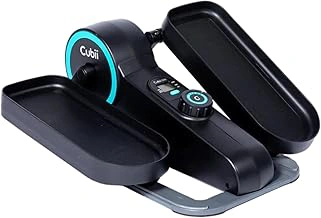
Cubii Move Under Desk Elliptical Machine with Adjustable Workout Levels
The Cubii Move offers manual resistance for users who prefer self-paced pedaling without motor noise. A tension dial adjusts workout intensity across multiple levels, so you can increase resistance as your legs warm up or dial it back during focused call segments. The compact footprint fits under most desks that provide at least the listed size of clearance, and the mechanical design produces minimal sound - no motor hum or electronic whir to interrupt virtual meetings.
At $135 and rated 4.3 out of 5, the Move delivers straightforward value for active sitting: turn the dial, start pedaling, and maintain movement at your own pace. Because it relies entirely on leg effort, you control the tempo without preset programs or batteries. This simplicity keeps maintenance low and operation quiet, making it a practical choice for home offices where discretion matters.
The trade-off is continuous effort. Unlike motorized models that assist your stride, the Move requires you to generate every rotation, which can be tiring during hour-long calls or back-to-back video sessions. Users who want passive motion or lower-intensity movement for extended periods may find the manual resistance demanding. But if you prefer full control over speed and resistance - and value silence over automation - the Cubii Move matches that need without compromise.
- ✅ Manual tension dial for adjustable resistance levels
- ✅ Compact design fits under desks with moderate clearance
- ✅ No motor noise during calls or focused work
- ✅ Straightforward operation without batteries or electronics
- ⚠️ Requires continuous leg effort throughout use
- ⚠️ May tire users during long meetings or extended sessions
- ⚠️ No passive motion or motorized assistance
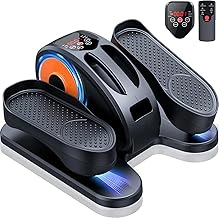
GUGTTR Under Desk Electric Elliptical Leg Exerciser with Remote Control and 12 Adjustable Speeds
The GUGTTR Under Desk Electric Elliptical brings motorized pedaling to your workspace, offering 12 adjustable speeds and a wireless remote that lets you change intensity without reaching down mid-call. Priced at $89.99 with a 4.4/5 rating, this model suits anyone who wants consistent motion without the manual effort required by passive ellipticals.
Because the unit is electric, the motor maintains steady pedaling even when you relax your legs completely. You can adjust speed using the included remote, which stays within arm's reach during long meetings and reduces the need to interrupt your workflow. The 12 speed settings range from gentle GUGTTR Under Desk Electric Elliptical Leg Exerciser with Remote Control and 12 Adjustable Speeds movement to a more active pace, giving you control over how much energy you expend while seated.
The trade-off for motorized convenience is noise: the electric motor introduces a low hum that's louder than fully manual units. Most users find it call-compatible, especially with headsets or in private offices, but open-plan spaces or sensitive microphone setups may pick up the sound. If your calls require absolute silence, test the unit during a video meeting to confirm compatibility with your audio equipment.
This elliptical works best for passive motion during extended calls or focus sessions when you'd rather not think about pedaling speed. The remote makes it easy to dial resistance up or down without breaking concentration, and the motorized drive ensures your legs keep moving even during distracted moments. For users who prefer to let the machine do the work while they stay engaged on screen, the GUGTTR offers a hands-free solution that keeps circulation active without adding physical effort.
- ✅ Motorized drive maintains consistent pedaling without manual effort
- ✅ Wireless remote allows hands-free speed adjustments during calls
- ✅ 12 adjustable speeds provide range from gentle to active motion
- ✅ Affordable at $89.99 for electric operation
- ⚠️ Electric motor produces low hum louder than manual units
- ⚠️ May be audible on sensitive microphone setups in quiet environments
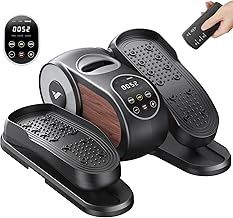
MERACH Under Desk Electric Elliptical Leg Exerciser with 12 Speeds and Remote Control
The MERACH Under Desk Electric Elliptical offers motorized movement across 12 speed settings, controlled by a wireless remote that lets you adjust intensity without bending down during calls or focused work. Priced at $99.99 with a 4.5/5 user rating, it delivers a convenient middle ground between basic manual models and premium options, particularly for users working at desks with shallow legroom.
Its compact footprint fits beneath desks where larger units crowd your knees or hit the underside of the work surface. The motorized drive removes the effort required to maintain consistent motion on manual ellipticals, which can help when you're concentrating on a presentation or typing notes. The 12-speed range spans light MERACH Under Desk Electric Elliptical Leg Exerciser with 12 Speeds and Remote Control movement to more deliberate pedaling, so you can match intensity to the type of work - gentle motion during client calls, higher speeds during passive listening or video reviews.
At $99.99, the MERACH costs slightly more than simpler motorized models but earns the highest rating in this comparison, suggesting users find the build quality, noise profile, or reliability above average. The remote control is a practical feature when you're seated and don't want to interrupt your workflow to reach under the desk. This combination of compact dimensions, speed flexibility, and hands-free control makes it well-suited to smaller home offices or cubicles where space is tight and convenience matters.
The trade-off is the higher price compared to bare-bones alternatives. If your desk has ample clearance and you prefer the direct feel of a manual elliptical, a less expensive option may meet your needs. But for users who value remote adjustability, a range of intensity levels, and a smaller unit that won't interfere with legroom, the MERACH balances features and cost effectively.
- ✅ 12 speed settings for varied intensity
- ✅ Wireless remote control for hands-free adjustment
- ✅ Compact footprint suits desks with limited legroom
- ✅ Motorized drive maintains consistent motion without effort
- ✅ 4.5/5 user rating suggests strong build quality or quieter operation
- ⚠️ Higher price at $99.99 compared to simpler motorized models
- ⚠️ Motorized design may feel less direct than manual alternatives