This guide is for standing desk owners who need to adjust keyboard and mouse height independently from the desktop surface, especially when the desk's minimum or maximum height doesn't align comfortably with forearm position. If you notice wrist extension, shoulder elevation, or awkward reach while typing at standing height, a keyboard tray can help you dial in neutral arm angles without changing your entire desk position.
You'll also find this useful if you alternate between sitting and standing throughout the day and want consistent arm support at both postures, or if you share a desk with someone whose elbow height differs significantly from yours. This guide focuses on mounting systems, adjustment ranges, and compatibility factors that matter for standing desks - not fixed-height workstations, which have different clearance and stability requirements.
We won't address specific wrist conditions or offer therapeutic advice. Instead, we explain how tray geometry, tilt options, and track-mount compatibility influence comfort and usability so you can match features to your workspace and posture needs.
What Matters Most: Mount Type and Vertical Range
Keyboard trays for standing desks must keep pace with the desk itself, which means mount type and vertical range determine whether a tray will work across your full sit-stand range or lock you into a single zone. The three most common mount systems - pole mounts, under-desk clamps, and corner or swivel clamps - each handle height adjustment differently and impose distinct compatibility requirements on your desk frame.
Pole mounts attach to the vertical legs or columns of your standing desk, traveling up and down with the desk surface. Because they anchor to the frame rather than the underside of the desktop, they typically offer the widest vertical travel - often 12 to 18 inches or more - and stay aligned as you adjust desk height. The tradeoff is that pole diameter and frame geometry must match the mount's clamp design; desks with round, square, or C-channel legs each require compatible hardware, and some frames have no accessible pole section at all.
Under-desk clamps fasten to the underside of the desktop or to a crossbar beneath it. These mounts work on almost any desk shape and require no exposed frame, making them the most universal option. Vertical adjustment is usually limited to 4 to 8 inches, however, which may not cover the full ergonomic range when moving from seated to standing. If your desk rises 15 or 20 inches, an under-desk tray may end up too high when standing or too low when seated unless you reposition it manually each time.
Corner and swivel clamps attach to the edge or corner of the desktop and pivot the tray in or out rather than moving it vertically. These designs prioritize stowability and footprint over height range; most offer 2 to 6 inches of vertical play through a sliding track or gas-spring mechanism. They suit users who keep their desk at a fixed height or who adjust infrequently, but they struggle to maintain neutral wrist posture across large height swings.
Vertical travel range matters most when your desk moves more than 10 inches between positions. A tray with insufficient range forces you to either overreach or hunch, negating the ergonomic benefit of the standing desk itself. Check that the tray's lowest position drops below your seated elbow height and its highest position stays at or just below standing elbow height - both measured with shoulders relaxed and elbows at 90 degrees. Compatibility constraints are equally concrete: measure your desk's pole diameter or crossbar thickness, confirm clearance between the desktop and any stability bar, and verify that clamp jaws or mounting brackets will not interfere with cable trays, power grommets, or desk-frame bracing.
If your desk frame exposes vertical poles and you shift between sitting and standing multiple times per day, a pole-mounted tray with 12-plus inches of travel will track your movements without manual repositioning. If your desk has a solid apron or no accessible frame, an under-desk clamp offers broad compatibility but may require you to choose a primary working height or accept a compromise position. Corner mounts work best when ergonomic range is less critical than desk-space recovery between work sessions.
Surface Size vs. Adjustability Tradeoffs
Keyboard tray surface size and adjustability range often work against each other in standing desk setups. A 26-inch-wide platform typically provides enough room for a full-size keyboard and mouse when positioned side by side, while 27-inch models add comfort for users who prefer wider mouse movement arcs or use extended keyboards. Surface depth matters just as much: 11-inch trays require tight mouse placement directly beside or slightly in front of the keyboard, while 12-inch platforms allow the mouse to sit comfortably forward, reducing reach and shoulder strain during long sessions.
Larger surfaces introduce mechanical tradeoffs that affect daily use. A 27-inch tray with 12-inch depth weighs more than compact alternatives, which means adjustment mechanisms must work harder to lift and tilt the platform smoothly. This added load can reduce vertical travel range on some mounting arms, limit tilt angles, or make height changes feel stiffer over time. If your desk frame already supports significant weight or you adjust position infrequently, the extra surface area may be worth the stability tradeoff. For users who shift between sitting and standing multiple times per day, a lighter 26-inch by 11-inch tray often delivers faster, smoother repositioning without sacrificing usable workspace.
Choose surface size based on your input devices and how often you adjust: measure your keyboard width, add four to six inches for mouse clearance, and prioritize lighter platforms if you change height settings regularly throughout the day.
Common Mistakes to Avoid
One of the most frequent errors is ignoring the specific frame geometry of your standing desk before selecting a tray. Desks with crossbars, control boxes mounted under the surface, or thicker grommet panels can block clamp paths or reduce usable mounting zones, yet many buyers assume any clamp-on tray will work. Always measure the available lip thickness, depth from the front edge to the nearest obstruction, and width between legs or supports before committing to a mount.
Another common mistake is assuming all C-clamp or edge-clamp systems fit all desk edges. Clamp throat depth varies widely - some accept lips up to 2.5 inches, others max out at 1.5 inches - and surface finish matters: polished laminate, solid wood, and metal edges each respond differently to compression, so confirm both the clamp's rated capacity and the desk manufacturer's guidance on accessories. Overlooking this match often leads to wobbly trays or surface damage.
Buyers also frequently overlook vertical travel limits when pairing a tray with a sit-stand desk. A tray that adjusts only six inches may leave you reaching too high in standing mode or hunched in seated mode if the desk's height range doesn't align. Check that the tray's lowest and highest positions fall within comfortable typing zones across your full desk range, accounting for your own arm length and preferred elbow angle.
Purchasing a pole-mount or track-mount tray without confirming you have the necessary pole or track system already in place is another avoidable misstep. These mounts are sold separately from their rails or posts in many cases, and retrofitting a desk afterward can mean drilling new holes or buying compatible hardware that wasn't part of the original budget.
Finally, neglecting clearance for cables, knees, or chair armrests leads to real-world friction. A tray that extends deep enough to hold a full keyboard and mouse may collide with cable-management trays underneath, restrict legroom when tilted, or prevent you from rolling close enough to type comfortably if armrests don't retract. Measure not only the tray footprint but also the space it sweeps through when adjusted, and account for slack in power cords, USB hubs, and monitor arms that share the underside of your desk.
Final Takeaway
Mount compatibility and vertical range are the two non-negotiable factors when choosing a keyboard tray for a standing desk. A tray that cannot attach securely to your desk's frame design or lacks sufficient height adjustment will fail to deliver neutral wrist posture across your full sit-stand range, regardless of other features.
Before purchasing, measure the width, thickness, and shape of your desk frame at the intended mounting location. Check whether your desk uses a rectangular tube, C-channel, or desktop-edge design, then confirm the tray's clamp or bracket system matches. Verify that the tray's minimum and maximum height positions cover your seated elbow height and standing elbow height, accounting for your chair's seat-pan range and the desk's lowest and highest settings.
Test clearance by simulating the tray's position at both extremes: ensure it does not collide with the desk frame, crossbar, or motor housing when lowered, and confirm it stays within comfortable reach when the desk is raised. If your desk model has known compatibility limitations - such as narrow frame spacing or obstructions near the front edge - cross-reference the tray manufacturer's fit list or contact support with your desk's make and model before ordering.
Choosing a keyboard tray that fits your specific desk geometry and movement pattern ensures consistent arm and wrist alignment, reduces awkward reaching, and makes the transition between sitting and standing seamless throughout the day.
Pre-Purchase Compatibility Checklist
- Measure desk frame thickness and confirm mount clamp or pole compatibility
- Verify desk has accessible mounting points (pole, underside edge, or corner)
- Check keyboard tray vertical travel matches your standing desk height range
- Confirm tray width accommodates your keyboard and mouse side-by-side
- Ensure tray mechanism doesn't obstruct desk legs or crossbars when lowered
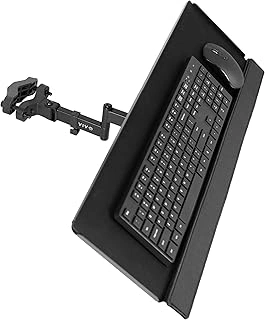
VIVO Universal 26-Inch Keyboard & Mouse Tray Pole Mount, Black, MOUNT-POLEKB
If your standing desk includes a vertical pole system, the VIVO Universal 26-Inch Keyboard & Mouse Tray Pole Mount (MOUNT-POLEKB) offers independent height adjustment without clamping to the desk surface. This pole-mount design slides onto compatible vertical poles and locks at any height, giving you flexibility to position the keyboard tray separately from your desktop height - useful when you want the tray lower than your work surface or when desk space is limited.
The 26-inch tray provides room for a full-size keyboard and mouse side by side, with a surface wide enough for most standard layouts. The black steel construction mounts to poles typically found on monitor arms or dedicated ergonomic pole systems, though you'll need to confirm pole diameter compatibility before purchasing, as this mount is designed for specific pole sizes common in desk accessory ecosystems.
Installation is more involved than clamp-on trays: you'll need to remove or adjust existing pole-mounted accessories, slide the tray bracket onto the pole, and tighten the locking mechanism at your preferred height. This setup works well if you already have a pole-based desk configuration, but adds complexity if you're starting from scratch. Once installed, the independent height adjustment lets you dial in a comfortable typing position regardless of desk elevation, making it a practical choice for users who switch frequently between sitting and standing.
At $59.99, this tray suits desks with existing pole infrastructure and users who value independent tray positioning over simpler clamp-mount options.
- ✅ Independent height adjustment on vertical pole systems
- ✅ 26-inch surface fits full-size keyboard and mouse
- ✅ Does not clamp to desk surface, preserving desktop space
- ⚠️ Requires compatible pole diameter and existing pole setup
- ⚠️ Installation more complex than clamp-on trays
- ⚠️ Not suitable for desks without vertical pole systems
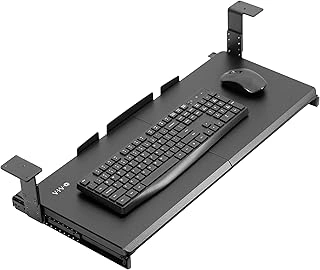
VIVO Large Height Adjustable Under Desk Keyboard Tray, 27x11 inch, Black, MOUNT-KB27HB
The VIVO MOUNT-KB27HB offers a spacious 27 × 11 inch platform that fits both a full-size keyboard and a mouse without crowding, making it a practical choice for users who need generous surface area beneath their standing desk. The tray mounts via clamp to the underside edge of desks, so it requires accessible front or side rails; desks with solid aprons or memory-controller boxes blocking the edge may not accommodate the clamp mechanism.
Height adjustability lets you dial in wrist alignment whether the desk is lowered for sitting or raised to standing height. The mechanism uses a lever-operated gas spring, allowing you to reposition the tray without tools as you transition between postures. This flexibility matters most when your standing desk sees frequent height changes throughout the day.
The clamp design works well with desktops up to approximately the listed size thick, though you should verify your desk's edge thickness and clearance before ordering. Desks with recessed control panels or thick modesty panels may limit where you can secure the clamp. The 27-inch width suits standard and wide keyboards, but measure your workspace to confirm the tray won't interfere with drawer pulls, cable-management channels, or monitor-arm posts.
At $49.99, the tray balances surface area and adjustability without requiring permanent drilling. The 4.2 out of 5 rating suggests most users find installation straightforward and appreciate the additional desk-surface real estate freed up by moving the keyboard below the work plane. If your standing desk has an open underside edge and you want height flexibility in a roomy platform, the MOUNT-KB27HB delivers practical ergonomic adjustment at a moderate price.
- ✅ 27 × 11 inch surface accommodates full-size keyboard and mouse
- ✅ Height-adjustable via gas-spring lever for sitting and standing transitions
- ✅ Clamp mount requires no drilling or permanent desk modification
- ✅ Frees up desktop workspace by relocating input devices below the surface
- ⚠️ Clamp mechanism requires accessible desk edge; solid aprons or control boxes may block installation
- ⚠️ Desk thickness and edge clearance must be verified before purchase
- ⚠️ 27-inch width may interfere with drawer hardware or cable routing on some desks
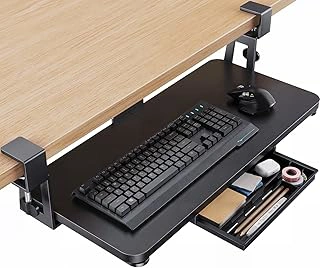
HUANUO Large Under Desk Keyboard Tray, C-Clamp Mount, 26x12 inch, Storage Drawer, Black
The HUANUO Large Under Desk Keyboard Tray offers a 26×12 inch surface with a built-in storage drawer, making it a practical choice for standing desk users who want both workspace and accessory organization in one unit. The C-clamp mount attaches to desk edges and works with most standing desk frames, though you'll need to confirm your desk edge thickness before installation.
At the listed size wide, the platform accommodates a full-size keyboard and mouse side-by-side without crowding. The 12-inch depth provides enough room for wrist positioning, and the integrated drawer underneath holds pens, USB drives, or small tools within reach. The drawer does add vertical depth to the overall assembly, so measure the clearance between your desk surface and your lap or chair armrests - especially important if you alternate between sitting and standing throughout the day.
The C-clamp mechanism grips the desk edge and can be tightened or loosened without tools, which simplifies height adjustments when you raise or lower your standing desk. Because the tray hangs below the desk surface, it won't interfere with desktop items, but the added drawer means the lowest position of the tray sits deeper than slimmer models. If you have limited under-desk clearance or a keyboard drawer already installed, check the total drop distance before committing.
The black finish blends with most office furniture, and the steel construction supports typical keyboard and mouse weight without flexing. The drawer slides open smoothly, though it's shallow - best for flat items rather than bulky accessories. For users who value cable management and want a dedicated spot for small office supplies, the built-in drawer reduces desktop clutter and keeps frequently used items accessible during standing sessions.
- ✅ 26×12 inch surface fits full-size keyboard and mouse comfortably
- ✅ Built-in storage drawer keeps small accessories within reach
- ✅ C-clamp mount attaches to most desk edges without drilling
- ✅ Steel construction supports typical keyboard weight without flex
- ⚠️ Drawer adds vertical depth and may reduce under-desk clearance
- ⚠️ Shallow drawer limits storage to flat items only
- ⚠️ Requires measurement of desk edge thickness for proper fit
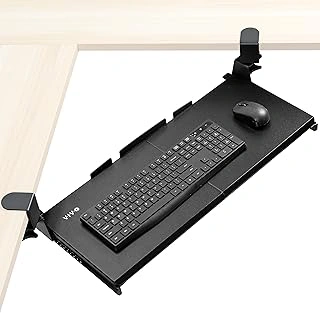
VIVO Corner Desk Slide-Out Keyboard Tray, 27x11", Swivel Clamps, Black, MOUNT-KB10C
Corner and L-shaped standing desks present unique mounting challenges that standard clamp-on trays often can't accommodate. The VIVO MOUNT-KB10C addresses this with swivel clamps that rotate to attach at angles, letting you position a keyboard tray where two desk surfaces meet or along angled edges. The 27×11-inch platform slides out on ball-bearing rails and provides enough surface for a full-size keyboard and mouse.
The swivel clamp design uses two independent mounting points that can be angled to match corner desk frames or non-parallel supports. Each clamp tightens onto desk edges or frames up to approximately the listed size thick, and the swivel mechanism adds roughly the listed amount degrees of rotation per clamp. This flexibility makes installation possible on corner workstations where fixed-angle clamps would leave gaps or require awkward positioning. The slide-out depth extends about the listed size from the desk edge when fully deployed, keeping the tray tucked away when not in use.
The platform itself is a flat black surface without a built-in wrist rest or mouse pad, so you'll need to add those separately if desired. The ball-bearing slides operate smoothly under typical keyboard and mouse weight, though heavier items like large mechanical keyboards and wrist rests may add drag over time. The tray does not tilt or adjust in height once mounted - the clamps set the vertical position, and the platform remains level during use.
This tray works best when your corner desk has accessible frame members or edge surfaces where both clamps can secure firmly. Desktops with thin veneers, glass tops, or frames that sit too far inboard may not provide stable attachment points. Measure your desk edge thickness and frame geometry before purchasing to confirm compatibility. For standing desk users who adjust height frequently, verify that the tray's fixed mounting position will remain comfortable across your full height range, since the clamps don't offer tool-free vertical repositioning.
At $59.99, the MOUNT-KB10C offers a practical solution for corner setups where standard trays won't fit, provided your desk frame supports swivel clamp attachment. The slide-out mechanism keeps the work surface clear when the tray isn't needed, and the swivel joints add enough flexibility to handle most corner angles without custom brackets.
- ✅ Swivel clamps rotate to fit corner and L-shaped desk frames
- ✅ 27×11-inch platform accommodates full-size keyboard and mouse
- ✅ Slide-out mechanism keeps tray tucked away when not in use
- ✅ Ball-bearing rails provide smooth extension and retraction
- ⚠️ No tilt or height adjustment after clamps are installed
- ⚠️ Requires accessible desk frame or edge surfaces for both clamps
- ⚠️ Flat platform with no integrated wrist rest or mouse pad
- ⚠️ Fixed mounting position may not suit all points in standing desk height range