We may earn a commission when you buy through links on this page, at no extra cost to you. How this works.
Remote workers who spend long hours in front of screens often notice fatigue, discomfort, or difficulty focusing - issues that inadequate or poorly positioned lighting can make worse. Choosing the right desk lamp is not about treating or preventing medical conditions, but about creating a setup that supports comfort and sustained attention during extended work sessions.
The key factors to evaluate are placement relative to your screen and keyboard, the ability to adjust brightness and color temperature, and features that minimize glare on reflective surfaces. A well-chosen lamp reduces the contrast between bright screens and dim surroundings, which can help you work more comfortably without squinting or leaning forward.
This guide walks through the practical attributes that matter most - beam angle, control granularity, stability, and how different mounting or base styles fit varied desk layouts. You'll learn how to compare lamps on real, observable features rather than vague promises, and how to match those features to your specific work environment and tasks.
By the end, you'll understand which lamp characteristics align with your screen time, desk size, and ambient light situation, so you can make a confident, informed choice without relying on exaggerated claims or untested assumptions.
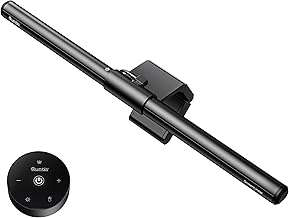
Quntis Monitor Light Bar with Remote, Eye-Care, Auto-Dimming
A monitor light bar addresses eye strain by illuminating your desk from above the screen, eliminating reflections and reducing the brightness contrast between your monitor and surroundings. The Quntis Monitor Light Bar mounts directly on top of most flat-panel displays and includes a wireless remote that adjusts both brightness and color temperature without adding clutter to your workspace.
The built-in auto-dimming sensor reads ambient light and adjusts output automatically, which helps maintain consistent illumination as daylight fades or overhead lighting changes. You can override the sensor using the remote to set manual brightness levels or shift the color temperature from warm (multipleK) to cool (multipleK) depending on the task. This range lets you match the lamp's output to your screen's white point or choose warmer tones for late-evening work.
At $35.99, this light bar offers a compact, budget-friendly entry point for single-monitor setups. The clamp-style mount fits displays up to approximately the listed size thick and distributes light across a typical multiple- to larger screen width. If you work with dual monitors or ultrawide panels exceeding the listed size, the coverage may leave outer edges dimmer. The remote requires line-of-sight to the sensor module, so desk layout matters if you plan to adjust settings frequently.
Setup involves clipping the bar onto the monitor's top edge and connecting the USB power cable to your computer or a wall adapter. There are no articulating joints or tilt adjustments beyond the fixed downward angle, so the lamp works best when your monitor sits upright and your desk depth keeps the keyboard and documents within the light pool. For users who need flexible positioning or broader coverage, a traditional desk lamp with an adjustable arm may prove more versatile.
The auto-dimming feature reduces manual fiddling, but the sensor's accuracy varies with room layout and reflection from walls or windows. If you prefer full control, the remote allows quick manual overrides. The wireless controller reduces the need to reach behind the monitor, making brightness and color tweaks straightforward during long screen sessions.
- ✅ Auto-dimming sensor adjusts to ambient light changes
- ✅ Wireless remote for brightness and color temperature (3000K - 6500K)
- ✅ Compact clamp mount saves desk space
- ✅ Budget-friendly at $35.99
- ⚠️ Limited coverage for dual monitors or ultrawide displays beyond 34 inches
- ⚠️ No articulating joints or tilt adjustment
- ⚠️ Remote requires line-of-sight to sensor module
Who This Lighting Guide Is For
This guide is written for professionals who spend extended hours in front of a screen and notice the toll it takes on comfort and focus. If you experience eye fatigue, dry eyes, or tension headaches by the end of the workday, poor lighting is often a major contributor. Many remote workers, office employees, and freelancers operate in spaces with inadequate overhead lighting - either too dim to support detailed tasks or too harsh and direct, creating glare on monitors and glossy surfaces.
You don't need to renovate your workspace or invest in expensive built-in fixtures to improve visual comfort. A well-chosen desk lamp can address contrast issues, eliminate shadows on your keyboard and documents, and reduce the flicker or glare that forces your eyes to constantly adjust. This guide is also for anyone working in shared spaces, basements, or rooms with windows that produce uneven natural light throughout the day.
If you want a practical solution that fits your existing desk setup and helps you work longer without discomfort, the sections that follow will walk you through placement, brightness levels, color temperature, and control features that matter most for screen-based work.
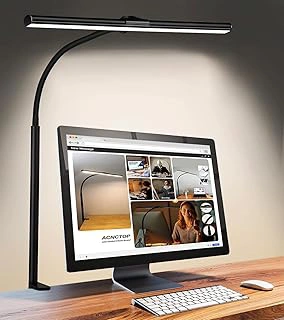
ACNCTOP Adjustable LED Desk Lamp with Flexible Gooseneck Clamp
If desk space is tight or you need lamp placement beyond the footprint of a traditional base, the ACNCTOP Adjustable LED Desk Lamp with Flexible Gooseneck Clamp offers a budget-friendly clamp design at $15.99. The flexible gooseneck arm lets you position light exactly where you need it - over a keyboard, to the side of a monitor, or angled away from screens to minimize glare. Because the clamp mounts to the edge of your desk, shelf, or headboard, you free up surface area and gain positioning control that standard desk lamps can't match.
This lamp works well for basic task lighting in home offices, dorm rooms, or workbenches where you need adjustable direction without spending much. The gooseneck bends to direct light down onto documents or away from reflective surfaces, which helps reduce glare when you're working at a computer. At this entry-level price point, expect simpler controls - you won't find auto-dimming sensors or fine color temperature adjustment that higher-end lamps provide, so brightness and warmth are set manually or fixed.
The clamp mechanism fits edges up to a typical desk thickness, but test the grip on your specific furniture before relying on it for permanent placement. Because the arm is flexible rather than articulated with joints, positioning can drift slightly under the weight of the lamp head, especially if you reposition it frequently. For straightforward task lighting where you need flexibility and a small budget, this lamp delivers practical positioning control; for more advanced glare management or precise tuning, consider lamps with stepless dimming and adjustable color temperature.
- ✅ Clamp design saves desk surface space
- ✅ Flexible gooseneck allows precise light positioning
- ✅ Budget-friendly at $15.99
- ✅ Directs light to reduce screen glare
- ⚠️ No advanced features like auto-dimming or color temperature adjustment
- ⚠️ Gooseneck may drift under lamp head weight with frequent repositioning
- ⚠️ Clamp fit depends on desk edge thickness
Why Standard Desk Lamps Often Cause Problems
Standard desk lamps frequently create glare and eye strain because they're designed for general lighting rather than screen-based work environments. When positioned incorrectly, a lamp's light beam strikes your monitor at angles that produce distracting reflections, forcing your eyes to constantly adjust between bright spots and darker areas of the screen. This contrast fatigue accumulates over hours of work, leading to discomfort that many people attribute to the screen itself rather than the lighting setup.
Fixed brightness levels in traditional lamps either flood your workspace with excessive light - causing your pupils to constrict and making dimmer screen areas harder to read - or provide insufficient illumination that forces you to lean closer to your work. Neither extreme supports comfortable viewing, and the mismatch becomes more pronounced as natural daylight changes throughout the day. Without the ability to dim or adjust output, you're locked into a single light level that rarely matches your current task or the ambient conditions in your room.
Most standard lamps also emit a single color temperature, typically warm yellow light around 2700K to 3000K. While this tone feels cozy for evening reading, it creates a color mismatch when used alongside the cooler, blue-shifted light of computer monitors (usually 6500K or higher). Your eyes must continuously adapt to these conflicting color signals, adding another layer of visual stress. Tasks requiring color accuracy or detailed focus suffer when the light source doesn't approximate daylight's neutral rendering.
Placement constraints compound these issues: many desk lamps have short arms or limited reach, forcing you to position the light source directly in your peripheral vision or too close to the monitor. The result is uneven task lighting, with bright pools near the lamp base and dim zones at the edges of your workspace. This non-uniform distribution creates constant micro-adjustments in your eye's focus and exposure settings, accelerating fatigue during extended work sessions.
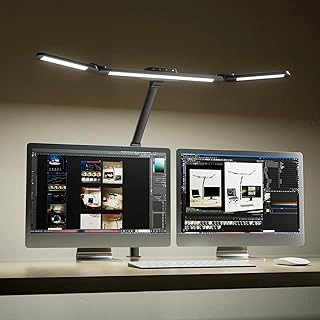
Honeywell Wide LED Desk Lamp with Clamp for Dual Monitors, Adjustable
Dual-monitor setups and large desks demand more light coverage than a single-arm lamp can provide, and the Honeywell Wide LED Desk Lamp addresses that need with a broader spread and clamp-mount design. Its adjustable arm lets you position the wide light bar where glare is least likely to reach your screens, while the clamp frees desk real estate that a weighted base would otherwise occupy.
The lamp's wide light bar distributes brightness across a greater horizontal span, reducing the dark zones that force your eyes to constantly readjust between illuminated and shadowed areas. The clamp mount attaches securely to desk edges up to approximately two inches thick, offering stable positioning even when the arm is extended or angled. This flexibility helps you steer light toward paperwork or keyboard zones without bouncing reflections into monitor panels.
At $73.99, this lamp sits at a higher price point that reflects the additional reach, adjustable articulation, and build required for dual-monitor coverage. The 4.2 out of 5 rating suggests most users find the brightness span and clamp stability meet expectations for larger work surfaces, though the lamp's footprint and adjustment range should match your specific desk depth and monitor arrangement before purchase.
If your workspace includes two screens or a deep desk that smaller lamps leave partly in shadow, the Honeywell's wider coverage and clamp design offer practical advantages. Shoppers working with standard single-monitor layouts may find narrower, less expensive lamps sufficient for their lighting needs.
- ✅ Wide light bar covers dual-monitor setups and large desks
- ✅ Clamp mount frees desk surface space
- ✅ Adjustable arm for directing light away from screens
- ⚠️ Higher price point at $73.99
- ⚠️ Requires desk edge clearance for clamp installation
Essential Features That Reduce Eye Strain
- Adjustable brightness levels to match ambient light and task demands
- Color temperature options (warm to cool white) for different times of day
- Flexible or adjustable arm to direct light away from screen surface
- Diffused or indirect light output to minimize harsh shadows
- Stable mounting or base that doesn't shift during adjustments
- Flicker-free LED technology to reduce subconscious visual stress
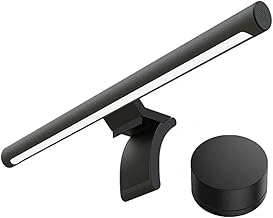
Xiaomi Mi Computer Monitor Light Bar with Wireless Remote Control
The Xiaomi Mi Computer Monitor Light Bar with Wireless Remote Control offers a space-saving alternative to traditional desk lamps, mounting directly onto the top edge of your monitor to cast light downward onto your workspace without creating screen glare. This asymmetric design directs illumination forward and down, keeping the light source out of your direct line of sight and preventing reflections on the monitor surface.
At $67.99, this model sits in the mid-range for monitor light bars and includes a wireless remote control that lets you adjust both brightness and color temperature without reaching for buttons on the light bar itself. The remote provides precise control over light output, allowing you to dial in comfortable settings for different times of day or tasks - warmer tones for evening work, cooler light for morning concentration - without leaving your seated position.
The minimalist design attaches via a counterweight clip that fits monitors with various thicknesses, eliminating the need for desk space that a traditional lamp would occupy. This positioning puts the light source closer to your working area while keeping it above eye level, reducing the contrast between bright and dark zones in your field of view that can contribute to visual fatigue during extended screen sessions.
The wireless remote adds convenience compared to models that require you to reach up and press buttons on the light bar itself, though it does mean keeping track of a small separate device on your desk. The unit draws power via USB, so you'll need an available port on your computer or a separate USB adapter. Because the light bar mounts to the monitor rather than the desk, it moves with your monitor if you adjust screen position, maintaining consistent workspace illumination.
This setup works best for single-monitor configurations where you want focused task lighting without adding another footprint to your desk. The color temperature control helps you match ambient lighting conditions, and the adjustable brightness means you can reduce the intensity gap between your screen and surroundings that often leads to eye strain during long work periods.
- ✅ Wireless remote for brightness and color temperature control without reaching the light bar
- ✅ Asymmetric light output directs illumination onto desk while avoiding screen glare
- ✅ Mounts directly to monitor, saving desk space
- ✅ Adjustable settings help balance screen and ambient lighting contrast
- ⚠️ Wireless remote is a separate item to keep track of on your desk
- ⚠️ Requires available USB port for power
- ⚠️ Works best with single-monitor setups
Lamp Placement and Screen Geometry
Proper lamp placement prevents glare and reduces eye strain by ensuring light reaches your workspace without reflecting off your screen or shining into your eyes. The ideal position is above or slightly behind your monitor, angled to illuminate the desk surface and keyboard without creating bright spots on the display. Monitor light bars mount directly on the top edge of flat-panel displays, directing light downward onto the desk while leaving the screen itself free from reflections. This geometry works especially well for users who sit close to the screen and need focused task lighting without a footprint on the desk.
Clamp lamps attach to the desk edge or a shelf and offer flexible positioning through adjustable arms, letting you angle the light source away from the monitor while still covering the keyboard and documents. Freestanding desk lamps with articulated heads provide similar control but occupy desk space; position them to the side of your monitor rather than directly in front to minimize screen glare. Avoid placing any light source in your direct line of sight or directly in front of the monitor, which creates competing brightness levels and forces your eyes to constantly adjust. Test placement by sitting in your normal working position and checking for reflections on the screen - shift the lamp until the display remains clear and the desk surface is evenly lit.
The distance between the lamp and your work surface also matters: too close creates harsh shadows and bright spots, while too far reduces usable light. For most setups, positioning the light source 15 to 24 inches above the desk surface balances coverage and comfort, though adjustable designs let you fine-tune based on task and ambient light conditions.
Brightness, Lumens, and Dimming Control
Brightness needs for desk work depend on the size of your work surface, the ambient light in the room, and whether you're reading paper or working on a screen. A lamp delivering between 400 and 800 lumens to your desk surface typically covers most office tasks, but the ability to adjust that output matters more than hitting a single target number.
Stepless dimming - continuous adjustment along a slider or touch strip - lets you fine-tune brightness to match changing daylight, screen brightness, or task type without jumping between fixed preset levels. Multi-level dimming with three to five steps works well if you have consistent routines, such as bright light for paper reading and lower output for evening screen work. Lamps with only on-off switching force you to accept one brightness level regardless of conditions, which can lead to glare when the room is dim or insufficient light when ambient sources fade.
Auto-dimming sensors measure ambient light and adjust lamp output automatically. This feature is useful in spaces with large windows or fluctuating natural light, since the lamp compensates without manual input. However, sensors can react slowly to sudden changes, and some users find the constant adjustment distracting during focused work. Manual dimming gives you predictable, stable output and works better if your environment and tasks stay fairly consistent throughout the day.
When comparing lamps, check whether dimming is controlled by touch, physical dial, remote, or app. Touch and dial controls offer immediate tactile feedback; remotes and apps add convenience if the lamp sits beyond arm's reach but introduce a small delay. Choose the control type that fits how you adjust lighting during your typical workday, and prioritize smooth, flicker-free dimming across the full range to avoid eye fatigue at lower settings.
Color Temperature and Circadian Considerations
Color temperature, measured in Kelvin (K), determines whether your desk lamp emits warm yellowish light or cool blue-tinted light, and this choice affects both focus and sleep quality. Cooler light in the 5000K - 6500K range mimics daylight and supports alertness during morning and afternoon work sessions, while warmer light around 2700K - 3000K contains less blue wavelength content and is better suited for evening hours when you want to minimize circadian disruption.
If you work varied hours or share your workspace with screen time before bed, an adjustable color-temperature lamp lets you dial in cooler tones during the day and shift to warmer tones after sunset. This flexibility costs more than a fixed-temperature model, but it becomes worthwhile if you regularly work past early evening or notice difficulty falling asleep after late computer sessions.
For dedicated daytime office spaces, a lamp fixed at 4000K - 5000K delivers neutral-to-cool light that reduces the need for your eyes to constantly adapt between screen brightness and ambient warmth. Conversely, if you only use your desk lamp for reading or casual tasks in the evening, a warmer 3000K fixture avoids unnecessary blue light exposure without requiring electronic controls.
The practical takeaway: match color temperature to your primary work window, and invest in adjustable controls only if your schedule or task mix genuinely shifts between early-morning focus work and late-night screen use.
Monitor Light Bars vs Traditional Desk Lamps
Monitor light bars and traditional desk lamps take fundamentally different approaches to workspace illumination, each with distinct advantages depending on your setup and tasks. A monitor light bar mounts directly to the top of your display and directs light downward toward your keyboard and desk surface, creating focused task lighting without occupying any desk space. This design minimizes screen glare because the light shines away from your eyes and doesn't reflect off the monitor, making it particularly effective for users working in small spaces or multi-monitor setups where desk real estate is limited. Traditional clamp or freestanding lamps, by contrast, position the light source to the side or behind your screen, offering broader coverage and greater flexibility in directing light exactly where you need it. You can adjust the arm to illuminate documents, notebooks, or specific work areas that a fixed monitor bar cannot reach as easily.
The tradeoff centers on space versus versatility. Monitor light bars excel when your primary task is screen-based work with occasional keyboard use - they eliminate desk clutter and deliver glare-free illumination in a compact footprint. Traditional lamps provide more adaptable lighting for mixed tasks like sketching, reading printed materials, or working across a wider desk area, but they require thoughtful placement to avoid reflecting light into your screen or creating shadows. If you frequently shift between digital and physical work, a repositionable lamp gives you control over light direction and intensity across different zones. If your workflow is screen-dominant and desk space is tight, a monitor light bar keeps your surface clear while reducing the risk of glare from poorly angled fixtures.
Neither option is universally superior - your choice depends on workspace constraints, the balance of screen versus hands-on tasks, and whether you value positioning flexibility or streamlined desk organization. Consider how much of your workday involves looking at printed documents or objects beyond the keyboard, and whether your monitor setup allows stable mounting for a light bar.
Common Mistakes to Avoid
Choosing a lamp without dimming control locks you into a single brightness level that may be too harsh in the evening or too dim for detailed tasks. Fixed-output lamps force you to adapt to the light instead of adjusting the light to your activity, making eye strain more likely during long work sessions.
Placing a light source directly in front of your screen creates reflections that bounce off the display and into your eyes, washing out contrast and forcing your eyes to work harder to distinguish text from glare. Position lamps to the side or above the monitor, never between you and the screen.
Ignoring color temperature options means you may end up with a cool white lamp that feels clinical in the evening or a warm lamp that distorts colors during design work. Look for lamps that offer multiple temperature settings or select a fixed temperature that matches your primary task - neutral white around 4000 K works well for mixed screen and paper work.
Selecting lamps with inadequate reach or unstable bases leads to frustration when the light won't extend over your keyboard or tips over during routine adjustments. Articulating arms and weighted bases provide the flexibility and stability needed for real desk use, especially on sit-stand workstations.
Failing to test placement before committing can leave you with a lamp that looked good in the store but creates shadows or glare in your actual workspace. Set up the lamp where you plan to use it, position your monitor and keyboard, then adjust the lamp head and observe reflections on the screen before finalizing your purchase.
Avoid these missteps by prioritizing adjustable controls, thoughtful placement relative to your screen, appropriate color temperature for your tasks, sufficient reach and stability, and real-world testing in your workspace before you commit to a lamp.
Final Takeaway
Choosing a desk lamp to reduce eye strain and glare starts with prioritizing adjustable brightness and color temperature, so you can match the light to changing tasks and daylight throughout the day. Placement matters just as much: position the lamp to the side of your screen rather than directly behind or in front, avoiding reflections that force you to squint or shift posture. Match the lamp type to your desk size and monitor count - swing-arm and clamp models work well for multi-screen setups or smaller surfaces, while weighted-base lamps suit larger desks where you need stable, centered light. Verify that the control options fit your workflow: touch panels and dimmers let you fine-tune output quickly, while preset modes can simplify switching between reading, screen work, and ambient tasks. The right lighting supports comfort and focus without requiring a workspace overhaul, and small adjustments to angle, intensity, and color can make long work sessions noticeably easier on your eyes.