We may earn a commission when you buy through links on this page, at no extra cost to you. How this works.
The material beneath your mouse and wrist changes how accurately your cursor moves, how comfortable your forearm stays during long sessions, and how often you need to clean your workspace. Felt and faux leather represent two fundamentally different approaches: one prioritizes cushion and sound absorption, the other emphasizes glide speed and stain resistance.
Felt desk pads deliver a soft, textured surface that dampens the noise of keyboard taps and mouse clicks. The woven fibers create friction that slows glide slightly, which some users find steadying for precise design work or data entry. That same texture, however, can trap dust, crumbs, and skin oils, making spills harder to blot and requiring more frequent spot cleaning or replacement.
Faux leather pads offer a smooth, low-friction plane that lets optical sensors track without interference from texture patterns. The non-porous coating wipes clean in seconds and resists liquid penetration. The tradeoff arrives in wrist contact: synthetic leather can feel warmer against bare skin during extended use, and lighter pads may slide on polished desks unless backed with grip dots or extra weight.
Mouse tracking precision depends on whether your sensor reads better over uniform weave or slick polymer, ergonomic comfort hinges on whether you prefer cushioned fabric or cool firmness, and durability splits between fiber wear and coating peel. Maintenance ease, desktop aesthetics, and whether you work in a quiet shared space or a private office further tip the balance. Understanding these specific tradeoffs helps you match pad material to the way you actually use your desk.
Quick comparison
| Bright Stone Non-Slip Felt Desk Mat and Mouse Pad | Check current price and reviews |
| Cossini XL Large Vegan Leather Desk Pad, Non-Slip and Waterproof | Check current price and reviews |
What is a Felt Desk Pad?
A felt desk pad is made from dense polyester or wool-blend fibers woven into a smooth, cushioned mat that sits between your keyboard, mouse, and desktop. The material absorbs vibration and sound, creating a quieter workspace while providing a soft surface for wrists and forearms during long typing or mousing sessions.
The woven texture grips your desk without adhesive, so the pad stays put even during rapid mouse movements. Felt's matte, non-reflective finish works well with optical and laser mouse sensors, offering consistent tracking across the entire surface. The slight give in the material adds comfort without sacrificing control, making it a popular choice for designers and writers who spend hours at their desk.
Spills are the main drawback. Felt absorbs liquid quickly, and cleaning often requires blotting and air-drying rather than a quick wipe. Over time, friction from repeated mouse use can cause pilling - small fiber balls that form on the surface - and dust particles settle into the weave more easily than on smoother materials. Regular vacuuming or lint-rolling helps, but felt demands more upkeep than alternatives if you want to keep it looking fresh.
The tradeoff is straightforward: felt delivers superior cushion and quiet operation, but you'll need to be mindful of spills and commit to occasional maintenance to preserve the surface.
What is a Faux Leather Desk Pad?
A faux leather desk pad uses a synthetic polymer - typically polyurethane (PU) or bonded vinyl - layered over a foam or fabric base to mimic the appearance and feel of genuine leather. The smooth, non-porous surface is engineered for consistent mouse tracking, and the layered construction usually includes a foam cushion that provides light wrist support during extended typing or mousing sessions.
Because the surface is synthetic, spills wipe away quickly with a damp cloth, making faux leather pads popular in shared workspaces or kitchens where coffee and crumbs are constant neighbors. The texture is uniform, so optical and laser mice track reliably without the micro-texture variations you sometimes encounter on fabric or felt. Visually, the material projects a polished, executive look that fits traditional office aesthetics.
The tradeoff comes down to breathability and longevity. Faux leather does not allow air circulation, so your forearms may feel warm during long sessions in a heated room or summer months. Over time - typically two to four years depending on use and quality - the polymer coating can crack, peel, or discolor, especially along edges where friction is highest. On glass or polished wood desks, some faux leather pads lack sufficient grip on the underside and may slide unless they include a rubberized or microfiber backing.
If you prioritize effortless cleaning, smooth mouse glide, and a formal workspace appearance, faux leather delivers those benefits immediately. Just plan for eventual replacement and consider whether heat buildup matters in your environment.
Mouse Tracking: How Surface Texture Affects Optical Sensor Accuracy
Optical sensor accuracy depends more on surface texture than the pad material itself. Felt desk pads feature a matte woven surface that scatters light evenly, creating diffuse reflections that optical and laser sensors read consistently across most mouse models. The texture provides stable tracking with minimal jitter, though the higher surface friction can result in slower pointer movement compared to smoother materials.
Faux leather desk pads offer a smooth, non-porous finish that allows the mouse to glide with less resistance. Most modern optical mice track reliably on these surfaces, but some sensors may encounter specular glare - bright reflections that can briefly confuse the imaging chip and cause minor cursor skips. This issue is rare with current mid-range and premium mice, which use higher-resolution sensors designed to handle varied surface reflections.
The friction difference between materials affects control more than accuracy. Felt slows the cursor slightly, which can improve precision during fine tasks like photo editing or spreadsheet work. Faux leather enables faster movements across the screen, useful for large-canvas design or multi-monitor setups. Both materials perform well for everyday use; sensor quality and DPI settings have a greater impact on tracking errors than pad texture alone.
If your mouse shows erratic behavior on either surface, adjusting DPI or updating firmware typically resolves the issue before switching pad materials becomes necessary.
Comfort and Ergonomics: Wrist Contact and All-Day Feel
When your forearm and wrist spend hours in contact with a desk pad, surface texture and temperature regulation become noticeable factors in comfort. Felt pads offer a cushioned, slightly yielding surface that distributes pressure more evenly across the wrist and forearm. The natural fiber construction allows airflow, which helps the pad stay cooler during extended work sessions and reduces the sticky feeling that can develop with prolonged skin contact. Felt edges tend to be soft and forgiving, creating a smooth transition that minimizes irritation along the forearm where it meets the pad.
Faux leather delivers a firm, smooth contact surface that some users find more stable, particularly when they prefer a consistent feel that doesn't compress. The smooth finish can support a neutral wrist position without the slight give that felt provides. However, synthetic leather traps heat more readily, and after several hours of contact, the surface may feel warm or cause skin to stick slightly, especially in warmer environments. The edges of faux leather pads can feel sharper or cooler to the touch, and some users notice a harder transition point where the forearm rests.
For users who type heavily or rest their wrists at a static angle for long periods, neither material replaces the targeted support of a dedicated wrist rest. Felt reduces pressure points and stays this product, making it a better fit for users sensitive to heat or who prefer a softer contact surface. Faux leather works well when you want a stable, low-friction surface and don't mind occasional warmth buildup. If wrist comfort during typing is a primary concern, consider pairing either pad with a separate ergonomic wrist support designed for that purpose.
Durability and Maintenance: Cleaning, Wear, and Longevity
Cleaning and maintenance routines differ sharply between the two materials. Faux leather desk pads wipe clean with a damp cloth and handle spills immediately - water, coffee, or ink can be blotted away before staining if you catch them quickly. That ease makes faux leather appealing for workspaces where drinks sit next to keyboards. Over time, though, faux leather may crack or peel, especially along edges or high-contact zones, often within two to three years of daily use.
Felt absorbs liquid on contact, so spills require immediate attention with spot-cleaning and blotting. Dust and debris settle into the fibers, calling for gentle vacuuming or a lint roller every few weeks. Felt can pill where your wrist or mouse apply repeated friction, giving the surface a worn look, but the material itself typically holds together without structural breakdown. The woven construction resists tearing or flaking in the way faux leather does not.
Both materials share a common weak point: the non-slip rubber or silicone backing degrades faster than the top surface, losing grip and sometimes leaving residue on the desk. If your workspace sees frequent spills or you prefer low-effort cleaning, faux leather requires less intervention day to day. If you work in a drier environment and can tolerate occasional spot maintenance, felt will likely outlast faux leather without visible surface damage.
Aesthetics and Style: How Material Shapes Desk Appearance
Visual impact matters when you spend hours at your desk. Felt desk pads bring a soft, textile appearance that works well in casual home offices or creative spaces where warmth and texture are priorities. The matte surface reduces glare and adds a layer of visual quiet. You'll find felt in a wide range of colors - charcoal, navy, burgundy, sage, blush - making it easier to coordinate with decor or personal preference.
Faux leather delivers a sleek, polished look common in corporate environments and minimalist setups. The smooth surface and subtle sheen give desks a formal, executive tone. Color choices are narrower: black, brown, gray, and occasionally tan dominate the market. If you prefer a clean, uncluttered visual statement, faux leather reinforces that aesthetic.
Both materials protect your desk finish from scratches, keyboard friction, and repeated mouse movement. Felt achieves this through thickness and grip; faux leather through a slick barrier layer. Your choice comes down to whether you want the understated, homey look of textile or the professional, streamlined appearance of synthetic leather. Neither material compromises on surface protection, so align the pick with the tone you want your workspace to project.
Which Desk Pad Material Fits Your Workspace?
Choosing between felt and faux leather desk pads comes down to how you prioritize comfort, maintenance, and workspace aesthetics. Felt provides a softer, more cushioned surface that reduces wrist pressure during extended typing or mouse use. The textile weave also dampens keyboard noise and stays cooler against your forearms in warm environments. However, felt absorbs spills and collects dust more readily, making it harder to clean and less forgiving if you frequently eat or drink at your desk.
Faux leather offers a firmer, smoother glide that many users prefer for fast mouse movements and gaming. Its sealed surface wipes clean in seconds, resists moisture, and maintains a polished appearance with minimal upkeep. The tradeoff is less cushion under your wrists and reduced breathability, which can feel sticky during long sessions or in humid conditions. Faux leather also tends to show scratches and wear marks over time, especially on darker colors.
Both materials track accurately with modern optical and laser mice, so sensor performance should not drive your decision. Instead, consider your contact preferences: if you rest your forearms on the pad for hours, felt's softness may prevent fatigue. If you prioritize speed and easy cleanup, faux leather's low-friction surface and wipe-down convenience are clear advantages. Spill risk matters too - faux leather handles accidental coffee splashes far better than absorbent felt.
If possible, visit a store or order samples to test surface feel and glide speed with your own mouse and hand posture. A desk pad lives under your hands daily, and tactile preference varies more than spec sheets suggest. Match the material to your workflow, cleaning habits, and desk environment rather than chasing a universal best choice.
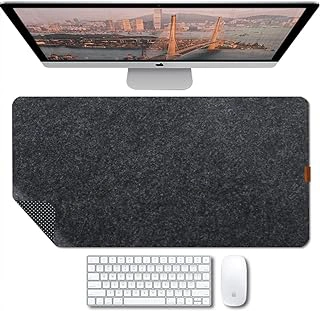
Bright Stone Non-Slip Felt Desk Mat and Mouse Pad
The Bright Stone Non-Slip Felt Desk Mat and Mouse Pad offers a soft polyester felt surface that dampens mouse movement noise and provides cushioned contact for wrists during long work sessions. Priced at $16.99 with a 4.6/5 rating, this mat represents the felt category's focus on comfort and a softer workspace feel.
The matte texture of the felt surface works reliably with optical mice, tracking cursor movement without the reflective glare that can sometimes interfere with sensors. Mouse glide is smooth and quiet, making this mat a good match for shared offices or noise-sensitive environments. The felt also reduces the hard click sounds when setting down a mouse or tapping fingers on the desk surface.
Wrist contact on the felt surface feels noticeably softer than faux leather alternatives. The material gives slightly under pressure, reducing concentrated stress points during extended typing or mousing. Users who experience discomfort from firmer surfaces often prefer this cushioned feel.
The non-slip backing keeps the mat stable on wood, laminate, and composite desk surfaces without adhesive or clamps. The mat stays in place during normal keyboard and mouse use.
Felt requires more careful maintenance than sealed materials. Spot-cleaning with a damp cloth handles most spills, but liquid can absorb into the fibers if not addressed quickly. The surface may develop visible wear patterns in high-traffic areas over months of use, particularly where the mouse travels most frequently or where wrists rest consistently.
This mat suits users who prioritize a quieter, softer workspace and are willing to handle occasional spot-cleaning. If you prefer a surface that wipes clean instantly or shows less visible wear over time, faux leather offers those tradeoffs at the cost of firmer contact and potentially louder mouse movement.
- ✅ Soft polyester felt cushions wrist contact during long sessions
- ✅ Matte texture provides reliable optical mouse tracking
- ✅ Quiet mouse movement reduces workspace noise
- ✅ Non-slip backing keeps mat stable without adhesive
- ✅ Affordable at $16.99
- ⚠️ Requires spot-cleaning; liquids can absorb into fibers
- ⚠️ May show visible wear patterns in high-use areas over time
- ⚠️ Less wipeable than sealed faux leather surfaces
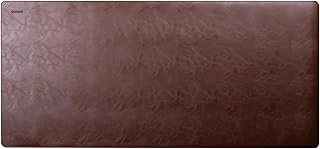
Cossini XL Large Vegan Leather Desk Pad, Non-Slip and Waterproof
The Cossini XL Large Vegan Leather Desk Pad delivers a smooth, low-friction surface that many office workers and gamers choose when fast mouse movement matters. Measuring XL dimensions, this faux leather pad stretches across a standard desk to accommodate keyboard, mouse, and accessories in one unified work zone.
The waterproof PU surface resists spills - coffee, water, and other liquids bead up rather than soaking through - so a quick wipe with a damp cloth restores the pad to its original appearance. That simplicity appeals to anyone who prefers minimal upkeep over regular spot treatments or hand washing. The non-slip backing keeps the pad anchored even during rapid mouse flicks, and the black finish suits professional and gaming setups without clashing with other desk elements.
Mouse tracking feels precise because the synthetic leather offers consistent glide with little drag. Optical and laser sensors read reliably across the uniform texture, making rapid cursor movements predictable. Wrist contact remains cool at first, though the non-Cossini XL Large Vegan Leather Desk Pad, Non-Slip and Waterproof material can trap heat during extended sessions - users who rest forearms on the pad for hours may notice warmth buildup compared to fabric alternatives.
The firm, flat construction provides stable support for writing and typing but lacks the cushioned feel that felt or neoprene-backed pads deliver. If wrist comfort is a higher priority than easy cleaning, a softer material may suit you better. Priced at $18.99 with a 4.7 out of 5 rating, the Cossini pad represents a solid middle-ground choice for anyone who values sleek aesthetics, fast mouse performance, and spill protection in a single product.
This pad fits offices where accidental liquid contact is common, home setups that prioritize a polished look, and gaming stations that demand consistent sensor tracking. If you work or play in air-conditioned spaces and clean your desk regularly, the low-maintenance surface will save time without compromising performance.
- ✅ Waterproof PU surface resists spills and wipes clean quickly
- ✅ Low-friction texture enables fast, precise mouse tracking
- ✅ Non-slip backing keeps pad stable during use
- ✅ XL size accommodates keyboard, mouse, and accessories
- ✅ Sleek black finish complements professional and gaming setups
- ⚠️ Non-breathable material can trap heat during extended forearm contact
- ⚠️ Firm surface lacks cushioned wrist support found in fabric pads
Quick Decision Guide: Felt or Faux Leather?
- Choose felt if you want softer wrist contact, quieter mouse movement, and breathable texture
- Choose faux leather if spills are common and you need fast wipe-clean maintenance
- Choose felt if you prefer matte, textile aesthetic and work in climate-controlled space
- Choose faux leather if you want smooth, fast mouse glide and professional appearance
- Choose felt if you rarely eat or drink at desk and prioritize cushioned comfort
- Choose faux leather if durability against stains and moisture matters more than surface softness