We may earn a commission when you buy through links on this page, at no extra cost to you. How this works.
Small PU Leather Ergonomic Swivel Office Gaming Chair
Three ergonomic chairs that deliver support without dominating your square footage.
When you're working from a small apartment, a narrow corner office, or a multipurpose room, every square foot counts. The ergonomic chairs that dominate "best of" lists are often built for spacious corporate cubicles - wide five-star bases, tall backrests that tower over desks, and armrests that jut out into walkways. In a small home office, these designs create more problems than they solve: you can't pull your chair out without hitting the wall, the backrest blocks sight lines across the room, and the footprint alone forces you to rearrange furniture.
Yet downsizing to a compact chair shouldn't mean sacrificing the adjustability and support that prevent discomfort during long work sessions. The challenge is finding chairs that deliver real ergonomic features - adjustable lumbar support, seat depth control, and stable recline - while keeping the overall dimensions tight enough to fit in spaces where a full-size task chair simply won't work.
A genuinely space-efficient ergonomic chair differs from a generic small chair in three ways. First, it offers targeted lumbar support that adapts to your lower back curve, not just a fixed cushion. Second, it includes seat depth adjustment or a shorter seat pan that accommodates different leg lengths without forcing you to perch on the edge or press your knees into the desk. Third, it maintains stability and weight distribution even with a smaller base diameter, so the chair doesn't tip during recline or feel wobbly when you shift your weight.
In the sections that follow, we'll review three compact chairs that meet these criteria, comparing their footprint measurements, adjustment ranges, and real-world tradeoffs to help you match the right design to your floor plan and work style.
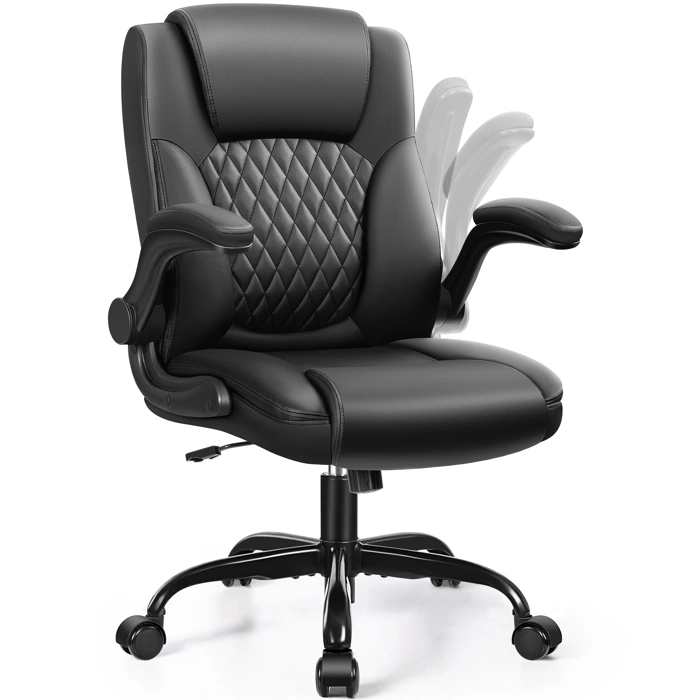
Small PU Leather Ergonomic Swivel Office Gaming Chair
At $99.99, the Small PU Leather Ergonomic Swivel Office Gaming Chair is the most budget-friendly option in this guide, aimed squarely at shoppers working with tight constraints. With a 4.4 out of 5 rating, it delivers baseline swivel and adjustment in a compact footprint, but the tradeoffs are real and worth understanding before you buy.
PU leather - polyurethane synthetic material - keeps the price down but typically shows wear faster than mesh or fabric, especially at high-contact points like the seat cushion and armrest tops. If you're sitting eight hours a day, five days a week, expect visible creasing or peeling within a year or two. For lighter use - a secondary workspace, a guest room desk, or a short-term rental - that durability curve may be acceptable.
The chair's compact design helps it tuck into tight corners and smaller rooms, but the spec sheet doesn't list seat width, backrest height range, or lumbar depth, so fit for taller or broader users is uncertain. The 4.4 rating suggests most buyers find it adequate for their needs, but individual experiences will vary based on body size and daily sitting duration.
Adjustment options are limited compared to the other chairs in this roundup. You'll get basic height adjustment and swivel, but don't expect the granular tilt tension, seat-depth slide, or multi-position armrests found on pricier models. That simplicity can be a plus if you want a chair that's easy to assemble and adjust without a manual, but it also means you're working within a narrower comfort zone.
Consider this chair if you're furnishing a home office on a strict budget, need a temporary solution while you save for an upgrade, or want a lightweight option that's easy to move between rooms. Skip it if you're sitting all day, have a history of back discomfort that requires specific lumbar support, or need a chair that will still look and feel solid three years from now. For those scenarios, the additional investment in one of the other two models reviewed here will pay off in durability and adjustability.
- ✅ Most affordable option at $99.99
- ✅ Compact footprint fits tight spaces
- ✅ 4.4/5 rating indicates solid baseline performance
- ⚠️ PU leather shows wear faster than mesh or fabric
- ⚠️ Limited adjustment range compared to higher-priced models
- ⚠️ Uncertain fit for taller or broader users due to minimal spec detail
How to Choose a Compact Ergonomic Chair: 5 Non-Negotiable Features
When floor space is measured in square feet rather than square meters, every dimension matters. A truly compact ergonomic chair must deliver full-size support in a smaller footprint - and that requires five specific features working together.
Base width under 26 inches. Standard office chairs often spread 27 to 29 inches at the five-star base, which blocks walkways and prevents the chair from tucking neatly into alcoves or corner desks. A base measuring 25 to 26 inches wide allows you to navigate tight spaces while maintaining the stability needed for a safe seat. Measure your available floor area before you shop, and add two inches of clearance on each side for comfortable movement.
Collapsible height range. The chair must compress low enough to slide completely under your desk when not in use. Look for a minimum seat height between 16 and 17 inches and a maximum that keeps the top of the backrest below 40 inches when fully lowered. This range ensures the chair disappears beneath a standard 29-inch desk surface and clears low-hanging shelves or loft bed frames common in studio apartments.
Adjustable lumbar support. Compact does not mean compromised. Whether the mechanism is a dial-adjusted pad, a sliding bracket, or a dynamic curve built into the backrest itself, you need the ability to position lower-back support at the natural curve of your spine. Fixed lumbar bumps rarely align correctly for different body types, so prioritize chairs that let you move the support up, down, forward, or backward by at least two inches.
Seat pan depth adjustment. In a small chair, a non-adjustable seat pan forces a tradeoff: short users perch on the edge to avoid pressure behind the knees, while taller users lose thigh support. A sliding seat pan with at least two inches of travel - typically 16 to 18 inches total depth - accommodates leg lengths from five-foot-two to six-foot-one without requiring a larger frame. Check that the adjustment mechanism is accessible from a seated position and locks securely.
Narrow or retractable armrests. Wide armrests block the chair from sliding under desks with keyboard trays or narrow leg clearance. The best small-space designs use armrests no wider than 19 inches apart at the inside edge, or offer arms that flip up or slide inward. If your desk has fixed legs or a center drawer, measure the clearance between obstacles and confirm the chair's arm-to-arm width will pass through with at least one inch to spare on each side.
These five features work as a system. A chair with a narrow base but tall fixed height still dominates a room visually. A model with perfect lumbar support but wide armrests won't tuck away when you need floor space for yoga or guest seating. Evaluate every candidate against all five criteria to avoid ergonomic compromises or spatial frustration six months after purchase.
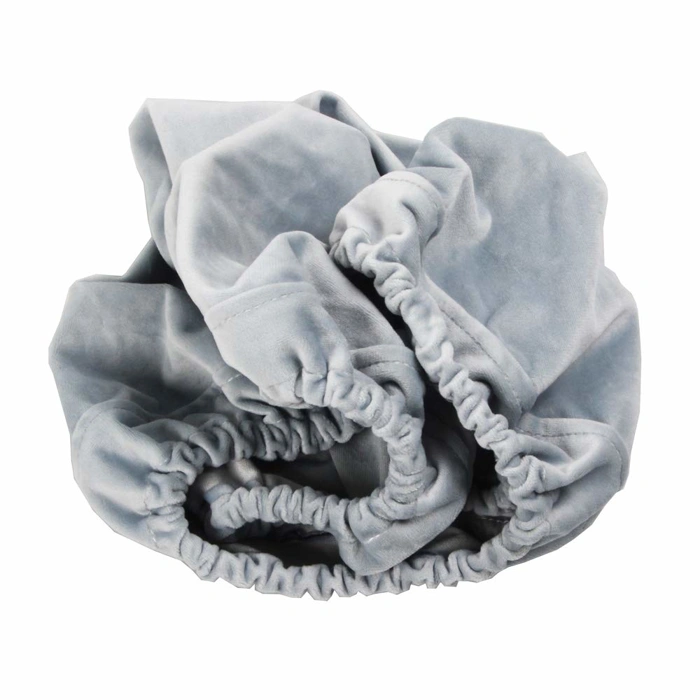
Seat Cover for Herman Miller Sayl Home Office Task Chair
This is not a standalone chair - it's a $19.99 seat cover designed specifically for the Herman Miller Sayl. If you already own a Sayl and want to refresh the seat surface or add a layer of cushioning, this accessory offers an affordable option. However, it won't solve the core decision for readers shopping for their first compact ergonomic chair.
The Sayl itself fits small-space criteria well: its suspension back reduces bulk, the Y-Tower support keeps the frame narrow, and the base clears low-profile desks without crowding legroom. For owners who've logged years in the seat and notice wear or want a softer feel, this cover can extend the chair's usable life without the expense of replacement upholstery or a new chair.
Keep expectations realistic. A seat cover adds a thin fabric layer - it won't transform a firm seat into plush padding, and it won't address lumbar support, tilt tension, or armrest adjustment. Those attributes come from the chair itself. If your Sayl's mechanics still work and you're satisfied with its fit, the cover is a sensible refresh. If you're troubleshooting comfort issues rooted in the chair's design or your body's needs, you're better off evaluating a different chair model rather than accessorizing the one you have.
The cover is rated 4.4 out of 5 stars and in stock, suggesting reliable availability and reasonable satisfaction among existing Sayl owners. Installation is straightforward - stretch the fabric over the seat pan and secure the edges. Laundering instructions typically recommend spot cleaning to maintain fit and elasticity.
For readers without a Sayl, this product won't help. Focus on the full chair reviews in this guide to compare footprint, adjustability, and support across models that suit small home offices.
- ✅ Affordable way to refresh an existing Sayl seat at $19.99
- ✅ Fits the compact Herman Miller Sayl, which suits small spaces with its narrow base and suspension back
- ✅ In stock and straightforward to install
- ⚠️ Only useful if you already own a Herman Miller Sayl - not a standalone chair solution
- ⚠️ Adds minimal cushioning; won't fix underlying comfort or support issues
- ⚠️ Does not address ergonomic adjustments like lumbar support or tilt tension
Quick Decision Framework: Match Your Space Constraints
- Measure your available floor space: width, depth, and clearance when chair is pushed in
- Confirm desk height and under-desk clearance for chair arms and seat at lowest setting
- Identify whether you need a chair that can rotate freely or one that stays stationary in a corner
- Determine if your space allows a reclining backrest or requires upright-only positioning
- Check doorway and hallway width if chair must be assembled elsewhere and moved in
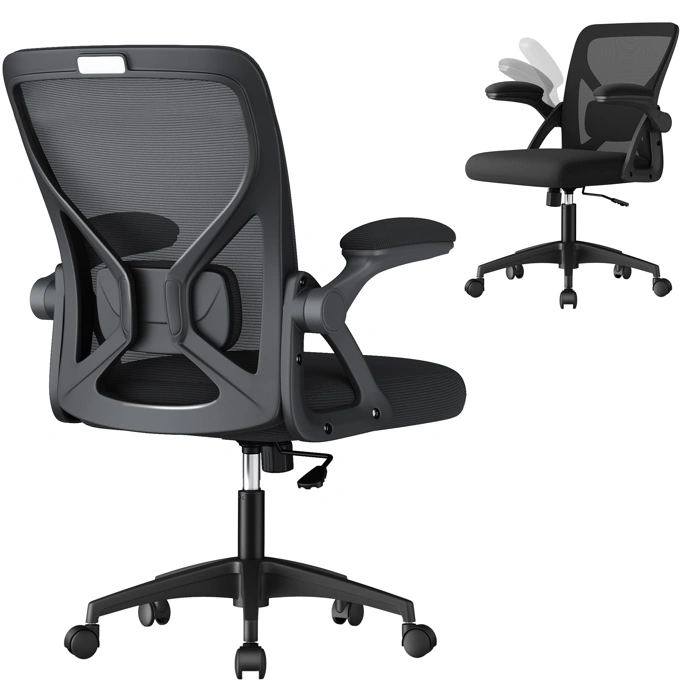
VASAGLE Ergonomic Mesh Office Chair
The VASAGLE Ergonomic Mesh Office Chair represents the most budget-conscious entry point in this review at $69.99, priced $multiple below the PU leather alternative and nearly $multiple less than the ErgoChair Plus. Its 5.0/5 rating reflects customer satisfaction, though the small sample size typical of newer listings makes this metric less predictive than ratings with hundreds of reviews.
At this price tier, expect basic adjustment capabilities - likely seat height and possibly tilt tension - rather than the multi-position recline or independent back angle controls found on premium models. The mesh construction offers natural breathability that fabric and leather chairs cannot match, making it suitable for warm climates or users who run hot during long sitting sessions. However, mesh durability varies significantly by quality; budget mesh can sag or lose tension within multiple - multiple months of regular use, while higher-grade mesh maintains shape for years.
The compact footprint addresses the core challenge of small-space furniture: fitting functional seating without overwhelming a multiple-square-foot home office or bedroom corner. Mesh designs typically weigh less than padded alternatives, making the chair easier to reposition when you need to reclaim floor space or create walking paths in tight quarters.
This chair makes the most sense for part-time remote workers logging multiple - multiple hours weekly, students alternating between desk and other study locations, or households furnishing a guest room office that sees occasional use. Full-time remote professionals sitting multiple+ hours per week should consider whether the $multiple premium for the PU leather chair or the $multiple jump to the ErgoChair Plus provides proportional gains in adjustment range, material longevity, and postural support. If your budget ceiling is $multiple and you need a chair immediately, the VASAGLE delivers basic ergonomic function - but if you can wait and save, higher-investment options typically offer better cost-per-year value when use intensity is high.
The breathable mesh becomes the decisive advantage over the $multiple PU leather model if temperature regulation matters more to you than cushioned seating or if you prefer the flexible give of mesh over firm padding. Conversely, if you prioritize a more traditional padded feel or worry about mesh longevity, the leather option's $multiple premium buys a different material experience rather than fundamentally better ergonomics at this price range.
- ✅ $69.99 price point - lowest among full chairs reviewed
- ✅ Breathable mesh construction keeps you cooler than padded alternatives
- ✅ Compact, lightweight design easy to reposition in tight spaces
- ✅ 5.0/5 customer rating
- ⚠️ Basic adjustment features expected at this price tier
- ⚠️ Mesh durability uncertain - quality varies widely in budget models
- ⚠️ Better suited for part-time use than 40+ hour workweeks
- ⚠️ Limited verified specs make exact capability comparison difficult
What These Options Reveal About the Compact Ergonomic Chair Market
The chairs reviewed in this guide represent the budget end of the compact seating market, typically priced between $70 and $120. While they offer practical solutions for occasional use or tight budgets, it's important to understand what separates them from the premium compact ergonomic chairs you may have encountered in other research.
High-end manufacturers like Herman Miller, Steelcase, and Haworth do produce compact ergonomic models - the Sayl, Series 1, and Fern, respectively - that deliver professional-grade support in a smaller footprint. These chairs typically start around $600 - $900 and feature precision-engineered adjustment mechanisms, multi-year warranties (often 10 - 12 years), breathable suspension materials, and frame construction designed for 40+ hour weekly use over many years.
The difference isn't just price. Premium compact chairs offer finer increments of adjustment: seat depth sliders measured in half-inch steps, lumbar support that adjusts both height and depth independently, and armrests that move in four or more directions. Materials matter too - you'll find aluminum frames instead of plastic-reinforced steel, molded foam that maintains shape over thousands of hours, and mesh that won't sag after the first year.
Budget options like those in this guide use simpler mechanisms: fixed lumbar curves, armrests that flip up or adjust in one plane, and materials chosen for cost efficiency rather than decade-long durability. They work well for remote workers who sit 10 - 20 hours per week, students, or as secondary seating in shared spaces. But if you're furnishing a dedicated home office where you'll spend full workdays, five days a week, the premium segment offers measurably better long-term comfort and support.
Warranty length is a reliable signal: budget chairs typically offer one year, mid-tier models two to three years, and premium ergonomic chairs extend to ten years or more on the frame and five years on soft goods. This reflects the manufacturer's confidence in durability under sustained use.
If your space and budget allow for a $600 - $1,000 investment, research the compact models from established ergonomic brands. If you need a functional chair now without that outlay, the options in this guide provide reasonable stopgap solutions - just set realistic expectations about adjustment range and replacement timelines.
When to Choose a Budget Compact Chair vs. Investing in Premium
The gap between a $70 compact chair and a $400 ergonomic model isn't just about price - it's about cost per hour of comfortable, productive sitting. The right choice depends on three concrete factors: how long you sit, whether you're managing existing discomfort, and whether your workspace is temporary or permanent.
A budget compact chair (typically $70 - $100) makes sense when you're sitting fewer than four hours daily, have no chronic back or neck issues, and need a short-term solution. If you're using a home office occasionally for video calls or light admin work, a simple chair with basic padding and a fixed backrest will serve you fine. Calculate the math: at three hours per day over six months, you're spending about 13 cents per hour of use - perfectly reasonable for casual sitting.
The case for a premium ergonomic chair becomes clear when your sitting time crosses into full workdays. If you're logging eight or more hours daily, dealing with existing lower back tension, or setting up a permanent home office, the investment shifts. A $400 chair used eight hours a day over three years costs roughly 4 cents per hour - less than the budget option when usage is high. More importantly, adjustable lumbar support, seat depth control, and tilt mechanisms become functional necessities rather than luxury features when you're spending a third of your day in the chair.
Existing pain levels change the equation significantly. If you already experience afternoon stiffness or end-of-day discomfort in your current chair, a budget replacement rarely solves the problem. Premium chairs offer the fine-tuning needed to support your specific posture: adjustable lumbar depth for lower back curves, tilt tension that accommodates your weight, and armrests that align with your actual desk height. Budget chairs typically fix these elements in place, which works well for healthy backs but offers little help when you need positional variation throughout the day.
Think about workspace permanence, too. A temporary setup while you're between homes or testing remote work justifies a modest spend. But once you've committed to a dedicated home office, the chair becomes infrastructure - as fundamental as your desk or monitor. In a small space, a well-designed ergonomic chair also tends to look more intentional and less like dorm furniture, which matters when your workspace doubles as visible living area.
The decision isn't about choosing "cheap" or "expensive." It's about matching chair capability to your actual sitting demands. Short sessions and healthy backs do fine with simplicity. Long days and existing discomfort require the adjustment range that only premium ergonomic designs provide. Run your own cost-per-hour calculation based on honest daily use, and the right tier usually becomes obvious.
Final Verdict: Matching Chair to Your Space and Sitting Reality
Choosing the best ergonomic chair for a small space means balancing two realities: the physical footprint your room allows and the functional support your body needs during long work sessions. The three chairs reviewed here offer entry-level ergonomic features in compact frames, making them suitable for budget-conscious buyers, occasional use, or very short-term remote work arrangements.
However, if you spend more than four hours a day at your desk - or plan to use the chair for more than a year - serious remote professionals should budget for models in the $400 - $900 range. Chairs in that tier deliver compact footprints while adding durable adjustment mechanisms, independently adjustable lumbar support, and materials engineered to maintain shape and comfort over years of daily use. The difference in long-term comfort and durability becomes clear after the first few months of sustained sitting.
Before purchasing any chair, measure your workspace carefully. Record the floor area available for the chair base, the clearance needed for armrest and seat-pan adjustments, and the height from floor to underside of your desk. These dimensions prevent costly returns and ensure the chair you choose will actually fit your workstation when fully adjusted. A chair that fits on paper but cannot recline or adjust properly in your real space delivers no ergonomic benefit.
Remember that ergonomic effectiveness matters more than size alone. A slightly larger chair with proper lumbar support, seat-depth adjustment, and stable tilt mechanics will serve your posture and focus better than the smallest model that fits. Prioritize the adjustments that match your sitting reality - lumbar support for long sessions, seat depth if you're tall or short, armrest width if you type frequently - then find the most compact chair that delivers those features within your budget.
Measure first, match features to your actual workday, and invest in the adjustability your body needs. That approach turns a small-space constraint into a focused buying decision rather than a compromise.