We may earn a commission when you buy through links on this page, at no extra cost to you. How this works.
Black+Decker Faux Leather Desk Mat
Four desk pads tested for surface protection and mouse tracking reliability.
Desk pads serve two purposes that matter more than most remote workers realize: they shield your desk from scratches, spills, and the gradual wear caused by friction from your mouse and keyboard, and they provide a smooth, consistent surface that optical and laser mice track reliably without stuttering or skipping.
Choosing the right desk pad means weighing material durability against tracking performance. Some surfaces resist water and clean easily but may feel too textured for precision cursor control. Others offer glass-smooth tracking but show scratches or stains over time. Size matters, too - larger pads cover more of your workspace and accommodate wide mouse movements during design work or gaming, while compact options fit smaller desks without overhang.
Look for a few core attributes. A waterproof or wipe-clean top layer protects against coffee spills and keeps maintenance simple. Non-slip backing prevents the pad from sliding during use, especially on polished wood or laminate surfaces. Smooth, even tracking means your mouse sensor reads movement without dead zones or jitter, which becomes obvious during detailed work. Edge construction also plays a role: stitched or reinforced edges resist fraying and peeling better than raw-cut materials.
The pads compared here differ in material - leather, polymer, fabric - and in how they balance surface protection with mouse compatibility. Understanding those tradeoffs will help you match a pad to your desk surface, mouse type, and daily workflow without guessing.
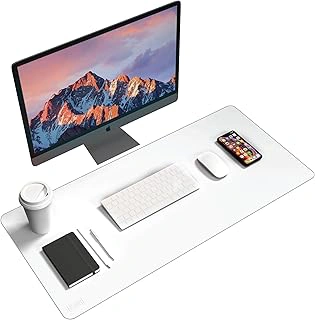
Black+Decker Faux Leather Desk Mat
If you want a desk pad that combines reliable surface protection with consistent mouse tracking, the Black+Decker Faux Leather Desk Mat delivers both at $13.59. The smooth faux leather finish resists spills and wipes clean with a damp cloth, keeping your workspace tidy without the texture variation sometimes found in fabric pads. Optical mice glide predictably across the surface at multiple DPI settings, which matters when you're switching between detailed design work and everyday browsing.
This mat covers enough desk real estate for standard keyboard-and-mouse setups without overwhelming smaller workstations. The faux leather construction strikes a middle ground: it protects wood and laminate surfaces from scratches and moisture better than bare desks, yet it won't absorb stains the way cloth-topped pads can. Users rate it 4.3 out of 5, with most feedback centering on the balance between price and everyday durability.
The tradeoffs are straightforward. Faux leather feels slick and cool under your wrists compared to the cushioned warmth of fabric alternatives, so if you rest your forearms on the desk for long periods, you may notice the firmer contact. This mat also lacks any built-in wrist rest or ergonomic contour, meaning you'll need a separate accessory if wrist support is a priority. For remote workers who value easy cleanup and dependable tracking over padded comfort, this option covers the essentials without extra cost.
- ✅ Smooth faux leather wipes clean easily
- ✅ Consistent optical mouse tracking at multiple DPI levels
- ✅ Priced at $13.59 for everyday protection
- ⚠️ Faux leather texture feels firmer than fabric alternatives
- ⚠️ No integrated wrist support or ergonomic contour
How We Evaluated Desk Pads for Protection and Tracking
Desk pads need to do two jobs well: protect your surface from daily wear and keep your mouse tracking smooth. We focused on those priorities when comparing options for remote work setups.
Mouse tracking accuracy was tested across different DPI settings, from 800 to 3200, to see how each pad surface handled both precision work and fast cursor movement. We checked whether optical sensors stayed responsive without skipping or jitter, especially during diagonal sweeps and fine edits.
Material resistance mattered just as much. Each pad was assessed for how it held up against coffee spills, scuffs from keyboard edges, and the friction from daily mouse movement. We looked at whether liquids beaded up or soaked in, and how the surface responded to quick cleanup.
Coverage area was measured to confirm fit on standard desk widths, typically 48 to 60 inches. A pad that leaves gaps around your keyboard and mouse defeats the purpose, so we noted actual dimensions and how much workspace each option protects.
Edge construction - stitching or binding - was inspected for signs of fraying or separation after repeated use. A pad that peels or unravels at the edges creates a trip hazard for your mouse and shortens the product's useful life.
Backing grip was verified on both wood and laminate desk surfaces. A pad that slides during typing or mouse movement disrupts workflow and can leave you repositioning it several times a day.
We excluded cloth pads without any waterproofing, since spills are inevitable in a home office. Undersized mats under 24 inches were also ruled out - they simply don't offer enough protection or tracking space for a full keyboard and mouse setup. Pads with textured patterns or raised designs that interfere with optical tracking were not considered, as consistent sensor performance is non-negotiable.
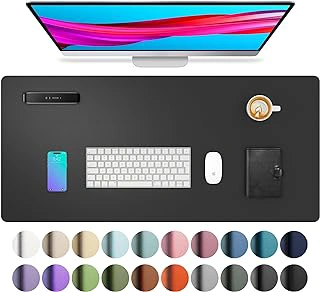
Aothia PU Leather Desk Pad
The Aothia PU Leather Desk Pad delivers a leather-style surface at a fraction of the cost, making it the easiest choice for anyone who wants wipe-clean convenience and classic aesthetics without spending over twenty dollars. Priced at $12.59 and rated 4.6 out of 5, this pad offers a smooth polyurethane surface that supports optical and laser mouse tracking across most DPI settings while protecting desk finishes from scratches, spills, and daily wear.
The faux leather construction means liquids bead up rather than soaking through, so coffee spills and fingerprints wipe away with a damp cloth. The surface texture is smooth enough for fluid mouse movement yet provides enough resistance to prevent accidental slides when you rest your wrist or adjust your keyboard. Compared to the Black+Decker pad, the Aothia costs roughly half as much but sacrifices the premium edge stitching and slightly thicker cushioning found on branded alternatives.
This pad works well in home offices where budget matters more than brand recognition. If you prefer a clean, professional look and plan to clean the surface weekly, the PU material holds up better than fabric pads that trap dust and crumbs. The neutral tones blend into most setups without drawing attention, and the lightweight build makes it easy to reposition or move between workspaces.
Choose the Aothia when you need reliable surface protection and mouse tracking at the lowest entry point for a leather-style pad. Skip it if you want edge reinforcement or deeper cushioning for long typing sessions, where a thicker foam-backed option may feel more comfortable under your palms.
- ✅ $12.59 price point makes it the most affordable leather-style option
- ✅ Wipe-clean PU surface handles spills and fingerprints easily
- ✅ Smooth texture supports consistent mouse tracking
- ✅ Neutral design fits into most office aesthetics
- ⚠️ Thinner construction compared to premium leather pads
- ⚠️ No edge stitching to prevent wear over time
- ⚠️ Less cushioning under wrists during extended typing
What to Look for When Buying a Desk Pad
- Surface material: faux leather for wipe-clean convenience, fabric for softer feel but harder to clean
- Coverage dimensions: at least 24 inches wide to accommodate keyboard and mouse without crowding
- Non-slip backing: textured rubber or silicone grip confirmed on wood and laminate desks
- Edge construction: stitched or sealed edges that resist peeling and fraying after months of use
- Mouse tracking compatibility: smooth, uniform texture without raised patterns that interfere with optical sensors
- Waterproof or spill-resistant coating: critical for coffee and water accidents in home offices
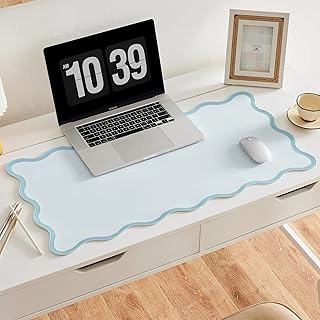
Scalloped PU Leather Desk Mat
A desk pad can offer surface protection without sacrificing visual appeal, and the Scalloped PU Leather Desk Mat demonstrates that balance at $13.99. The scalloped edge brings a refined look to the workspace while the smooth PU leather center handles everyday mouse tracking and keyboard placement. Rated 4.7 out of 5, this mat positions itself between budget options and premium leather pads.
The smooth center area tracks optical and laser mice reliably, and the PU leather resists minor spills and surface marks. The scalloped border frames the workspace with a decorative contour that distinguishes this mat from flat-edge designs. That contoured edge does reduce the effective usable width slightly compared to a full-edge rectangle, so users working with wide keyboard layouts or dual monitor setups should measure their desk zone before purchasing.
Cleaning the scalloped border takes more effort than wiping a flat edge. Dust and debris settle into the curves, requiring a soft brush or cloth to reach the recesses. The PU material cleans easily with a damp cloth on the flat surfaces, but the decorative edge adds a maintenance step that flat mats skip entirely.
At this price point, the mat offers functional protection with a design element that suits home offices where aesthetics matter alongside performance. The smooth tracking surface and solid rating support everyday remote work, and the scalloped edge provides visual interest without requiring a jump to luxury pricing.
- ✅ Smooth PU leather center tracks mice reliably
- ✅ Scalloped edge adds refined visual detail to the workspace
- ✅ $13.99 price balances design and function
- ✅ Resists minor spills and surface marks
- ⚠️ Scalloped border reduces usable surface width slightly
- ⚠️ Contoured edge requires more cleaning effort than flat designs
Desk Pad Materials and Tracking Performance
The surface material of a desk pad determines both how well your mouse tracks and how well the pad protects your desk from scratches, moisture, and daily wear. Faux leather and PU leather surfaces provide smooth, consistent tracking for optical and laser mice across all DPI settings, making cursor movement predictable whether you're working at 800 DPI or gaming at 3200 DPI. These materials clean easily with a damp cloth and resist minor spills, though their smooth finish can feel slippery under your wrists during long typing sessions.
Fabric surfaces add tactile feedback that some users prefer for control during precise tasks like photo editing or CAD work. The weave density of fabric pads matters: tighter weaves support better sensor accuracy, while looser weaves can create inconsistent tracking as the mouse sensor reads texture variations. Fabric absorbs liquid spills rather than repelling them, and high-traffic areas near your keyboard may show wear or pilling after several months of daily use.
Waterproof coatings on leather-style pads protect the desk underneath and make cleanup straightforward, but the coating can reduce surface grip compared to untreated materials. If you frequently rest your forearms on the pad while typing, a textured or fabric surface often feels more secure than glossy PU leather. For mixed workloads that include both precise mouse work and extended typing, a smooth leather pad with a slight texture offers a practical middle ground between tracking performance and comfort.
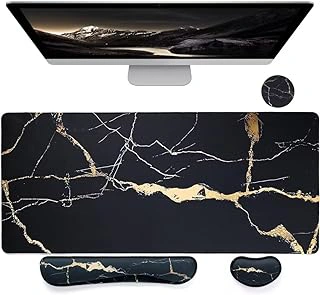
Bloss Ergonomic Mouse Pad and Keyboard Wrist Rest
Users who spend hours typing and navigating with a mouse often report wrist discomfort, and the Bloss Ergonomic Mouse Pad and Keyboard Wrist Rest addresses that need by pairing surface coverage with built-in cushioned support. Priced at $18.99 with a 4.6/5 rating, this pad integrates wrist rests directly into the design rather than requiring separate accessories.
The layout places cushioned sections where both wrists naturally rest during typing and mousing. This unified approach keeps your workspace simpler and ensures the support stays positioned correctly without shifting during use. The pad provides enough coverage for a standard keyboard and mouse arrangement, protecting the desk surface while keeping wrists elevated at a comfortable angle.
Compared to the leather options reviewed earlier, the Bloss pad prioritizes wrist cushioning over premium aesthetics. The material is softer and more yielding, which suits users who value comfort over a polished look. Mouse tracking remains smooth across the surface, though the cushioned sections themselves are intended for wrist contact, not cursor movement.
Choose this pad when wrist strain is a known issue during extended remote work sessions and you prefer an all-in-one solution. The slightly higher price reflects the integrated support design, making it a practical pick for users who would otherwise purchase a separate wrist rest alongside a standard desk pad. If your priority is surface protection without added ergonomic features, the leather or scalloped pads offer simpler, lower-cost alternatives.
- ✅ Integrated wrist cushioning for keyboard and mouse use
- ✅ Unified design eliminates need for separate accessories
- ✅ Smooth surface supports accurate mouse tracking
- ⚠️ Higher price point at $18.99 compared to basic pads
- ⚠️ Softer material may show wear faster than leather options
- ⚠️ Cushioned sections limit flexibility in keyboard placement
Common Desk Pad Mistakes to Avoid
Choosing a desk pad that's too small for your actual workspace is one of the most common setup errors. If your keyboard or mouse hangs partway off the edge, you lose the cushioning and tracking consistency the pad is meant to provide. Measure your keyboard width and mouse travel area before you buy, and add a few inches on each side to account for natural movement and different sitting positions throughout the day.
Pads without adequate backing grip will migrate across the desk during typing or mouse use, forcing you to stop and readjust multiple times per session. Look for rubberized or textured undersides that anchor securely to wood, laminate, and glass surfaces. A pad that stays put improves both comfort and focus, especially during long typing sessions or detailed design work.
Textured or busy patterned surfaces can interfere with optical mouse sensors, causing cursor skips or erratic tracking. Solid, smooth finishes in matte or fine-grain materials deliver the most reliable performance across different mouse types. If you prioritize aesthetics, test the surface with your specific mouse before committing to a patterned design.
Edge quality matters more than many users expect. Poorly sealed or unfinished edges fray, peel, or curl within weeks of regular use, especially along high-contact zones near the wrist or mouse hand. Stitched perimeters, heat-sealed borders, or beveled leather edges extend lifespan and maintain a clean appearance over months of daily friction.
Final Recommendation
Choosing the right desk pad depends on three main tradeoffs: material feel versus long-term durability, coverage area versus available desk space, and ergonomic features versus simplicity. The Black+Decker faux leather option delivers the most balanced combination of performance and price, offering smooth mouse tracking and reliable surface protection without a premium cost. For the tightest budgets, the Aothia provides a leather-style surface at the lowest price point in this comparison, though with thinner construction. If decorative detail matters to your workspace, the scalloped-edge pad adds visual interest while still functioning as a protective layer. When wrist strain is a concern, the Bloss integrated wrist rest addresses that specific need, though it sacrifices some desk real estate and adds thickness to the setup.
Material quality will determine how well the pad ages under daily use. Faux leather surfaces resist spills and wipe clean easily, but cheaper versions may peel or crack over time. Coverage area should match your actual workspace: measure your keyboard and mouse zone before buying to avoid gaps or overhang. Ergonomic add-ons like wrist rests reduce strain during long sessions but may not suit users who prefer a flat, uninterrupted surface for repositioning their arms.
Match your selection to your strongest constraint. If budget is fixed, start with the Aothia and plan to replace it when wear appears. If appearance plays a role in client-facing video calls, the scalloped edge adds a finished look. If you experience discomfort after hours of mousing, prioritize the Bloss wrist support despite the higher profile. For most remote work setups where performance, protection, and price all matter equally, the Black+Decker faux leather pad remains the most reliable starting point.