We may earn a commission when you buy through links on this page, at no extra cost to you. How this works.
Laptop screens sit low by design, forcing your neck into sustained downward flexion during long typing sessions. When you pair your laptop with an external keyboard and mouse, an adjustable stand lifts the display to eye level, letting you maintain a neutral head position and reducing cumulative strain on your cervical spine.
The right stand does more than add height. It needs enough vertical range to match your seated eye level, a base footprint and weight distribution that resist wobble during active typing, ventilation that keeps the laptop cool under load, and adjustability that accommodates different desk surfaces or working postures. Portability matters if you move between rooms or offices, while price should reflect the materials and engineering behind stable, repeatable positioning.
We excluded stands that offer only a fixed incline without multi-position height adjustment, models with smooth platforms that let laptops slide forward under typing pressure, and designs that obscure USB-C or HDMI ports when the laptop is mounted. The four stands below meet those baseline requirements and differ meaningfully in height ceiling, footprint, material choice, and cost, giving you clear tradeoffs to match your workspace and usage pattern.
What to Look for When Choosing an Adjustable Laptop Stand
- Height range: confirm the stand raises your screen to eye level when paired with an external keyboard
- Stability: test typing force; metal or reinforced stands flex less than lightweight plastic
- Ventilation: open or slotted designs prevent heat buildup during long sessions
- Portability: folding mechanisms add convenience but may reduce desk stability
- Port access: verify the stand does not block USB, power, or headphone jacks
- Weight capacity: check manufacturer specs against your laptop weight to avoid sag or tip risk
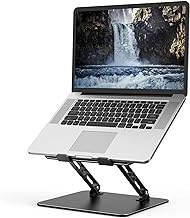
Gogoonike Adjustable Metal Foldable Ventilated Laptop Stand
The Gogoonike Adjustable Metal Foldable Ventilated Laptop Stand sells for $14.99 and earns a 4.6 out of 5 rating, making it an accessible starting point for remote workers who want eye-level typing without spending heavily. Its foldable metal frame collapses flat for transport, and the ventilated platform allows airflow underneath your laptop during long sessions.
Height and angle adjustment let you raise the screen closer to eye level, reducing the forward neck tilt common with flat desk setups. The open ventilation slots help dissipate heat when the laptop runs warm, though the cooling benefit depends on your machine's vent placement.
Because the construction prioritizes portability and cost, the frame can flex slightly under firm typing pressure, especially when extended to maximum height. This movement is manageable for light to moderate typing but may feel less stable than heavier aluminum stands. The tradeoff keeps weight and price low, which suits users who value pack-and-go convenience or want to try an elevated setup before investing more.
At this price, the Gogoonike stand offers real height adjustment and ventilation without requiring a significant upfront commitment, making it a practical choice for budget-conscious setups.
- ✅ Folds flat for easy transport between workspaces
- ✅ Ventilated platform promotes airflow under the laptop
- ✅ Adjustable height and angle bring the screen closer to eye level
- ✅ $14.99 price point lowers the barrier to ergonomic typing
- ⚠️ Lighter metal frame may flex slightly during heavy typing
- ⚠️ Less stable at maximum extension compared to heavier stands
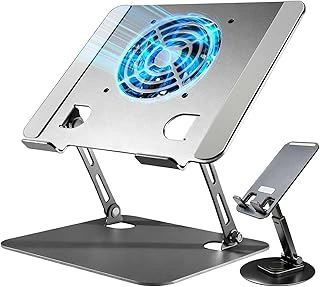
Laptop Stand for Desk with Active Cooling Fan
Laptops that throttle performance or become uncomfortable to touch during extended work sessions need better airflow, and this stand addresses that problem directly. The built-in active cooling fan draws heat away from the laptop base while the adjustable height brings the screen closer to eye level, reducing the need to hunch forward during long typing sessions.
The fan connects via USB and moves air continuously across the underside of the laptop. Users working with demanding applications - video calls, large spreadsheets, or multiple browser tabs - will notice the difference during afternoon marathons when passive stands offer no thermal relief. The stand adjusts across multiple height settings, and the broad base keeps the setup stable even when typing with force.
At $35.80, this stand costs more than simpler folding models, and the USB cable adds a connection to manage. The cooling fan introduces a low hum that some users will hear in quiet rooms. The footprint is also larger than ultra-portable stands, so it claims more desk real estate and does not collapse flat for travel. If your laptop stays cool on its own or you prioritize portability, a passive stand will serve you better. But for users who feel heat building through the keyboard or see performance dip during long sessions, the active cooling justifies the price and desk space.
The stand earns a 4.5 out of 5 rating and remains in stock. It works well for stationary desk setups where thermal management matters more than portability, and the height adjustability ensures the screen lands at a comfortable angle regardless of chair height.
- ✅ Active cooling fan reduces laptop heat during extended use
- ✅ Adjustable height settings accommodate different viewing angles
- ✅ Stable base supports firm typing without wobble
- ⚠️ Requires USB power connection for fan operation
- ⚠️ Larger footprint than passive folding stands
- ⚠️ Fan noise audible in quiet environments
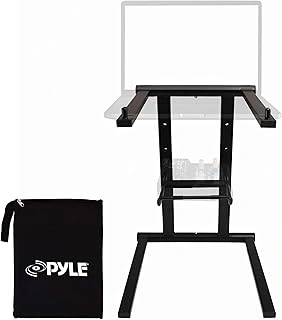
Pyle Portable Folding Laptop Stand with Adjustable Height and Accessory Tray
The Pyle Portable Folding Laptop Stand delivers height adjustment and a built-in accessory tray for $33.99, making it the most portable pick in this lineup. The folding mechanism collapses the stand flat enough to slide into a backpack or carry bag, so you can set up an eye-level workspace on a hotel desk, couch, or library table without hauling a fixed-height tower.
Height adjustment lets you dial in the angle and elevation that matches your seated posture, whether you're typing at a coffee table or standing at a kitchen counter. The accessory tray sits alongside the main laptop platform and holds a phone, wireless mouse, stylus, or sticky notes within arm's reach - useful when you're working from a cramped surface or want to keep your phone visible for notifications without cluttering the desk.
That tray adds bulk to the folded footprint, so the Pyle folds thicker than single-panel aluminum risers. Stability depends on how far you extend the height adjusters: at maximum elevation, the stand can wobble slightly during fast typing, especially on soft surfaces like a couch cushion or bed. You'll see the steadiest performance on a hard, flat table with the legs set to a moderate height.
The folding joints and accessory tray mean more moving parts than a welded aluminum stand, which may affect long-term rigidity if you fold and unfold daily. Still, for travelers, remote workers who rotate between rooms, or anyone who values a phone dock built into the stand, the Pyle balances portability and convenience at a lower price than most adjustable competitors.
- ✅ Folds flat for backpack or bag portability
- ✅ Built-in accessory tray keeps phone and mouse within reach
- ✅ Adjustable height accommodates varied seating positions
- ✅ Lower price than most height-adjustable stands
- ⚠️ Folding tray adds bulk to the collapsed profile
- ⚠️ Can wobble at maximum height during fast typing
- ⚠️ More moving parts than welded aluminum designs
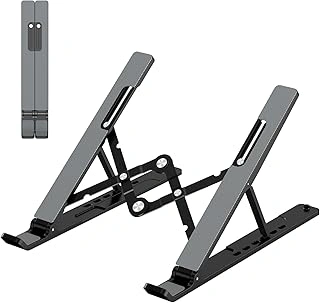
Gogoonike Adjustable Portable Laptop Stand with Ventilated Cooling
At $7.99, the Gogoonike Adjustable Portable Laptop Stand with Ventilated Cooling offers a practical entry point for anyone curious about raising their screen without the upfront cost of heavier-duty models. The ventilated slots encourage airflow underneath your laptop, which helps when you're working through long sessions in warm rooms or pushing your processor during video calls.
This stand folds flat and weighs little enough to slide into a backpack pocket, making it useful for rotating between a home desk and a coffee shop. The adjustable angles let you experiment with different screen heights until you find a position that keeps your neck in a more neutral line. Because the frame is lighter, you'll notice more wobble if you type quickly or press hard on your keyboard - resting your palms on the desk rather than the laptop itself keeps the setup steadier.
The 4.5-out-of-5 rating reflects solid performance at this price tier. If you're testing whether a raised screen makes a difference in your posture or you need a backup stand that travels easily, the low financial risk and compact footprint make this a sensible first purchase. Heavier laptops or aggressive typers may want something with a wider base and sturdier material, but for lighter machines and gentler use, the Gogoonike delivers reliable lift without clutter.
- ✅ $7.99 price makes it easy to test ergonomic typing with minimal commitment
- ✅ Ventilated slots promote airflow during extended use
- ✅ Folds flat and light enough for daily portability
- ✅ Adjustable angles to experiment with screen height
- ⚠️ Lighter frame wobbles under heavy or fast typing
- ⚠️ Less stable with larger, heavier laptops
How to Set Up Your Laptop Stand for Eye-Level Typing
Position your external keyboard and mouse before adjusting the stand height. The keyboard should sit at elbow height when your shoulders are relaxed and your arms form a 90-degree angle. Once that baseline is set, raise the laptop stand until the top edge of the screen aligns with your seated eye level - or slightly below if you wear bifocals.
Stand height and chair height work together. If you raise the stand but keep a low chair, your neck will tilt upward. If your chair is too high and the stand too low, you'll hunch forward. Aim for a neutral neck position where your gaze angles down about 10 to 20 degrees to the center of the screen.
Adjustable stands change the screen position, but they do not correct posture on their own. A stand set too high with no external keyboard forces your wrists into an awkward angle. A stand paired with a chair that lacks lumbar support shifts the problem to your lower back. Check that your feet rest flat on the floor or on a footrest, your lower back touches the chair, and your forearms stay parallel to the desk surface.
If you switch between sitting and standing, recheck the setup each time. Standing desk converters and tall stands require the screen higher than seated setups, and the external keyboard must move to match. The goal remains consistent: eyes level with the top third of the display, neck relaxed, and shoulders down.
Stand Comparison: Price, Portability, and Cooling
Choosing between these four stands comes down to three practical trade-offs: what you're willing to spend, how often you move your workspace, and whether your laptop runs hot during long sessions.
The ultra-budget Gogoonike at $7.99 offers the lowest entry point. Its lightweight build makes it easy to toss in a bag, and the open design allows passive airflow underneath your laptop. If you work in short bursts or your machine stays cool naturally, this stand handles the basics without added weight or complexity.
The metal Gogoonike at $14.99 steps up stability and adds a foldable hinge, which matters if you switch between sitting and standing or carry your setup between rooms. The aluminum construction provides better passive cooling than plastic alternatives, and the price stays accessible for remote workers outfitting multiple locations.
The cooling fan stand at $35.80 shifts priorities toward active temperature management. Two built-in fans push air directly against your laptop's underside, which helps during video calls, rendering work, or any task that spins up your CPU. The trade-off is weight and desk commitment - this stand works best when you have a dedicated workspace and a nearby power outlet.
Pyle's stand at $33.99 splits the difference by adding a side accessory tray for a phone, notebook, or external drive. Portability stays strong thanks to its folding design, but you lose active cooling. Choose this option when you value organization and flexibility over thermal performance, especially if your laptop manages heat well on its own.
Match the stand to your work pattern: grab the $7.99 model for occasional elevation, the $14.99 foldable for daily portability, the fan stand for heat-heavy tasks at a fixed desk, or the Pyle for multi-device setups on the move.
Common Mistakes When Using a Laptop Stand
Setting the screen height too far above eye level forces your head to tilt backward, which shifts strain from your neck to your upper spine and can cause headaches during long sessions. Many users raise the stand to its maximum height without checking whether their natural gaze meets the top third of the screen, which is the target zone for comfortable viewing.
Using the stand without an external keyboard locks your hands into an awkward elevated position. Your wrists bend upward and your shoulders hunch to reach the built-in keys, undoing most of the postural benefit the stand provides. An external keyboard lets you keep your elbows close to your body and your forearms parallel to the floor.
Placing the stand on a soft or uneven surface reduces stability and introduces wobble during typing. Laptop stands need a firm, flat base to distribute weight evenly, especially when you adjust the angle or height mid-session. A wobbly stand amplifies every keystroke and makes precise cursor work frustrating.
Ignoring the rest of your setup limits what the stand can do. Chair height, desk depth, and the distance between your eyes and the screen all interact with stand height. If your chair is too low, raising the laptop only increases the gap. If your desk is shallow, the stand may push the screen too close. Adjustable stands work best when you calibrate the entire workspace around a neutral seated posture, with feet flat, thighs parallel to the ground, and the screen an arm's length away.
Final Recommendation: Which Stand Fits Your Workspace?
Choosing the right adjustable laptop stand depends on three factors: how much desk space you have, whether your laptop runs hot during video calls, and how often you move between work locations.
If you want to test eye-level typing without spending much, the $7.99 Gogoonike stand offers a simple way to try an elevated setup. It folds flat and adjusts to six angles, making it easy to slip into a bag or drawer when not in use.
For a daily desk companion, the $14.99 Gogoonike stand adds width and a more stable base. The wider platform supports laptops up to 17 inches and reduces wobble when you type on the keyboard. This is the stand to pick if you plan to use it in the same spot every day and want reliable performance without adding complexity.
When your laptop fan runs constantly during Zoom meetings or renders, the cooling fan stand addresses heat buildup directly. The built-in fans pull air through the base, and the adjustable height still lets you align the screen at eye level. Choose this option if overheating interrupts your workflow more than portability matters.
The Pyle stand suits users who work from a home office one day and a coffee shop the next. It folds into a compact profile and weighs less than most hardcover books, so it travels without taking up valuable bag space. The tradeoff is a smaller footprint, which means you'll want to center your laptop carefully to avoid tipping on uneven surfaces.
All four stands deliver adjustable height - the difference comes down to whether you prioritize low cost, cooling power, portability, or everyday stability. Match your workspace habits to the stand's strengths, and you'll notice less neck strain within the first week of use.