We may earn a commission when you buy through links on this page, at no extra cost to you. How this works.
Remote workers sitting for eight or more hours a day often look for ways to move without losing focus or falling behind on deadlines. The choice between a standing desk and a treadmill desk comes down to how much movement you can sustain while typing, reading, or joining video calls - and whether your workflow tolerates the tradeoffs that come with walking.
Standing desks let you shift posture throughout the day, alternating between sitting and standing to reduce the strain of staying in one position. Treadmill desks add low-speed walking to the equation, which raises heart rate and burns more energy but introduces balance, noise, and coordination demands that may interfere with detail work or conversations.
This guide compares standing desks and treadmill desks across the factors that affect day-to-day productivity: task compatibility, physical stamina, space requirements, cost, and the learning curve each option demands. You'll see verified product examples for both categories, along with the situational constraints that make one a better fit than the other for specific work patterns and home office layouts.
Neither option solves sedentary habits on its own. The question is which type of movement fits the tasks you do most, the room you have available, and the energy you can sustain during focused work hours.
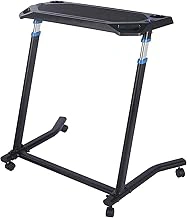
UNISKY Cycling Desk, Mobile Foldable Multi-Functional Bike Trainer & Treadmill Desk
The UNISKY Cycling Desk offers remote workers a flexible, space-conscious alternative to fixed standing or treadmill desks. Priced at $139.99 and rated 4.2 out of 5, this mobile, foldable unit adapts to bike trainers or walking pads, making it suitable for smaller home offices where footprint and storage matter as much as movement.
Mobility defines the design: the desk rolls into position during work sessions and folds flat when not in use. For renters, frequent movers, or anyone juggling limited square footage, this portability solves the permanence problem that built-in standing desks create. The multi-functional platform accommodates both cycling and walking setups, so users can vary activity type without investing in separate furniture.
Stability tradeoffs appear with the mobility advantage. The wheeled, foldable frame provides less rigidity than fixed standing desks or dedicated treadmill desk models, which may affect typing comfort during higher-intensity pedaling or faster walking speeds. Surface area is also compact, so users with dual-monitor setups or extensive desk accessories will need to streamline their workspace.
For light-duty tasks - email, video calls, reading - the UNISKY Cycling Desk supports steady movement without a permanent floor commitment. It works best when desk work alternates between seated, standing, and moving modes rather than serving as the sole workspace all day. The $139.99 price point makes experimentation affordable, particularly for remote workers curious about movement desks but hesitant to commit to heavier, pricier permanent installations.
- ✅ Folds flat for compact storage in small spaces
- ✅ Mobile design rolls into position and stores easily
- ✅ Works with both bike trainers and walking pads
- ✅ Affordable entry point at $139.99
- ⚠️ Less stable than fixed standing or treadmill desks
- ⚠️ Compact surface limits multi-monitor or accessory-heavy setups
- ⚠️ May shift during higher-intensity pedaling or walking
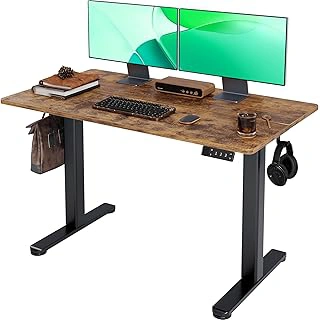
Claiks Electric Standing Desk, Adjustable, 24x48, Splice Board, Black/Rustic Brown
The Claiks Electric Standing Desk offers a 24×48-inch work surface and motorized height adjustment for under multiple, making it an accessible entry point for remote workers testing the standing desk format. The splice board construction combines a rustic brown finish with a black steel frame, and the desk ships with memory presets that let you store preferred sitting and standing heights.
At 4.4 out of 5 stars, the desk handles dual-monitor setups or a laptop with external keyboard across its four-foot width. The electric motor adjusts smoothly enough for typing tasks, though you'll want to pause mid-keystroke during transitions. The splice board surface provides a stable platform for focus work - writing, data entry, or video calls - without the motion dynamics of a treadmill deck underneath.
This desk suits workers who want to alternate posture throughout the day without committing to continuous movement. Memory presets remove the guesswork when switching between sitting and standing, and the price point leaves room for an anti-fatigue mat or monitor arm if you need them. The 24-inch depth accommodates a standard monitor and keyboard but may feel tight if you use oversized peripherals or prefer more desktop real estate.
For productivity centered on typing accuracy and screen focus, the Claiks delivers the core benefit of a standing desk - posture variation - without the learning curve or footprint of a treadmill configuration.
- ✅ Electric height adjustment with memory presets at $99.99
- ✅ 24×48-inch surface fits dual monitors or wide laptop setup
- ✅ Stable platform for typing and focus tasks
- ⚠️ 24-inch depth may feel shallow for larger peripherals
- ⚠️ Splice board construction less premium than solid desktop options
The Case for the Standing Desk: Benefits, Drawbacks, and Impact on Focus
Standing desks let you shift positions without changing the mental overhead of your work. When you're debugging code, editing a spreadsheet, or drafting a proposal, your brain needs stable conditions - standing provides that while keeping blood moving more than sitting does. Electric height-adjustable models allow quick transitions between sitting and standing throughout the day, so you can respond to fatigue without losing your place in a task.
The stability of a fixed surface matters for precision work. Typing accuracy stays high, mouse control remains steady, and you can lean in to read dense information without compensating for motion. This makes standing desks well-suited to detail-oriented tasks where small errors cost time. You control the pace and can stand as long as comfort allows, then lower the desk when legs tire.
Drawbacks center on endurance and energy expenditure. Standing for extended periods can lead to leg and lower back fatigue, especially on hard flooring. An anti-fatigue mat helps but adds another purchase and floor footprint. Calorie burn is modest compared to walking - standing increases energy expenditure only slightly over sitting. If weight management or cardiovascular activity is a goal, standing alone won't deliver much.
Focus during cognitively demanding work tends to stay consistent because you're not dividing attention between movement and task execution. For remote workers who spend hours in video calls, financial modeling, or creative problem-solving, that lack of distraction becomes the primary advantage.
The Case for the Treadmill Desk: Benefits, Drawbacks, and Impact on Energy
Walking at a slow pace while working can shift your energy level in ways a static standing desk cannot. Light movement increases circulation, which helps sustain alertness during long stretches of video calls, document review, or brainstorming sessions where precision typing is not required.
Treadmill desks work best when walking speed stays under 2 mph. At that pace, most people can handle phone conversations, reading on a screen, or navigating slides without significant distraction. Tasks that demand fast, accurate typing or細 細micro-adjustments with a mouse become harder as speed increases or fatigue sets in.
The motor in most walking pads generates audible hum, which can be picked up on calls if your microphone is sensitive. Over a full workday, even slow walking requires more physical stamina than standing or sitting, and some users report foot fatigue or leg soreness in the first weeks of adaptation.
Space is another consideration. A walking pad or treadmill desk requires a footprint larger than a standard standing desk base, and the unit must be positioned where you can safely step on and off without obstruction. Compact folding models reduce storage bulk but still need clearance during use.
If your workday includes a mix of task types, a treadmill desk shines during lower-stakes activities that benefit from steady, gentle motion. For heads-down writing, spreadsheet work, or design tasks that demand fine cursor control, switching to a stationary position will preserve accuracy and reduce frustration.
Head-to-Head Comparison: Productivity, Task Suitability, and Physical Demands
Productivity at a desk depends on more than movement - it hinges on how well the setup matches the task at hand. A standing desk offers stable typing and quick transitions between sitting and standing, making it a natural fit for work that demands precision or uninterrupted concentration. Writing code, editing spreadsheets, or drafting reports all benefit from a motionless surface and the ability to shift posture without pausing. Video calls work smoothly at a standing desk because the camera stays steady and you can adjust height without the distraction of forward motion.
Treadmill desks introduce low-level activity that can keep energy steady during passive tasks - reading documents, attending calls where you listen more than you speak, or clearing out email queues. The trade is typing stability. Even at a slow one to two miles per hour, hand movement introduces small inconsistencies that add up during tasks requiring fine motor control or rapid keystroke sequences. Some people adapt within a few days; others find the bounce disruptive enough to limit treadmill time to lighter work.
Physical fatigue shows up differently with each option. Standing for hours without movement can lead to leg discomfort or lower back stiffness, especially if posture drifts or the floor surface is too hard. Walking spreads effort across more muscle groups and keeps circulation moving, but sustained treadmill sessions can tire the legs in a way that makes afternoon focus harder. Neither setup is passive - both require the body to work, and that effort influences how long you can maintain peak mental output.
The learning curve for a standing desk is minimal: stand up, adjust the height, and get back to work. Treadmill desks require a short adaptation period. Coordinating typing, mouse work, and a steady gait takes practice, and most people start with shorter intervals to build stamina and confidence. Task-switching also becomes more deliberate - pausing the belt for a complex calculation or detailed design review is common, which can interrupt flow if the work changes frequently.
Neither option suits every task equally. Deep analytical work, detailed design, or anything requiring sustained hand precision favors the standing desk. Tasks that tolerate slight movement or benefit from a gentle energy boost - calls, reading, light admin work - fit the treadmill desk better. Recognizing these boundaries helps you assign the right setup to the right work, rather than forcing one tool to cover everything.
The Verdict: Which Desk Is the Right Choice for You?
Your work style matters more than desk type. If your day revolves around writing, coding, design work, or other tasks that demand precision and frequent typing, a standing desk offers the stable surface and quick height adjustment you need without introducing motion that can slow you down or add fatigue during focused sprints.
Treadmill desks work best when your calendar is packed with calls, virtual meetings, reading sessions, or brainstorming time. Walking at a slow pace keeps energy levels steady during these activities without interfering with your ability to speak clearly or absorb information. The tradeoff is space: treadmill desks require a larger footprint and a willingness to commit that floor area to a single function.
If you switch between deep work and lighter tasks throughout the day, a hybrid approach delivers more flexibility. Pair a height-adjustable standing desk with a compact walking pad that slides under the desk when not in use. This setup lets you stand while typing complex reports, sit for video editing, and walk during conference calls without locking yourself into one mode or sacrificing desk real estate permanently.
Budget and stamina also play a role. Standing desks start lower in price and require less physical conditioning, making them easier to adopt immediately. Treadmill desks cost more upfront and demand consistent leg strength and endurance, especially if you plan to walk for multiple hours each day. Start with the desk format that matches your current task mix and physical readiness, then expand if your routine or workspace allows.
Key Factors to Consider: Space, Budget, and Your Work Style
- Available floor space: treadmill desks require 4 - 6 feet of depth and clearance
- Budget: standing desks start around $100; treadmill desks or walking pads add $200 - 500
- Noise tolerance: motors and belt movement can disrupt calls or housemates
- Task mix: high ratio of typing or precision work favors standing desks
- Physical stamina: walking desks demand sustained low-level exertion
- Transition ease: standing desks allow instant sit-stand switching; treadmills require deliberate setup