We may earn a commission when you buy through links on this page, at no extra cost to you. How this works.
Keyboard design influences how your hands, wrists, and shoulders align during hours of typing. When you use a standard flat keyboard, your wrists often bend outward - a posture called ulnar deviation - while your shoulders rotate inward to bring your hands together. Over weeks and months, these small deviations accumulate into the repetitive strain injuries that interrupt work and limit comfort.
Split keyboards separate the key clusters to match shoulder width, reducing the inward shoulder rotation that pulls on neck and upper-back muscles. Standard ergonomic keyboards keep the layout unified but introduce a curve, tent, or wave to encourage straighter wrists without asking you to relearn key positions. Both designs aim to reduce wrist deviation and forearm pronation, yet they achieve neutrality through different trade-offs.
This comparison focuses on true ergonomic keyboards - designs that prioritize neutral hand posture - rather than conventional flat models. Split keyboards demand an adjustment period because each hand operates independently, and your muscle memory must adapt to the wider spacing. Standard ergonomic keyboards preserve the familiar key arrangement, so the learning curve stays shallow even as the frame tilts or curves your hands into a less strained angle.
The faster path to reduced strain depends on how much wrist deviation you currently experience, how wide your natural shoulder stance is, and whether you can afford the productivity dip that accompanies a layout change. Understanding these measurable differences helps you choose the design that aligns with your work rhythm and physical setup.
Quick comparison
| Arteck 2.4G USB Wireless Split Ergonomic Keyboard with Cushioned Wrist Rest | Check current price |
| Logitech Ergo K860 Split Wireless Keyboard with Logi Bolt and Bluetooth | Check current price |
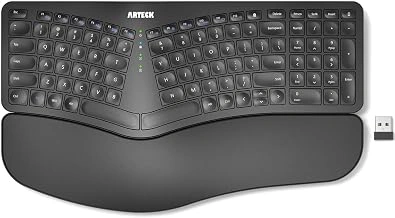
Arteck 2.4G USB Wireless Split Ergonomic Keyboard with Cushioned Wrist Rest
The Arteck 2.4G USB Wireless Split Ergonomic Keyboard offers a budget-friendly entry point for users who want to try split geometry without a significant investment. Priced at $54.99, this model pairs a separated keywell layout with an integrated cushioned wrist rest, helping to position hands at a more natural shoulder width while providing soft support during long sessions. The 2.4 GHz USB wireless connection delivers stable performance with minimal latency, and the plug-and-play receiver reduces driver installation on most systems.
With a 4.3 out of 5 rating, the keyboard strikes a balance between accessibility and function. The fixed split angle accommodates most users who type with their shoulders relaxed and elbows closer to neutral, though it lacks adjustable tenting or negative tilt found in premium alternatives. The cushioned wrist rest attaches to the base, reducing the need for separate accessories, but the overall build feels lighter and less rigid than higher-end options. Wireless range is adequate for desk use, yet Bluetooth connectivity is absent, so pairing with tablets or multiple devices requires a dedicated USB port.
This keyboard suits first-time split adopters testing whether separated keywells reduce forearm tension and shoulder strain during daily typing. The lower price and included wrist rest make it easier to explore the layout before committing to more expensive designs. If you need adjustable tenting, mechanical switches, or Bluetooth pairing, other models in this comparison will serve better. For straightforward wireless operation and a gentle introduction to split ergonomics, the Arteck 2.4G remains a practical choice that keeps upfront cost low while delivering core layout benefits.
- ✅ Affordable at $54.99 for split layout and wrist rest
- ✅ Integrated cushioned wrist rest included
- ✅ 2.4 GHz wireless with plug-and-play USB receiver
- ✅ Separated keywells encourage natural shoulder width
- ⚠️ No Bluetooth connectivity
- ⚠️ Fixed split angle with no tenting adjustment
- ⚠️ Lighter build compared to premium models
How Standard Ergonomic Keyboards Address RSI Risk
Standard ergonomic keyboards keep all keys on a single unified surface, using a gentle wave or negative slope to reduce wrist extension during typing. The key bed curves slightly upward in the center, encouraging a more neutral wrist position without forcing hands farther apart. This approach targets the common problem of flat, extended wrists pressing against a desk, which contributes to strain in the flexor tendons and median nerve pathway.
The wave design typically raises the center column of keys by 10 to 20 degrees, allowing fingers to rest at different heights that match natural hand shape. Many models include a built-in wrist rest to support the palm base and reduce pressure points. Because the layout mirrors a traditional keyboard, most users adapt within a few days, typing at near-full speed without relearning key positions or adjusting muscle memory.
Portability remains a practical advantage. Standard ergonomic keyboards fit into conventional laptop bags and desk spaces, and their narrower footprint leaves room for a mouse without excessive reaching. Setup requires no assembly, and the single-piece construction eliminates concerns about alignment or stability on uneven surfaces.
The tradeoff centers on shoulder and forearm posture. Keeping hands close together forces the shoulders to rotate inward and the forearms to pronate, even when wrist extension improves. Users who experience shoulder tension, upper back discomfort, or forearm fatigue may find that a wave-shaped key bed addresses wrist strain but leaves other postural issues unresolved. Standard ergonomic keyboards work best for those whose primary concern is wrist extension and who value a compact, familiar typing experience over broader postural correction.
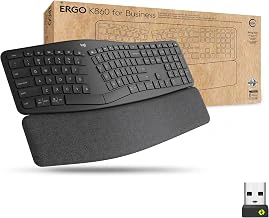
Logitech Ergo K860 Split Wireless Keyboard with Logi Bolt and Bluetooth
The Logitech Ergo K860 addresses repetitive strain with a curved split keyframe that positions each hand at a natural angle, reducing forearm rotation and shoulder tension during extended typing sessions. The integrated palm rest rises three inches at its deepest point, keeping wrists elevated and neutral rather than bent backward. This keyboard pairs Logi Bolt USB receiver technology with standard Bluetooth, allowing secure wireless connection to up to three devices without signal dropouts common in crowded office environments.
The split layout separates keys by roughly two inches at the center, encouraging shoulder-width hand placement instead of the inward pull that strains deltoids and traps. Curved keywells guide your fingers along a slight arc, matching the natural path of each digit and reducing the stretching required for top-row function keys. The palm cushion combines memory foam with a leatherette surface that remains cool during multi-hour sessions, distributing pressure across the heel of your hand rather than concentrating it at the wrist joint.
Build quality stands out: the chassis weighs two pounds and sits flat without flex, even during aggressive typing. Keys deliver multiple travel with tactile feedback that registers strokes without bottoming out, reducing impact force on fingertips. The numpad remains full-size, a departure from compact ergonomic boards that force accountants and data-entry users back to standard layouts. Battery life extends beyond two years on two AAA cells, eliminating the weekly charging ritual that interrupts workflow with rechargeable models.
This keyboard suits users already experiencing wrist soreness or shoulder tightness who need immediate postural correction. The split angle and palm lift work together to relieve the specific strain patterns caused by collapsed wrists and internally rotated shoulders. Professionals typing six-plus hours daily - writers, coders, transcriptionists - gain the most from the refined geometry and stable platform. The $159.99 price reflects premium materials and dual connectivity, positioning the K860 for committed ergonomic setups rather than trial purchases.
The tradeoff arrives in portability and desk footprint. At the listed size wide and two pounds, the K860 claims permanent desk space and resists daily packing into laptop bags. The integrated palm rest cannot be removed, locking you into the full larger depth whether your desk accommodates it or not. Users rotating between standing desks, conference rooms, and home offices may find the size and weight impractical compared to low-profile split boards that fold or separate.
Adaptation typically spans one to two weeks as muscle memory adjusts to the split layout and curved key paths. Typing speed drops multiple% initially before recovering to baseline, then often exceeding it as the natural hand position reduces fumbling for edge keys. The K860 earns a 4.5/5 rating from users who prioritize wrist comfort and shoulder relaxation over portability, making it a strong match for static workstations where RSI prevention outweighs mobility needs.
- ✅ Curved split keyframe reduces forearm rotation and shoulder tension
- ✅ Integrated three-inch palm lift maintains neutral wrist posture
- ✅ Logi Bolt and Bluetooth support secure connection to three devices
- ✅ Two-pound chassis provides stable, flex-free typing platform
- ✅ Full-size numpad retained for data-entry workflows
- ✅ Two-year battery life on AAA cells eliminates frequent charging
- ⚠️ $159.99 price premium compared to basic ergonomic keyboards
- ⚠️ 17.9-inch width and two-pound weight limit portability
- ⚠️ Integrated palm rest adds 10.2-inch depth, non-removable
- ⚠️ One to two week adaptation period reduces initial typing speed
How Split Keyboards Address RSI Risk
Split keyboards physically divide the left and right key groups into separate modules or distinct halves, permitting users to position each section at shoulder width rather than forcing both hands to angle inward toward a single board. This separation eliminates ulnar deviation - the sideways bend at the wrist that occurs when your pinky tilts toward your forearm - by letting each hand rest in line with the corresponding forearm. Maintaining that straight alignment reduces stress on the tendons and muscles that run through the wrist and into the hand.
The wider stance also opens the shoulders, counteracting the hunched posture that standard keyboards encourage. When hands crowd together on a traditional layout, shoulders roll forward and upper-back muscles tighten to compensate. Splitting the keys reverses that collapse, distributing load more evenly across the shoulder girdle and upper spine.
Many split designs incorporate tenting - raising the thumb side of each half so palms face slightly inward - or negative tilt, which lowers the front edge to keep wrists from extending upward. Both adjustments further reduce pronation, the inward rotation of the forearm that flattens the palm against the desk and compresses the carpal tunnel. These features add complexity: extra hinges, adjustment screws, or modular stands that increase desk footprint and setup time.
Adaptation to a split layout typically demands one to three weeks of reduced speed and higher error rates while muscle memory rebuilds around the new hand positions. Touch typists must recalibrate finger reach, particularly for central keys like T, G, B, Y, H, and N, which migrate to the inner edges of each half. Portable use suffers as well; most split keyboards occupy more bag space and require deliberate repositioning each time you sit down, making them less practical for frequent travel or hot-desking.
The tradeoff is clear: split keyboards offer stronger wrist and shoulder neutrality than any unified ergonomic board, but demand more desk real estate, a steeper learning curve, and careful daily setup to maintain the correct hand spacing.
Head-to-Head: Wrist Angle, Shoulder Strain, and Learning Curve
Wrist angle is where the split design pulls ahead most decisively. A fixed-angle or adjustable split keyboard forces your hands into a neutral, thumbs-up alignment that keeps the radius and ulna bones parallel, reducing pronation stress on the forearm muscles. Standard ergonomic keyboards offer a gentler palm slope and sometimes a slight center curve, but your wrists still rotate inward to track the single, continuous key plane. If you already feel tingling or fatigue along the thumb side of your forearm after long typing sessions, the split layout addresses the root mechanical cause more directly.
Shoulder strain follows a similar pattern. Split keyboards place each half at roughly shoulder width, letting your arms hang naturally from the shoulder joint rather than drawing inward toward the desk centerline. Standard ergonomic boards keep both hands on one chassis, which means your shoulders still angle forward and your upper trapezius muscles stay contracted to hold that posture. Over an eight-hour workday, that sustained inward pull accumulates into neck and upper-back tension. The split configuration eliminates the compromise by giving each arm its own space.
The learning curve flips the advantage. Standard ergonomic keyboards feel familiar within minutes because the key layout mirrors a flat board and your muscle memory transfers almost immediately. Split keyboards demand conscious retraining: your brain must remap which hand types Y, B, and the middle-column keys, and your fingers will hunt for the first week. Most users report fluency after ten to fourteen days of full-time use, but that adjustment window can disrupt deadline work or frustrate anyone who types by visual search rather than touch.
Choose a split keyboard when you have documented wrist or shoulder discomfort and the time to invest in relearning your typing motion. A standard ergonomic keyboard makes sense if your strain is mild, your work pace is high, or you share your desk with others who will not tolerate the layout shift. The split design prevents more aggressively; the standard design prevents more gently and fits into existing workflows without friction.
Quick Decision Framework: Which Keyboard Fits Your RSI Risk Profile
- Choose a split keyboard if you already experience wrist or shoulder pain during or after typing sessions
- Choose a standard ergonomic keyboard if you want mild preventive correction with zero learning curve
- Prioritize split designs if your workstation allows fixed placement and you type more than four hours daily
- Opt for standard ergonomic if you move between workspaces or need a keyboard that fits in a laptop bag
- Budget under $60: start with the Arteck split to test tolerance for separated key sections
- Budget above $150 and committed to long-term ergonomic investment: choose the Logitech Ergo K860
The Verdict: Matching Keyboard Design to Your Current Symptoms and Work Setup
Choosing between a split keyboard and a standard ergonomic keyboard depends on two factors: the severity of your current wrist or shoulder discomfort, and how much flexibility your workspace allows.
Split keyboards deliver stronger correction for wrist deviation and shoulder tension. The independent halves let you position each hand at a natural shoulder-width distance, which reduces internal rotation at the shoulder and keeps wrists straighter during typing. This makes split designs more effective when you already experience discomfort in your forearms, wrists, or upper back. The tradeoff is a longer adjustment period - most users need one to three weeks to rebuild typing speed - and a fixed desk footprint that makes them harder to move or use on shared workstations.
Standard ergonomic keyboards provide gentler correction with immediate usability. The integrated wrist rest, slight tenting, and moderate splay reduce wrist extension without forcing a new hand position. These models work well for preventive use or mild discomfort, and their compact, portable design suits hot-desking environments or users who switch between office and home setups. However, they cannot address shoulder tension as effectively because the keys remain anchored to a single frame.
Neither keyboard design eliminates repetitive strain risk on its own. Wrist and shoulder positioning improve with the right keyboard, but desk height, monitor placement, and break frequency still determine whether strain accumulates over the day. A split keyboard on a desk that sits too high will still force your shoulders into elevation. A standard ergonomic model paired with a monitor placed too low will still pull your neck forward.
Start by identifying your primary discomfort zone. If wrist deviation or shoulder tension is already present, prioritize a split keyboard and plan for the adaptation window. If you want to prevent strain before it starts, or if you work across multiple locations, a standard ergonomic model offers faster integration and easier portability. Then adjust your desk height so your elbows rest at 90 degrees, position your monitor at eye level, and set a timer to stand or stretch every 45 minutes. The keyboard supports better posture, but the full workspace setup determines whether that support translates into reduced strain.