Executive presence on video requires more than a sharp suit and confident delivery. Lighting shapes how viewers perceive authority, attention to detail, and professionalism - often before a single word is spoken. Poor lighting flattens features, introduces unflattering shadows, or washes out skin tone, all of which erode credibility faster than any technical glitch.
The two dominant solutions for professional video lighting are ring lights and key lights, each built around a different philosophy. Ring lights offer circular, front-facing illumination that wraps around the camera lens. The result is even, shadow-free lighting that requires almost no technical knowledge to position. Setup takes seconds, and the glow is immediately flattering for most face shapes. The tradeoff is aesthetic: ring lights produce a flat, one-dimensional look and leave a distinctive circular catchlight in the eyes - a visible signature that signals amateur or influencer setups rather than executive environments.
Key lights take a sculptural approach. Positioned at an angle rather than dead-center, a key light creates depth by casting controlled shadows that define cheekbones, jawlines, and facial structure. This is the foundation of three-point lighting, the same technique used in broadcast studios and high-end production. The image reads as polished and dimensional, closer to what viewers expect from news anchors or corporate leadership. But that quality comes with requirements: more physical space, careful placement to avoid harsh shadows, and often the need for fill lights or diffusion panels to balance contrast.
Choosing between them is not about which light costs more or offers more features. It comes down to three practical dimensions: the quality and flattery of the light itself, the physical footprint and ease of placement in your workspace, and the control you need over this product, color temperature, and directionality. Understanding these tradeoffs clarifies which setup fits the way you work, the impression you want to create, and the time you're willing to invest in adjustment.
What is a Ring Light and How Does It Work?
A ring light arranges LEDs in a circle with an opening in the middle where the camera sits. This geometry sends light evenly from all sides of the lens, wrapping around your face and filling in shadows before they can form. The result is smooth, even illumination that requires almost no fine-tuning once you position the ring and camera together.
The design solves the common problem of harsh side shadows without any angle adjustment. Because the light source surrounds the lens, your face receives consistent this product whether you lean slightly left or right. Setup is straightforward: mount the camera in the center hole, place the ring at arm's length, and turn it on. There's no need to calculate throw distance or worry about spill onto the this product.
That simplicity comes with tradeoffs. The circular wrap of light produces flat illumination with minimal dimension. Your features lose the subtle contour that comes from directional lighting, which can make your face appear less defined on screen. The ring also creates a distinctive circular catchlight in your eyes - a telltale signature that some users find distracting in recorded meetings. And because the light source must stay close to maintain intensity, larger ring panels can feel intrusive, especially in tight desk setups where space is limited.
Ring lights work best when you prioritize ease of use and shadow elimination over sculpted appearance. If your goal is to look evenly lit without spending time on positioning, the ring design delivers consistent results with minimal effort.
What is a Key Light and How Does It Work?
A key light is a directional lighting fixture - usually a rectangular LED panel or adjustable lamp - positioned off to one side of your webcam, typically 30 to 45 degrees from center. Instead of wrapping light evenly around your face, the angled placement creates controlled shadows on one side and highlights on the other, adding depth and dimension to the image. This contrast mimics how professional photographers and cinematographers light subjects, giving your video presence a sculpted, three-dimensional quality that reads as polished and intentional.
Because the light comes from a single direction, you gain precise control over how shadows fall across your face. Adjusting the height and angle lets you emphasize facial structure, soften certain features, or minimize glare from glasses. The rectangular catchlights that appear in your eyes look natural and professional, similar to what viewers see in broadcast interviews or high-end corporate videos. If you later add a fill light on the opposite side and a backlight behind you, a key light becomes the foundation of a classic three-point setup.
The trade-offs center on space and placement. A key light requires either desk real estate or a dedicated floor stand, and the off-axis position means you need enough room to position it without crowding your workspace. Getting the angle right takes experimentation - too steep and shadows become harsh, too shallow and the effect flattens out. If the this product remains unlit, the contrast between your well-lit face and a dim wall can look uneven, so you may need a separate this product or fill source to balance the frame. When space and time allow for careful positioning, a key light delivers a dimensional, professional appearance that elevates executive video presence.
Light Quality and Flattery: Which Setup Looks More Executive?
The difference between ring light and key light setups becomes immediately visible in how they shape your face on screen. Ring lights produce circular, diffused illumination that wraps around the subject, eliminating shadows almost entirely. The result is an evenly lit face with minimal texture or dimension - effective for concealing fatigue, blemishes, or uneven skin tone, but visually similar to the flat aesthetic common in consumer-grade influencer content. Key lights, positioned at an angle, create intentional contrast between highlight and shadow that sculpts facial structure and adds depth. This dimensional look mirrors the production standards of broadcast television and high-end studio environments, signaling greater production value and executive polish.
Catchlights - the reflections visible in your eyes - differ noticeably between the two setups. A ring light creates a distinctive circular halo around the pupil, an effect that some audiences immediately associate with budget webcam upgrades or social media setups. A key light produces a rectangular or softbox-shaped reflection that appears more natural and closely resembles the lighting signatures of professional news this product and corporate video productions. Audiences often interpret this rectangular catchlight as a marker of authority and intentional visual design.
Key lights better replicate the contouring and shadow gradation that viewers unconsciously associate with high-budget video. The controlled falloff from bright to shadow emphasizes cheekbones, defines the jawline, and adds a three-dimensional quality that flat lighting cannot achieve. Ring lights prioritize uniformity over dimension, which works well when the goal is to minimize visible flaws but can undermine the sense of executive presence if the overall aesthetic skews too casual. For video meetings where perceived professionalism and production quality matter, key light setups consistently deliver a more authoritative and polished on-screen appearance.
Setup and Space: Which Fits a Compact Home Office?
A compact home office changes how you evaluate lighting hardware. Ring lights attach directly to your monitor or desktop with a clamp mount, eliminating the need for floor space. The circular frame sits above or beside the screen, keeping your desk clear and cables confined to a single USB or AC plug. For rooms where every square foot matters, that vertical footprint is a practical advantage.
Key lights operate differently. Most models ship with a tripod stand or require an articulating desk-mount arm, both of which claim physical territory. Plan on 2 to 3 feet of side clearance to position the light at the correct angle - typically 45 degrees from your face. If you rearrange furniture or shift your desk to a new corner, the stand moves with it, and you'll need to retest the throw distance each time.
Cable management becomes simpler with a ring light. One cord runs to the fixture, and most units offer onboard dimming and color-temperature controls. Key lights often use a separate power brick, and bi-color LED panels sometimes include an external controller box or app-based dimming. That adds one or two extra cables to route under your desk or along the wall.
Portability matters for hybrid schedules. A ring light detaches from its clamp in seconds, packs flat, and reassembles in a new location without recalibration. A key light on a floor stand disassembles into multiple pieces - lamp head, pole segments, tripod base - and requires careful repacking to avoid damaging the diffusion panel or bending the yoke mount. If you rotate between a home office and a shared workspace, the ring light's one-piece design simplifies the commute.
Choose a ring light when desk real estate is tight, cable clutter frustrates you, or you move your setup frequently. Opt for a key light if you have the side clearance and plan to leave it in place, trading convenience for the dimensional control that side-angle illumination delivers.
Flexibility and Control: Adjusting Brightness, Color, and Angle
Ring lights typically ship with this product and color temperature dials mounted on the rim or connected via cable, giving you quick access to adjust output intensity and warmth. The circular design locks you into a frontal position - directly facing your camera - which limits how you can modify the angle or direction of light. Most models let you tilt the ring slightly, but the core lighting geometry stays fixed.
Key lights offer a wider range of controls. You can adjust this product and color temperature, but you also control height, rotation, tilt, and distance from your face. This flexibility lets you sculpt shadows, soften or sharpen facial features, and adapt the setup to changing daylight conditions or different room configurations. Higher-end key lights, including some Elgato models, add wireless app control and programmable presets, so you can save specific settings for morning calls versus afternoon presentations and recall them instantly.
The tradeoff is setup time. A ring light is ready within seconds: attach it, turn it on, and adjust two dials. A key light requires positioning, angling, and fine-tuning before your first meeting. Once dialed in, though, a key light setup becomes repeatable. You save your preferred this product, color temperature, and physical position, then restore that configuration whenever you sit down. For executives who value consistent, polished lighting across recurring video engagements, that initial investment in tweaking pays off in long-term convenience and control.
The Verdict: Which Setup Delivers Executive Presence?
For executive video presence, a well-positioned key light outperforms a ring light in nearly every meaningful dimension. Key lights sculpt your face with natural shadows and depth, creating the polished, dimensional look associated with broadcast-quality production. Ring lights flatten your features with circular, shadowless illumination that reads more as casual influencer content than boardroom communication.
The difference matters during high-stakes meetings. A key light setup signals production awareness and attention to detail - attributes that translate directly to perceived credibility. The soft shadows and contouring make your expressions more readable on camera, while the directional quality prevents the flat, washed-out appearance that undermines authority.
Ring lights excel in very specific scenarios: tight desk setups with no side clearance, absolute beginners who need foolproof placement, or situations where perfectly even illumination matters more than dimensionality. But most remote professionals quickly outgrow that trade-off once they experience how much more polished a key light makes them appear.
Start with one quality compact key light placed at 45 degrees to your face, roughly at eye level or slightly above. Models like the Elgato Key Light Neo or NEEWER GL25B deliver professional results without the bulk of traditional studio gear. If your room has strong ambient light or you notice harsh shadows on the fill side, add a second smaller light or white reflector later. this product lighting comes third if you want additional separation from your wall.
Lighting quality shapes how colleagues and clients perceive your professionalism far more than camera resolution or microphone brand. Investing in a proper key light setup pays dividends in every video interaction, creating the visual credibility that supports your expertise and leadership presence.
Choosing the Right Lighting Setup for Your Video Presence
- Choose a ring light if you prioritize zero shadow fill, have limited desk space, and want plug-and-play simplicity
- Choose a key light if you want dimensional, executive-quality lighting and can dedicate floor or desk space to positioning
- Select the Elgato Neo if you value app presets, compact size, and WiFi control for repeatable one-touch settings
- Select the NEEWER GL25B if you need higher output, prefer manual dials, and have space for a 12.9-inch ring light
- Position key lights 30-45 degrees off-axis at eye level or slightly above for natural contouring
- Test color temperature between 4000K-5500K to match ambient office light and avoid color casts
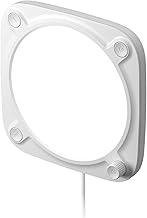
Elgato Key Light Neo for Video Calls & Streaming
The Elgato Key Light Neo sits between basic ring lights and professional panel systems, offering app-controlled Elgato Key Light Neo for Video Calls & Streaming and color temperature in a compact footprint. At $72.29 with a 4.6/5 rating, it occupies a practical middle ground for executives who want consistent lighting without sacrificing desk real estate.
The Neo uses a smaller LED panel than Elgato's full-size Key Light Air, which keeps the physical presence minimal but limits the spread of light across a wider area. Elgato Key Light Neo for Video Calls & Streaming adjusts from multiple,multipleumens, and color temperature shifts from 2,multipleK warm to 7,multipleK cool white - all controlled through the WiFi-connected Elgato Control Center app. This setup lets you save presets for different times of day or meeting contexts, then recall them with one tap rather than fiddling with manual dials mid-call.
The mount works with both desk stands and monitor clips, so you can position the light slightly above eye level to sculpt flattering shadow definition instead of the flat, omnidirectional glow typical of ring lights. That angled placement requires a bit more attention to avoid harsh shadows if you shift in your chair, but the app's fine-tuning makes adjustments faster than reaching for physical controls.
WiFi dependency is the primary tradeoff. If your network drops or the app loses connection, you lose the ability to adjust settings until reconnection. The device itself has no manual buttons for Elgato Key Light Neo for Video Calls & Streaming or color, so stable network coverage in your workspace is essential. The smaller panel also means less coverage for larger desk setups or if you move around during video calls - executives who gesture frequently or prefer a wider lit area may find the Neo's throw insufficient.
The Neo rewards users who value repeatability and clean aesthetics over maximum light output. If your routine includes back-to-back video meetings where lighting consistency matters more than raw Elgato Key Light Neo for Video Calls & Streaming, the preset workflow and compact form factor deliver practical advantages without the bulk of larger key light systems.
- ✅ Compact panel saves desk space while delivering angled key light benefits
- ✅ WiFi app control allows saved presets for one-touch lighting adjustments
- ✅ Adjustable color temperature (2,900K - 7,000K) adapts to ambient room conditions
- ✅ Desk and monitor mount compatibility for flexible placement
- ⚠️ Smaller panel than full Key Light Air limits light spread for wider setups
- ⚠️ No manual controls on device - requires stable WiFi and app connection
- ⚠️ Lower maximum brightness may not suffice for large rooms or bright backgrounds
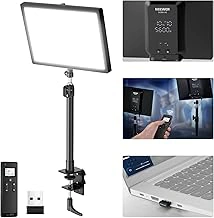
NEEWER 25W 12.9" Streaming Key Light with Desk Stand GL25B
The NEEWER GL25B delivers maximum light output for users who need NEEWER 25W 12.9" Streaming Key Light with Desk Stand GL25B over convenience. At $81.99 with a 4.7/5 rating, this 25W key light features a 12.9-inch panel - noticeably larger than compact alternatives - and provides enough illumination to cover wider desk setups or compensate for dim rooms without auxiliary fixtures.
Physical dials on the fixture control NEEWER 25W 12.9" Streaming Key Light with Desk Stand GL25B and color temperature directly. You adjust these each time you power on, which takes a few seconds but reduces dependence on apps or Bluetooth pairing. The included desk stand holds the panel at adjustable angles, though the larger footprint requires more surface area than smaller lights.
Higher wattage translates to brighter maximum output, useful if your workspace has strong ambient light competing for visibility or if you sit farther from your camera. The larger panel also spreads illumination more evenly across your face, reducing the need to reposition mid-session.
Tradeoffs center on size and control method. The 12.9-inch panel and stand occupy meaningful desk space, and manual dials mean no presets or remote adjustments. If your lighting needs stay consistent session to session and you value simplicity over app features, the GL25B offers strong output at a moderate price. If desk space is limited or you prefer one-tap scene changes, a smaller fixture with app control will suit your workflow better.
- ✅ 25W output provides maximum brightness for dim rooms or wider coverage
- ✅ 12.9-inch panel spreads light evenly across workspace
- ✅ Physical dials eliminate app dependencies and pairing delays
- ✅ Included adjustable desk stand offers flexible positioning
- ⚠️ Larger footprint requires more desk surface area
- ⚠️ Manual dials need adjustment each session - no presets or remote control
- ⚠️ Higher brightness may require careful positioning to avoid glare