We may earn a commission when you buy through links on this page, at no extra cost to you. How this works.
The Pomodoro Technique is a time-management method that breaks work into fixed intervals - traditionally 25 minutes - separated by short breaks. It works well when you control your schedule and face a queue of discrete tasks: writing, coding, design work, data entry, or research. If your role involves back-to-back meetings, real-time customer support, or unpredictable interruptions, structured intervals become harder to maintain and the technique loses much of its value.
This guide walks through the setup decisions that determine whether timed intervals feel productive or disruptive. Choosing the right interval length, break structure, and tool depends on your attention span, task complexity, and workspace environment. Common mistakes - like ignoring task boundaries, skipping breaks, or using a timer that demands constant interaction - undermine focus rather than support it. The sections that follow explain how to configure each element so the system fits your work style instead of fighting it.
Who This Method Works Best For
The Pomodoro Technique delivers the most value for people who control their own schedule and work on tasks that require sustained concentration. Remote workers, software developers, writers, data analysts, and students often see the clearest improvement because their days include multi-hour blocks of self-directed work with few external interruptions.
If your role involves deep reading, coding, drafting documents, analyzing datasets, or designing - activities where flow state matters - structured intervals help you enter focus faster and sustain it longer. The method works especially well when you can close communication tools for 25 minutes at a time without missing urgent requests.
Roles that depend on constant collaboration, real-time troubleshooting, or unpredictable task switching see less benefit. Customer support representatives, emergency coordinators, and managers fielding frequent questions struggle to honor fixed intervals because their attention must shift on demand. In these environments, the rigid structure can create friction rather than clarity.
Physical timers - mechanical or digital - add a layer of accountability for people who find smartphone apps too easy to dismiss or who want to keep their phone out of reach during work sessions. The audible tick and manual wind-up create a small ritual that reinforces commitment. Apps suffice when you need silent operation, automatic logging, or integration with task managers, but they require discipline to avoid opening other apps mid-session.
If you work in a shared office or coworking space, consider whether a ticking timer will distract colleagues. In those cases, a silent app or vibrating wearable timer offers the structure without the sound. The choice between physical and digital tools comes down to your environment and whether tactile feedback helps you stay honest about break boundaries.
What Matters Most in Your Setup
Three decisions shape whether your Pomodoro setup supports deep focus or quietly sabotages it: the interval length you choose, the device you use to track time, and how you structure your breaks.
The classic 25-minute work interval exists for a reason - it sits just inside the window where most people maintain peak concentration before mental fatigue begins to creep in. If 25 minutes feels too short and you're hitting flow states that last longer, you can extend to 30 or 35 minutes, but be honest about whether you're actually sustaining focus or just avoiding the discipline of a break. Shorter intervals - 15 or 20 minutes - work well when the task is cognitively demanding or unfamiliar, or when you're rebuilding focus habits after distraction-heavy routines. The key is consistency: pick one interval length and use it for at least a week before adjusting.
The device you use matters more than most people expect. A physical timer - whether a simple kitchen timer, a dedicated Pomodoro cube, or a manual wind-up - removes the distraction surface entirely. There's no screen to glance at, no notifications to dismiss, and no temptation to check just one thing while you're resetting the clock. Apps and browser timers add convenience - automatic logging, break reminders, session stats - but they live on the same devices that house your email, messaging, and every other focus trap. If you choose an app, treat setup as a commitment device: enable Do Not Disturb, close all other tabs, and place your phone face-down or in another room. The best timer is the one that removes friction from starting and adds friction to stopping early.
Break structure determines whether you can sustain multiple sessions or burn out by lunch. A five-minute break after each 25-minute work block is standard, but what you do in those five minutes controls how well the next session goes. Passive breaks - scrolling, watching clips, checking feeds - don't restore attention; they shift it to another demanding stimulus. Active breaks that involve movement, a change of visual field, or a simple physical task give your prefrontal cortex a genuine rest. Stand up, walk to another room, stretch, look out a window, refill your water. After every four work intervals, take a longer break of 15 to 30 minutes to let mental fatigue fully dissipate. This longer rest isn't optional - it's the reset that makes afternoon sessions viable.
Setup choices interact. A physical timer pairs well with longer intervals because you're not leaning on the device for micro-feedback. Apps work better with strict break protocols because the screen itself is a risk factor. Custom intervals require more self-awareness; if you're experimenting, track not just how much you finish but how you feel at the end of each session. Sustainable focus comes from matching your setup to your actual work pattern, not to an ideal you wish you had.
Pre-Session Environment Checklist
- Phone in another room or drawer, not on silent mode beside you
- Single task written down before starting timer
- Browser tabs closed except those needed for current task
- Notification badges and pop-ups disabled system-wide
- Water and any needed materials within arms reach
- Break activity decided in advance (walk, stretch, not scrolling)
How to Choose the Right Timer Type
Choosing the right timer is the first practical step in building a sustainable Pomodoro routine. The decision comes down to two main options: physical timers and smartphone apps. Each brings distinct trade-offs that affect focus, discipline, and workflow.
Physical timers offer a single-purpose tool that removes the phone as a distraction vector. When you use a dedicated timer - whether a classic kitchen timer, a twist cube, or a digital desk unit - you eliminate the temptation to check notifications, scroll feeds, or open other apps mid-session. The tactile act of setting a physical timer creates a small ritual that signals the start of focused work. Many users find the visible countdown on a display or the quiet ticking reinforces commitment throughout the interval. Physical timers also tend to produce clear, audible alerts that are hard to ignore, which helps maintain the rhythm of breaks and work blocks.
Smartphone apps provide flexibility and customization without requiring extra hardware. Most Pomodoro apps allow you to adjust interval lengths, choose notification sounds, track session history, and integrate with task lists. This works well when phone discipline is already strong - if you can open the app, start the timer, and leave the device face-down or in another room. Apps are convenient for remote work, travel, or environments where carrying a physical timer is impractical. The risk is that the phone remains within arm's reach, and the same device that tracks your focus can also interrupt it.
Consider your work environment and habits when making the choice. If you frequently reach for your phone out of habit, a physical timer creates a deliberate barrier. If your workflow depends on digital tools and you already manage notifications effectively, an app may integrate more smoothly. Some people use both: a physical timer at a dedicated desk and an app for flexible or mobile work sessions.
Visual countdown clarity also varies by type. Physical timers with analog dials or segmented LED displays make elapsed time immediately visible, which can help you gauge progress without breaking focus. Many apps show time remaining on the lock screen, but this still requires lifting and looking at the phone. Alert customization is typically richer in apps - you can choose gentle chimes, escalating tones, or vibration patterns - while physical timers usually offer a single bell or beep.
Ultimately, the right timer type is the one that removes friction and keeps you anchored to the interval structure. The tool should fade into the background once set, leaving your attention free for the task at hand.
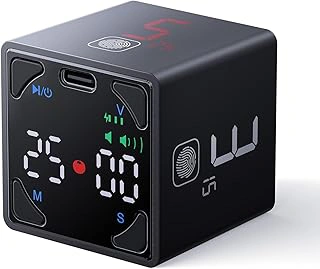
Ticktime Pomodoro Timer Cube, Productivity Timer, Black
The Ticktime Pomodoro Timer Cube is a flip-to-start timer designed to simplify focus sessions. You rotate the cube to select one of six preset time intervals printed on each face, then place that face up to begin the countdown. The device requires no buttons, apps, or setup beyond an initial charge, which makes it easy to use in shared workspaces or when switching between tasks quickly.
Each face of the cube corresponds to a fixed duration: common intervals include 5, multiple, multiple, and multiple minutes. The timer displays a visual countdown on the top face, showing remaining time at a glance. When the session ends, the cube emits a single alert tone. This physical interaction - flipping to start - can help reinforce the transition into focused work, especially if you find tapping a phone or adjusting app settings distracting.
The main limitation is flexibility. The Ticktime cube offers fewer preset intervals than dial-based or digital timers, so if your workflow requires custom durations or multiple alert modes, you may find it restrictive. The alert is also a single tone with no volume control, which may be too soft in noisy environments or too abrupt if you prefer a gradual notification. The device is lightweight and portable, but the plastic casing can feel less durable than metal or rubberized alternatives.
This timer suits straightforward Pomodoro sessions - multiple-minute work blocks followed by short breaks - without the need to configure settings or manage notifications. If you value simplicity and want a physical cue to start and stop work, the flip-to-start design is effective. If you need variable intervals, adjustable alerts, or longer battery life for extended use, consider timers with more configuration options.
- ✅ Flip-to-start design requires no buttons or app setup
- ✅ Visual countdown on top face shows remaining time at a glance
- ✅ Six preset intervals cover common Pomodoro and break durations
- ✅ Lightweight and portable for use in different workspaces
- ⚠️ Fewer preset intervals than dial-based or fully configurable timers
- ⚠️ Single alert tone with no volume or notification mode adjustment
- ⚠️ Plastic casing may feel less durable than metal or rubberized options
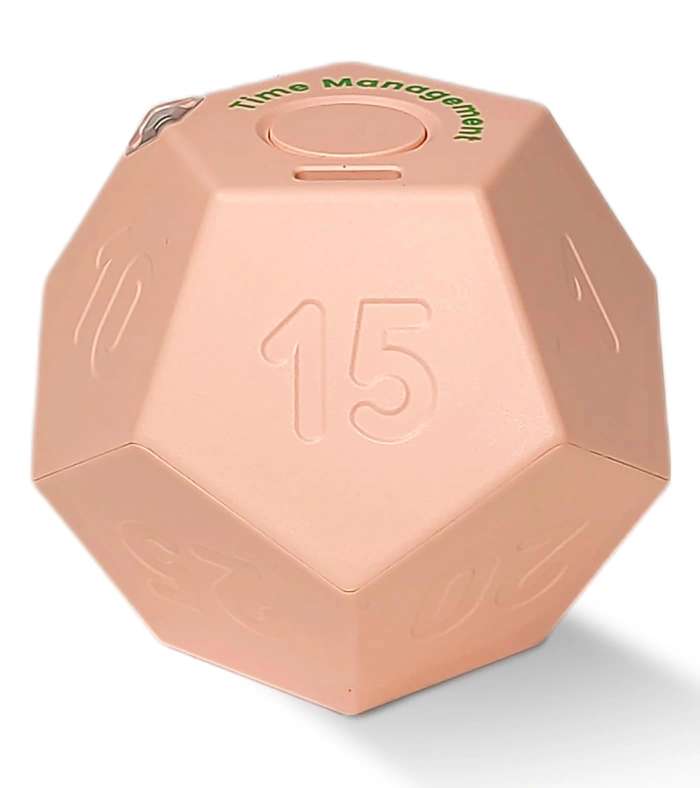
Cube Pomodoro Productivity Timer with Silent/Vibration, Pink
The Cube Pomodoro Productivity Timer is designed for environments where audible alarms would be disruptive. It offers both silent and vibration alert modes, making it practical for open offices, shared workspaces, or home settings where others are present. At $16.48 with a 4.6/5 rating, it sits at a lower price point than many mechanical timers while offering flexible notification options.
This timer uses a cube format: flip to the desired interval, and it begins counting down immediately. The silent mode uses visual cues only, while vibration mode provides a tactile alert without sound. This flexibility is particularly useful in noise-sensitive environments or when working alongside others who shouldn't be interrupted by repeated audible alarms.
The device is battery-powered and compact, fitting easily on a desk or in a bag.
Because it relies on visual or vibration feedback rather than sound, you'll need to stay within sight or contact of the timer. If you tend to move around your workspace frequently or work in multiple rooms, an audible alert may be more reliable. The cube design also means you're limited to preset intervals rather than custom times, so it works best when standard Pomodoro intervals (multiple, multiple, multiple minutes, etc.) match your workflow.
This timer suits users who work in shared spaces, value discretion, and can stay near their desk during focus sessions. If you need audible reminders or prefer mechanical winding, consider other options in this guide.
- ✅ Silent and vibration modes for noise-sensitive spaces
- ✅ Lower price point at $16.48
- ✅ Cube flip design for quick interval selection
- ✅ Compact and portable
- ⚠️ Requires staying within sight or contact range
- ⚠️ Preset intervals only, no custom times
- ⚠️ Visual and vibration alerts may be missed if not nearby
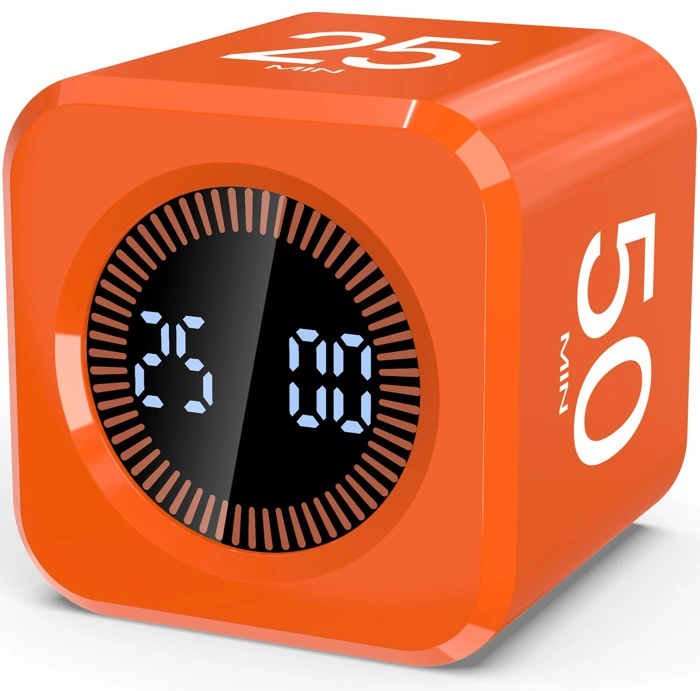
Digital Visual Pomodoro Timer Cube with Silent & Sound Mode, Orange
This compact cube timer offers both silent and sound alert modes, making it adaptable whether you work in a shared office or at home. At $15.29 with a 4.8/5 rating, it delivers the highest rating at the lowest price in this category, which makes it a practical choice if you're experimenting with physical timers for the first time or want the flexibility to toggle between audible and vibration-free alerts depending on your environment.
The visual countdown display on each face reduces guesswork during work or break intervals. You rotate the cube to select preset durations, so starting a session is quick and requires no app, Bluetooth, or battery-charging routine. The orange housing is easy to spot on a desk, and the dual-mode design means you can use silent mode during calls or sound mode when you need a more assertive cue to transition between blocks.
Because it's a single-purpose device, it won't distract you with notifications or tempt you to check other apps. The tradeoff is limited customization - you're working with the durations printed on each face rather than programming intervals down to the second. If you value simplicity, portability, and the ability to switch alert styles without opening settings, this timer covers the essentials at a budget-friendly price.
- ✅ Dual-mode flexibility with both silent and sound alerts
- ✅ Highest rating at the lowest price in category
- ✅ Visual countdown on each face for at-a-glance progress
- ✅ Rotate-to-start design with no app or charging required
- ✅ Compact, single-purpose build that eliminates digital distractions
- ⚠️ Preset durations only - no custom interval programming
- ⚠️ Limited to the time blocks printed on cube faces
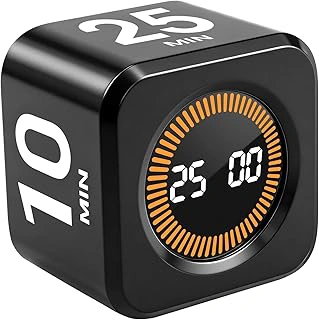
Pomodoro Timer Cube for Productivity — 5/25/10/50 Minutes Preset, Digital Gravity Sensor Desk Visual Timer for ADHD, Silent Mode, Ideal for Office, Study, Kitchen & Kids
The Pomodoro Timer Cube offers four preset intervals - 5, 10, 25, and 50 minutes - making it a practical choice if you want to experiment with different session lengths or switch between work modes throughout the day. The gravity sensor lets you flip the cube to start a new interval without navigating buttons, which keeps transitions quick when you're moving from deep work to a short break or from email batches to a longer focus block.
The silent mode means no audible ticking, and the digital display keeps the remaining time visible at a glance. At $16.99, it's an affordable option for anyone who prefers a physical timer over a phone app and wants the flexibility to adjust interval length as their workflow changes.
Because this timer uses preset increments, it works best if those four durations align with your routine. If you need custom intervals - say, multiple or multiple minutes - you'll want a timer with more granular control. The cube design is compact enough for a desk but relies on being flipped to the correct face, so it suits users who like tactile interaction rather than set-and-forget automation.
The gravity sensor adds convenience but also means you need a stable surface; flipping the cube on an uneven desk may require a second adjustment. For office, study, or kitchen use, the visual countdown and silent operation help maintain focus without creating distraction, especially in shared spaces where audible alarms can interrupt others.
- ✅ Four preset intervals (5/10/25/50 minutes) cover common Pomodoro and break durations
- ✅ Gravity sensor enables quick session switching by flipping the cube
- ✅ Silent mode eliminates audible ticking
- ✅ Digital display shows remaining time at a glance
- ✅ Compact cube design fits on a desk without taking up much space
- ⚠️ Preset increments only - no custom interval options
- ⚠️ Gravity sensor requires a stable, flat surface for reliable operation
- ⚠️ Tactile flipping may not suit users who prefer set-and-forget timers
Common Mistakes That Kill Focus
Even experienced users can accidentally undermine the Pomodoro Technique by introducing distractions or misunderstanding its core purpose. Recognizing these common mistakes helps you preserve the focus containers the method is designed to create.
One frequent error is skipping or cutting breaks short. When you push through multiple work intervals without stepping away, mental fatigue accumulates quickly. Breaks are not optional; they allow your brain to consolidate information and reset attention. Shortening a five-minute break to two minutes or working through it entirely reduces your effectiveness in the next session.
Using a phone-based timer without enabling airplane mode or Do Not Disturb invites interruptions. Notifications, calls, and message previews break concentration, and even glancing at the lock screen can pull your attention away from the task. If you rely on your phone as a timer, isolate it completely from incoming signals during work intervals.
Starting a Pomodoro with a vague task definition makes it hard to stay on track. If your goal is simply "work on project," you'll spend cognitive energy deciding what to do next instead of executing. Define a specific, concrete action before you start the timer: "draft introduction paragraph," "review budget spreadsheet rows 10 - 25," or "outline three main points for presentation."
Checking email, social media, or chat applications during a session fragments your focus. Each context switch costs time and mental energy to recover. Treat the interval as a closed container - no inbound communication, no quick replies, no "just one second" glances. Capture any intrusive thoughts or tasks on paper and return to them during a break.
Another mistake is treating the 25-minute interval as a hard deadline rather than a focus container. The goal is sustained attention, not racing to finish a task before the timer rings. If you reach a natural stopping point at 22 minutes, use the remaining time to review your work or prepare the next step. If you're mid-thought when the timer sounds, jot down where you are and take your break - you'll resume more smoothly than if you push through.
Finally, rigidly adhering to 25-minute intervals when your task or energy level calls for adjustment can reduce effectiveness. Some deep work benefits from longer stretches; some administrative tasks fit better in shorter bursts. The technique is a tool, not a rule. Adapt interval length to match the demands of your work and your current capacity, then apply the same discipline to breaks and boundaries.
Adjusting Interval Length for Your Work
The standard 25-minute Pomodoro interval works well for many people, but it is a starting point rather than a universal rule. Your work environment, task type, and experience level all influence the ideal interval length.
If you work in a high-distraction environment - such as an open office, a busy home, or anywhere with frequent interruptions - shorter intervals can help you maintain focus without feeling defeated by constant disruptions. A 15-minute session is easier to protect and complete, and the frequent breaks give you natural moments to address quick questions or environmental noise without derailing your entire work block.
When you are new to the Pomodoro technique, shorter intervals also reduce the friction of starting. Committing to 15 minutes feels manageable, and the rapid sense of progress builds momentum. As your focus stamina improves, you can lengthen the intervals gradually.
For deep technical work - coding, data analysis, complex writing, or design tasks that require extended concentration - longer intervals often produce better results. Once you enter a flow state, interrupting after 25 minutes can feel disruptive. In these cases, 50-minute sessions with 10-minute breaks preserve continuity while still providing regular rest. Some people use a 45-minute interval to stay slightly below the point where fatigue typically sets in.
Testing different lengths over the course of a week reveals what fits your work style. Try 15-minute intervals on Monday and Tuesday, 25-minute intervals on Wednesday and Thursday, and 50-minute intervals on Friday. Track how many intervals you complete, how often you feel the urge to stop early, and how your energy holds across the day. The format that lets you finish sessions consistently without mental fatigue is the one to adopt.
Avoid changing interval length within a single day unless circumstances force it. Consistency helps you settle into a rhythm, and switching formats mid-stream adds decision overhead that reduces the technique's simplicity.
What to Do During Breaks
The quality of your break determines how well your next Pomodoro performs. A good break resets attention and restores energy; a poor one simply shifts cognitive load to a different screen, leaving you just as drained when the timer restarts.
Effective breaks involve movement, hydration, or rest. Stand up and stretch your shoulders, neck, and back. Walk to another room or step outside if possible. Drink water. Close your eyes and let them relax away from the monitor. These activities give your visual system, posture, and working memory a genuine pause.
Counterproductive breaks include scrolling social media, checking email, reading news, or watching short videos. These feel like rest because they're different from your work task, but they keep your attention engaged and your eyes on a screen. You return to the next Pomodoro with the same fatigue you tried to escape.
Pre-decide what you'll do during breaks before you start the session. Write it down: "5-minute breaks = walk to kitchen and stretch." This removes the in-the-moment decision and prevents you from defaulting to your phone out of habit. When the break timer starts, you already know the plan and can execute it without friction.
If you work in a shared space or can't leave your desk, simple seated stretches, controlled breathing, or looking at a distant object through a window all help. The key is to disengage from the screen and give your body a different input for a few minutes.
Final Takeaway
Effective Pomodoro use starts before you press start. Clear your workspace, close unrelated tabs, and silence notifications so each interval runs on attention, not willpower. The tool itself matters: physical timers eliminate the temptation to check your phone or toggle settings mid-session, while app-based options work best when notifications are disabled and the interface stays out of sight between intervals.
The 25-minute default is a starting point, not a rule. If you consistently break flow at 20 minutes, shorten the interval. If you hit stride at 30, extend it. Productivity comes from matching the timer to your task and energy, not forcing yourself into a fixed rhythm that creates friction.
Breaks are non-negotiable. Skipping them to push through may feel efficient in the moment, but it degrades focus across the day. Use short breaks to step away from your screen - stretch, hydrate, or look at something distant. Use long breaks to reset completely: walk outside, eat, or switch contexts entirely.
Most failures trace to setup, not technique. A cluttered desk, a timer that demands interaction, or intervals that don't align with your work style will erode consistency faster than any motivational strategy can fix. Start with your environment, choose a timer that removes decision points, and adjust intervals based on what actually happens during your sessions, not what you think should happen.
Success is iterative. Track what works for a week, then refine. If mornings demand longer focus blocks and afternoons need shorter bursts, build that into your routine. The Pomodoro Technique is a framework for structured attention - it works when you adapt it to the way you actually work, not the other way around.