We may earn a commission when you buy through links on this page, at no extra cost to you. How this works.
Gunnar Gaming Glasses - Intercept Onyx Amber Lens - Blue Light Blocking Relieve Dry Eye
Compare software filters and physical glasses for blue light blocking and eye strain relief.
Remote workers and professionals who spend eight or more hours daily in front of screens face a common problem: digital eye strain. Symptoms like dry eyes, blurred vision, and headaches interrupt focus and make long days harder. Two solutions have gained traction - blue light blocking software and computer glasses - but they work in fundamentally different ways.
Blue light blocking software adjusts your screen's color temperature in real time, reducing the amount of blue wavelengths emitted by the display. Computer glasses, on the other hand, filter blue light through tinted lenses before it reaches your eyes. Both aim to reduce exposure, but the tradeoffs between them shape which option fits better for specific work environments and habits.
Effectiveness varies by use case. Software offers dynamic control and works across all applications without changing your workspace setup. Glasses provide consistent filtering regardless of device or ambient lighting, but they require you to wear them and may tint your display perception. Cost and convenience also differ: software is often free or low-cost and lives on your device, while glasses require an upfront purchase and physical maintenance.
This comparison examines how software and glasses perform across four key dimensions - blue light reduction consistency, ease of daily use, cost over time, and situational constraints. The goal is to show which option addresses your specific strain triggers and work setup, rather than declaring one universally superior.
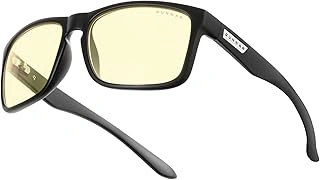
Gunnar Gaming Glasses - Intercept Onyx Amber Lens - Blue Light Blocking Relieve Dry Eye
The Gunnar Intercept uses an amber-tinted lens to filter blue light during extended screen time, a design choice common among dedicated computer eyewear. Priced at $48.99 with a 4.4 out of 5 rating, these frames offer a purpose-built approach for remote workers and gamers who spend hours in front of monitors.
The onyx frame features a wraparound shape that minimizes peripheral light and adds side coverage, which can help reduce glare from surrounding sources. The amber lens tint shifts color perception slightly - whites appear warmer, and blues become muted - but many users find the tradeoff worthwhile for the increased contrast and reduced screen Gunnar Gaming Glasses - Intercept Onyx Amber Lens - Blue Light Blocking Relieve Dry Eye during long sessions.
Unlike clear-lens alternatives, the Intercept's amber tint is immediately visible, making it less suitable for video calls where appearance matters. The frame width and temple design work well for average to wider face shapes, though users with narrower features may find the fit loose. The lens coating aims to reduce dry eye symptoms often linked to prolonged focus and decreased blink rate, though no medical claims are verified.
At this price point, the Intercept competes with lower-cost blue light glasses that lack the wraparound design and brand reputation Gunnar has built in gaming and office environments. The frame durability and lens clarity hold up better than budget options, but the amber tint remains a personal preference - some users adapt quickly, while others find it distracting for color-sensitive work like photo editing or design.
For remote professionals who prioritize blue light reduction over natural color accuracy and prefer a physical solution to software dimming, the Gunnar Intercept delivers consistent filtering without the need to adjust settings across devices.
- ✅ Amber lens provides noticeable blue light filtering for extended screen use
- ✅ Wraparound frame design reduces peripheral glare
- ✅ 4.4/5 rating reflects solid user satisfaction
- ✅ Purpose-built for gaming and office environments
- ⚠️ Amber tint shifts color perception, unsuitable for color-critical work
- ⚠️ Visible tint may be less professional for video calls
- ⚠️ Frame fit may be loose on narrower faces
- ⚠️ $48.99 price higher than basic blue light glasses
What Is Blue Light and How Does It Affect Your Eyes?
Blue light is a short-wavelength, high-energy portion of the visible light spectrum, typically measured between 380 and 500 nanometers. Digital screens - monitors, laptops, tablets, and smartphones - emit significant amounts of blue light as part of their LED backlighting technology.
Your eyes are not particularly good at blocking blue light. Unlike ultraviolet light, which the cornea and lens mostly filter out, blue light passes through to the retina. This constant exposure has two main effects: it can disrupt your circadian rhythm by suppressing melatonin production, especially during evening hours, and it contributes to a cluster of discomfort symptoms often grouped under the term digital eye strain.
Digital eye strain symptoms include dry or irritated eyes, difficulty focusing, blurred vision, and a tired or heavy feeling around the eyes after prolonged screen time. These sensations result from a combination of factors: reduced blink rate during screen use, the contrast and flicker of digital displays, and the sustained near-focus demand placed on your eye muscles. Blue light itself plays a role, though it is one contributor among several rather than the sole cause of discomfort.
The concern around blue light is not about immediate damage for most people using screens at typical this product and distance. Instead, the issue is cumulative fatigue and the way evening exposure can delay sleep onset by interfering with your body's internal clock. Remote professionals who spend eight or more hours daily in front of screens often notice these effects more acutely, particularly if work extends into evening hours without breaks or adjustments to screen settings.
Understanding blue light's role helps clarify why filtering or reducing exposure has become a popular focus. The goal is not to eliminate blue light entirely - it serves useful functions during daylight hours, including alertness and mood regulation - but to manage screen-related exposure in ways that reduce strain and preserve comfortable vision throughout the workday.
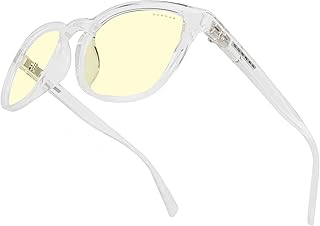
Gunnar Premium Gaming and Computer Glasses - Blue Light Blocking
The Gunnar Premium Gaming and Computer Glasses offer a frame-based alternative for remote workers who prefer a physical solution over software adjustments. Priced at $49.99 with a 4.4 out of 5 rating, these glasses deliver blue light filtering through dedicated lens coatings rather than digital screen manipulation.
The frame design and fit differ from the Intercept model, providing options for users with different face shapes or style preferences. While both Gunnar models target the same blue light wavelengths, the Premium edition features a distinct frame geometry that may sit more comfortably on wider faces or offer a less sporty aesthetic for video calls and client meetings.
Lens coating quality remains consistent across Gunnar's lineup, meaning you get comparable blue light reduction performance regardless of which frame style you choose. The main decision point comes down to how the frames align with your face dimensions and whether you prefer a more understated look versus the wraparound coverage of sport-oriented models.
At the same price point as the Intercept, this model suits remote professionals who need a frame that balances eye protection with a more conventional appearance during extended screen sessions.
- ✅ Alternative frame design for different face shapes
- ✅ Same blue light blocking performance as other Gunnar models
- ✅ Less sporty aesthetic suitable for professional video calls
- ✅ Consistent lens coating quality at $49.99
- ⚠️ Frame fit depends on individual face dimensions
- ⚠️ No adjustable features for personalized fit
- ⚠️ Physical glasses required for all screen use
Solution 1: Blue Light Blocking Software (How It Works, Pros & Cons)
Blue light blocking software adjusts your screen's color temperature throughout the day, shifting the display toward warmer tones in the evening to filter out short-wavelength blue light. Applications like f.lux, Apple's Night Shift, and Windows Night Light work by gradually reducing blue wavelengths emitted by your monitor, typically ramping up the amber or orange tint as sunset approaches and reverting to normal during daylight hours.
The core mechanism is straightforward: the software overlays a color filter that dampens the intensity of blue pixels, which proponents suggest may help reduce eye strain and support natural sleep patterns by limiting exposure before bedtime. Most tools allow you to set a schedule based on your location or manually adjust the intensity slider to match your preference.
Advantages of this approach include zero upfront cost - most options are free - and automation that requires no physical accessory or daily routine change. Once configured, the software runs in the this product, toggling on and off without intervention. You can disable it instantly if you need accurate color representation, and installation typically takes less than a minute.
Limitations become apparent in specific workflows. Because the software tints the entire display, color-critical tasks like photo editing, graphic design, or video grading will show distorted hues. Professionals in visual fields often disable the filter during work hours, which reduces overall exposure reduction. The filter also works only on the device where it's installed; secondary monitors, tablets, or smartphones require separate configuration, and some corporate IT policies restrict third-party software installation on work machines.
If your day involves switching between creative tasks and general productivity, you'll need to remember to toggle the filter on and off manually to avoid inaccurate color decisions. For remote workers who spend most of their time in spreadsheets, email, and documentation, the convenience and cost of software make it a practical first step in managing screen-related eye strain.
Solution 2: Physical Computer Glasses (How They Work, Pros & Cons)
Computer glasses work by filtering blue light before it reaches your eyes, using specially tinted lenses that block or absorb wavelengths in the 380 - 500 nanometer range. Most models feature amber or yellow-tinted coatings that reduce blue light transmission while maintaining color visibility for everyday tasks. Many pairs also include anti-reflective coatings that cut glare from overhead lighting and screen surfaces, addressing another common contributor to visual discomfort during extended computer work.
The physical filtering approach covers every screen you look at - monitors, phones, tablets, or e-readers - without requiring software installation or device configuration. Once you put the glasses on, the protection remains consistent regardless of which application you're using or which device you pick up. Some computer glasses also offer slight magnification (typically +0.50 to +1.00 diopter) to reduce focusing effort at typical screen distances, and prescription versions can integrate your corrective lens needs with blue light filtering in a single pair.
The main advantages center on simplicity and universal coverage. You don't need administrator rights, compatibility checks, or battery life concerns. The filtering strength stays the same throughout the day, and glare reduction can improve contrast and reduce squinting under bright office lights. If you work across multiple devices or switch between personal and work computers frequently, glasses provide protection everywhere without reconfiguring settings on each machine.
Limitations include the upfront cost, which ranges from budget models around $20 to prescription pairs exceeding $200. You need to remember to wear them, and forgetting means zero protection during that session. Fit and style matter - poorly fitting frames slide down or pinch, and some users dislike the appearance of tinted lenses in video calls or professional settings. Coordinating computer glasses with existing prescription eyewear can add complexity: you may need a separate pair for screen work, progressive lenses, or clip-on filters. The tint also shifts color perception slightly, which can be distracting for design work or photo editing where accurate color matters.
Computer glasses suit remote workers who value a set-it-and-forget-it tool that works across all their devices and don't mind managing a physical accessory. If you already wear prescription glasses daily, integrating blue light filtering into your next lens order is often straightforward and keeps your routine unchanged.
Head-to-Head Comparison: Effectiveness, Cost, Convenience, and Style
Choosing between blue light blocking software and computer glasses comes down to four practical factors: how well each reduces exposure, what you'll pay, how easily it fits into your workflow, and whether appearance matters to you.
Both options reduce blue light exposure, but they work differently. Software adjusts screen output automatically based on time of day, gradually warming the display as evening approaches. This aligns with natural light changes but only affects the device where it's installed. Computer glasses filter blue light consistently across every screen you use - laptop, desktop, tablet, or phone - without requiring software on each device. If you switch between multiple monitors or work on shared equipment, glasses cover everything at once.
Cost splits clearly: software is free. Applications like f.lux and built-in operating system features cost nothing and update automatically. Computer glasses require an upfront purchase, typically between $50 and $100 for non-prescription frames with blue light filtering lenses. Prescription versions add the cost of your lens correction. Software wins on budget, but glasses are a one-time expense with no recurring fees.
Convenience depends on your habits. Software needs installation and permission on every device you use regularly, which can be awkward on work-issued computers with restricted settings or tablets where you lack admin access. Once installed, it runs automatically with no daily action required. Glasses require you to remember to wear them and keep them accessible, but they work instantly on any screen without technical setup. If you forget them at home or in another room, you lose the protection until you retrieve them.
Style is the final factor. Software remains completely invisible to others - your screen changes, but your appearance does not. Glasses are visible and become part of your look during video calls and in-person meetings. Many users appreciate frames as a professional accessory, while others dislike the feel of wearing glasses if they don't already use vision correction. If you already wear prescription glasses, adding blue light filtering to your regular lenses solves the style question entirely.
The most effective approach for heavy screen users combines both: software handles your primary workstation with automatic adjustments throughout the day, while a pair of blue light glasses covers mobile devices, shared computers, and situations where you can't install software.
Which Option Is Right for Your Work Style and Needs?
- Choose software if you work primarily on one or two devices, want zero cost, and don't need color accuracy for creative tasks.
- Choose computer glasses if you switch between multiple screens (laptop, tablet, phone), want consistent filtering without configuration, or share devices.
- Use both together if you spend 8+ hours daily on screens and want maximum blue light reduction in evening work sessions.
- Skip both if you already limit screen time after 7 PM and don't experience dry eyes or sleep disruption.
- Consider prescription computer glasses if you already wear corrective lenses and want integrated blue light filtering without stacking multiple pairs.
Conclusion: The Best Strategy for Protecting Your Eyes
Both blue light blocking software and computer glasses can help reduce eye strain, but they work in fundamentally different ways. Software filters light at the source by shifting your display's color temperature, while glasses filter light after it leaves the screen by absorbing or reflecting specific wavelengths before they reach your eyes.
The right choice depends on how many devices you use, your budget, and whether color accuracy matters for your work. If you work primarily on one or two computers and need precise color for design, photography, or video editing, computer glasses let you filter blue light without altering what you see on screen. If you switch between multiple devices throughout the day or want zero upfront cost, software offers a more flexible solution that travels with your operating system settings.
Start with free software like f.lux, Windows Night Light, or macOS Night Shift to see whether warmer screen tones reduce your discomfort during evening work sessions. If you notice improvement but find the color shift distracting, or if you need protection across tablets, phones, and monitors without adjusting settings on each one, adding a pair of computer glasses makes sense as a second layer.
Neither option replaces foundational screen habits. The 20-20-20 rule - looking at something 20 feet away for 20 seconds every 20 minutes - gives your eye muscles a break that no filter can provide. Position your monitor so the top of the screen sits at or slightly below eye level, keep it an arm's length away, and adjust this product to match your surrounding light. Blue light reduction works best when combined with proper ergonomics and regular visual rest, not as a substitute for them.