We may earn a commission when you buy through links on this page, at no extra cost to you. How this works.
Most built-in laptop cameras and budget webcams struggle when natural light drops or overhead fixtures cast shadows across your workspace. The sensor size, aperture, and image processing in standard webcams are optimized for bright daylight conditions, so once ambient light falls below office levels, video becomes grainy, motion smears, and facial features wash out or disappear into noise.
Automatic gain compensation tries to salvage the image by amplifying signal from the sensor, but this multiplies noise and creates the washed-out or speckled look familiar to anyone who has joined a late-afternoon Zoom call from a home office without a ring light. Frame rate also drops when exposure lengthens to gather more light, turning every head movement into a stutter.
Three hardware approaches address low-light capture without requiring you to add external lamps or reposition your desk. Built-in LED arrays supplement ambient light at the source. Larger sensors with wider apertures gather more photons per frame, reducing the need for gain. Advanced image processors apply real-time noise reduction and dynamic range mapping to preserve detail in shadows and highlights simultaneously.
This guide compares three 1080p webcams that use these distinct strategies, so you can match the solution to your workspace constraints, mounting options, and typical lighting conditions during calls.
Quick comparison
| Angetube 1080P 60FPS Streaming Webcam with Ring Light, Remote, 5X Zoom, Privacy Cover | Check current price |
| Anker PowerConf C200 2K Webcam with Low-Light Correction, AI Mics, Privacy Cover | Check current price |
| EMEET C60E Dual-Camera 4K Webcam, 11X Zoom, Autofocus, Remote, RGB Lighting | Check current price |
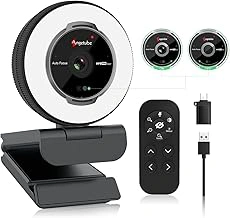
Angetube 1080P 60FPS Streaming Webcam with Ring Light, Remote, 5X Zoom, Privacy Cover
The Angetube 1080P 60FPS webcam surrounds the lens with a built-in ring light, turning a hardware solution into the primary low-light strategy. Instead of relying on sensor correction to brighten a dim image, the ring light adds fill illumination directly to your face, reducing noise and flattering skin tones even in windowless rooms or late-evening calls. The light has three Angetube 1080P 60FPS Streaming Webcam with Ring Light, Remote, 5X Zoom, Privacy Cover levels and three color temperatures, so you can dial in warm or cool tones to match ambient lighting or personal preference.
Recording at 60 frames per second keeps motion smooth when you gesture or shift in your chair, a contrast to the multiplefps ceiling most budget webcams impose. The 5X digital zoom lets you crop tighter on your face or pull back to show more of the room, though digital zoom does sacrifice some sharpness at maximum magnification. A wired remote sits on your desk to toggle the light, adjust zoom, and trigger the privacy cover without reaching for the camera or opening software menus.
The ring light works exceptionally well when you sit close enough to benefit from direct illumination - roughly arm's length from the monitor. If you wear glasses, expect a faint ring reflection in the lenses; tilting the camera slightly downward or angling your head can minimize it, but the halo may remain visible on video. The privacy cover slides horizontally across the lens and has a firm detent, more reliable than flip-up tabs that loosen over time.
At $59.85 with a 4.4 out of 5 rating, the Angetube delivers integrated lighting for less than the cost of a separate desk lamp and mid-tier webcam. The tradeoff is bulk: the ring light adds diameter and weight, so the mount needs a stable monitor bezel or tripod thread. If your workspace lighting is inconsistent or you record content after dark, the built-in ring light removes one setup variable and keeps your face evenly lit without external gear.
- ✅ Built-in ring light with three brightness levels and color temperatures
- ✅ 60fps recording for smooth motion during calls
- ✅ Wired remote for light, zoom, and privacy cover control
- ✅ 5X digital zoom to adjust framing
- ✅ Privacy cover with firm sliding mechanism
- ⚠️ Ring light creates reflections in eyeglasses
- ⚠️ Digital zoom reduces sharpness at higher magnification
- ⚠️ Larger form factor due to ring light housing
What to Look for in a Low-Light Webcam
- Hardware low-light correction or larger sensor size
- Built-in ring light or adjustable fill light
- 1080p resolution at 30fps minimum (60fps preferred for motion)
- Autofocus to stay sharp when you shift position
- Privacy shutter for quick coverage between calls
- USB plug-and-play compatibility with Zoom, Teams, and Slack
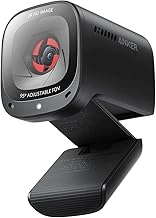
Anker PowerConf C200 2K Webcam with Low-Light Correction, AI Mics, Privacy Cover
The Anker PowerConf C200 tackles low-light video calls by capturing at 2K resolution and using software-based correction to improve darker scenes, then downscaling output to 1080p for sharper detail than native 1080p sensors deliver. This approach preserves more image information in dim conditions - no external lighting required - though the correction algorithm can introduce slight softness or grain when ambient light drops below typical desk-lamp levels.
Dual AI-powered microphones with noise reduction handle keyboard clatter and Anker PowerConf C200 2K Webcam with Low-Light Correction, AI Mics, Privacy Cover hum without requiring a separate mic, useful if your workspace doubles as a living area. The privacy shutter slides across the lens when you step away, a simple mechanical solution that doesn't rely on software toggles.
Compared to webcams with built-in ring lights, the C200 depends entirely on sensor correction and software processing. In spaces with moderate ambient light - a window during daytime or overhead fixture at night - the 2K-to-1080p pipeline produces clean, detailed video. In near-dark conditions, a ring-light model will deliver more even exposure and truer color, while the C200 may struggle with contrast and noise. The choice hinges on whether you can control your environment: if you have at least one steady light source, sensor correction is convenient and cable-free; if your room stays dim, active lighting compensates for what the sensor cannot capture.
At $59.99, the C200 balances resolution, audio, and low-light assist in one package, making it a practical pick for home offices with variable lighting where you prefer not to add extra hardware.
- ✅ 2K sensor downscaled to 1080p improves detail in moderate low light
- ✅ Dual AI microphones reduce background noise without separate audio gear
- ✅ Privacy shutter provides mechanical lens cover
- ⚠️ Software correction can introduce softness or grain in very dim conditions
- ⚠️ No built-in lighting - relies on ambient sources for best results
Comparing the Three Approaches to Low-Light Video
The three webcams use different strategies to handle poor lighting, and understanding these approaches helps you match the right tool to your workspace.
The ring-light model places LEDs around the lens to add direct illumination. This works in rooms with almost no ambient light, but the circular light can create reflections on glasses and produces a distinctive catch-light in your eyes that some users find distracting. It draws more power and adds bulk, yet it delivers immediate this product without relying on software.
Sensor-based correction uses a larger image sensor and wider aperture to gather more available light, then applies processing to brighten the image. This approach keeps the webcam compact and avoids reflection issues, but performance drops sharply in very dark rooms where there simply isn't enough light to amplify. Color accuracy can suffer under extreme low-light correction, and some models introduce visible lag when processing frames in real time.
The 4K-downsampling method captures video at higher resolution, then combines pixel data to output a cleaner 1080p image with better low-light detail. This technique reduces noise and improves clarity in dim conditions, but it requires a more expensive sensor and faster processor, which raises the price. It also demands more USB bandwidth and CPU overhead during calls.
When choosing, consider your room's baseline light level. If you work in a space with no windows and minimal desk lighting, the built-in ring light offers the most reliable results. If you have some ambient light but need a portable, low-profile webcam, sensor correction provides a good balance. If you want the cleanest image quality in moderately dim rooms and budget allows, 4K downsampling delivers the best overall clarity.
Price premiums reflect hardware complexity: ring-light models add ten to fifteen dollars for the LED array and power circuitry, while dual-mode or 4K-capable sensors can double the base cost. Assess whether your lighting conditions justify the extra expense, and remember that no webcam fully replaces adequate room lighting for natural skin tones and sharp detail.
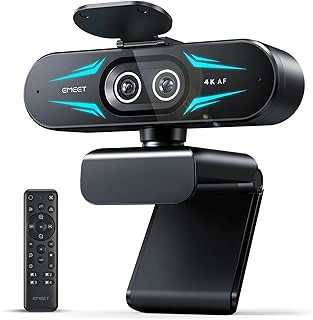
EMEET C60E Dual-Camera 4K Webcam, 11X Zoom, Autofocus, Remote, RGB Lighting
The EMEET C60E steps up to a 4K sensor and dual-camera system that deliver sharper multiplep output than single-sensor webcams can manage. When your home office lighting is inconsistent or minimal, the built-in RGB fill lighting offers adjustable color temperature and EMEET C60E Dual-Camera 4K Webcam, 11X Zoom, Autofocus, Remote, RGB Lighting to balance shadows across your face without harsh glare. Autofocus tracks movement between sitting upright and leaning forward during presentations, and the 11X digital zoom lets you frame tighter headshots or pull back to include whiteboards or demonstration materials without repositioning the camera.
Two camera angles - one for standard video calls, one optimized for top-down or alternate perspectives - give content creators flexibility for tutorials or product demos that single-lens models can't match. The included remote control switches between cameras, adjusts zoom, and toggles lighting modes from across the room, practical when you're standing at a flip chart or demonstrating software on a second monitor. At $59.99, the C60E sits above basic webcams but avoids the price jump to prosumer models that exceed most remote work budgets.
The 4K sensor downsampled to multiplep preserves detail in low light better than native multiplep chips, so facial features stay defined even when your desk lamp is the only light source. RGB lighting cycles through warm, neutral, and cool tones to match overhead fluorescents or tungsten task lights, reducing the washed-out or orange-tinted appearance common in dim rooms. Autofocus responds within a second when you shift position, keeping sharpness consistent through long meetings where you lean in to read chat messages or sit back during colleague presentations.
Dual-camera switching works best when you regularly alternate between talking-head video calls and tabletop demonstrations; if you only join standard Zoom meetings, the secondary camera goes unused. The 11X zoom is digital rather than optical, so maximum magnification introduces some softness - fine for isolating your face but less crisp for reading small text on shared documents. RGB lighting adds a subtle color cast that may look unnatural if mixed poorly with existing ambient light; start with neutral white and adjust incrementally. The remote requires line-of-sight, so it won't work through walls or from behind your monitor.
Choose the EMEET C60E when you need both reliable low-light Zoom performance and occasional flexibility for recording tutorials, product reviews, or hybrid presentations that require camera repositioning or lighting control without leaving your seat.
- ✅ 4K sensor provides sharper 1080p detail in low light
- ✅ RGB fill lighting adjusts color temperature and brightness
- ✅ Dual-camera system for standard and alternate angles
- ✅ 11X digital zoom and remote control for flexible framing
- ✅ Autofocus tracks movement during presentations
- ⚠️ Digital zoom softens image at maximum magnification
- ⚠️ RGB lighting may create color cast with mixed ambient sources
- ⚠️ Secondary camera underutilized for standard video calls only
- ⚠️ Remote requires line-of-sight to function
Setup Tips for Better Video in Dim Rooms
Positioning your webcam and managing available light sources can make a bigger difference than any camera setting. Start by placing the webcam at eye level or slightly above - this means raising your laptop on a stand or mounting the camera on top of an external monitor. When the lens sits too low, you'll appear to be looking down, and shadows from overhead lights become more pronounced.
Your monitor itself acts as a soft fill light. If you work in a dim room, open a white document or browser window before your call to bounce a little extra light onto your face. It's not a substitute for dedicated lighting, but it helps reduce the contrast between your face and the this product.
A single ceiling light or desk lamp positioned behind the webcam - not behind you - provides even front lighting. Avoid placing the camera between you and a window during the day; backlighting from natural light will either blow out the window or turn you into a silhouette, even with low-light correction active. If a window is unavoidable, close the blinds or schedule calls earlier or later when the sun isn't directly behind you.
Run a quick test recording in your actual workspace at the time of day you take most calls. Check for glare on glasses, uneven shadows under your eyes, or a washed-out this product. Small adjustments - tilting the webcam down a few degrees, moving a lamp six inches to the left - often solve problems that no amount of auto-exposure can fix. The goal is to give the sensor enough light to work with so it doesn't have to push gain and introduce noise.
Which Webcam Fits Your Home Office Setup
Matching a webcam to your workspace depends on how much control you have over lighting and whether you need features beyond video calls. If your desk sits far from a window and adding lamps isn't practical, the Angetube model's built-in ring light delivers consistent this product without rearranging furniture or buying separate equipment. That fixed lighting works well when you sit in the same spot for every call.
The Anker webcam takes a different approach: its sensor adjusts exposure and color balance automatically, which helps when natural light shifts during the day or when you move between rooms. Paired with dual microphones that handle voice clarity, it suits users who want plug-and-play simplicity and don't want to manage hardware lighting between meetings.
For those who occasionally record tutorials, product demos, or presentations, the EMEET's dual-camera design adds flexibility. Switching between a face view and an overhead angle means you can show documents or objects without repositioning the camera mid-session. That versatility comes at a slightly higher price, so it makes the most sense when you need more than standard video conferencing.
All three connect via USB and work immediately with Zoom, Microsoft Teams, Google Meet, and similar platforms on Windows and macOS. No drivers or software installs are required, though each manufacturer offers optional desktop utilities for manual exposure and white balance tweaks. Choose based on whether your priority is built-in lighting, automatic sensor correction, or multi-angle capability.