We may earn a commission when you buy through links on this page, at no extra cost to you. How this works.
Remote workers face a constant tension between screen real estate and portability. A laptop alone forces you into cramped windows, constant app-switching, and neck strain from hunching over a single 13- or 15-inch display. Adding a portable external monitor transforms a coffee shop table or hotel desk into a functional workspace without the bulk of traditional desktop displays.
The right portable monitor depends on how you balance four priorities. Screen size determines how much content you can view side-by-side, but larger panels add weight and require more room in your bag. Weight matters when you're carrying your setup through airports or coworking spaces several times a week. Resolution affects text clarity and eye comfort during long work sessions; 1080p is the baseline, while 1440p or 4K reduces pixelation on smaller screens. Price ranges from under $150 for basic 13-inch models to over $400 for premium 17-inch displays with higher resolution and color accuracy.
This guide focuses on monitors built for productivity on the move. We excluded gaming-focused models with high refresh rates but poor color accuracy, screens larger than 18 inches that sacrifice true portability, and any option requiring a separate power brick instead of drawing power through a single USB-C cable. The four monitors below represent different points on the size-weight-resolution spectrum, so you can match your choice to your travel frequency, desk space, and budget.
How We Selected These Four Portable Monitors
We chose these four monitors by measuring portability features that matter when you're moving between locations or working in tight spaces. Every monitor was evaluated for physical dimensions, actual weight with and without a case, and how easily it fits into a standard backpack or carry-on without adding bulk.
USB-C plug-and-play compatibility was tested by connecting each display to laptops running Windows and macOS. We noted which models powered on through a single cable and which required separate power adapters. Screen quality was assessed under typical indoor lighting - café windows, apartment desks with overhead LEDs, and co-working spaces with mixed natural and artificial light - to see how readable text remained and whether glare became a problem.
Real-world scenarios guided the selection: setting up a dual-screen workflow in a hotel room, extending a laptop display on a small desk shared with notebooks and coffee, and packing gear for same-day moves between locations. We prioritized monitors that balanced screen size with weight, offered stable kickstands or magnetic covers, and didn't require extra dongles or bulky power bricks. The goal was to identify displays that genuinely fit into mobile work routines without compromising usability once you arrive.
Screen Size vs. Portability: Finding Your Tradeoff
Screen size determines how much workspace you gain and how much bag space you sacrifice. A 10.5-inch monitor adds minimal weight and fits into laptop sleeves, but the narrow canvas limits side-by-side document work and forces more scrolling. Most users find anything smaller than 13 inches useful only for quick reference panels or status dashboards rather than primary workflows.
The 15.6-inch category delivers the widest appeal. These monitors typically weigh between 1.5 and 2.2 pounds, match standard laptop screen dimensions, and provide enough horizontal room to place a document beside a spreadsheet or code editor without constant window switching. They slide into most backpack laptop compartments and remain light enough for daily carry without noticeable shoulder strain.
At 17.3 inches, portable monitors approach the usable area of a small desktop display. The extra diagonal space becomes meaningful when editing photos, comparing dense spreadsheets, or running split-screen video calls. The tradeoff arrives in weight - often 2.5 to 3 pounds - and bulk that requires a dedicated monitor sleeve or padded compartment. Frequent flyers who change cities weekly typically regret the extra bulk, while remote workers who stay in one location for weeks or months find the workspace gain worth the occasional pack-and-move inconvenience.
Match your choice to movement frequency. If you fly more than twice a month or walk long distances with your gear, favor 15.6 inches or smaller. If you relocate monthly or drive between locations, the handling cost of a 17-inch screen drops and the workspace benefit justifies the size.
USB-C Power Delivery: Why Single-Cable Matters
Single-cable USB-C connectivity solves one of the biggest frustrations for anyone working on the move: cable clutter. When a portable monitor supports USB-C Power Delivery, the same cable that carries your video signal also powers the display. That means you can travel with one cable instead of juggling a video cable, a power adapter, and an extra outlet.
This works when your laptop's USB-C port supports DisplayPort Alt Mode for video output and delivers enough power - typically 5 to 15 watts for a 13- to 15.6-inch portable screen. Most modern laptops with USB-C or Thunderbolt ports meet these requirements, but older machines or budget models may only support data transfer, not video. Check your laptop's specifications before buying.
Older HDMI-only portable monitors require a separate power adapter plugged into the wall or a second USB cable tethered to your laptop. That adds weight, bulk, and one more thing to pack. For digital nomads switching between coffee shops, coworking spaces, and hotel desks, the difference is noticeable. A single USB-C cable also means faster setup: plug in, and the monitor powers on and displays your desktop immediately.
The tradeoff is compatibility. If your laptop doesn't support USB-C video output, you'll need a monitor with HDMI input and a separate power solution. Some portable monitors include both USB-C and HDMI ports, giving you flexibility across different devices. Before you buy, confirm your laptop's ports can handle both video and power delivery over USB-C, or plan to carry the extra cables a hybrid-input monitor requires.
Resolution and Text Clarity: Why 1080p is the Floor
A portable monitor with anything less than 1920×1080 resolution will leave you squinting at blurry text and jagged edges during long work sessions. At typical portable monitor sizes - 13 to 17 inches - 1080p delivers enough pixel density to keep spreadsheets legible and documents comfortable to read without zooming.
Lower-resolution panels, often marketed as "HD" or 720p, spread fewer pixels across the same screen real estate. The result is fuzzy outlines around letters, reduced sharpness in fine UI elements, and eye strain when you're toggling between browser tabs or editing slides. For remote work that involves reading contracts, coding, or managing multi-column layouts, that drop in clarity becomes frustrating quickly.
4K portable monitors do exist, but they carry a steep price premium and drain laptop batteries faster. Most digital nomads find 1080p hits the sweet spot: text stays crisp, colors remain accurate, and you avoid the compatibility hiccups that sometimes accompany ultra-high-resolution external displays on older USB-C ports. If your daily workflow centers on document review, email, video calls, and light design work, 1080p provides all the clarity you need without the cost or power trade-offs of 4K.
When comparing models, confirm the panel is true 1920×1080 rather than an upscaled lower resolution. Genuine 1080p ensures you can comfortably split your screen between a text editor and a reference document without sacrificing readability on either side.
Weight and Packing: What Fits in a Carry-On
Most portable monitors under 2 pounds slide into laptop sleeves and backpack side pockets without forcing you to reorganize your entire carry-on. A 13.3-inch display typically measures around 12 inches wide and 8 inches tall, fitting comfortably alongside a 13- or 14-inch laptop in standard padded compartments. Models in the 15.6-inch range usually weigh between 1.5 and 2.2 pounds and measure roughly 14 inches wide, which still clears TSA carry-on limits but may require a dedicated sleeve or the main laptop compartment.
A 17.3-inch monitor pushes closer to 2.5 pounds and 16 inches in width, eating into space you might reserve for a change of clothes or camera gear. That extra half-pound feels minor on a desk but adds up when you're walking between co-working spaces or catching trains. Slim bezels help: a monitor with quarter-inch borders takes up less bag real estate than one with chunky frames, even if the active screen size is identical.
Weight savings justify a smaller screen when your bag is already at capacity or when you move locations daily. A 10.5-inch display can weigh under a pound and tuck into a tablet pocket, leaving room for chargers and a portable stand. Larger screens make sense when you stay in one place for several days and prioritize side-by-side document work over packability. A 15.6-inch panel gives you enough vertical height to read full spreadsheets without constant scrolling, which can offset the inconvenience of carrying an extra pound.
Protective sleeves reduce the risk of pressure cracks during transit, especially if you pack the monitor flat against hard objects like external batteries or book spines. Neoprene or padded nylon cases add an ounce or two but cost far less than a replacement screen. If your backpack lacks a dedicated padded slot, a standalone sleeve turns any compartment into a safer home for the display.
Compare dimensions and weight against your existing bag layout before committing to a size class. Measure the interior width of your laptop compartment and confirm the monitor will sit flat without bending. An extra inch in width or a quarter-pound in weight can be the difference between a monitor that disappears into your workflow and one that makes you rethink every packing decision.
this product and Glare: Indoor vs. Near-Window Use
this product, measured in nits, determines how clearly you can see your screen under different lighting conditions. Most portable monitors ship with this product ratings between 250 and 300 nits, which handles typical indoor environments - hotel rooms, dim offices, and cafés with controlled lighting - without issue.
Near-window desks and bright co-working spaces change the equation. Direct sunlight or strong overhead lighting creates glare and washes out darker tones, making text harder to read and colors less accurate. Monitors rated above 300 nits maintain better visibility in these conditions, though even 400-nit panels struggle against direct sun.
Screen coating also plays a role. Matte finishes scatter reflected light, reducing glare but sometimes softening image sharpness. Glossy screens deliver sharper contrast and richer color but act like mirrors under bright ambient light. If your workspace moves frequently - window seat one day, dark corner the next - a matte panel with at least 300 nits offers more consistent usability.
For digital nomads working in unpredictable lighting, prioritize monitors that pair moderate this product with anti-glare coatings. You avoid squinting in bright rooms without sacrificing image quality when the curtains close.
Which Portable Monitor is Right for You?
The right portable monitor depends on how you work and where you work from. Frequent travelers who prioritize minimal pack weight should look at the Topmonitor 10.5" - it's the lightest option and fits easily into any bag. If budget is your primary constraint, the KOORUI 15.6" delivers a full HD display at the lowest price in this comparison. Remote workers who split time between home and coworking spaces will find the ViewSonic VA1653 offers the best balance of screen real estate, weight, and color accuracy. For those who need maximum visible workspace and rarely move their setup, the ARZOPA 17.3" provides the largest screen without requiring a permanent desk mount.
Desk size matters as much as travel frequency. A 10.5" screen works on airplane tray tables and tiny café tables but limits how many windows you can view comfortably. A 17.3" monitor demands stable surface space and adds noticeable weight to your bag. The 15.6" models sit in the middle, offering enough screen for side-by-side documents without dominating a small desk.
Budget and feature trade-offs are straightforward across these four. Lower-priced models typically use TN or basic IPS panels with narrower viewing angles. Higher-priced options add better color reproduction, USB-C power delivery, and sturdier stands. Match your selection to your actual workflow: if you edit photos or design graphics, invest in better color accuracy; if you draft email and spreadsheets, a budget panel will serve you well.
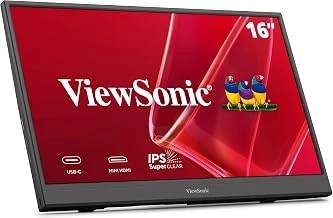
ViewSonic VA1653 16 Inch 1080p FHD IPS Portable Monitor
The ViewSonic VA1653 delivers a larger amount of 1080p IPS screen in a package that balances workspace and portability. For digital nomads who spend hours writing, coding, or managing spreadsheets, the extra vertical and horizontal space makes a noticeable difference compared to multiple- or multiple-inch alternatives.
At $89.99, this monitor sits in the mid-tier range. You're paying more than the smallest budget options but less than premium ultra-thin models. The 16-inch panel provides enough room to dock a browser and a document side-by-side without constant window shuffling, which matters when you're working from a cramped café table or a hotel desk.
The 1080p resolution on a 16-inch screen keeps text sharp and comfortable to read during long sessions. The IPS panel offers consistent color and wide viewing angles, useful when you can't always position the monitor at eye level in temporary workspaces.
This model weighs more than ultra-compact multiple-inch monitors, so if your priority is the lightest possible pack, the tradeoff is real. But if you value usable screen real estate over shaving a few ounces, the VA1653 strikes a practical middle ground. It's large enough to reduce strain during extended use but still fits into most laptop sleeves and backpack compartments designed for multiple- or 16-inch devices.
The single USB-C cable handles both video and power when connected to compatible laptops, eliminating the need for separate adapters in most setups. For older machines without USB-C display output, you'll need a mini-HDMI cable and separate power source.
Digital nomads who work across multiple time zones and locations will find the 16-inch size hits a useful sweet spot: not so small that productivity suffers, not so bulky that packing becomes a puzzle. If your workflow demands more screen than a laptop alone and you can accommodate the moderate weight increase, this monitor delivers reliable performance without premium pricing.
- ✅ 16-inch screen provides usable workspace for multitasking
- ✅ 1080p IPS panel delivers sharp text and wide viewing angles
- ✅ Mid-tier $89.99 price balances cost and features
- ✅ USB-C single-cable connection simplifies setup
- ⚠️ Heavier than ultra-compact 13-inch models
- ⚠️ Requires mini-HDMI and separate power for non-USB-C laptops
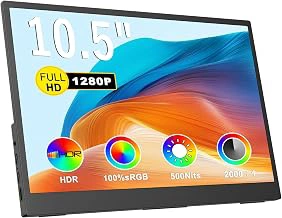
Topmonitor 10.5" 1280P FHD IPS Portable Monitor
The Topmonitor 10.5" 1280P FHD IPS delivers the smallest footprint in this lineup, designed for travelers who count ounces and inches in their carry-on. At $59.83, it slots in as the most affordable option when desk real estate or backpack space is at a premium.
The 10.5-inch screen size fits into the same footprint as a large tablet, making it simple to slide into a laptop sleeve or sling bag side pocket. Hotel desks, airplane tray tables, and crowded coffee shop counters become viable workspaces when you need a second window without sprawling across the table. The 1280P FHD IPS panel provides clear text rendering at typical working distances for this size.
That compact size comes with predictable tradeoffs. The smaller viewing area limits how much content you can comfortably see at once - two full-width documents side by side become tight, and spreadsheet columns quickly run off the edge. This monitor works best as a reference display for messaging apps, documentation, or email while your laptop handles the main task. Single-app focus is where it shines; treating it as a workspace extender for complex multitasking will feel cramped.
Frequent flyers and ultra-light packers will appreciate the minimal weight and bulk. Coffee shop sessions where table space is scarce, hotel rooms with narrow desks, or co-working hot desks where setup and teardown happen multiple times a day all favor this smaller form factor. If your workflow revolves around one primary app and a handful of reference windows, the Topmonitor 10.5" offers a practical entry point without the bulk or cost of larger portable screens.
- ✅ Smallest footprint in the category, fits in laptop sleeves and tight spaces
- ✅ $59.83 price point makes it the most affordable option tested
- ✅ 1280P FHD IPS panel delivers clear text at working distances
- ✅ Minimal weight and bulk for frequent travelers and light packers
- ⚠️ 10.5-inch screen limits comfortable multitasking and side-by-side content
- ⚠️ Better suited for reference windows than full workspace expansion
- ⚠️ Smaller viewing area can feel cramped for spreadsheet or document-heavy workflows
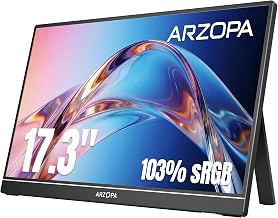
ARZOPA 17.3" 1080P FHD IPS Portable Gaming Monitor
The ARZOPA 17.3" 1080P FHD IPS Portable Gaming Monitor offers the largest viewing area in the portable monitor category while maintaining USB-C power compatibility. With a 17.3-inch diagonal and full HD resolution, this screen provides enough workspace for multitasking without requiring a traditional desktop setup.
The 1080p IPS panel delivers consistent color and viewing angles across the full screen, which matters when you're sitting off-center or sharing your display during a video call. At $119.99, the ARZOPA balances price and screen real estate for users who need maximum visibility without stepping up to a full-sized monitor.
The 17.3-inch size makes this the heaviest and bulkiest option among portable monitors. It fits in a backpack but takes up most of the main compartment, and the added weight becomes noticeable during longer carries. Single-cable USB-C connectivity keeps the setup simple, though you'll need to confirm your laptop supports video output and power delivery through the same port.
This monitor works best for remote workers who stay in one location most of the time but occasionally move between rooms or take short trips. If you're packing daily or traveling frequently by plane, a smaller multiple- or multiple-inch model will pack easier. The ARZOPA earns a 4.6/5 rating from users who prioritize screen size over ultra-portability and appreciate the extra workspace for spreadsheets, coding environments, or side-by-side document review.
- ✅ 17.3-inch display provides the most workspace in the portable category
- ✅ 1080p IPS panel with consistent color and viewing angles
- ✅ USB-C power and video through a single cable
- ✅ $119.99 price point for a large portable screen
- ⚠️ Heaviest and bulkiest portable monitor in this comparison
- ⚠️ Less practical for frequent travelers or daily commuters
- ⚠️ Requires USB-C port with video output and power delivery
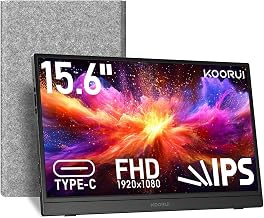
KOORUI 15.6 inch 1080P FHD IPS Portable External Display
The KOORUI 15.6-inch portable monitor offers a compelling entry point for anyone exploring external displays on a budget. At $49.99, it delivers a 1080p Full HD IPS panel in a size that balances portability with screen real estate - small enough to slip into a backpack, large enough to give you meaningful workspace expansion. The 4.5/5 rating reflects solid performance for the price, making it a practical choice for remote workers testing portable monitors for the first time or students setting up a dual-screen workflow in a dorm or shared space.
This monitor sits in the middle ground between ultra-compact multiple-inch models and larger multiple-inch screens. You gain enough vertical space to comfortably stack documents or code editors without the added weight and bulk of a bigger display. The IPS panel provides decent viewing angles, so you can position it at an angle on a small desk or side table without losing color accuracy. It works well as a secondary display for email, chat apps, or reference materials while your laptop handles primary tasks.
The tradeoff for the low price is straightforward: you won't find premium build materials, high refresh rates, or touch functionality. The stand options are basic, and you may need to prop it against something or invest in a separate stand for the best angle. But for side-desk use, coffee shop work sessions, or a first portable monitor purchase, the KOORUI delivers functional screen space without risk. It's especially suited to users who prioritize cost over advanced features and want to test whether a portable monitor fits their workflow before committing to a higher-end model.
- ✅ Budget-friendly $49.99 price point
- ✅ 15.6-inch 1080p IPS display balances portability and workspace
- ✅ Good middle-ground size for first-time portable monitor users
- ✅ Lightweight enough for travel and side-desk setups
- ⚠️ Basic stand options may require additional support
- ⚠️ No premium build materials or advanced features
- ⚠️ Limited upgrade path if you need higher refresh rates or touch input
Key Features to Compare in a Portable Monitor
- Screen size: 10.5 to 17.3 inches balances portability and usable workspace
- Weight and thickness: under 2 lbs and slim profile for backpack or carry-on
- Resolution: 1080p FHD minimum for clear text at typical viewing distances
- USB-C power and video: single-cable connection simplifies setup and reduces clutter
- Panel type: IPS preferred for better color accuracy and viewing angles
- Stand or cover: built-in kickstand or magnetic cover adds convenience