Sticky notes accumulate into colorful drifts, reminder lists get buried under other papers, and urgent tasks vanish into the clutter. A glass desktop whiteboard offers a durable, reusable surface that sits at eye level, keeps your workspace organized, and eliminates the need for disposable paper reminders.
Glass desktop whiteboards resist staining and ghosting better than laminated boards, wipe clean without residue, and provide a stable writing surface that won't curl or fade. Unlike wall-mounted glass panels, desktop models include built-in stands or storage features, so they occupy minimal space and remain portable.
This guide compares three glass desktop whiteboards priced under $30, each offering different combinations of size, storage slots, and stand design. All three are freestanding units with tempered glass surfaces. None are oversized glass pads or require wall mounting. The focus is on models suited to compact desk environments where reducing paper clutter matters more than large brainstorming surfaces.
Choosing the right model depends on how much writing area you need, whether you want pen or accessory storage built into the base, and how often you move the board between desk zones. Larger glass surfaces accommodate multi-task lists but require deeper desk space, while compact boards fit tight workstations but limit writing room. A durable stand and secure storage keep markers accessible and prevent the board from tipping during use.
How We Chose These Glass Desktop Whiteboards
Desktop footprint mattered first. We looked for glass whiteboards small enough to sit on a working desk without covering the entire surface, typically 12 to 18 inches wide. Boards marketed as full desk pads or oversized glass mats were excluded because they replace your work area instead of adding quick-capture space alongside your keyboard or notepad.
Integrated storage or a stand came next. Models with built-in pen trays, clip holders, or foldable stands earned priority because they keep markers within reach and reduce the drawer clutter that often defeats the purpose of going paperless. Acrylic boards were ruled out - they scratch easily and fog over time, which undermines long-term use.
Tempered glass durability was non-negotiable. Standard glass can crack under daily handling, so every option here uses tempered construction to handle routine bumps and the weight of leaning pens or phone props. Marker erasability without ghosting or staining also shaped the list, since cheap coatings trap ink and force you back to sticky notes within weeks.
Price stayed under thirty dollars. Budget caps ensured these boards compete directly with the cost of a month's worth of notepads and adhesive tabs. Wall-mount units were excluded because remote workers and renters often lack spare vertical space or permission to drill, making countertop models more practical. The result is a short list of glass boards that free up desk real estate, hold tools in place, and erase cleanly after hundreds of swipes.
Side-by-Side Comparison: Storage, Footprint, and Features
Choosing between the three models comes down to matching features to your workspace constraints and workflow. The Glass Desktop Whiteboard with Storage Drawer adds a physical compartment for markers and erasers, which keeps tools accessible but increases the overall footprint - useful if your desk has room and you want everything self-contained. The Compact Tempered Glass Desktop Whiteboard prioritizes minimal desk space, offering a smaller writing surface without built-in storage, making it the lightest and easiest to reposition when you need flexibility. The Multi-Function Glass Desktop Whiteboard and Phone Stand combines a writing area with an integrated phone holder, trading some writing width for dual-purpose utility - ideal if you reference your device often while jotting notes.
Storage type drives the decision for many remote workers. Integrated drawers eliminate the need for separate pen cups or trays, but they lock you into a fixed orientation and add weight. Models without storage give you more freedom to angle or move the board but require you to supply your own accessory organization. Stand adjustability varies: some boards offer tilt or height options to reduce glare or match your sight line, while simpler designs use a fixed easel that keeps the profile low. If you frequently switch between sitting and standing, adjustable stands reduce neck strain; if your desk height is constant, a fixed stand simplifies setup.
Included accessories differ across models. Some ship with one or two dry-erase markers and a microfiber cloth; others arrive bare, expecting you to use existing supplies. Glass size directly affects how much content you can display at once - larger surfaces accommodate task lists, meeting notes, and quick diagrams simultaneously, while compact options force you to erase more often or limit scope. Best-use cases become clear when you map features to tasks: the storage-drawer model suits dedicated note-taking stations where the board stays in place; the compact variant fits shared desks or travel setups; the phone-stand hybrid works for video calls, recipe following, or any scenario where screen reference and handwritten notes happen in parallel. Price typically reflects feature count, so decide which conveniences justify the cost difference for your daily routine.
What to Look for When Buying a Glass Desktop Whiteboard
Choosing a glass desktop whiteboard requires matching the surface size to your available desk space and typical note-taking habits. Compact models around 9×12 inches fit between a keyboard and monitor without crowding your work area, while larger 12×16-inch surfaces accommodate multi-column task lists or sketch-heavy workflows. Before you buy, measure the depth and width of your desk zone to confirm the whiteboard will sit stable without overhanging or blocking access to other tools.
Tempered glass offers impact resistance and heat tolerance that standard glass cannot match. If your desk sees frequent repositioning or you work in a shared space where accidental knocks are likely, tempered construction reduces the risk of shattering. Standard glass costs less but requires gentler handling and a dedicated spot where it won't be jostled.
Storage options shape how you manage markers, erasers, and loose notes. Built-in drawers keep supplies contained and prevent clutter from migrating across your desk, while open compartments offer quick access but less containment. Boards without storage rely on separate pen trays or desk organizers, which may suit minimalists who already have a system in place.
Stand angle adjustment matters when you alternate between writing upright and referencing notes at a slant. Fixed angles work well if you always sit at the same height and distance, but tilt mechanisms let you optimize glare and wrist position throughout the day. Look for smooth, secure adjustment that holds position under marker pressure.
Marker and eraser compatibility depends on surface coating. Most glass whiteboards accept dry-erase markers, but verify that included or recommended erasers remove ink without streaking. Some surfaces clean with a damp cloth alone, while others develop ghost marks if you use the wrong marker formulation or leave ink too long.
Magnetic surfaces add the ability to attach notes, clips, or small documents directly to the board. Non-magnetic glass keeps the focus on writing but requires adhesive or separate holders for reference sheets. Decide whether you need that attachment layer or prefer a cleaner, write-only surface.
Evaluate each feature against your daily desk routine: frequent moves favor lighter frames, tight spaces demand compact dimensions, and busy desks benefit from integrated storage that keeps supplies from scattering.
Common Questions About Glass Desktop Whiteboards
Glass desktop whiteboards resist ghosting and staining better than traditional melamine boards because the non-porous surface prevents ink from soaking in. Most models retain a clean appearance even after months of daily use, though darker markers may leave faint traces if left on overnight.
Stubborn marker residue comes off with a damp microfiber cloth and a small amount of isopropyl alcohol or glass cleaner. Avoid abrasive scrubbers, which can scratch the surface. For everyday cleaning, a dry eraser followed by a quick wipe is usually enough.
Standard dry erase markers work on all glass whiteboards. Low-odor and bullet-tip markers produce the cleanest lines. Liquid chalk markers and wet-erase ink should be avoided unless the manufacturer explicitly supports them, since they can leave residue that requires more aggressive cleaning.
Desk space requirements vary by model. Compact 12×9-inch boards fit between a keyboard and monitor, while 16×12-inch versions occupy roughly the same footprint as a standard notepad. Larger 20×16-inch models need at least 18 inches of clear desk width and may crowd smaller workspaces.
Wood stands in most desktop whiteboard kits provide stable support for writing when placed on flat surfaces. Boards under two pounds rarely tip during normal use. Heavier pressure or uneven desks may cause slight wobble, but the risk of tipping is low with properly assembled frames.
Magnetic glass whiteboards hold standard neodymium magnets and small refrigerator magnets. Thicker glass reduces magnetic pull, so magnets rated for three sheets of paper or fewer may slide under the weight of multiple documents. Check the product specifications for maximum magnet strength if you plan to use them for holding notes or reminders.
How to Transition from Paper Clutter to a Glass Whiteboard System
Moving from scattered sticky notes and paper lists to a glass whiteboard requires a deliberate shift in how you capture and organize information at your desk. The physical product is only half the solution - the other half is building a system that replaces your old paper habits with a durable, visible alternative.
Start by consolidating every active sticky note, scrap-paper reminder, and loose to-do list into a single location on your new whiteboard. Translate recurring tasks into a column or zone on the glass surface, and group related items together. This one-time transfer gives you a clear picture of what has been cluttering your workspace and makes it easier to see which items are outdated or redundant.
Establish a daily erase-and-refresh routine at the end of each workday or first thing each morning. Wipe completed tasks, rewrite anything that carries over, and leave the board ready for the next session. This habit prevents the whiteboard from becoming a static decoration and keeps your focus on what matters today rather than last week's notes.
Designate storage compartments near the whiteboard for markers, erasers, and cleaning cloths so supplies are always within reach. A small tray or drawer keeps these tools from migrating around your desk and ensures you can update the board without searching for a pen. If your whiteboard includes integrated storage or a marker ledge, use it exclusively for whiteboard tools to avoid mixing in unrelated desk clutter.
Pair your whiteboard with a simple digital backup method for tasks that extend beyond a few days. Snap a quick photo of the board at the end of each week, or transfer longer-term projects into a task app or calendar. The whiteboard remains your daily command center, while the digital record preserves context for work that spans multiple weeks. This two-layer approach gives you the tactile benefit of writing by hand without losing track of commitments that outlive a single erase cycle.
Final Recommendation: Which Glass Desktop Whiteboard Fits Your Desk
Choosing the right glass desktop whiteboard comes down to how you balance storage, workspace footprint, and price. The Yeoux with drawer works best if you want an all-in-one solution that keeps markers, pens, and sticky notes within arm's reach while the glass surface handles quick notes and task lists. The Birch calendar board fits desks where you juggle scheduling alongside daily reminders, giving you dual surfaces without taking up more floor space. The Yeoux reversible stand delivers the cleanest, most affordable option when you need a simple writing surface that flips between glass and cork without built-in compartments.
All three models eliminate the paper clutter that typically piles up beside your keyboard. If storage is your top priority and you prefer everything consolidated in one place, the drawer model saves you from hunting through desk organizers. If you manage appointments and deadlines alongside freeform notes, the calendar layout keeps both visible at a glance. If your desk is already organized and you simply want a reusable writing surface on a tight budget, the reversible stand gives you flexibility without extra bulk.
Check the individual product sections above for current prices and retailer links. Match your choice to your actual desk habits rather than features you think you might use, and you'll cut down on wasted sticky notes and loose paper within the first week.
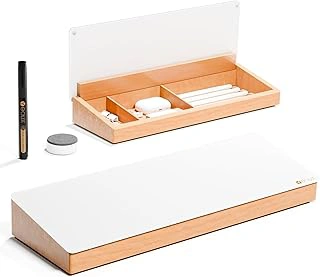
Yeoux Glass Desktop Whiteboard with Wood Organizer and Drawer
The Yeoux Glass Desktop Whiteboard with Wood Organizer and Drawer combines a writing surface with built-in storage, making it a practical choice for compact desks where every inch counts. The unit integrates a smooth glass panel for jotting notes, a wooden organizer with compartments for markers and erasers, and a small drawer underneath for paper clips, sticky notes, or other desk supplies. This all-in-one design reduces the need for separate pen cups or organizers cluttering your workspace.
The glass surface provides a firm writing plane that wipes clean with standard dry-erase markers. After repeated use, some glass whiteboards can show faint ghosting if ink sits too long, so prompt erasing helps maintain clarity. The wooden base adds a warm accent to the desk and keeps frequently used items within arm's reach. At $26.99 with a 4.6/5 rating, the Yeoux model offers solid value for users who prioritize integrated storage alongside a functional writing surface.
This whiteboard suits remote workers, students, or anyone managing multiple small tasks throughout the day. The drawer is shallow but sufficient for slim accessories, while the organizer compartments hold standard markers upright and accessible. If you want a single piece that addresses both quick note-taking and supply organization without sprawling across your desk, this model delivers on both fronts.
- ✅ Built-in drawer and organizer compartments consolidate desk supplies
- ✅ Smooth glass surface for dry-erase markers
- ✅ Compact all-in-one design saves desktop space
- ✅ Affordable at $26.99 with strong user rating
- ⚠️ Shallow drawer limits storage to small, flat items
- ⚠️ Glass may show faint ghosting if ink is not erased promptly
- ⚠️ Wooden base may not match all desk finishes
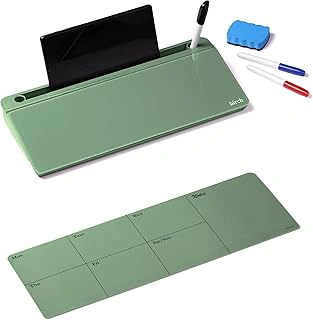
Birch Small Desktop Glass Whiteboard & Magnetic Calendar – Dry Erase Desk Pad Keyboard Stand with Storage, Adjustable Dividers, 3 Markers & Eraser – Office, Home & School (Moss)
The Birch Small Desktop Glass Whiteboard combines three desk tools in one compact unit: a writable glass surface, a magnetic calendar grid, and a keyboard stand with underneath storage. Priced at $27.49 with a 4.4 out of 5 rating, it targets users who need both planning space and a slight ergonomic lift for their keyboard.
The glass panel includes a printed magnetic calendar that lets you attach reminders or notes directly to the surface while using dry-erase markers for tasks, deadlines, or quick notes. The unit ships with three markers and an eraser, so you can start using it immediately without hunting for accessories.
Adjustable dividers sit in the storage tray underneath, letting you separate pens, sticky notes, paper clips, or USB cables based on your workflow. The dividers slide to different widths, which helps when you swap between thick marker sets and slim pens. This storage approach keeps small items visible and within reach instead of scattered across your desk or buried in drawers.
As a keyboard stand, the Birch unit raises your keyboard by a few inches, which can reduce wrist angle if your chair height or desk setup leaves your hands angled upward. The riser function works best with compact or tenkeyless keyboards; full-size boards with numpads may overhang the edges depending on your model.
The magnetic surface is useful for attaching sticky notes, small printed schedules, or business cards without tape or pins. However, the calendar grid is printed rather than writable in separate date boxes, so you write over the grid lines with your dry-erase markers. If you prefer clearly defined cells for each day, you may need to be deliberate with your handwriting size.
The moss color accent along the base adds a subtle design element without dominating your desk palette. The glass wipes clean with the included eraser or a damp cloth, and the compact footprint fits most desk depths without pushing your monitor or lamp back.
This model suits users who juggle short-term planning, frequent note-taking, and prefer a slight keyboard elevation. If you rarely use a calendar or already have an external keyboard tray, a simpler glass pad may serve you better. For those managing multiple roles or projects from one desk, the combination of writable space, magnetic attachment points, and organized storage reduces the need for separate planners, memo boards, and drawer organizers.
- ✅ Combines writable glass, magnetic calendar, and keyboard stand in one unit
- ✅ Adjustable dividers in storage tray organize small desk items by width
- ✅ Includes three markers and eraser for immediate use
- ✅ Magnetic surface holds sticky notes and reminders without tape
- ✅ Compact footprint fits most desk depths
- ⚠️ Calendar grid is printed rather than separate writable cells
- ⚠️ Keyboard riser may not accommodate full-size boards with numpads
- ⚠️ Requires deliberate handwriting size to stay within grid lines
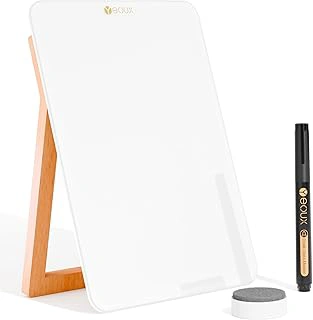
Yeoux Desktop Glass Whiteboard with Reversible Wood Stand
The Yeoux Desktop Glass Whiteboard with Reversible Wood Stand is the most affordable option in this roundup at $21.99, and it delivers a straightforward writing surface without any integrated storage compartments or organizers. The reversible wooden stand allows you to adjust the angle by flipping the board, which helps you find a comfortable viewing position depending on whether you sit or stand at your desk.
This model focuses entirely on the whiteboard function. The glass surface erases cleanly, and the stand keeps the board stable during use. Because there are no pen trays, accessory slots, or built-in storage, the footprint stays minimal - ideal if your desk is already crowded or you want to tuck the board away when not in use.
The simplicity here is both the strength and the limitation. You get a reliable writing surface at the lowest price point, but you will need to store your markers and eraser separately. If you already have desk organizers in place and just need a compact board for quick notes, reminders, or short task lists, the Yeoux model fits that role well. Users who want an all-in-one station with compartments for accessories will find the other models in this guide more complete.
The reversible stand is particularly useful if you share a workspace or move the board between different desk setups, since you can adjust the angle without tools or add-ons. At 4.5 out of 5, the Yeoux board earns its rating by delivering core whiteboard functionality at a budget-friendly price, making it the practical choice when storage integration is not a priority.
- ✅ Lowest price at $21.99
- ✅ Reversible wooden stand for angle adjustment
- ✅ Minimal footprint without storage compartments
- ✅ Clean-erasing glass surface
- ⚠️ No integrated pen tray or accessory storage
- ⚠️ Less complete solution for all-in-one desk organization
Quick Checklist: Choosing Your Glass Desktop Whiteboard
- Measure your desk depth and width to confirm whiteboard footprint fits without crowding keyboard or mouse
- Decide if you need built-in storage for markers, erasers, or small supplies
- Check if magnetic surface matters for attaching reminders or calendar grids
- Confirm stand allows angle adjustment if you prefer tilted or upright positioning
- Verify tempered glass rating if durability and scratch resistance are priorities
- Look for included markers and eraser to avoid separate purchases