We may earn a commission when you buy through links on this page, at no extra cost to you. How this works.
Software developers spend more time staring at screens than almost any other profession - often 8, 10, or 12 hours a day writing code, debugging, and reviewing pull requests. That sustained exposure to blue light from monitors can disrupt sleep patterns by suppressing melatonin production, especially during late-night coding sessions. Many developers also report eye strain, dry eyes, and difficulty focusing after long stretches of screen work.
Blue light blocking glasses filter the high-energy visible light emitted by monitors, which may help reduce eye fatigue and support better sleep quality when worn in the hours before bed. The question is which type works best for a developer's workflow. Amber-tinted lenses block more blue light but change color perception, which can be a problem when reviewing design work or adjusting UI elements. Clear lenses with blue light coatings preserve color accuracy but filter less of the spectrum.
Fit matters as much as filtration. Glasses that pinch behind the ears or slide down your nose become a distraction during focus work. Developers who already wear prescription lenses need either fit-over designs or blue light coatings added to their existing frames. Glare reduction is another practical consideration - reflective coatings can catch overhead lighting and create visual noise.
The right pair balances filtration strength, all-day comfort, and compatibility with your setup. If you code late into the evening, stronger amber tints may help protect your sleep schedule. If color accuracy is non-negotiable, clear coatings offer a compromise. And if you wear prescription glasses, a fit-over or clip-on design avoids the need for custom lenses.
What to Look for in Blue Light Glasses for Coding
Choosing blue light glasses for coding means balancing filter strength against color accuracy. Amber lenses block a higher percentage of blue light across the spectrum, which can reduce eye strain during late-night debugging sessions but shifts reds and blues noticeably. That color shift becomes a problem during design reviews, UI tweaks, or any work where accurate color representation matters. Clear lenses filter a narrower band of blue light while keeping colors true to your monitor, making them better for front-end work or collaborative screen sharing where precise color is critical.
Weight distribution affects whether you'll keep them on through your second standup of the day. Frames that press into the bridge or temples become uncomfortable after a few hours, especially if you're already wearing headphones. Look for designs with wider nose pads or flexible temple arms that spread pressure across a larger area. Frame width also matters if you use a multi-monitor setup - narrow frames create tunnel vision and force you to turn your head more often.
Fit-over styles work for developers who already wear prescription glasses and don't want to order custom blue light lenses. These slide over your existing frames, though they add bulk and can trap heat. Filtering percentages vary widely: some clear lenses block only 20 - 30 percent of blue light in the 400 - 450 nm range, while amber options can block 90 percent or more. Higher filtering isn't always better if it degrades the visual information you rely on for your work.
The right pair depends on your workflow. If you code in low light and rarely touch design files, stronger amber filtering makes sense. If you switch between code editors and design tools, or present work to clients, clear lenses preserve the color fidelity you need without forcing you to take the glasses off every time you review a mockup.
Amber vs Clear Lenses: The Real Tradeoff for Developers
Software developers face a filtering versus accuracy compromise every time they choose blue light blocking glasses. Amber lenses block significantly more blue light - often 90% or more in the 400 - 500 nm range - which makes them effective for evening coding sessions and supports normal sleep cycles when you're working late. The tradeoff is visible: amber tint shifts screen colors, turning whites yellow and blues green, which complicates UI review, design handoffs, and any task where precise color judgment matters.
Clear lenses preserve color fidelity across your monitors, video calls, and design tools. You see accurate hex values, can review visual mockups without second-guessing, and present on camera without a yellow cast on your face. The filtering is lighter, typically blocking 20 - 40% of blue light in a narrower wavelength band, so these work best during daytime hours when natural light exposure is higher and sleep hormone suppression is less of a concern.
If your workday is heavily weighted toward backend coding, terminal work, or text editing after sunset, amber lenses offer stronger protection when your circadian rhythm is most vulnerable. Developers who spend afternoons on front-end polish, collaborate over video, or frequently switch between code and design tools will find clear lenses less disruptive. Some developers keep both: clear glasses for morning standups and collaborative work, amber for solo evening sprints. The choice hinges on when you code and whether your tasks require color-accurate feedback or can tolerate a warm filter in exchange for deeper blue light reduction.
How We Chose These Four Glasses
Software developers code for six, eight, or ten hours straight, so choosing blue light blocking glasses requires more than glancing at the first pair that appears in search results. We narrowed the field by focusing on glasses with verified customer ratings of 4.4 out of 5 or higher, ensuring real users found them comfortable enough to wear through long sprints and late-night debugging sessions.
Comfort during extended wear became the first filter. Lightweight frames, flexible temples, and non-slip bridges matter when you're heads-down in code and can't afford a headache from pinching or slipping. We included both amber and clear lens options because workflows differ: amber lenses block more blue light for developers who code deep into the evening, while clear lenses suit video calls and pair programming where color accuracy helps.
Compatibility with developer use cases shaped the final list. One pair fits over prescription glasses for developers who already wear corrective lenses. Another works well on video calls without tinting your appearance. A third offers a wraparound fit that blocks peripheral glare from multiple monitors. The fourth balances strong blue light filtering with a budget-friendly price, appealing to junior developers or anyone hesitant to spend heavily on their first pair.
Price ranges span $35 to $75, keeping options practical without sacrificing build quality or lens performance. All four products are in stock and available on Amazon, so you can order today and wear them by the end of the week. This selection method prioritizes real attributes and tradeoffs, giving you enough detail to match a pair to your specific coding environment and screen time.
Protecting Your Eyes for a Long Career in Tech
Blue light glasses work best when they're part of a broader approach to screen comfort. Even the highest-quality lenses can't eliminate strain if you're staring at a monitor for hours without breaks or working in poorly lit conditions.
The 20-20-20 rule remains one of the simplest defenses against fatigue: every 20 minutes, shift your focus to something at least 20 feet away for 20 seconds. This gives your eye muscles a chance to relax and interrupts the static posture that builds tension across your forehead and neck. Pair this habit with monitor this product that matches the ambient light in your room - screens that glow brighter than their surroundings force your pupils to work harder, while dim displays in bright rooms create similar stress.
Position matters as much as optics. Place your monitor so the top edge sits at or slightly below eye level, and keep the screen about an arm's length away. This alignment reduces the need to tilt your head forward, which compounds neck and shoulder discomfort over time. If you use multiple monitors, angle them to minimize how far you rotate your head during the day.
Blue light blocking glasses are a useful tool for developers who spend ten or twelve hours in front of code editors, but they don't replace good habits. Combining the right lenses with regular breaks, thoughtful lighting, and an ergonomic desk setup builds the kind of comfort that sustains a long career in tech without burning out your eyes in the process.
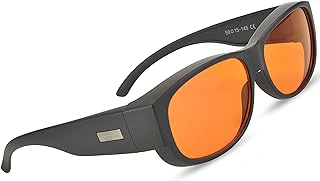
Spectra479 Fit Over Amber Blue Light Blocking Glasses
If you already wear prescription glasses, the Spectra479 Fit Over Amber Blue Light Blocking Glasses ($39.55) let you add blue light protection without ordering custom lenses or switching frames. These slip over your existing eyewear and cover the full lens area, blocking blue wavelengths through an amber tint that's most useful during evening coding sessions or late-night debugging when color accuracy matters less than reducing eye strain.
The amber coating provides stronger blue light filtration than clear lenses, which can help when you're working past sunset and want to minimize screen-related disruption to your sleep cycle. The tradeoff is visible color shift - whites appear warmer, and blues read as gray or muted - so they're not ideal for front-end design work or color-critical tasks. For writing code, reviewing logs, or working in a terminal, the tint rarely interferes.
The fit-over design works well with standard prescription frames, though very wide or oversized glasses may feel tight at the temples. The 4.5/5 rating reflects solid build quality and reliable coverage, but check your frame dimensions if your prescription glasses are wider than average. At under multiple, this is a practical option for developers who want evening blue light protection without the cost or hassle of prescription blue light lenses.
- ✅ Fits over prescription glasses without custom lenses
- ✅ Amber tint provides strong blue light blocking for evening use
- ✅ Affordable at $39.55
- ✅ 4.5/5 rating reflects reliable quality
- ⚠️ Amber tint distorts color, not suitable for design work
- ⚠️ May feel tight over very wide prescription frames
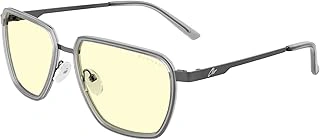
GUNNAR ClixGaming Blue Light Blocking Gaming Glasses with Amber Lens
Software developers spending eight or more hours a day in front of multiple monitors need frames that disappear during long sessions. The GUNNAR ClixGaming sits in the middle of the comfort curve with a lightweight build and amber lens designed to filter the short-wavelength light that ramps up eye fatigue after extended focus work.
At $74.00, these fall between budget frames and premium models, offering a balance of build quality and lens technology without the cost of specialized coatings. The 4.4/5 rating reflects consistent feedback about all-day wearability and reduced strain during back-to-back code reviews or debugging marathons.
The amber tint is the defining tradeoff. It cuts through screen glare and softens the harsh blue spectrum that can interfere with evening melatonin production, making these a solid choice for developers who code late or want better sleep quality after night shifts. The downside is color accuracy: front-end developers reviewing UI mockups, designers tweaking CSS color values, or anyone doing color-critical work will need a color-accurate monitor or a second pair of clear-lens glasses for those tasks.
Frame comfort during long stretches matters more than spec sheets suggest. The ClixGaming design distributes weight evenly without pinching behind the ears or leaving nose-pad marks after a full sprint. If you prioritize focus and recovery over pixel-perfect color work, the amber lens delivers measurable relief without the adjustment period some darker tints require.
- ✅ Lightweight frame designed for 8+ hour wear without pressure points
- ✅ Amber lens reduces eye strain and supports better sleep after late coding sessions
- ✅ $74.00 price balances quality and cost in the mid-range category
- ⚠️ Amber tint affects color accuracy for front-end UI work and design review
- ⚠️ Requires color-accurate monitor or secondary clear-lens pair for color-critical tasks
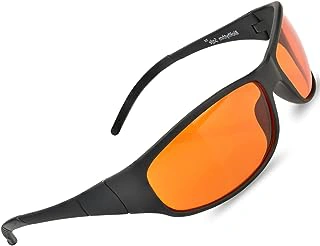
Blue Light Blocking Amber Glasses for Sleep
Software developers who code late into the evening face a specific challenge: screen exposure in the hours before bed can interfere with natural sleep cycles. The Blue Light Blocking Amber Glasses for Sleep address this at $35.95, making them the most budget-friendly option in this comparison with a 4.6/5 rating.
The amber tint is noticeably strong. Everything on screen takes on a yellow-orange cast, which changes how syntax highlighting, UI design mockups, and color-coded dashboards appear. For developers working primarily in terminals, text editors, or backend scripting - where color accuracy matters less - this tradeoff is manageable. If you're adjusting CSS hex values or reviewing design comps in Figma, the tint becomes a limitation.
The sleep-focused design means these glasses prioritize amber filtration over features like anti-reflective coatings, premium hinges, or all-day comfort. The frames are lightweight plastic, functional for a few evening hours but not built for the durability or adjustability you'd expect from higher-priced options. They fit standard head sizes without nosepads or temple adjustments.
For developers who want to protect sleep quality during late-night deploys or crunch sprints without spending heavily, these amber glasses work well in the right context. The price reflects a narrower use case rather than an all-day solution.
- ✅ Budget-friendly at $35.95
- ✅ Strong amber tint suited for sleep-focused evening use
- ✅ Works well for terminal, scripting, and backend coding tasks
- ✅ Lightweight and functional for short sessions
- ⚠️ Heavy amber tint distorts on-screen colors significantly
- ⚠️ Not ideal for design work or color-critical tasks
- ⚠️ Basic frame construction prioritizes price over durability
- ⚠️ Limited adjustability for fit customization
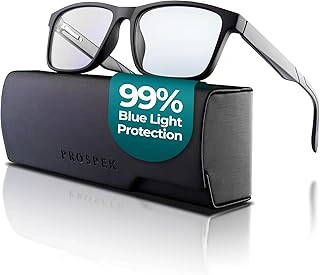
Prospek Clear Lens Blue Light Reading Glasses (0 to +3.0 Diopters) for Computer Use
Front-end developers and UI designers often need to see color accurately while still cutting blue light exposure during the day. The Prospek Clear Lens Blue Light Reading Glasses preserve true-to-life colors on screen, which matters when you're reviewing design mockups, adjusting CSS palettes, or hopping between code and video calls.
These frames ship with diopter strengths from 0 (no magnification) up to +3.0, so developers who find themselves squinting at small editor fonts can add the reading power they need without ordering a separate pair. The clear lens approach makes them unobtrusive on camera and in client meetings - no amber tint to explain.
At $39.95 with a 4.5/5 rating, they offer a middle-ground price point for developers who want blue light filtering without the color shift of amber lenses. The tradeoff is straightforward: clear lenses block less blue light than amber variants, so they work best during daylight hours when your circadian rhythm isn't as sensitive. If you code late into the evening, you may still want a second, higher-filtration pair for post-sunset sessions.
The diopter range and color accuracy make these a practical choice for developers who switch frequently between coding, design review, and video meetings, but expect lighter blue light protection than you'd get from a dedicated amber lens.
- ✅ Clear lenses preserve accurate screen colors for design and UI work
- ✅ Available in diopter strengths 0 to +3.0 for developers who need reading magnification
- ✅ Unobtrusive appearance on video calls
- ✅ Mid-range price at $39.95
- ⚠️ Blocks less blue light than amber lens options
- ⚠️ Better suited for daytime use than late-evening coding sessions
Quick Decision Guide: Which Glasses Match Your Workflow
- Already wear prescription glasses and don't want custom lenses? Choose the Spectra479 fit-over option
- Code 8+ hours straight and prioritize comfort over everything? The GUNNAR ClixGaming offers the best all-day fit
- Work late, need to protect sleep quality, and have a tight budget? The $35.95 amber glasses for sleep deliver strong melatonin protection
- Attend frequent video calls or do color-critical front-end work? The Prospek clear lens preserves accurate color perception
- Need reading magnification while filtering blue light? Only the Prospek offers diopter options up to +2.50